
Introducció
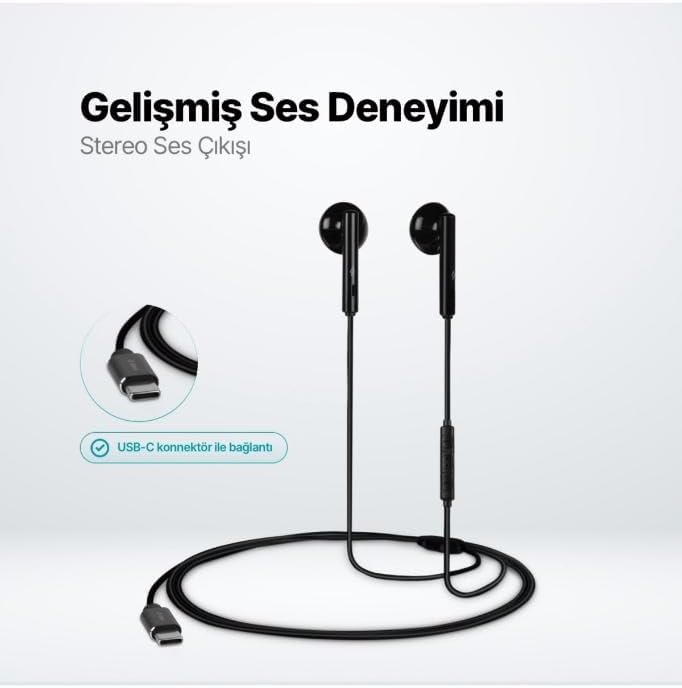
The TTEC Rio 2 Stereo USB-C Headset with Microphone is designed to provide a high-quality audio experience for music and calls. Its comfortable, lightweight design ensures a perfect fit and effective ambient noise isolation, allowing for hands-free communication and entertainment.
Característiques principals:
- Advanced stereo sound output for an immersive audio experience.
- Integrated microphone for clear phone calls.
- Smart inline controller for easy management of volume, calls, and music playback.
- Lightweight and ergonomic design for extended comfort.
- Universal USB-C connection.
Configuració
To begin using your TTEC Rio 2 headset, follow these simple steps:
- Connecteu els auriculars: Locate the USB-C port on your device (smartphone, tablet, laptop, etc.). Insert the USB-C connector of the TTEC Rio 2 headset firmly into the device's USB-C port.
- Reconeixement del dispositiu: Your device should automatically recognize the headset. If prompted, select the TTEC Rio 2 as the audio output and input device.
- Ajustar l'ajust: Place the earbuds comfortably in your ears. The ergonomic design ensures a snug fit for optimal sound quality and noise isolation.
Instruccions de funcionament
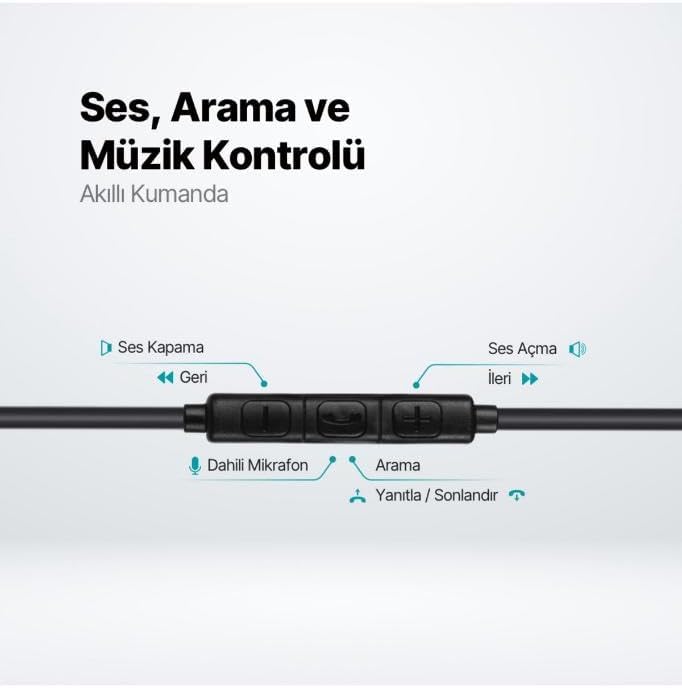
The TTEC Rio 2 headset features an inline smart controller for convenient management of your audio and calls.
Inline Controller Functions:
- Puja el volum (+): Press to increase audio volume.
- Baixar el volum (-): Press to decrease audio volume.
- Play/Pause/Answer/End Call (Center Button):
- Single press to play or pause music.
- Premeu una sola vegada per respondre a una trucada entrant.
- Premeu una sola vegada per finalitzar una trucada activa.
- Manteniu premuda per rebutjar una trucada entrant.
- Next Track (Forward Button): Premeu per passar a la cançó següent.
- Previous Track (Backward Button): Press to go back to the beginning of the current song or to the previous song.
- Micròfon integrat: Located on the inline controller, it captures your voice for calls and voice commands.
Manteniment
Proper care will extend the life and performance of your TTEC Rio 2 headset.
- Neteja: Netegeu suaument els auriculars i el cable amb un drap suau i sec. No utilitzeu productes químics agressius ni materials abrasius.
- Emmagatzematge: When not in use, store the headset in a clean, dry place. Avoid extreme temperatures. The included cable organizer clip can help prevent tangling.
- Eviteu la humitat: No exposeu els auriculars a l'aigua ni a una humitat excessiva.
- Manejar amb cura: Avoid pulling on the cable or applying excessive force to the connectors.

Resolució de problemes
If you encounter issues with your TTEC Rio 2 headset, refer to the following common solutions:
| Problema | Possible solució |
|---|---|
| No hi ha so dels auriculars. |
|
| El micròfon no funciona. |
|
| La qualitat del so és deficient o distorsionada. |
|
| Hissing or static noise. |
|
Especificacions
| Característica | Detall |
|---|---|
| Marca | TTEC |
| Número de model | 2KMM14S |
| Connectivitat | USB-C |
| Factor de forma dels auriculars | In-orella |
| Col·locació de l'orella | In-orella |
| Micròfon | Integrat |
| Dimensions del paquet | 19.8 x 8.5 x 3.1 cm |
| Pes de l'article | 40 grams |
| ASIN | B0D3XJ5SP7 |
Garantia i Suport
For warranty information and customer support, please refer to the documentation included with your purchase or visit the official TTEC weblloc web. Conserveu el comprovant de compra per a qualsevol reclamació de garantia.