
1. Informació important de seguretat
Please read all safety instructions carefully before using the VETEK NPX108 camcorder. Keep this manual for future reference.
- No exposeu la càmera a l'aigua ni a la humitat.
- Eviteu temperatures extremes.
- No intenteu desmuntar o reparar la càmera vosaltres mateixos.
- Feu servir només accessoris i adaptadors d'alimentació aprovats.
- Mantenir fora de l'abast dels nens.
2. Contingut del paquet
Verifiqueu que tots els elements siguin presents al vostre paquet:
- VETEK NPX108 4K Camcorder
- Estabilitzador de mà
- Parasol de l'objectiu
- Micròfon
- Llum d'ompliment
- Targeta SD de 64 GB
- Control remot
- DV-108 Battery (4500mAh)
- Cable USB
- Carregador
- Bossa de la càmera
- Manual d'usuari

Image: The VETEK NPX108 camcorder with all included accessories, such as the handheld stabilizer, microphone, fill light, SD card, battery, cables, and carrying bag.

Image: A visual representation of the camcorder and its accessories, including microphone, remote control, LED lights, lens hood, battery, bag, 64GB SD card, data line, charger, and user manual.
3. Producte acabatview
3.1. Components i controls

Image: A multi-angle diagram of the camcorder highlighting key components such as Handle Charging Port, Battery, Video Button, Photo Button, Confirmation Button/Control Wheel, DISP Button, USB Interface/Camera Charging Port, MIC Interface, HDMI Interface, Lens, Power Button, Menu Button, Mode Button, Playback Button, SD Card Slot, Speaker, Handle Hot Shoe, Handle Video/Photo Button, Handle Digital Zoom, Camera Zoom, and Camera Hot Shoe.
The VETEK NPX108 camcorder features a 4.0-inch 270-degree rotating touchscreen for flexible viewing and control. It supports 4K Ultra HD 60FPS video resolution and 64MP image resolution, with 18X digital zoom.

Image: The VETEK NPX108 camcorder showcasing its 4K UHD capabilities, 64MP resolution, 270-degree rotating screen, and 3.0-inch HD touch screen.
4. Configuració
4.1. Instal·lació i càrrega de la bateria
The camcorder uses a 4500mAh Lithium Polymer battery. Ensure the battery is fully charged before first use.
- Obriu la tapa del compartiment de la bateria.
- Insert the battery according to the polarity indicators.
- Tanqueu bé la tapa del compartiment de la bateria.
- Connect the USB cable to the camera's charging port and the charger, then plug into a power outlet. The camera supports recording while charging.

Image: The camcorder displaying a 93% battery charge on its screen, emphasizing its 4500mAh battery for longer shooting times.
4.2. Instal·lació de la targeta SD
The camcorder comes with a 64GB SD card. Insert it correctly to store your recordings.
- Localitzeu la ranura de la targeta SD a la càmera.
- Inseriu la targeta SD amb els contactes metàl·lics mirant en la direcció correcta fins que encaixi al seu lloc.
- To remove, gently press the card until it ejects.
4.3. Fixació d'accessoris
Attach the included accessories for enhanced functionality.
- Estabilitzador de mà: Attach the stabilizer to the bottom of the camera for improved stability, especially for low-angle shots. It includes zoom and shooting buttons for convenience.
- Micròfon: Connect the external microphone to the MIC interface for clearer audio recording, reducing background noise.
- Llum d'ompliment: Mount the fill light onto the camera's hot shoe for additional illumination in low-light conditions. Adjust brightness and color temperature as needed.
- Parasol: Attach the lens hood to protect the lens from damage and improve image contrast by reducing glare.
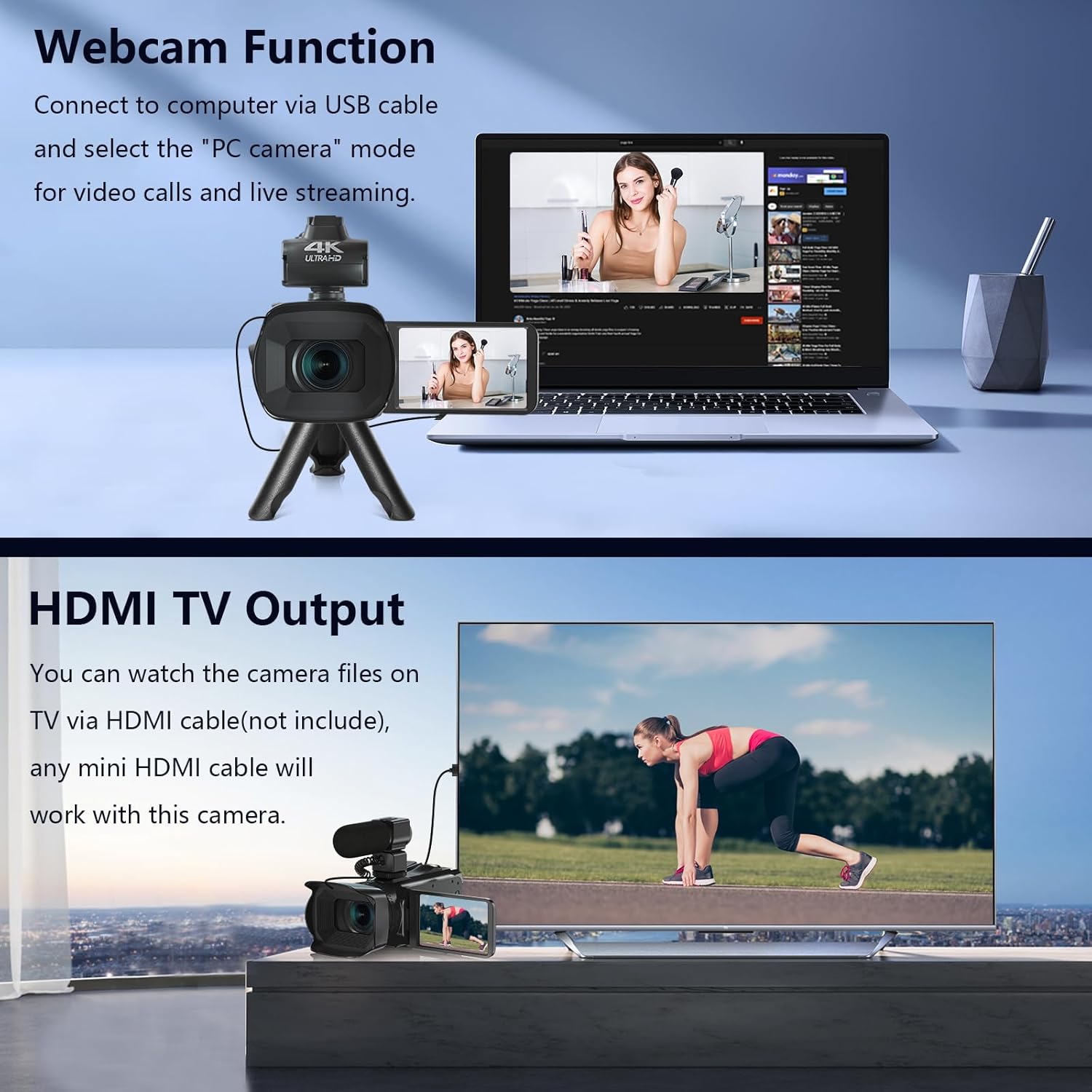
Image: The fill light accessory demonstrating its adjustable brightness (100%, 50%, 10%) and color temperature (3300K-5600K) settings, with examples of white light, white glow, and warm light.
5. Funcionament de la càmera
5.1. Encendre/apagar
Open the LCD screen to power on the camera. Close it to power off.
5.2. Enregistrament bàsic (vídeo/foto)
Use the dedicated Video and Photo buttons to switch between modes and start/stop recording or capture images.
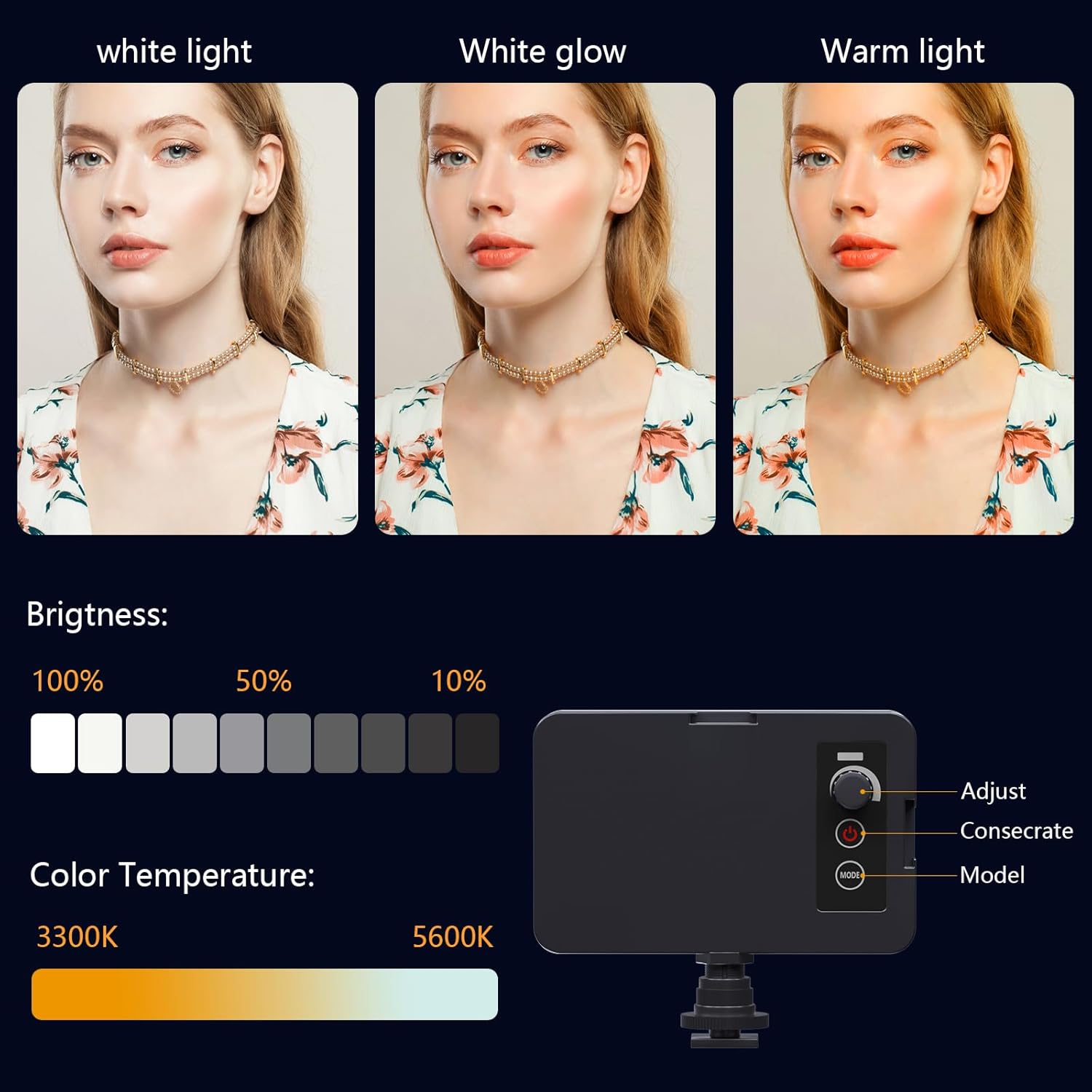
Image: The camcorder recording a 4K 60FPS video, with smaller inset images showing the effect of 18X, 16X, and 12X digital zoom on a subject.
5.3. Funció de zoom
Use the zoom controls on the camera body or handheld stabilizer to adjust the 18X digital zoom.
5.4. Funcionament de la pantalla tàctil
Navigate menus and settings directly on the 4.0-inch touchscreen. The screen can rotate 270 degrees for versatile shooting angles.
5.5. Configuració del menú
Press the Menu button to access various settings such as resolution, white balance, exposure, and metering mode. Use the control wheel or touchscreen to make selections.
5.6. Connexió Wi-Fi i ús de l'aplicació
Connect your smartphone to the camcorder via Wi-Fi to control it remotely and transfer files.
- Turn on Wi-Fi on the camcorder via the menu. The screen will display the Wi-Fi ID (e.g., 4K_WIFI) and password (e.g., 12345678), along with a QR code.
- Download the "IDC CAM" app by scanning the QR code or searching on your app store.
- On your smartphone, go to Wi-Fi settings and connect to the camcorder's Wi-Fi network using the provided password.
- Open the "IDC CAM" app. You can now view a live feed, control recording, and capture photos remotely.

Image: The camcorder's screen showing Wi-Fi ID, password, and a QR code for downloading the companion app, with smartphones connected via Wi-Fi in the background.
For a visual guide on Wi-Fi connection and app usage, watch this video:
Video: This video demonstrates how to connect the NPX108 digital video camera to Wi-Fi and use the companion app for remote control and file gestió.
5.7. WebFunció de càmera
La càmera de vídeo es pot utilitzar com a webcam for video calls and live streaming.
- Connect the camcorder to your computer using the USB cable.
- On the camera's screen, select "PC CAM" mode.
- L'ordinador ara hauria de reconèixer la càmera de vídeo com a weblleva.
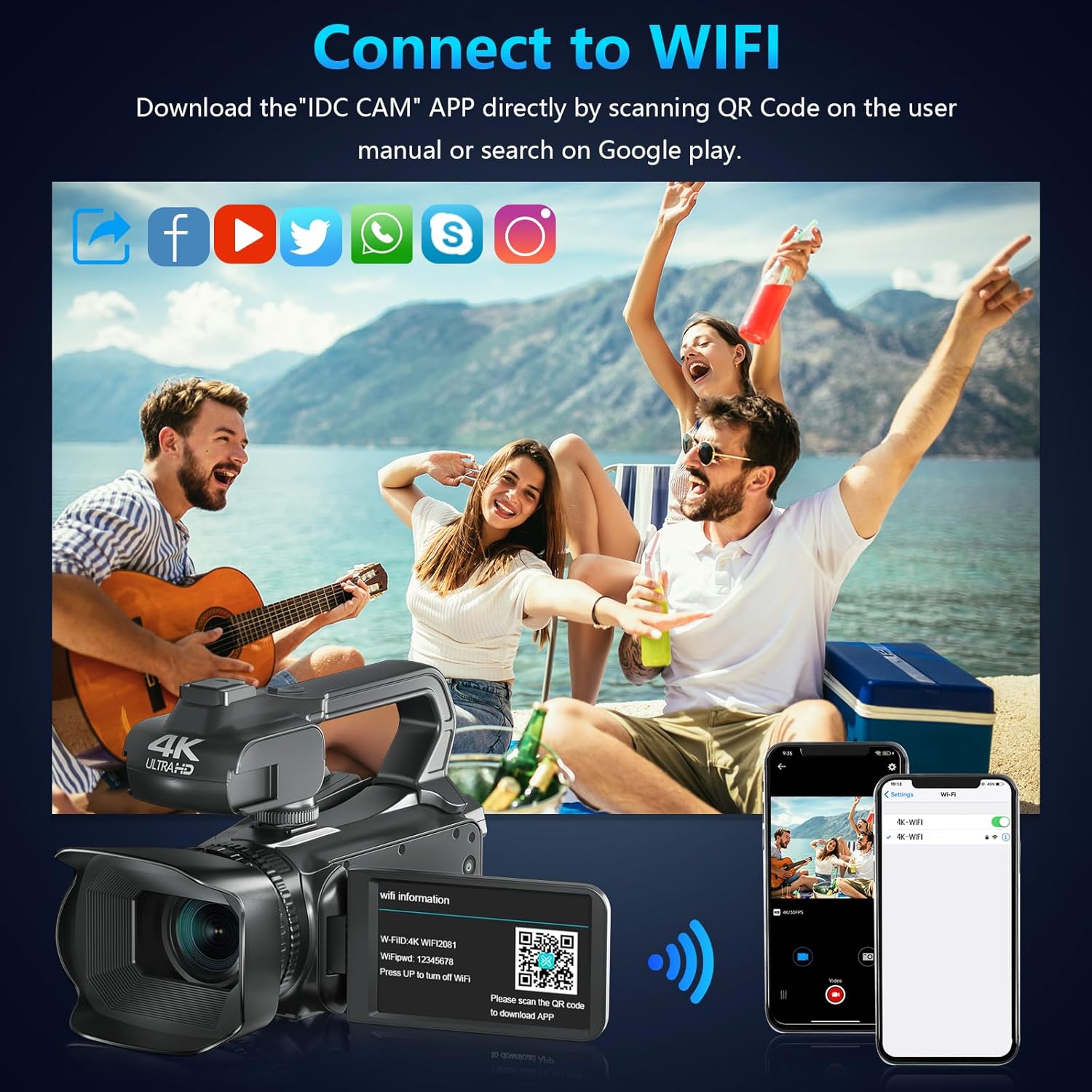
Image: The camcorder functioning as a webcam connected to a laptop, and also connected to a TV via HDMI for output.
5.8. HDMI TV Output
View your recorded videos and photos directly on a TV or monitor.
- Connect the camcorder to your TV using a mini HDMI cable (not included).
- Seleccioneu l'entrada HDMI adequada al vostre televisor.
- The camera's display will now be mirrored on your TV.

Image: The camcorder connected to a laptop for live streaming (webcam mode) and to a TV via an HDMI cable for real-time viewing del contingut.
5.9. Característiques especials
- Enregistrament mentre es carrega: Continue recording even when the battery is low by connecting the charger.
- càmera lenta: Capture dynamic scenes in slow motion.
- Time-lapse: Record events over an extended period and condense them into a short video.
- Temporitzador automàtic: Set a delay before capturing a photo or starting a video.
- Anti-shake: Digital image stabilization helps reduce blur from camera movement.
- Visió nocturna: Capture clear footage en condicions de poca llum.

Image: A collage demonstrating various camcorder features: recording while charging, pause function, continuous shooting, and anti-shake stabilization.

Image: A sequence of three images illustrating the time-lapse recording feature, capturing the progression of a sunset over water.
6. Manteniment
6.1. Neteja
- Feu servir un drap suau i sec per netejar el cos de la càmera.
- Per a la lent, feu servir un drap de neteja de lents i una solució especialitzada per a la neteja de lents. Eviteu tocar la lent directament amb els dits.
- Clean the touchscreen with a microfiber cloth.
6.2. Emmagatzematge
- When not in use, store the camera in its protective bag in a cool, dry place.
- Traieu la bateria si la càmera no s'utilitzarà durant un període prolongat.
7. Solució De Problemes
| Problema | Causa possible | Solució |
|---|---|---|
| La càmera no s'encén | La bateria està morta o està inserida incorrectament. | Carregueu la bateria o torneu-la a inserir correctament. |
| No es pot gravar vídeo/fer fotos | La targeta SD està plena, no està inserida o està malmesa. | Insert a new SD card, ensure it's properly inserted, or format the card (this will erase all data). |
| Poor video/image quality | L'objectiu està brut, hi ha poca il·luminació o hi ha una configuració incorrecta. | Clean the lens, use the fill light, or adjust exposure/white balance settings. |
| Problemes de connexió Wi-Fi | Incorrect password, app not installed, or distance too far. | Verify password, install "IDC CAM" app, ensure close proximity to camera. |
8. Especificacions
- Marca: VETEK
- Número de model: NPX108
- Resolució de captura de vídeo: 4K (60 FPS)
- Resolució d'imatge: 64MP
- Zoom digital: 18X
- Mida de la pantalla: 4.0 Inches (270-degree rotating touchscreen)
- Connectivitat: Wi-Fi, USB, HDMI
- Característiques especials: Auto Focus, Recording While Charging, Slow Motion, Time-Lapse, Webcam Function, Self-Timer, HD Output, External MIC Support, Handheld Stabilizer Support, Night Vision, Anti-Shake, Face Detection
- Bateria: Polímer de liti de 4500 mAh (inclòs)
- Emmagatzematge: Targeta SD (64 GB inclosa)
- Pes de l'article: 3.56 lliures
- Dimensions del producte: 6.7 x 3.8 x 3.9 polzades
9. Garantia i Suport
VETEK products are designed for quality and reliability. For any issues or inquiries, please refer to the following:
- Política de devolució: All products are eligible for a free return within 30 days of purchase.
- Atenció al client: VETEK offers 24-hour customer service. Please contact us for assistance.
- Plans de protecció: Extended protection plans are available for purchase (e.g., 2-Year Protection Plan, 3-Year Protection Plan, Complete Protect).

Image: The VETEK brand logo, representing quality and customer commitment.