
1. Introducció
This manual provides comprehensive instructions for the installation, operation, and maintenance of your SV3C 8MP 2.4/5G Wireless Outdoor PTZ Camera (Model: HX02). Please read this manual carefully before using the product to ensure proper functionality and safety. Keep this manual for future reference.
2. Producte acabatview
2.1 Característiques clau
- High-Performance 8MP Camera with PTZ: Features an 8-megapixel Full HD lens for clear and smooth video. Offers horizontal 320-degree pan and vertical 180-degree tilt adjustment via smartphone app for comprehensive, blind-spot-free monitoring.
- AI Human Detection, Auto-Tracking, and Light Deterrent: Equipped with a human detection sensor, allowing for human-only detection if desired. When human or object movement is detected, the camera automatically starts recording and tracks the subject. The sensor light illuminates at night to deter intruders. Abnormal activity notifications are sent to your smartphone or tablet via the app.
- Color Night Vision and Dual-Band 2.4/5GHz Wi-Fi Support: Integrates both infrared LEDs and white LEDs for clear color surveillance even in complete darkness. Supports both wired and wireless (2.4GHz and 5GHz) Wi-Fi connections.
- Outdoor Installation (IP66) and Expandable System: Constructed from aluminum alloy, with an IP66 dustproof and waterproof rating, ensuring durability in various weather conditions. The C11 outdoor security camera allows simultaneous viewing of up to 6 devices and can be expanded to include up to 64 SV3C HX series security cameras.
- Two-Way Audio, PC Compatibility, and Versatile Applications: Built-in microphone and speaker enable remote monitoring of surrounding sounds and two-way communication. Supports PC monitoring via the HiP2P Client software. Ideal for various scenarios including vehicle monitoring, garden security, store surveillance, childcare, and elderly care, both indoors and outdoors.
2.2 Components del producte
The following image illustrates the main components of the SV3C HX02 camera.

The package includes the camera unit, power adapter, and screw set for installation.
3. Configuració
3.1 Configuració inicial i instal·lació de l'aplicació
- Download and install the dedicated app (Camhi/Camhipro) on your smartphone or tablet (iOS/Android).
- Enceneu la càmera.
- Open the app and follow the on-screen instructions to add the camera. This typically involves scanning a QR code on the camera.
3.2 Connexió Wi-Fi
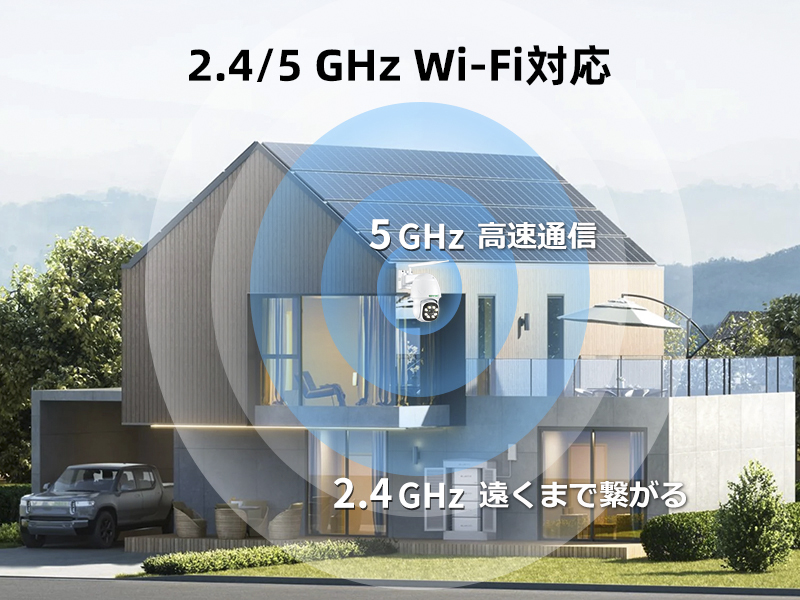
The camera supports both 2.4GHz and 5GHz Wi-Fi bands. Ensure your router is compatible and select the appropriate band during setup for optimal performance. For environments without a network, AP mode is supported.
3.3 Muntatge de la càmera
The camera is designed for wall-mount installation using screws. Ensure the mounting location provides a clear view and stable support. The camera's aluminum construction and IP66 rating make it suitable for outdoor use.

4. Instruccions de funcionament
4.1 Control PTZ
From the smartphone app, you can remotely adjust the camera's viewing angle. The camera supports a horizontal pan of 320 degrees and a vertical tilt of 180 degrees. This allows you to monitor a wide area with a single camera.

4.2 AI Detection and Auto-Tracking
The camera features AI human detection and auto-tracking. When movement of a person, vehicle, or pet is detected, the camera automatically begins recording and adjusts its lens to follow the subject. You can customize detection areas, sensitivity, and operating times through the app to prevent false alarms.


4.3 Modes de visió nocturna
The camera offers three night vision modes: Infrared Mode (black and white), Full Color Mode (using white LEDs), and Smart Mode (switches between infrared and color based on detection). This ensures clear surveillance images day and night.
4.4 Àudio bidireccional
With the built-in microphone and speaker, you can listen to the camera's surroundings and communicate with people near the camera through the app. This feature is useful for interacting with visitors or deterring intruders.

4.5 Enregistrament i emmagatzematge
The camera supports continuous 24-hour recording. Video footage can be stored on a Micro SD card (up to 128GB, sold separately) or via cloud storage (paid service, motion detection recordings only). It is also compatible with NVR systems.

4.6 PC Monitoring
In addition to smartphone and tablet apps, you can monitor the camera feed on your PC by downloading the HiP2P Client software.

5. Manteniment
The SV3C HX02 camera is designed for outdoor use with an IP66 waterproof and dustproof rating. Regular cleaning of the lens with a soft, dry cloth is recommended to maintain optimal image clarity. Ensure all cable connections are secure and protected from moisture.
6. Solució De Problemes
- Problemes de connexió Wi-Fi: If the Wi-Fi connection is unstable, especially in environments with thick walls (e.g., steel-frame houses), consider using a Wi-Fi repeater to extend the signal range.
- FTP Storage Changes: As of January 1, 2025, the FTP encryption method has changed. Files can no longer be saved to previous folders and can only be saved to the root directory. For detailed instructions and solutions, please refer to the official website (search for "HX Series-FTP manual folder creation method").
- Compatibilitat de l'aplicació: If you encounter issues with the app, ensure it is updated to the latest version. If you are upgrading from an older SV3C camera, note that the app might have changed, requiring a new app installation.
7. Especificacions
| Característica | Especificació |
|---|---|
| Ús recomanat | Home Security, Motion Detection |
| Marca | SV3C |
| Tecnologia de connectivitat | Wi-Fi, Cablejat |
| Característiques especials | HD Resolution, PTZ Technology, Motion Sensor, Built-in Light, Two-Way Audio |
| Ús interior/exterior | Interior, Exterior |
| Dispositius compatibles | NVR, Smartphone, Tablet, PC |
| Font d'alimentació | Elèctric amb cable |
| Protocol de connexió | Ethernet, Wi-Fi |
| Tipus de muntatge | Suport de paret (de cargol) |
| Resolució de captura de vídeo | 4K (8MP) |
| Product Exterior Material | Alumini |
| Waterproof Type | Impermeable (IP66) |
| Tipus sense fil | Wi-Fi (2.4 GHz/5 GHz) |
| Relació de zoom digital | 5x |
| Dimensions del producte | 17 x 11.5 x 20 cm |
| Número de model | HX02 |
| Format de captura de vídeo | H.265 |
| Visió nocturna | Visió nocturna en color |
8. Garantia i Suport
SV3C is committed to providing reliable after-sales service. For any questions, technical support, or warranty claims, please contact SV3C customer support through the official website or your purchase platform. Please retain your proof of purchase for warranty purposes.