
1. Introducció
This manual provides comprehensive instructions for the assembly, setup, operation, and programming of your CaDA C59006W Dual Control Mode T-Rex Building Blocks Set. Please read this manual carefully before use to ensure proper functionality and safety.
2. Advertències de seguretat
WARNING: CHOKING HAZARD - SMALL PARTS MAY BE GENERATED.
This product contains small parts and is not suitable for children under 3 years of age. Adult supervision is recommended during assembly and play, especially for children aged 6 and above.
Assegureu-vos que totes les connexions estiguin ben fixades per evitar que les peces es desprenguin durant el funcionament.
Do not expose the electronic components to water or extreme temperatures.
3. Contingut del paquet
The CaDA C59006W T-Rex Building Blocks Set includes:
- 701 blocs de construcció (diverses formes i mides)
- 1 x Unitat de control remot
- 1 x Main Control Unit (integrated within the T-Rex model)
- Instruction Manual (digital via app)
- Required electronic components for movement and lighting

Image: The product packaging and two assembled CaDA C59006W T-Rex models, along with the main control unit.
4. Instruccions de muntatge
The CaDA C59006W T-Rex model consists of 701 building blocks. Assembly is guided by a detailed electronic instruction manual available via a mobile application.
- Download the CaDA App: Cerca "CaDA" in your mobile device's app store (iOS or Android) and download the official application.
- Accés a les instruccions digitals: Open the CaDA app and locate the instructions for model C59006W. The app provides step-by-step, illustrated guidance for assembly.
- Follow Step-by-Step Guidance: Carefully follow the digital instructions to connect the building blocks. Pay close attention to the placement of electronic components.
- Verifica les connexions: Ensure all blocks are securely connected and electronic wires (if any) are properly routed as per the instructions.
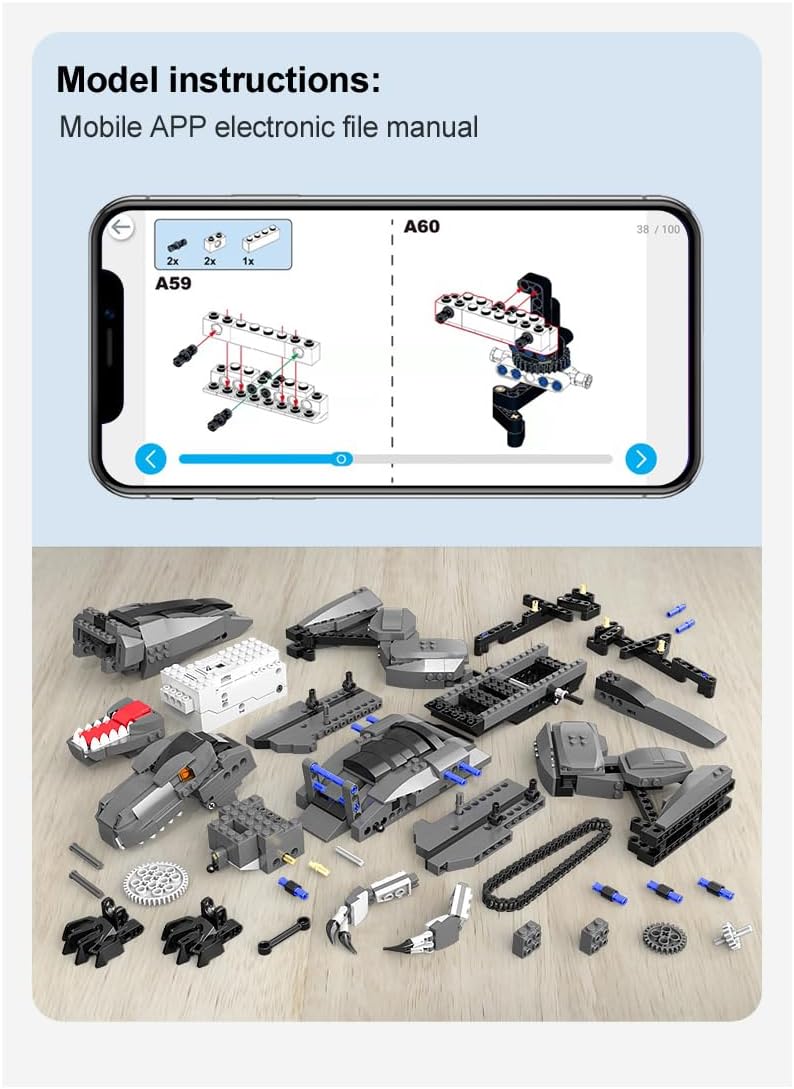
Image: A smartphone screen showing the CaDA app's digital assembly instructions, alongside a collection of the product's building blocks.
5. Configuració
5.1 Instal·lació de la bateria
Batteries are required for both the main control unit (within the T-Rex) and the remote control. Batteries are not included with the product.
- Unitat de control principal: Refer to the assembly instructions in the CaDA app for the specific battery type and installation location within the T-Rex model.
- Comandament a distància: Open the battery compartment on the back of the remote control. Insert the required batteries (typically AA or AAA, check remote for markings) ensuring correct polarity (+/-). Close the compartment securely.
5.2 App Connection (for App Control Mode)
To use the mobile app for control and programming:
- Ensure the T-Rex main control unit is powered on.
- Open the CaDA app on your mobile device.
- Activa el Bluetooth al teu dispositiu mòbil.
- Within the app, follow the prompts to search for and connect to your C59006W T-Rex model via Bluetooth.
6. Instruccions de funcionament
The CaDA C59006W T-Rex offers two control modes: a dedicated 2.4GHz remote control and a programmable mobile app.
6.1 2.4GHz Remote Control Mode
Use the included physical remote control for direct operation.

Image: The CaDA T-Rex model demonstrating both mobile app control and physical 2.4GHz remote control options.
- Encès: Ensure the T-Rex and remote control are both powered on.
- Maridatge: The remote control should automatically pair with the T-Rex. If not, refer to the app's digital manual for pairing instructions.
- Moviment: Use the joysticks or directional buttons on the remote to control the T-Rex's movement (forward, backward, turning). The control distance is approximately 25 meters.
- Funcions especials: The remote may have buttons for specific actions like head movement, tail movement, or eye LED activation. Refer to the remote's markings or the app manual for details.
6.2 Mobile App Control Mode
The CaDA app transforms your mobile device into a versatile remote control with additional features.

Image: A smartphone displaying the CaDA app's remote control interface, featuring controls for movement, sound effects, light effects, and lock actions.
- Real-time Speed: Adjust the T-Rex's speed using the on-screen slider.
- Connexió Bluetooth: Ensure a stable Bluetooth connection between your device and the T-Rex.
- Efectes de so: Activate various Tyrannosaurus sound effects through the app.
- Efecte de llum: Control the eye LED light (on/off).
- Control Tracks: Independently control the left and right tracks for precise movement and turning.
- Lock Action: Use the lock button to hold a specific action or pose.
6.3 T-Rex Movements and Features
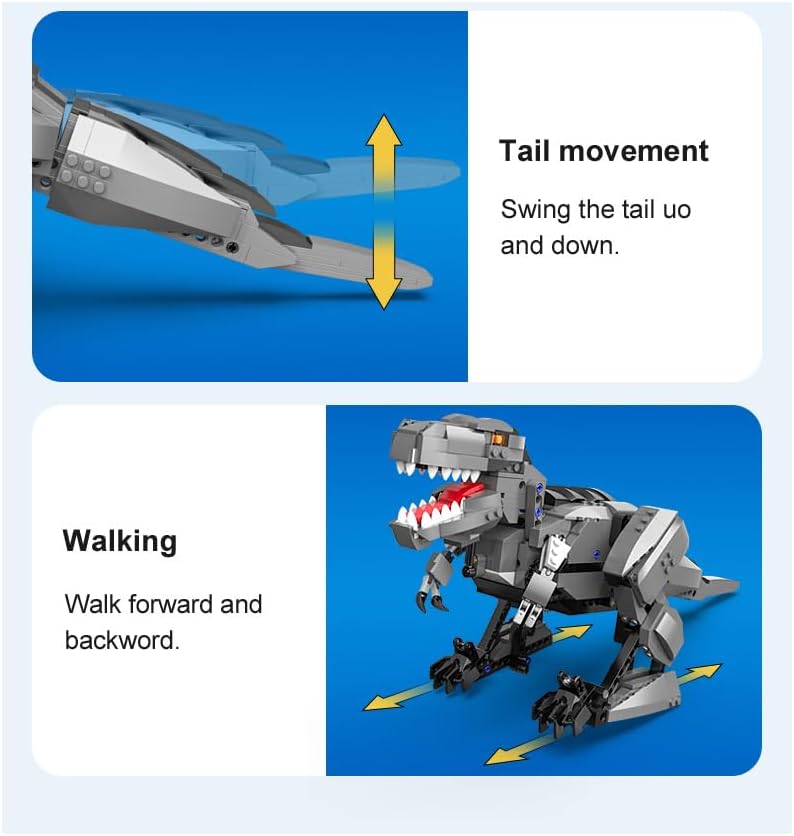
Image: Illustrations detailing the T-Rex's tail movement (swinging up and down) and walking capability (forward and backward).
- Caminant: The T-Rex can walk forward and backward.
- Tail Movement: The tail can swing up and down.
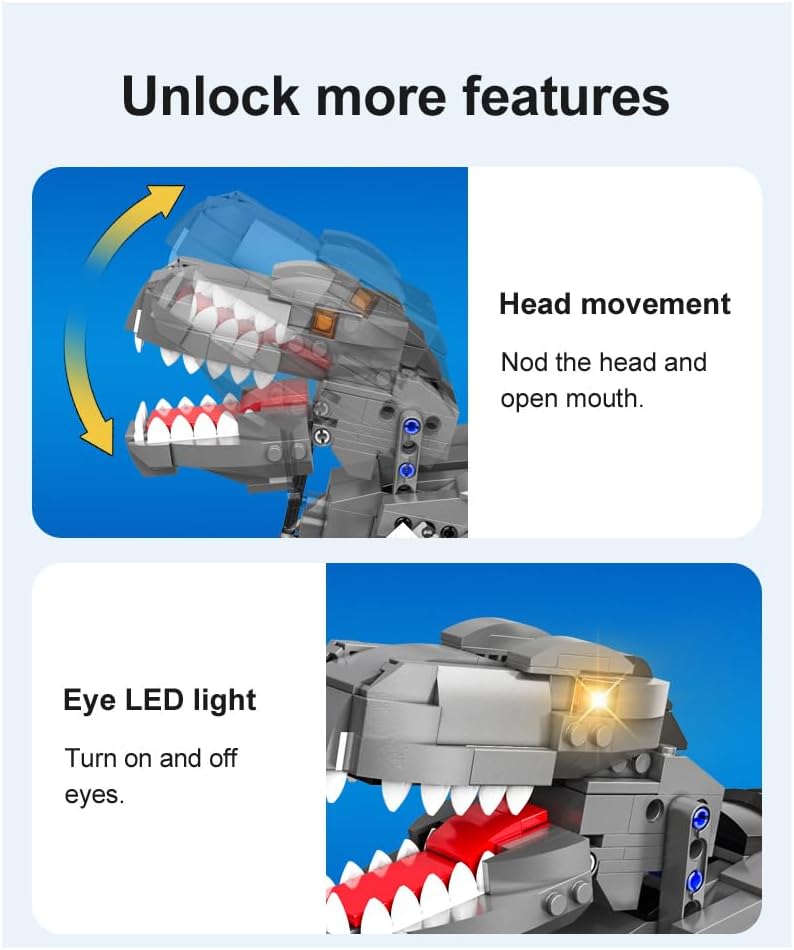
Image: Illustrations demonstrating the T-Rex's head movement (nodding and mouth opening) and the functionality of its eye LED lights.
- Moviment del cap: The T-Rex can nod its head and open its mouth.
- Eye LED Light: The eyes feature LED lights that can be turned on and off.
7. Programming Functionality
The CaDA app includes a programming interface that allows users to create custom sequences of actions for the T-Rex.

Image: The CaDA T-Rex model positioned with a mobile phone displaying a drag-and-drop programming interface, and a physical remote control, illustrating dual control and programming capabilities.
- Drag and Drop Basics: The programming interface uses a visual, block-based "drag and drop" system, making it accessible for beginners.
- Sequence Creation: Arrange command blocks to define a series of movements, sounds, and light effects.
- Execució: Once programmed, execute the sequence to watch your T-Rex perform the custom actions.
8. Manteniment
- Neteja: Wipe the model with a dry, soft cloth. Do not use water or cleaning agents on electronic components.
- Emmagatzematge: Store the T-Rex and its components in a cool, dry place away from direct sunlight.
- Cura de la bateria: Remove batteries from both the T-Rex and the remote control if the product will not be used for an extended period to prevent leakage.
- Comprovació de components: Periodically check for any loose blocks or connections and re-secure them as needed.
9. Solució De Problemes
- T-Rex Not Responding:
- Check if batteries are correctly installed and charged in both the T-Rex and the remote control.
- Ensure the T-Rex main control unit is powered on.
- If using the app, verify Bluetooth is enabled and the app is connected to the T-Rex.
- Ensure the remote control is within the 25m operating range.
- Movement Issues:
- Inspect the tracks and joints for any obstructions or loose blocks.
- Check if the motors are properly connected as per assembly instructions.
- Problemes de connexió de l'aplicació:
- Restart the CaDA app and your mobile device's Bluetooth.
- Assegureu-vos que cap altre dispositiu interfereixi amb la connexió Bluetooth.
- Try re-pairing the device within the app.
- Peces que falten o danyades:
- Review la llista del contingut del paquet.
- Contact CaDA customer support for assistance (refer to the support section).
10. Especificacions
| Característica | Detall |
|---|---|
| Número de model | C59006W |
| Marca | CaDA |
| Nombre de peces | 701 |
| Dimensions del producte | 34 x 25 x 7.5 cm |
| Pes del producte | 1.24 kg |
| Material | Plàstic |
| Color | Gris |
| Modes de control | 2.4GHz Remote Control, Programmable Mobile App |
| Distància de control remot | Aprox. 25m |
| Edat recomanada | 5 years and up (Manufacturer recommended), 6+ (Product description) |
| Piles necessàries | Sí (no inclòs) |
| Objectiu Educatiu | Pensament creatiu |
11. Garantia i Suport
Specific warranty information is not provided in the product details. For any support inquiries, missing parts, or warranty claims, please refer to the official CaDA website or contact your retailer directly.
You may also find additional resources and FAQs within the CaDA mobile application.