
1. Producte acabatview
The YESIDO EP06 Wireless Bluetooth Stereo Music Headphones are designed for children, offering a comfortable and engaging audio experience. Featuring Bluetooth 5.3 for stable connectivity, 40mm titanium-plated speakers for quality sound, and active noise cancellation for immersive listening. These headphones also include colorful RGB lighting effects and support memory card playback. The ergonomic design ensures comfort for extended use.
2. Informació de seguretat
- No exposeu els auriculars a temperatures extremes, humitat ni líquids.
- Eviteu deixar caure els auriculars ni sotmetre'ls a impactes forts.
- Mantingueu-ho fora de l'abast dels nens petits per evitar el risc d'asfíxia amb peces petites.
- Listen at moderate volume levels to prevent hearing damage, especially for children.
- Do not attempt to disassemble or repair the headphones yourself. Contact qualified service personnel.
- Desfeu-vos del producte i la bateria de manera responsable d'acord amb la normativa local.
3. Contingut del paquet
Si us plau, comproveu el paquet per veure si hi ha els elements següents:
- YESIDO EP06 Wireless Headphone
- Cable d'alimentació (tipus C)
- Manual d'usuari
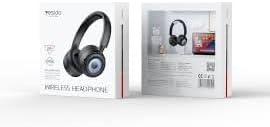
Image: The product packaging for the YESIDO EP06 headphones, displaying the headphones and branding.
4. Controls i indicadors
The headphones feature intuitive controls for easy operation. Specific button functions are detailed below:
- Botó d'encesa: Premeu i manteniu premut per encendre/apagar. Premeu breument per reproduir/pausar.
- Augment de volum / pista següent: Prem curt per pujar el volum. Prem llarg per passar a la següent pista.
- Baixada de volum / pista anterior: Prem curt per baixar el volum. Prem llarg per anar a la pista anterior.
- Botó de mode: Press to switch between Bluetooth, TF card, and AUX modes.
- Botó de llum RGB: Press to cycle through or turn off RGB lighting effects.
- Port de càrrega (tipus C): Per connectar el cable de càrrega.
- Conector d'àudio de 3.5 mm: For wired connection using an AUX cable (not included).
- Ranura per a targetes TF: Insert a memory card for MP3/WAV/WMA playback.
- Indicador LED: Mostra l'estat de l'alimentació, el mode d'emparellament i l'estat de càrrega.

Imatge: Una imatge detallada view of the headphone's side, highlighting the various control buttons, the Type-C charging port, and the TF card slot.
5. Configuració
5.1 Càrrega dels auriculars
- Connecteu el cable de càrrega tipus C proporcionat al port de càrrega dels auriculars.
- Connecteu l'altre extrem del cable a un adaptador de corrent USB (es recomana 5 V/1 A) o al port USB d'un ordinador.
- L'indicador LED s'il·luminarà durant la càrrega i s'apagarà quan estigui completament carregat.
A full charge takes approximately 2 hours. A 10-minute flash charge can provide up to 2 hours of listening time.

Image: Pink headphones positioned near a smartphone, symbolizing the extended battery life and quick charging capability.
5.2 Vinculació Bluetooth
- Assegureu-vos que els auriculars estiguin completament carregats.
- Press and hold the Power Button for 3-5 seconds until the LED indicator flashes blue and red, indicating pairing mode.
- Al dispositiu (telèfon intel·ligent, tauleta, etc.), activeu el Bluetooth i cerqueu els dispositius disponibles.
- Select "YESIDO EP06" from the list of devices.
- Once connected, the LED indicator will flash blue slowly or turn solid blue.
6. Instruccions de funcionament
6.1 Encès/Apagat
- Encès: Manteniu premut el botó d'engegada durant 3 segons.
- Apagar: Manteniu premut el botó d'engegada durant 3 segons.
6.2 Reproducció de música
- Reproduir/pausa: Premeu breument el botó d'engegada.
- Pista següent: Premeu llargament el botó de pujar el volum.
- Pista anterior: Premeu llargament el botó per baixar el volum.
- Pujar el volum: Premeu breument el botó de pujar el volum.
- Baixar el volum: Premeu breument el botó per baixar el volum.
6.3 Canvi de mode
Press the Mode Button to cycle through Bluetooth, TF card, and AUX modes.
6.4 Control d'il·luminació RGB
Press the RGB Light Button to change the lighting effects or turn them off.
6.5 Cancel·lació activa del soroll (ANC)
The headphones feature Active Noise Cancellation for an immersive listening experience. Refer to the specific button on the headphones for ANC activation/deactivation (usually a dedicated button or a long press on a multi-function button).
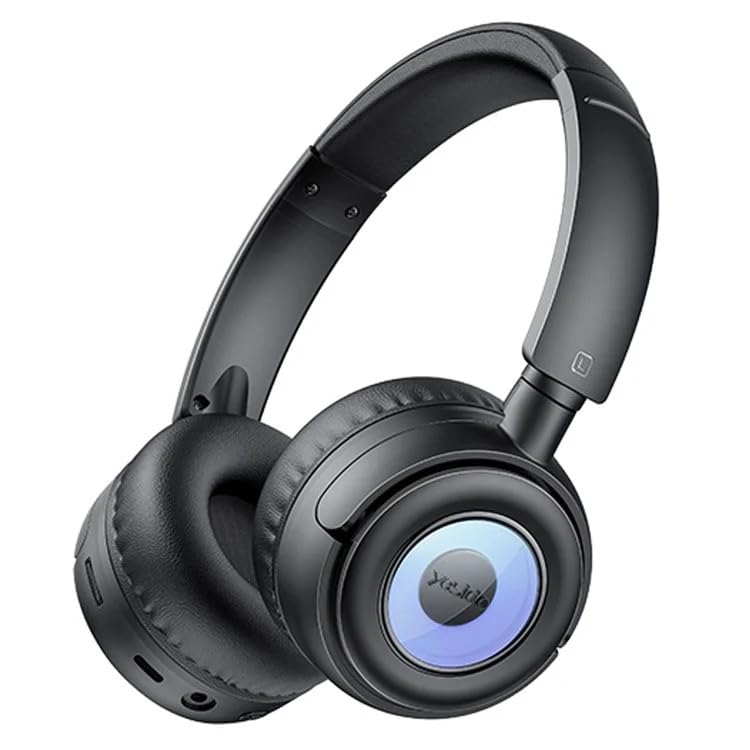
Image: A user wearing the black YESIDO EP06 headphones, engaged in gaming on a laptop, demonstrating the stable and fast Bluetooth 5.3 connectivity.

Image: A child wearing the blue YESIDO EP06 headphones, illustrating the specially tuned EQ sound effect designed to be gentle on children's ears.
7. Manteniment
- Netegeu els auriculars regularment amb un drap suau i sec.
- No utilitzeu netejadors abrasius ni dissolvents.
- Guardeu els auriculars en un lloc fresc i sec quan no els feu servir.
- Eviteu l'exposició prolongada a la llum solar directa o temperatures altes.
8. Solució De Problemes
- Sense energia: Assegureu-vos que els auriculars estiguin carregats.
- No es pot emparellar: Ensure headphones are in pairing mode (flashing red/blue). Turn off and on Bluetooth on your device. Move closer to the headphones.
- Sense so: Check volume levels on both headphones and connected device. Ensure the correct mode is selected (Bluetooth, TF card, AUX).
- Qualitat de so baixa: Ensure headphones are within Bluetooth range (10m). Check for interference from other devices.
- Les llums RGB no funcionen: Press the RGB Light Button to activate or cycle through effects.
9. Especificacions
| Número de model | EP06 |
| Connectivitat | Bluetooth 5.3 |
| Mida de l'altaveu | 40mm Titanium-plated |
| Durada de la bateria | Up to 20 hours (12 hours with RGB lights on) |
| Temps de càrrega | Aproximadament 2 hores |
| Port de càrrega | Tipus-C |
| Interval Bluetooth | Fins a 10 metres |
| Suport per a targetes de memòria | Up to 32GB (MP3/WAV/WMA formats) |
| Material | ABS plastic + hardware bracket + PU leather earmuffs |
| Característiques | Active Noise Cancellation, RGB Lighting, Foldable |
10. Garantia i Suport
The YESIDO EP06 headphones come with a 6 mesos de garantia from the date of purchase. This warranty covers manufacturing defects. It does not cover damage caused by misuse, accidents, unauthorized modifications, or normal wear and tear.
For warranty claims or technical support, please contact your retailer or the YESIDO customer service department with your proof of purchase.