
1. Introducció
Thank you for choosing the OBZ F2 Desktop Barcode Scanner. This device is designed to provide efficient and accurate barcode scanning for various applications, including retail, logistics, and payment processing. Its hands-free operation, automatic detection, and broad compatibility make it a versatile tool for enhancing productivity.
This manual provides essential information on setting up, operating, and maintaining your OBZ F2 scanner. Please read it thoroughly before use to ensure proper functionality and to prevent damage.
2. Informació de seguretat
- Do not expose the scanner to extreme temperatures, humidity, or direct sunlight.
- Eviteu deixar caure l'escàner ni sotmetre'l a impactes forts.
- Do not attempt to disassemble or modify the scanner. This will void the warranty.
- Keep the scanning window clean to ensure optimal performance. Use a soft, dry cloth for cleaning.
- Aquest dispositiu només està dissenyat per a ús interior.
3. Contingut del paquet
Please check the package contents upon opening. The standard package should include:
- OBZ F2 Desktop Barcode Scanner
- Cable USB (adjunt)
- Manual d'usuari (aquest document)
4. Producte acabatview
The OBZ F2 scanner features a compact, desktop design with an integrated USB cable for easy connectivity. Its omnidirectional scanning capability allows for quick and efficient reading of various barcode types.

Figure 4.1: OBZ F2 Desktop Barcode Scanner in use, demonstrating QR code scanning from a smartphone.

Figura 4.2: posterior view of the OBZ F2 scanner showing the integrated USB cable for connection.

Figure 4.3: Product dimensions and material details. Note the protective film on the scan window that should be removed before first use.
5. Configuració
The OBZ F2 Barcode Scanner is designed for plug-and-play operation, requiring no software or driver installation.
- Desempaquetar l'escàner: Traieu amb cura l'escàner del seu embalatge.
- Traieu la pel·lícula protectora: Peel off any protective film from the scanning window.
- Connexió a l'ordinador: Plug the USB cable of the scanner into an available USB port on your computer or POS system.
- Reconeixement del sistema: Your operating system will automatically detect and configure the scanner. This may take a few seconds.
- A punt per al seu ús: Once recognized, the scanner is ready to begin scanning barcodes.
6. Instruccions de funcionament
The OBZ F2 scanner utilizes automatic detection and CMOS image technology for efficient and accurate scanning.
6.1. Escaneig de codis de barres
- Funcionament amb mans lliures: Place the scanner on a flat surface. There is no need to pick it up.
- Detecció automàtica: The scanner will automatically activate when a barcode is presented within its scanning area.
- Posicionament: Hold the barcode (on paper, label, or digital screen) within the scanner's field of view. The scanner will emit a light beam to read the code.
- Confirmació: A successful scan is typically indicated by an audible beep and/or a visual confirmation light.

Figura 6.1: Example of a payment process using the OBZ F2 scanner to read a QR code from a mobile device.
6.2. Tipus de codis de barres compatibles
The OBZ F2 scanner supports a wide range of 1D and 2D barcode symbologies, including those found on labels, paper, and digital displays (mobile phones, computer screens).

Figure 6.2: The scanner supports various 1D codes (e.g., Code128, Code39, UPC, EAN13) and 2D codes (e.g., QR Code).
6.3. Compatibilitat del sistema
The scanner is compatible with a variety of operating systems, ensuring broad usability across different setups.
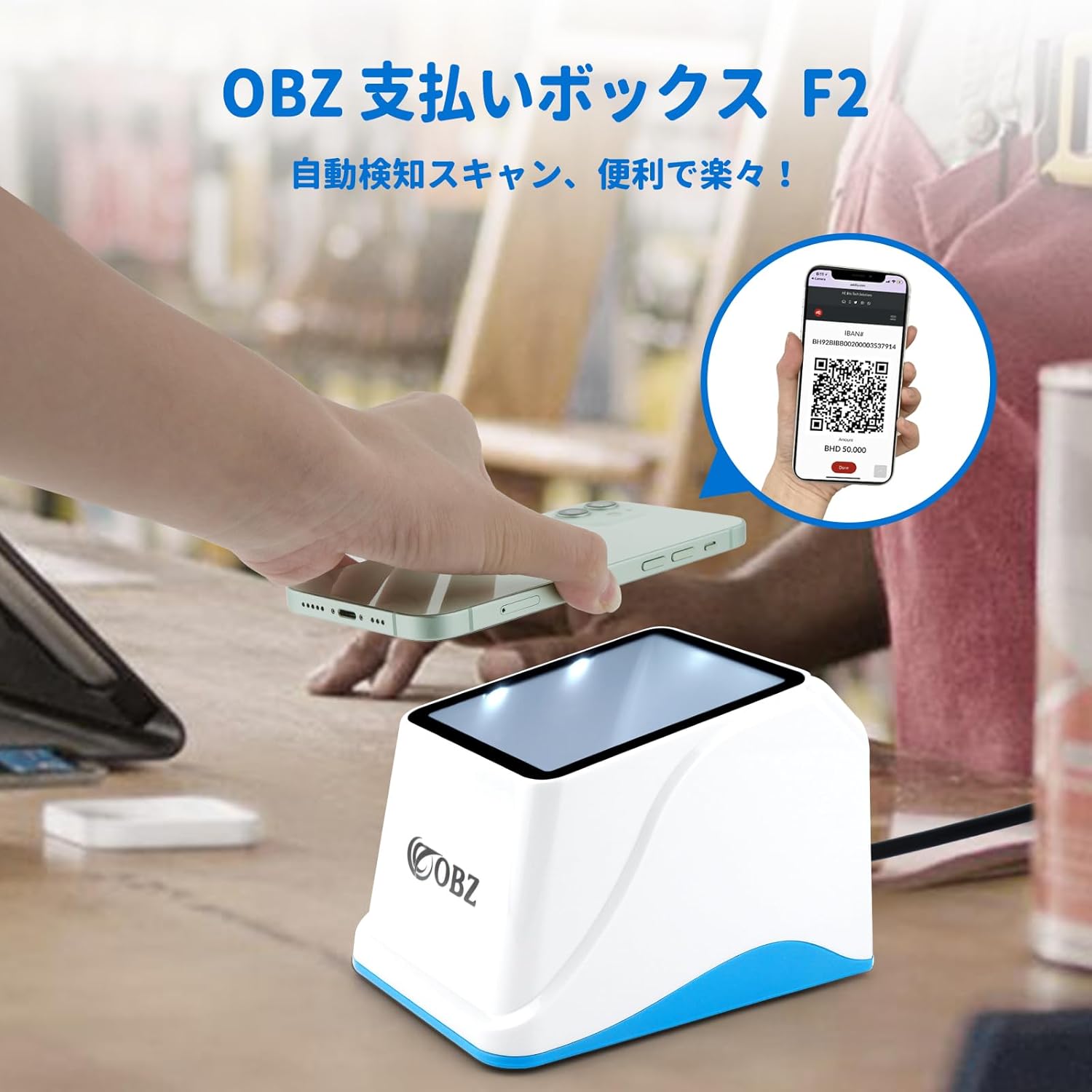
Figure 6.3: Compatible with Windows (XP/7/8/10/11), Linux, Android, and Mac OS. It integrates seamlessly with common office software like Word, Excel, and TXT applications.
7. Manteniment
Proper maintenance ensures the longevity and optimal performance of your OBZ F2 scanner.
- Neteja de la finestra d'escaneig: Netegeu regularment la finestra d'escaneig amb un drap suau i sense borrissol. Per a taques difícils, esbandiu lleugeramentampNetegeu el drap amb aigua o un netejador suau i no abrasiu. No utilitzeu productes químics agressius ni materials abrasius.
- Neteja general: Netegeu l'exterior de l'escàner amb un drap sec o lleugerament humit.amp drap per eliminar la pols i la brutícia.
- Emmagatzematge: When not in use, store the scanner in a clean, dry environment away from direct sunlight and extreme temperatures.
8. Solució De Problemes
If you encounter issues with your OBZ F2 scanner, please refer to the following common problems and solutions:
| Problema | Causa possible | Solució |
|---|---|---|
| L'escàner no s'encén ni respon. | El cable USB no està connectat correctament o el port USB està defectuós. | Assegureu-vos que el cable USB estigui ben connectat tant a l'escàner com a l'ordinador. Proveu un port USB diferent. |
| L'escàner no llegeix codis de barres. | Barcode is damaged, poorly printed, or not supported. Scanning window is dirty. Insufficient lighting. | Try scanning a different, known-good barcode. Clean the scanning window. Ensure adequate lighting. Verify the barcode type is supported. |
| Scanner reads slowly or intermittently. | Scanning window is dirty. Barcode is not presented correctly. | Clean the scanning window. Ensure the barcode is flat and within the optimal scanning range. |
| No sound or incorrect sound settings. | Sound settings need adjustment. | Refer to the user guide (PDF) for instructions on adjusting the volume and sound settings. This typically involves scanning specific configuration codes. |
Si el problema persisteix després de provar aquestes solucions, poseu-vos en contacte amb l'atenció al client.
9. Especificacions
| Característica | Descripció |
|---|---|
| Model | F2 (NF2-JP) |
| Color | Blanc + Blau |
| Dimensions (L x A x A) | 136 mm x 95 mm x 96 mm |
| Pes | 180 g |
| Longitud del cable | 1.2 m |
| Material | ABS + PC |
| Mètode de connexió | Cable USB |
| Tecnologia d'escaneig | Imatge CMOS |
| Angle d'escaneig | 360 graus |
| Simbologies suportades | 1D: Code128, Code39, UPC, EAN13, etc. 2D: QR Code, etc. |
| Compatibilitat | Windows XP/7/8/10/11, Linux, Android, Mac OS |
10. Garantia i Suport
OBZ provides a garantia de tres anys for this barcode scanner from the date of purchase. This warranty covers manufacturing defects and malfunctions under normal use.
For technical support, warranty claims, or any inquiries regarding your OBZ F2 Barcode Scanner, please contact our customer service team through the platform where you purchased the product. Please have your purchase details and product model number ready when contacting support.