1. Introducció
Thank you for choosing the Dafit ZL02CPRO Smart Watch. This device is designed to enhance your daily life with advanced health monitoring, communication features, and smart assistant capabilities. Please read this manual carefully to ensure proper use and optimal performance of your new smart watch.
2. Què hi ha a la caixa
Upon opening your Dafit ZL02CPRO Smart Watch package, you should find the following items:
- Dafit ZL02CPRO Smart Watch
- Wristbands (pre-attached or separate, depending on model)
- Cable de càrrega
- Manual d'usuari (aquest document)
3. Producte acabatview
The Dafit ZL02CPRO Smart Watch features a 1.28-inch round TFT screen and is available with either a metal or silicone strap. It includes a side button for navigation and interaction.

Image: Dafit ZL02CPRO Smart Watch with a black metal mesh band, displaying time, date, steps, and heart rate data.
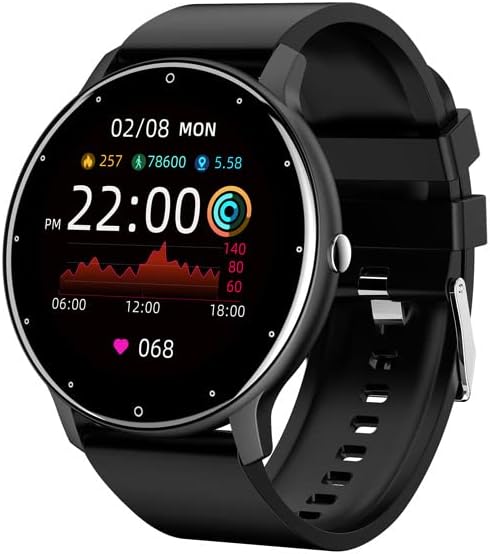
Image: Dafit ZL02CPRO Smart Watch with a black silicone band, showing a similar display with health metrics.

Image: A selection of over 100 stylish digital watch faces available for the Dafit ZL02CPRO Smart Watch, demonstrating customization options.
4. Guia de configuració
4.1 Càrrega del dispositiu
Before first use, fully charge your smart watch. Connect the magnetic charging cable to the charging points on the back of the watch and plug the USB end into a standard USB power adapter (not included) or a computer USB port. A full charge typically takes about 2 hours.
4.2 Baixant l'aplicació
To unlock the full functionality of your smart watch, download the companion application. Cerca "Dafit" in your smartphone's app store (Google Play Store for Android or Apple App Store for iOS). The app supports Android 5.0 and above, and Apple iOS 9.0 or later.
4.3 Emparellament amb el telèfon intel·ligent
- Ensure your smart watch is charged and powered on.
- Activa el Bluetooth al teu telèfon intel·ligent.
- Open the Dafit app on your smartphone.
- Follow the in-app instructions to search for and connect to your ZL02CPRO watch. The app will guide you through the pairing process.
- Once paired, you can synchronize data, customize settings, and receive notifications.
5. Instruccions de funcionament
5.1 Navegació bàsica
- Pantalla tàctil: Llisca esquerra/dreta, amunt/avall per navegar pels menús i les funcions. Toca per seleccionar.
- Botó lateral: Premeu per tornar a la pantalla d'inici o activar el dispositiu. Premeu llargament per veure les opcions d'engegada.
5.2 Bluetooth Call Function
After successful pairing, your watch can make and receive calls directly. Ensure the Bluetooth connection is stable and within 10 meters of your phone.
- Fer trucades: Access the dial pad or contact list on the watch to initiate a call.
- Recepció de trucades: When a call comes in, the watch will display the caller ID. Tap to answer or reject the call.
5.3 Notificacions
Receive notifications for calls, SMS messages, and various app alerts directly on your watch. Enable desired app notifications within the Dafit app settings on your smartphone.
5.4 Music and Camera Control
- Control de música: Controla la reproducció de música al teu telèfon intel·ligent (reproduir, pausar, saltar pistes) directament des del rellotge.
- Comandament a distància de la càmera: Feu servir el rellotge com a disparador remot per a la càmera del vostre telèfon intel·ligent.
6. Funcions de monitorització de l'estat
The Dafit ZL02CPRO Smart Watch provides comprehensive health and fitness tracking capabilities:
- Seguiment d'activitats: Monitors step number, calories burned, and distance traveled.
- Monitorització de la freqüència cardíaca: Registra contínuament la teva freqüència cardíaca durant tot el dia.
- Monitorització del son: Analitza els teus patrons de son, incloent-hi el son profund, el son lleuger i els horaris de vigília.
- Modes multiesportiu: Supports various sport modes to track specific exercise data, including GPS movement track (requires smartphone GPS).
7. Smart Assistant Features
Beyond health tracking, your smart watch offers several convenient smart assistant functions:
- Informe meteorològic: Rep actualitzacions meteorològiques en temps real.
- Recordatori sedentari: T'avisa quan has estat inactiu durant massa temps.
- Despertador: Configura alarmes directament des del teu rellotge.
- Cronòmetre: A built-in stopwatch for timing activities.
- Ajust de brillantor: Ajusta la brillantor de la pantalla per a una òptima viewing.
- Mode d'estalvi d'energia: Extend battery life when needed.
8. Water Resistance and Battery Life
8.1 IP68 Water Resistance
The Dafit ZL02CPRO Smart Watch is IP68 waterproof, meaning it is resistant to dust and can withstand immersion in water up to 1.5 meters for 30 minutes. It can be worn when washing hands or in the rain. Important: Do not use the watch in showers, saunas, hot tubs, or during diving, as steam and hot water can damage the device.
8.2 Durada de la bateria
With a full charge, the watch can be used for approximately 5-7 days, depending on usage patterns and features enabled. Charging time is approximately 2 hours.
9. Manteniment
To ensure the longevity and proper functioning of your Dafit ZL02CPRO Smart Watch, follow these maintenance guidelines:
- Neteja: Regularly wipe the watch screen and body with a soft, dry cloth. If necessary, use a slightly damp un drap i després assecar-lo bé.
- Cura de la corretja: Clean silicone straps with mild soap and water. For metal straps, use a soft brush to remove debris. Ensure straps are dry before wearing.
- Eviteu productes químics: No utilitzeu productes químics agressius, dissolvents de neteja ni detergents forts, ja que poden danyar l'acabat o els components interns del rellotge.
- Emmagatzematge: Quan no l'utilitzeu durant períodes prolongats, guardeu el rellotge en un lloc fresc i sec, allunyat de la llum solar directa.
10. Solució De Problemes
If you encounter issues with your Dafit ZL02CPRO Smart Watch, please refer to the following common solutions:
| Problema | Possible solució |
|---|---|
| El rellotge no s'encén | Ensure the watch is fully charged. Connect to the charging cable and wait a few minutes before attempting to power on again. |
| No es pot emparellar amb el telèfon intel·ligent | Check that Bluetooth is enabled on your phone. Ensure the watch is within Bluetooth range (10m). Restart both the watch and your phone. Try unpairing and re-pairing through the Dafit app. |
| No s'han rebut notificacions | Verify that notifications are enabled in the Dafit app settings for specific applications. Ensure the watch is connected via Bluetooth. Check your phone's notification settings. |
| Dades de salut inexactes | Assegureu-vos de portar el rellotge ben ajustat al canell, aproximadament a l'amplada d'un dit per sobre de l'os del canell. Netegeu el sensor de la part posterior del rellotge. |
| Durada de la bateria curta | Reduce screen brightness, disable continuous heart rate monitoring if not needed, and use power-saving mode. Limit frequent screen wake-ups. |
Si el problema persisteix, poseu-vos en contacte amb l'atenció al client per obtenir més ajuda.
11. Especificacions
Below are the technical specifications for the Dafit ZL02CPRO Smart Watch:
| Característica | Detall |
|---|---|
| Model | ZL02CPRO |
| Tipus de pantalla de visualització | Pantalla TFT |
| Mida de la pantalla | 1.28 Inches (Round Screen) |
| Tecnologia de connectivitat | Bluetooth |
| Comunicació sense fils estàndard | Bluetooth |
| Sistema operatiu | Wear OS (compatible with Android 5.0+ / iOS 9.0+) |
| Capacitat de la bateria | 230 milionsamp Hores |
| Durada de la bateria | 5-7 dies (ús típic) |
| Temps de càrrega | Aprox. 2 hores |
| Resistència a l'aigua | IP68 |
| Pes de l'article | 80 grams (2.82 unces) |
| GPS | GPS mitjançant Smartphone |
| Idiomes admesos | Chinese, English, German, Spanish, French, Russian, Arabic, Ukrainian, Italian, Portuguese |
12. Garantia i Suport
For warranty information, please refer to the documentation included with your purchase or contact the retailer. If you have any questions or require technical support, please reach out to the manufacturer's customer service. Contact details are typically available on the product packaging or the official brand weblloc.