
1. Introducció
The LEAUDIO XDUOO MH-02 is a versatile USB Digital-to-Analog Converter (DAC) and Tube Headphone Amplifier. It combines the warmth of tube pre-amplification with the power of a Class A transistor buffer, designed to enhance your audio experience. This manual provides detailed instructions for setup, operation, and maintenance of your MH-02 unit.
2. Instruccions de seguretat
- Assegureu-vos que la font d'alimentació voltage matches the requirements specified for the device (DC 12V/2A).
- No exposeu la unitat a l'aigua, la humitat ni a temperatures extremes.
- Eviteu col·locar la unitat sota la llum solar directa o a prop de fonts de calor.
- Assegureu-vos que hi hagi una ventilació adequada al voltant de la unitat per evitar el sobreescalfament.
- No intenteu obrir ni reparar la unitat vosaltres mateixos. Encarregueu tot el manteniment a personal qualificat.
- Mantenir fora de l'abast dels nens.
3. Contingut del paquet
Si us plau, comproveu el paquet per veure si hi ha els elements següents:
- XDUOO MH-02 Unit
- Power Adapter (DC 12V) (Typically included, please verify packaging)
- USB Cable (Typically included, please verify packaging)
4. Producte acabatview
4.1 Tauler frontal
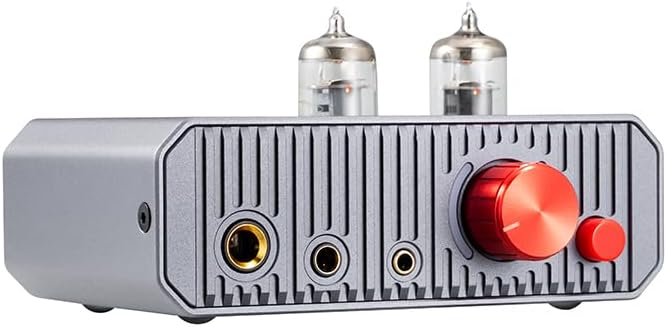
This image displays the front panel of the MH-02, highlighting the dual vacuum tubes, the prominent red volume control knob, the smaller red gain selection button, and the three distinct headphone output jacks.
- Sortida d'auriculars de 6.35 mm: Presa d'auriculars estàndard.
- Sortida d'auriculars balancejada de 4.4 mm: Balanced headphone jack for compatible headphones.
- Sortida d'auriculars de 3.5 mm: Presa d'auriculars estàndard.
- Pom de volum: Controls the output volume for headphones and line out.
- Gain Button: Toggles between low and high gain settings.
- Tubs de buit: Dual 6J1 tubes for pre-amplificació.
4.2 Panell posterior

This image illustrates the rear panel of the MH-02, featuring the RCA input and output connections, the USB-C port for digital audio, the DC 12V power input, and the main power switch.
- RCA L/R IN: Entrada d'àudio analògic.
- RCA L/R OUT: Analog audio line output.
- USB IN (Type-C): Digital audio input for USB DAC function.
- CC 12V: Power input jack.
- Interruptor d'alimentació: Toggles the unit on or off.
5. Configuració
5.1 Connecting to a USB Audio Device

This diagram illustrates two primary connection methods: USB for digital sources like laptops, and RCA for analog sources such as CD players, both leading to headphone output.
- Use a USB OTG cable (not included) to connect the MH-02's USB IN port to your computer (Windows, Linux, Mac OS X), iOS device, Android device, or HiFi player.
- Connect your headphones to one of the headphone output jacks on the front panel.
- Ensure the MH-02 is powered on.
- Select the MH-02 as the audio output device in your source device's sound settings.
5.2 Connecting to an Analog Audio Device
- Use an RCA audio cable to connect the AUX/Line output of your player (e.g., CD player) to the RCA L/R IN ports on the rear panel of the MH-02.
- Connect your headphones to one of the headphone output jacks on the front panel.
- Ensure the MH-02 is powered on.
5.3 Connexió d'alimentació
- Connect the provided DC 12V power adapter to the DC 12V input jack on the rear panel of the MH-02.
- Connecteu l'adaptador de corrent a una presa de corrent adequada.
6. Instruccions de funcionament
6.1 Encès/Apagat
Flip the power switch on the rear panel to the 'ON' position to power on the unit. Flip it to 'OFF' to power off. A built-in relay mutes the circuit during power-on to prevent 'POP' noise and ensure optimal tube operation.

This image shows an internal relay, which is part of the built-in protection circuit designed to prevent 'POP' noise during power cycles.
6.2 Control de volum
Rotate the large red knob on the front panel clockwise to increase volume and counter-clockwise to decrease volume. Start with a low volume setting before playing audio to avoid sudden loud sounds.
6.3 Gain Switch Operation

This diagram explains the function of the gain switch: pressing the button activates 'LOW' gain, while leaving it unpressed selects 'HIGH' gain.
The small red button on the front panel is the gain switch. Press it gently to toggle between two gain settings: Low Gain (button pressed) and High Gain (button unpressed). Select the appropriate gain setting based on your headphones' impedance and sensitivity to achieve optimal sound and prevent over-driving or under-driving.
6.4 Using as a Pre-ampmés viu
The MH-02 features a volume-controlled line output (RCA L/R OUT) that routes audio through its tube stage. This allows the unit to function as a pre-amplifier for other audio amplifiers or active speakers, potentially enhancing their sound quality.
7. Especificacions
| Paràmetre | Valor |
|---|---|
| Font d'alimentació | DC 12V/2A |
| SO compatible | Windows, Linux, Mac OS X, iOS, Android |
| Sampling Rate Support (PCM) | 16-32 bits/44.1 k-384 kHz |
| Sampling Rate Support (DSD) | DSD64-256 |
| Potència de sortida | 1300 mW (càrrega de 32 Ω) |
| Resposta de freqüència | 10Hz-60KHz (±0.5dB) |
| Guanyar | +12dB / +18dB |
| THD+N | 0.8% (1KHz, 32Ω load) |
| Relació S/N | 113 dB |
| Conversació | 70 dB |
| Dimensions de la unitat (L x A x A) | 12 x 10 x 6.4 cm (aprox. 4.7 x 3.9 x 2.5 polzades) |
| Pes de la unitat | 0.42 Kg (approx. 14.8 ounces) |
| Item Weight (as listed) | 14.4 unces |
| Fabricant | LEAUDIO |
| Data de primera disponibilitat | 20 de maig de 2024 |
8. Solució De Problemes
- Sense so:
- Ensure the unit is powered on and the power adapter is securely connected.
- Check all audio cables (USB, RCA, headphones) are correctly and securely connected.
- Verify the volume knob is turned up.
- If using USB, ensure the MH-02 is selected as the default audio output device on your computer or source device.
- Test with different headphones or source devices to isolate the issue.
- So distorsionat:
- Reduce the volume on both the MH-02 and your source device.
- Check the gain setting. If using sensitive headphones, try the 'Low Gain' setting.
- Ensure audio cables are not damaged or loose.
- Prova amb diferents àudios files or sources.
- Connexió intermitent:
- Comproveu si totes les connexions dels cables estan soltes.
- Try a different USB or RCA cable.
- Assegureu-vos que la font d'alimentació sigui estable.
9. Manteniment
- Neteja: Feu servir un drap suau i sec per netejar l'exterior de la unitat. No utilitzeu netejadors líquids ni dissolvents.
- Substitució del tub: The 6J1 vacuum tubes have a finite lifespan. If you notice a significant degradation in sound quality or tube failure, contact the manufacturer or a qualified technician for replacement instructions. Ensure the unit is powered off and unplugged before attempting any tube replacement.
- Emmagatzematge: Quan no l'utilitzeu durant períodes prolongats, guardeu la unitat en un lloc fresc i sec, allunyat de la llum solar directa i de la pols.
10. Garantia i Suport
Per obtenir informació sobre la garantia, assistència tècnica o consultes sobre el servei tècnic, consulteu la documentació que s'inclou amb la compra o poseu-vos en contacte directament amb el venedor/fabricant. Conserveu el comprovant de compra per a reclamacions de garantia.