
1. Introducció
Thank you for choosing the Asani Indoor Air Quality Monitor. This device is designed to provide real-time, comprehensive monitoring of various air pollutants and environmental factors in your indoor spaces. With its advanced sensors, it detects 8 major air pollutants including Carbon Dioxide (CO2), Volatile Organic Compounds (VOCs), Formaldehyde (HCHO), Air Quality Index (AQI), Particulate Matter (PM2.5, PM10), as well as humidity and temperature. This manual provides essential information for the proper setup, operation, and maintenance of your monitor to ensure accurate readings and long-lasting performance.
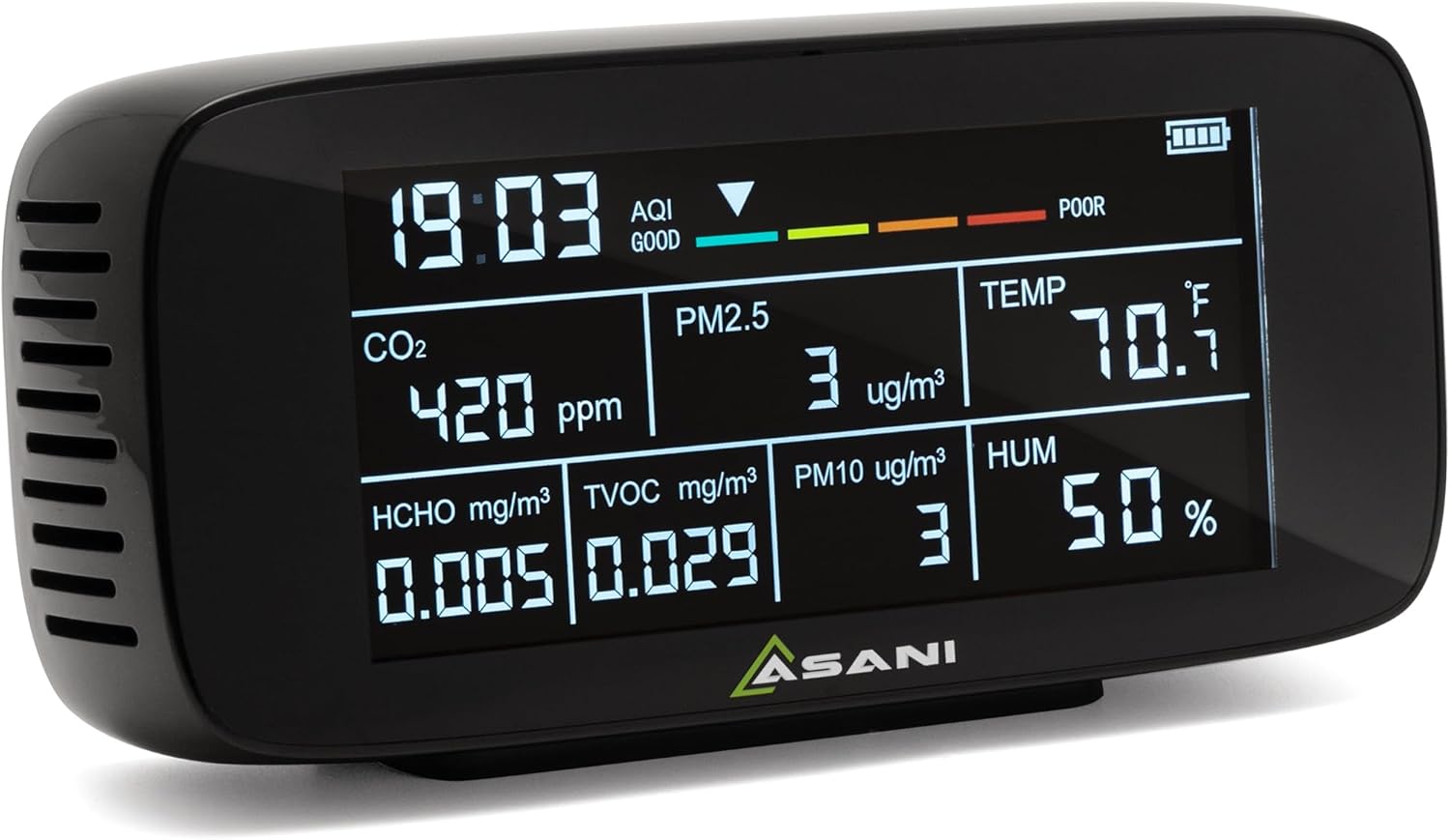
Image: Asani Indoor Air Quality Monitor, front view showing the display with time, AQI, CO2, PM2.5, PM10, HCHO, TVOC, temperature, and humidity readings.
2. Característiques del producte
- Seguiment integral: Equipped with ultra-precise sensors to detect CO2, VOCs, formaldehyde, AQI, PM2.5, PM10, humidity, and temperature.
- Portàtil i versàtil: Designed for easy portability, suitable for monitoring air quality in homes, offices, vehicles, and areas affected by environmental factors like wildfires.
- Interfície fàcil d'utilitzar: Features a clear, easy-to-read display for stress-free setup and operation, without the need for Wi-Fi or app-based controls.
- Durada de la bateria ampliada: Powered by a 3000 mAh rechargeable lithium polymer battery, offering up to 11 hours of continuous operation.
- Apagat automàtic: Includes an "Auto-Shutdown" feature that powers down the device after 11 hours to extend its lifespan and maintain performance.
- Dades en temps real: Provides instant readings for all detected parameters, allowing for immediate assessment of air quality.

Image: A visual representation of the 9-in-1 functionality, listing pollutant types (CO2, PM2.5, PM10, HCHO, TVOC) with common sources, and additional functions (AQI, Time, Temperature, Humidity).
3. Components del dispositiu
Familiarize yourself with the key components and display indicators of your Asani Air Quality Monitor:

Imatge: Frontal i superior view of the Asani Air Quality Monitor with labels pointing to: Time, AQI (Air Quality Index), Battery Level, CO2 (Carbon Dioxide), HCHO (Formaldehyde), TVOC (Total Volatile Organic Compounds), PM2.5, PM10, Temperature, Humidity, and USB-C Rechargeable port.
- Pantalla de visualització: Shows all real-time readings and indicators.
- Botó d'encesa: Located on the back/side for turning the device on/off.
- Port de càrrega USB-C: Per recarregar la bateria interna.
- Vendes d'aire: Located on the sides and back for air circulation to the sensors.
- Indicadors:
- Hora: Visualització de l'hora actual.
- AQI (índex de qualitat de l'aire): Overall air quality indicator (Good, Moderate, Caution, Unhealthy).
- Nivell de bateria: Indica la càrrega restant de la bateria.
- CO2 (Carbon Dioxide): Measured in parts per million (ppm).
- PM2.5/PM10: Particulate matter measured in micrograms per cubic meter (µg/m³).
- HCHO (formaldehid): Measured in milligrams per cubic meter (mg/m³).
- TVOC (compostos orgànics volàtils totals): Measured in milligrams per cubic meter (mg/m³).
- TEMP (Temperature): Measured in degrees Fahrenheit (°F) or Celsius (°C).
- HUM (Humidity): Measured in percentage (%).
4. Configuració
- Unboxing: Carefully remove the Asani Air Quality Monitor from its packaging. Ensure all components are present: the monitor unit, USB-C charging cable, and this manual.
- Càrrec inicial: Before first use, it is recommended to fully charge the device. Connect the provided USB-C charging cable to the monitor's USB-C port and plug the other end into a compatible USB power adapter (not included). The battery indicator on the display will show charging status.
- Encès: Press and hold the power button (usually located on the back or side) for a few seconds until the display lights up.
- Calibració inicial:
IMPORTANT: For accurate readings, the device requires a calibration process upon startup and whenever it is moved to a new location. Allow the monitor to run for approximately 10 minuts in the desired environment for the air to circulate through its sensors and for calibration to complete. During this time, HCHO values may initially decrease as the device stabilizes.
- Col·locació: Place the monitor in a central location within the area you wish to monitor. Ensure air vents are not obstructed. Avoid placing it directly next to windows, air conditioners, heaters, or in direct sunlight, as this can affect temperature and humidity readings.
5. Instruccions de funcionament
5.1. Comprensió de la pantalla
The large, clear display provides real-time readings for all monitored parameters. The Air Quality Index (AQI) bar at the top offers a quick visual summary of overall air quality:

Image: Chart explaining AQI levels: Good (Green), Moderate (Yellow), Caution (Orange), Unhealthy (Red), with descriptions for each category.
- Good (Green): La qualitat de l'aire és satisfactòria i la contaminació de l'aire suposa poc o cap risc.
- Moderate (Yellow): Air quality is acceptable. However, there may be a risk for some people, particularly those who are unusually sensitive to air pollutant.
- Caution (Orange): Els membres de grups sensibles poden experimentar efectes sobre la salut. És menys probable que el públic en general es vegi afectat.
- Unhealthy (Red): Alguns membres del públic en general poden experimentar efectes sobre la salut; els membres de grups sensibles poden experimentar efectes més greus per a la salut.
5.2. Continuous Monitoring
Once powered on and calibrated, the monitor will continuously display the current air quality data. You can move the device between rooms as needed, remembering to allow for a brief recalibration period (approx. 10 minutes) after relocation for optimal accuracy.
5.3. CO2 Alarm Function
The device may include an audible alarm function for high CO2 levels. If CO2 levels exceed a preset threshold (e.g., 1000 ppm), the monitor may beep to alert you to potentially poor ventilation. Refer to the device's specific button functions (if any) for adjusting or silencing this alarm.
5.4. Automatic Shutdown Feature
To conserve battery and extend the device's lifespan, the monitor is equipped with an automatic shutdown feature. It will power down automatically after approximately 11 hours of continuous operation. To resume monitoring, simply press the power button again.
6. Manteniment
- Neteja: Gently wipe the device with a soft, dry cloth. Do not use abrasive cleaners, solvents, or immerse the device in water. Ensure no liquid enters the air vents.
- Cura del sensor: The sensors are delicate. Avoid exposing the device to excessive dust, moisture, or extreme temperatures, which can affect sensor accuracy and lifespan. Do not attempt to clean the internal sensors.
- Emmagatzematge: When not in use for extended periods, store the monitor in a cool, dry place away from direct sunlight and extreme temperatures. It is advisable to fully charge the battery before long-term storage.
- Bateria: The device uses a built-in rechargeable lithium polymer battery. Do not attempt to replace the battery yourself. If the battery performance significantly degrades, contact customer support.
7. Solució De Problemes
| Problema | Causa possible | Solució |
|---|---|---|
| El dispositiu no s’encén. | La bateria està esgotada. | Connect the device to a power source using the USB-C cable and allow it to charge for at least 30 minutes before attempting to power on again. |
| Readings seem inaccurate or fluctuate wildly. | Device not fully calibrated or recently moved. Les sortides d'aire estan obstruïdes. Exposure to strong fumes or drafts. | Ensure the device has been running for at least 10 minutes in its current location for calibration. Check that air vents are clear. Move the device away from direct sources of pollution (e.g., cleaning products, cooking fumes) or strong air currents. |
| CO2 alarm sounds frequently. | High CO2 levels detected. | Increase ventilation in the room by opening windows or doors. Reduce the number of occupants in the space if possible. |
| La durada de la bateria és més curta del que s’esperava. | Degradació de la bateria amb el pas del temps. Continuous operation without auto-shutdown. | Ensure the auto-shutdown feature is functioning. If significant degradation occurs, contact customer support for assistance. |
8. Especificacions
| Paràmetre | Detall |
|---|---|
| Número de model | DM197 |
| Marca | Asani |
| Detected Pollutants | CO2, VOCs, Formaldehyde (HCHO), PM2.5, PM10 |
| Mides addicionals | AQI (Air Quality Index), Temperature, Humidity |
| Font d'alimentació | Alimentat per bateria (ió de liti recarregable) |
| Capacitat de la bateria | 3000 mAh |
| Temps de funcionament | Fins a 11 hores (continuades) |
| Port de càrrega | USB-C |
| Pes de l'article | 12.32 unces (aproximadament 349 grams) |
| Dimensions | Approx. 7.4 x 3.46 x 1.65 inches (based on image PT01) |
| Tipus de sensor | Ionization (for some parameters) |
| Precisió de la mesura | 1 ppm (for CO2, as per spec) |
9. Informació de la garantia
Asani products are manufactured with high-quality standards. For specific warranty details, including coverage period and terms, please refer to the warranty card included with your product packaging or visit the official Asani weblloc web. Si us plau, conserveu el comprovant de compra per a qualsevol reclamació de garantia.
10. Atenció al client
If you encounter any issues or have questions regarding your Asani Indoor Air Quality Monitor, please do not hesitate to contact our customer support team.
- Assistència en línia: Visit the official Asani weblloc web per a preguntes freqüents, guies de resolució de problemes i formularis de contacte.
- Suport per correu electrònic: Consulteu l'embalatge del producte o la fitxa oficial weblloc web per a l'adreça de correu electrònic del servei d'atenció al client.
- Suport telefònic: Check the official Asani weblloc web per conèixer els números de telèfon d'assistència disponibles i l'horari d'atenció.
When contacting support, please have your product model number (DM197) and purchase details ready.