
Introducció
Welcome to the user manual for your new TECNO Spark 20 Pro 5G smartphone. This guide provides essential information to help you set up, operate, maintain, and troubleshoot your device. Please read through this manual carefully to ensure optimal performance and longevity of your smartphone.

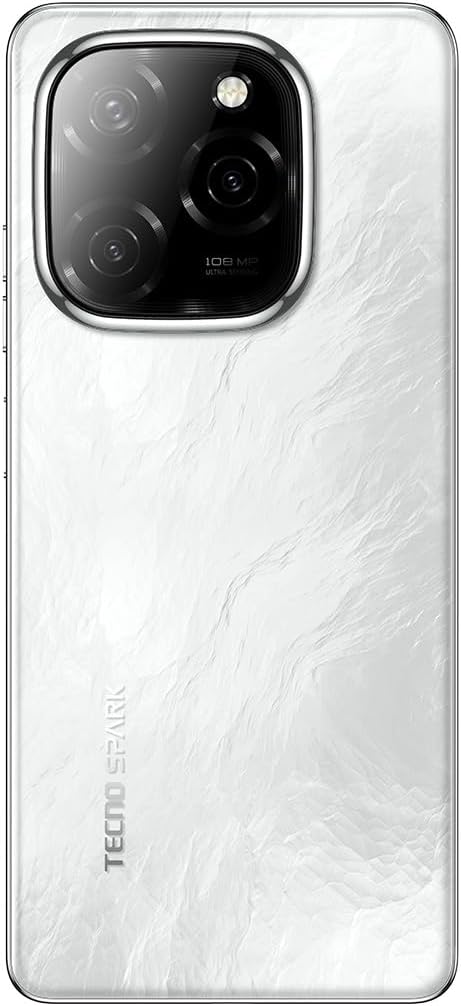
Imatge: Anvers i revers view of the TECNO Spark 20 Pro 5G smartphone, showcasinel seu disseny i el mòdul de càmera.
1. Configuració
1.1 Contingut del paquet
Abans de començar, assegureu-vos que tots els elements estiguin presents al paquet:
- TECNO Spark 20 Pro 5G Smartphone
- Cable USB-Type C
- Adaptador de corrent (33 W)
- Eina expulsora de SIM
- Guia d'inici ràpid (si escau)
- Targeta de garantia (si escau)
1.2 Inserció de la targeta SIM
- Localitza la safata de la targeta SIM al lateral del dispositiu.
- Introduïu l'eina d'expulsió de la SIM al forat petit que hi ha al costat de la safata i premeu suaument fins que la safata surti.
- Place your Nano SIM card into the designated slot on the tray. Ensure the gold contacts face downwards.
- Empenyeu amb cura la safata cap al telèfon fins que encaixi al seu lloc.

Imatge: Lateral view of the smartphone showing the SIM card tray and power/volume buttons.
1.3 Càrrega inicial i engegada
Es recomana carregar completament el dispositiu abans del primer ús.
- Connecteu el cable USB tipus C al port de càrrega del telèfon i a l'adaptador de corrent.
- Connecteu l'adaptador de corrent a una presa de corrent.
- Once sufficiently charged, press and hold the Power button (located on the side) until the TECNO logo appears.
- Seguiu les instruccions que apareixen a la pantalla per completar la configuració inicial, inclosa la selecció d'idioma, la connexió Wi-Fi i la configuració del compte de Google.
Imatge: Part inferior view of the smartphone, highlighting the USB Type-C charging port and speaker grille.
2. Funcionament del vostre dispositiu
2.1 Navegació bàsica
Your TECNO Spark 20 Pro 5G runs on Android 14 with HiOS 14. Navigate using touch gestures:
- Toca: Selecciona un element o obre una aplicació.
- Llisca: Desplaçar-se per pantalles o llistes.
- Pessigar: Apropar o allunyar les imatges i web pàgines.
- Premsa llarga: Accedir a menús contextuals o moure icones.
2.2 Funcions de la càmera
The device features a 108MP Ultra Clear rear camera and an 8MP front camera with dual LED flash.
- Càmera posterior: Open the Camera app, select "Photo" for standard shots, "Pro" for advanced settings, or "Macro" for close-up photography.
- Càmera frontal: Switch to the front camera for selfies. The dual LED flash assists in low-light conditions.
- Gravació de vídeo: Select "Video" mode to record in up to 4K resolution.

Imatge: Part posterior view of the smartphone, highlighting the 108MP camera system with its triple lens setup.
Connectivitat 5G 2.3
Experience high-speed internet with 5G connectivity, supported by 10 5G bands, Linkbooming, and Smart 5G 3.0 technology for wider coverage and faster speeds.
- Ensure your SIM card supports 5G and your network provider offers 5G services in your area.
- Access network settings to manage 5G preferences.
2.4 Àudio i pantalla
- Àudio: Enjoy immersive sound with Dolby Atmos and dual stereo speakers, featuring Hi-Res Audio certification.
- Visualització: The 6.78-inch LTPS display offers a 120Hz adaptive refresh rate for smooth scrolling and gaming. The Dynamic Port 2.0 provides interactive notifications.
2.5 Funcions de seguretat
Unlock your device securely using the side-mounted fingerprint sensor.
- Vés a Settings > Security & Privacy > Fingerprint Unlock to set up your fingerprint.
3. Manteniment
3.1 Neteja del vostre dispositiu
- Feu servir un drap suau i sense borrissol per netejar la pantalla i la carcassa del telèfon.
- Eviteu utilitzar productes químics o materials abrasius.
- The device has an IP53 rating, meaning it is resistant to dust and splashing water, but it is not waterproof. Avoid submerging it in water.
3.2 Cura de la bateria
- Per allargar la durada de la bateria, eviteu exposar el telèfon a temperatures extremes.
- Use the original 33W fast charger for optimal charging performance.
- Eviteu esgotar completament la bateria amb freqüència.
3.3 Actualitzacions de programari
Comproveu i instal·leu regularment si hi ha actualitzacions de programari per assegurar-vos que el vostre dispositiu tingui les funcions i els pegats de seguretat més recents.
- Vés a Configuració > Sistema > Actualització de programari per comprovar si hi ha actualitzacions disponibles.
4. Solució De Problemes
| Problema | Possible solució |
|---|---|
| El dispositiu no s'encén. | Ensure the battery is charged. Connect to the charger for at least 10 minutes, then try powering on again. If it still doesn't work, perform a forced restart by holding the Power button for 10-15 seconds. |
| No es pot connectar a la Wi-Fi. | Check if Wi-Fi is enabled in settings. Restart your router and phone. Forget the network and reconnect. |
| Pobre senyal 5G. | Ensure you are in a 5G coverage area. Check your SIM card is properly inserted. Contact your network provider for assistance. |
| La càmera no funciona. | Restart the phone. Clear the cache and data of the Camera app (Settings > Apps > Camera > Storage > Clear Cache/Data). |
| La bateria s'esgota ràpidament. | Close background apps. Reduce screen brightness. Disable unnecessary features like GPS, Bluetooth, or Wi-Fi when not in use. Check battery usage in settings to identify power-hungry apps. |
5. Especificacions
| Característica | Detall |
|---|---|
| Marca | Tecno |
| Nom del model | Spark 20 Pro |
| Sistema operatiu | Android 14, HiOS 14 |
| Mida de la memòria RAM | 16 GB (8GB physical + 8GB memory fusion) |
| Capacitat d'emmagatzematge | 256 GB (UFS 2.2) |
| Model de processador | MediaTek Dimensity 6080 5G (6nm) |
| Velocitat de la CPU | 2.4 GHz |
| Mida de la pantalla | 6.78 polzades |
| Resolució de visualització | 3840 x 2160 (4K) |
| Freqüència d'actualització | Adaptatiu de 120 Hz |
| Tipus de visualització | LCD (LTPS) |
| Resolució de la càmera posterior | 108 megapíxels |
| Resolució de la càmera frontal | 8 megapíxels |
| Característiques de la càmera | Macro mode, Integrated Flash (Dual LED for front camera) |
| Resolució de captura de vídeo | 4K |
| Capacitat de la bateria | 5000 mAh (polímer de liti) |
| Carregant | Càrrega ràpida de 33 W, càrrega inversa de 10 W |
| Tecnologia cel·lular | 5G |
| Connectivitat | 5G, Wi-Fi, USB Type-C, 3.5mm Headphone Jack |
| Ranures per a targetes SIM | Single SIM (Nano) |
| Seguretat biomètrica | Reconeixement d'empremtes digitals |
| Nivell de resistència a l'aigua | IP53 (resistent a les esquitxades) |
| Components inclosos | USB Cable, Power Adapter |
| Dimensions del producte | 16.9 x 7.6 x 0.9 cm |
| Pes de l'article | 199 grams |
| Any de fabricació | 2024 |
6. Informació de la garantia
Your TECNO Spark 20 Pro 5G smartphone comes with a garantia limitada d'un any from the date of purchase. This warranty covers manufacturing defects under normal use. It does not cover damage caused by misuse, accidents, unauthorized repairs, or normal wear and tear.
Please retain your proof of purchase for warranty claims. For detailed terms and conditions, refer to the warranty card included in your product package or visit the official Tecno weblloc.
7. Suport
For further assistance, technical support, or service inquiries, please contact Tecno customer support through one of the following channels:
- Oficial Weblloc: Visita el Tecno official weblloc for FAQs, support resources, and contact information.
- Suport per correu electrònic: Consulteu la targeta de garantia o el formulari oficial website for specific email addresses.
- Centres de servei: Locate authorized service centers in your region via the Tecno weblloc.
When contacting support, please have your device model (Spark 20 Pro) and serial number ready.