1. Introducció
Thank you for choosing the AJAZZ AJ159P Superlight Wireless Gaming Mouse. This high-performance gaming mouse is engineered for precision, speed, and comfort, featuring an ultra-lightweight design, advanced sensor technology, and versatile connectivity options. This manual provides detailed instructions to help you set up, operate, and maintain your new gaming mouse.

Figure 1: AJAZZ AJ159P Superlight Wireless Gaming Mouse with Magnetic Charging Dock.
2. Contingut del paquet
Si us plau, comproveu el contingut del paquet per assegurar-vos que hi hagi tots els elements:
- AJAZZ AJ159P Wireless Gaming Mouse
- Base de càrrega magnètica
- USB-C to USB-A Paracord Cable (1.6m)
- Receptor USB de 2.4 GHz (emmagatzemat dins del ratolí)
3. Producte acabatview
Familiarize yourself with the components of your AJAZZ AJ159P mouse:
- Botó de clic esquerre
- Botó de clic dret
- Roda de desplaçament / Botó central de clic
- Forward Button (Side)
- Backward Button (Side)
- DPI Switching Key (Bottom)
- Power On/Off Switch (Bottom)
- USB-C Port (Front)
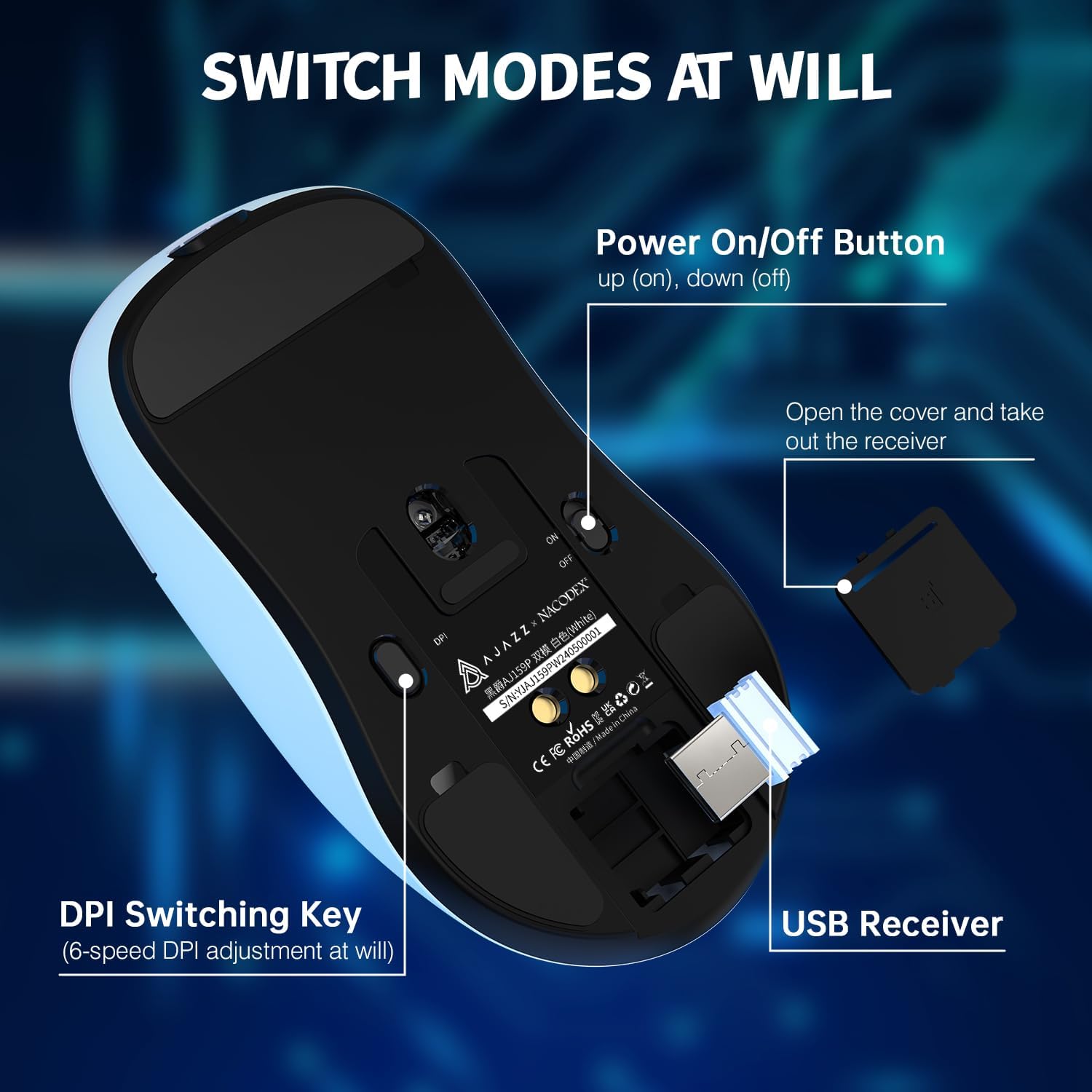
Figure 2: Underside of the mouse showing the power switch, DPI switch, and USB receiver storage.

Figura 3: superior view of the mouse highlighting programmable buttons and software interface.
4. Configuració
4.1. Connexió sense fil (2.4 GHz)
- Locate the USB 2.4GHz receiver stored in the compartment on the underside of the mouse. Gently open the cover and remove the receiver.
- Connecteu el receptor USB a un port USB disponible del vostre ordinador (PC o Mac).
- Gireu l'interruptor d'engegada de la part inferior del ratolí a la posició "ON".
- El ratolí s'hauria de connectar automàticament a l'ordinador. Si no, assegureu-vos que el receptor estigui ben connectat i que el ratolí estigui encès.
4.2. Connexió amb cable (USB-C)
- Connect the included USB-C paracord cable to the USB-C port on the front of the mouse.
- Connecteu l'altre extrem del cable (USB-A) a un port USB disponible de l'ordinador.
- The mouse will function in wired mode and will also charge simultaneously.
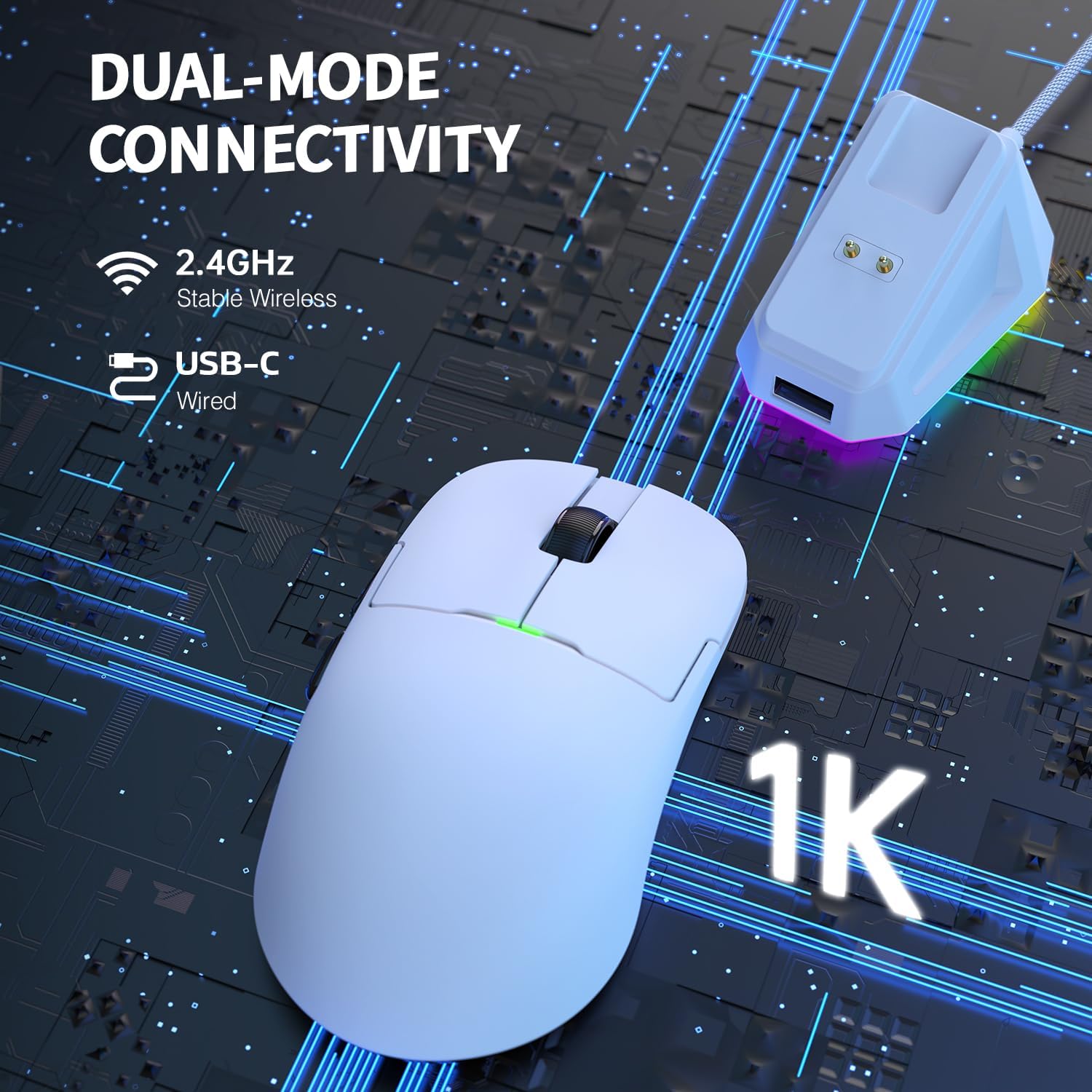
Figure 4: Dual-mode connectivity via 2.4GHz wireless and USB-C wired.
5. Instruccions de funcionament
5.1. Ajust de DPI
The mouse features 6 adjustable DPI levels, allowing you to customize sensitivity for different tasks or games. Press the DPI switching key on the bottom of the mouse to cycle through the preset DPI values. The default DPI settings are typically 400, 800, 1600, 2400, 3200, and 26000 DPI.

Figure 5: PixArt PAW3395 sensor provides up to 26,000 DPI for precise tracking.
5.2. Botons programables
The AJAZZ AJ159P features 6 programmable buttons. To customize button functions, macro settings, and lighting effects, please download the official AJAZZ software from the manufacturer's website. The software allows for advanced personalization to suit your gaming and productivity needs.
5.3. Gestió d'energia
To conserve battery life, always switch the power button on the bottom of the mouse to 'OFF' when not in use for extended periods.
6. Càrrega
The AJAZZ AJ159P mouse can be charged using the included magnetic charging dock or directly via the USB-C cable.
6.1. Ús de la base de càrrega magnètica
- Connect the USB-C cable to the charging dock and then to a USB power source (e.g., computer USB port, USB wall adapter).
- Place the mouse onto the charging dock, aligning the two magnetic charging points on the mouse with those on the dock. The magnetic connection will secure the mouse and initiate charging.
- The charging dock features an RGB switch on its base, allowing you to change its lighting effect.

Figure 6: Magnetic RGB Charging Dock for convenient and fast charging.
6.2. Càrrega directa per USB-C
You can also charge the mouse by connecting the USB-C cable directly to the mouse's USB-C port and a USB power source. The mouse can be used in wired mode while charging.
7. Manteniment
To ensure the longevity and optimal performance of your AJAZZ AJ159P mouse, follow these maintenance guidelines:
- Neteja: Use a soft, dry cloth to wipe the mouse and charging dock. For stubborn dirt, slightly dampNetegeu el drap amb aigua o una solució de neteja suau. Eviteu utilitzar productes químics agressius o materials abrasius.
- Cura del sensor: Mantingueu el sensor òptic de la part inferior del ratolí net i lliure de pols o deixalles per garantir un seguiment precís.
- Emmagatzematge: Quan no l'utilitzeu durant períodes prolongats, guardeu el ratolí en un lloc fresc i sec, allunyat de la llum solar directa i de temperatures extremes.
- Cura del cable: Eviteu doblegar o doblegar bruscament el cable USB-C per evitar danys.
8. Solució De Problemes
If you encounter any issues with your AJAZZ AJ159P mouse, refer to the following common problems and solutions:
| Problema | Causa possible | Solució |
|---|---|---|
| El ratolí no respon (sense fil) | Low battery, USB receiver disconnected, mouse powered off, interference. | Charge the mouse. Ensure USB receiver is securely plugged in. Turn mouse power switch to 'ON'. Try a different USB port. Move closer to the receiver or remove obstructions. |
| El ratolí no respon (amb cable) | Cable not connected properly, damaged cable, faulty USB port. | Ensure USB-C cable is securely connected to both mouse and computer. Try a different USB port. Test with another USB-C cable if available. |
| Els DPI no canvien | El botó DPI no s'ha premut correctament, conflicte de programari. | Ensure you are pressing the dedicated DPI button on the bottom of the mouse. If using custom software, check its settings. |
| Problemes de càrrega | Dock/cable not connected, faulty power source, misaligned mouse on dock. | Ensure dock/cable is securely connected to a working USB power source. Verify mouse is correctly aligned on the magnetic dock. Try direct USB-C charging. |
| Intermittent disconnection | Wireless interference, low battery, outdated firmware. | Ensure no strong wireless signals are interfering. Charge the mouse. Check the official AJAZZ weblloc per a qualsevol actualització de firmware. |
9. Especificacions
Key technical specifications for the AJAZZ AJ159P Superlight Wireless Gaming Mouse:
| Característica | Detall |
|---|---|
| Marca | AJAZZ |
| Número de model | AJAZZ AJ159P |
| Color | AJ159P with Charging Dock (White) |
| Tecnologia de connectivitat | Dual Mode (2.4GHz Wireless, USB-C Wired) |
| Sensor | Sensor òptic PixArt PAW3395 |
| DPI (punts per polzada) | Up to 26,000 DPI (Programmable, 6 levels) |
| IPS (polzades per segon) | 650 IPS |
| Acceleració | Fins a 50G |
| Taxa de votació | 1000 Hz / 1 ms |
| Pes | 56g (Ultra Lightweight) |
| Nombre de botons | 6 (programable) |
| Tipus de canvi | HUANO Switches (80 Million Clicks) |
| Codificador | FSWQ TTC Encoder (1 Million Clicks) |
| Tipus de bateria | Polímer de liti |
| Dispositius compatibles | PC, Mac |
| Característiques especials | Magnetic Charging Dock, PAW3395 Sensor, 80 Million Clicks |
10. Garantia i Suport
AJAZZ products are designed and manufactured to the highest quality standards. For warranty information and technical support, please refer to the warranty card included with your product or visit the official AJAZZ weblloc web. Conserveu el comprovant de compra per a qualsevol reclamació de garantia.