
T-Wolf GG-G530
T-Wolf RoboCop Competitive Gaming Mouse GG-G530 User Manual
Model: GG-G530
Introducció
This manual provides essential information for the setup, operation, and maintenance of your T-Wolf RoboCop Competitive Gaming Mouse GG-G530. Please read this manual thoroughly before using the product to ensure optimal performance and longevity.
Contingut del paquet
- 1 x T-Wolf RoboCop Competitive Gaming Mouse GG-G530
- 1 x Manual d'usuari (aquest document)
Característiques del producte
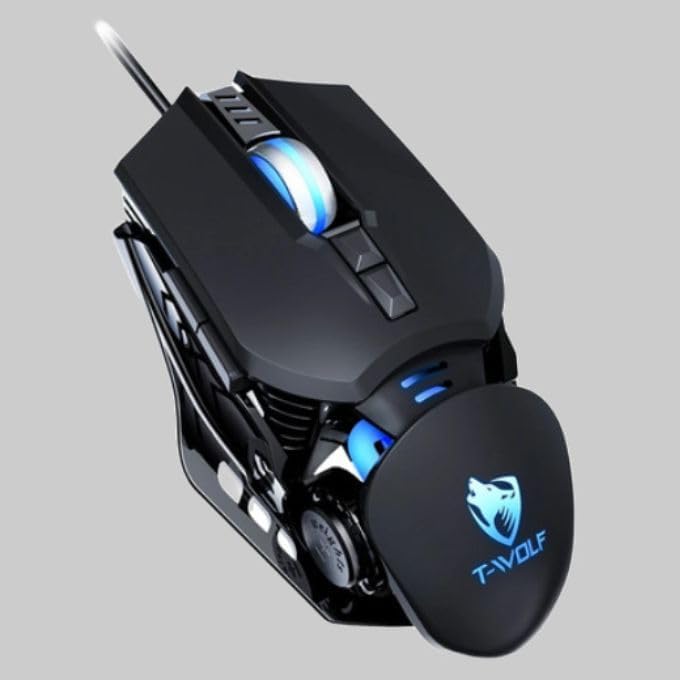
The T-Wolf RoboCop Competitive Gaming Mouse GG-G530 is designed for precision and comfort, suitable for both gaming and office use. Key features include:
- Optical Engine Design: Ensures stable operation and high sensitivity.
- Mechanical Armored Modeling: Distinctive and robust design.
- Symmetrical DIY Counterweight: Allows for adaptable weight adjustment.
- 7 Botons: Includes left click, right click, scroll wheel, DPI switcher, and additional programmable buttons.
- Connectivitat intel·ligent: Plug-and-play functionality with automatic driver installation.
- DPI ajustable: Four levels of sensitivity (1200/2400/3200/6400 DPI) for precise control.
- Disseny ergonòmic: Provides comfortable use for extended periods without fatigue.
- Four-Color Light Effect: Dynamic lighting for visual appeal.
- Connexió per cable: Reliable USB interface with a 150cm cable.
- Compatibilitat del sistema: Supports Windows and Mac operating systems.
Configuració
- Connecteu el ratolí: Insert the USB connector of the T-Wolf RoboCop Gaming Mouse into an available USB port on your computer.
- Instal·lació automàtica del controlador: The operating system will automatically detect the mouse and install the necessary drivers. This process typically takes a few moments. No manual driver installation is required.
- A punt per al seu ús: Once the drivers are installed, the mouse is ready for immediate use.
Instruccions de funcionament
The T-Wolf RoboCop Gaming Mouse features 7 buttons for various functions. Familiarize yourself with their basic operations:
- Botó esquerre de clic: Selecció i interacció primàries.
- Botó dret: Accesses contextual menus and secondary functions.
- Roda de desplaçament: Es desplaça pels documents i web pàgines. També pot funcionar com a botó del botó central.
- DPI Switcher Button: Ajusta la sensibilitat del ratolí (DPI).
- Botons addicionals: The remaining buttons can be assigned specific functions through your operating system's mouse settings or compatible third-party software (note: no macro programming is natively supported by the mouse hardware).

Ajust de DPI
The mouse features an adjustable DPI (Dots Per Inch) setting, allowing you to change the cursor sensitivity on the fly. This is particularly useful for different tasks, such as precise aiming in games or fast navigation in general use.
- Localitza el DPI Switcher Button, typically positioned behind the scroll wheel.
- Press the DPI Switcher Button to cycle through the available DPI settings: 1200 DPI, 2400 DPI, 3200 DPI, and 6400 DPI.
- Each press will change the sensitivity, allowing you to find the setting that best suits your current activity.

Manteniment
To ensure the longevity and optimal performance of your T-Wolf RoboCop Gaming Mouse, follow these simple maintenance guidelines:
- Neteja: Feu servir un drap suau i sec per netejar la superfície del ratolí. Per a la brutícia persistent, netegeu lleugerament.ampNetegeu el drap amb aigua o una solució de neteja suau. Eviteu productes químics agressius o materials abrasius.
- Sensor òptic: Periodically clean the optical sensor on the underside of the mouse with a cotton swab to prevent dust buildup, which can affect tracking performance.
- Cura del cable: Avoid sharply bending or pulling the USB cable to prevent internal damage.
- Emmagatzematge: Quan no l'utilitzeu, guardeu el ratolí en un entorn net i sec, allunyat de temperatures extremes.
Resolució de problemes
If you encounter issues with your T-Wolf RoboCop Gaming Mouse, refer to the following common solutions:
- El ratolí no respon:
- Assegureu-vos que el cable USB estigui ben connectat a un port USB que funcioni de l'ordinador.
- Prova de connectar el ratolí a un port USB diferent.
- Reinicieu l'ordinador.
- El moviment del cursor és erràtic o irregular:
- Netegeu el sensor òptic de la part inferior del ratolí.
- Ensure you are using the mouse on a clean, non-reflective, and uniform surface. Mouse pads are recommended.
- L'ajust de DPI no funciona:
- Ensure you are pressing the correct DPI switcher button.
- The mouse cycles through fixed DPI settings; there is no visual indicator on the mouse itself for the current DPI level, only the change in cursor speed.
- Botons que no funcionen:
- Check your operating system's mouse settings to ensure buttons are enabled and configured correctly.
- Test the mouse on another computer to rule out a software or system issue.
Especificacions
| Model | GG-G530 |
| Material | ABS + Electroplating |
| Sistema de seguiment | Òptic |
| Connexió | Amb cable |
| Longitud del cable | 150 cm |
| Tipus d'interfície | USB |
| Configuració de DPI | 1200 / 2400 / 3200 / 6400 (ajustable) |
| Nombre de botons | 7 |
| Vida útil | Approximately three years |
| Mètode de treball | Fotoelèctric |
| Efecte de llum | Four-color cycling |
| Mida de l'article | 130 x 80 x 35 mm |
| Pes de l'article | 160 g |
| Sistemes suportats | Windows, Mac |
Garantia i Suport
Your T-Wolf RoboCop Competitive Gaming Mouse GG-G530 comes with a Garantia del fabricant de 6 mesos des de la data de compra.
This warranty covers defects in materials and workmanship under normal use. It does not cover damage caused by accident, misuse, abuse, unauthorized modification, or external causes such as liquid damage.
For warranty claims or technical support, please contact your retailer or the point of purchase. Please retain your proof of purchase for warranty validation.

Ask a question about this manual
Ask about setup, troubleshooting, compatibility, parts, safety, or missing instructions. Manuals+ will review the question and use this page’s manual context to help answer it.