
ROMOSS RS1500
ROMOSS RS1500 Portable Power Station 1500W User Manual
1. Introducció
Thank you for choosing the ROMOSS RS1500 Portable Power Station. This device is a versatile 1500W solar-powered generator with a 1328Wh lithium-ion battery backup, designed to provide reliable power for various applications, including home emergency use, outdoor activities like camping, and car travel. It features multiple output ports, including AC, DC, USB, and a wireless charging pad, ensuring compatibility with a wide range of electronic devices. This manual provides essential information for safe operation, optimal performance, and proper maintenance of your power station.
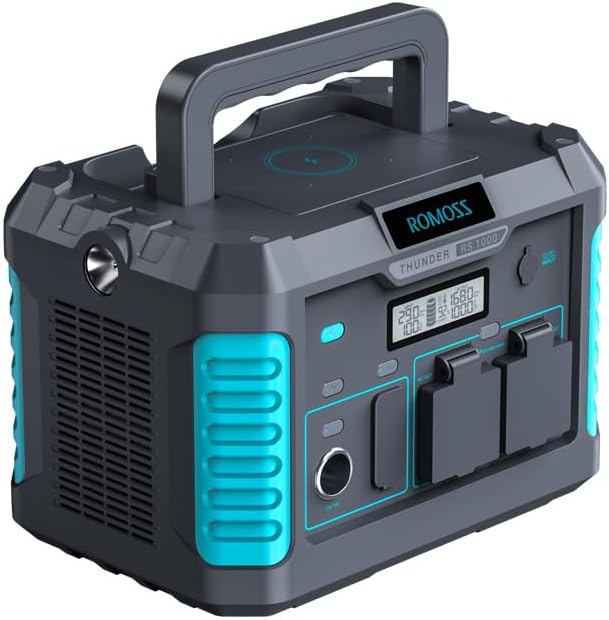
Figure 1: ROMOSS RS1500 Portable Power Station. This image displays the overall design of the power station, highlighting its compact form factor and integrated handle for portability.
2. Instruccions de seguretat
To ensure safe operation and prolong the lifespan of your ROMOSS RS1500 Portable Power Station, please read and adhere to the following safety guidelines:
- No desmunteu, repareu ni modifiqueu la unitat. Un muntatge incorrecte pot causar incendis o lesions.
- Do not expose the unit to fire or high temperatures (above 60°C/140°F).
- Do not use or store the unit in bathrooms or areas exposed to water or rain.
- Do not use or store the unit near heat sources such as stoves or heaters.
- Use only the original charger and cables provided or approved by ROMOSS.
- Mantingueu la unitat lluny de nens i animals de companyia.
- Avoid dropping, impacting, or subjecting the unit to strong vibrations.
- Assegureu-vos de ventilar correctament durant l'ús i la càrrega per evitar el sobreescalfament.
- If the unit emits smoke, odor, or unusual noise, discontinue use immediately and contact customer support.
- Dispose of the unit according to local regulations for lithium-ion batteries.
3. Contingut del paquet
Verifiqueu que tots els elements siguin presents al vostre paquet:
- 1x ROMOSS Explorer 1500 Portable Power Station
- Adaptador de CA 1x
- 1x Car Adapter-DC Cable
- 1x Manual d'usuari (aquest document)
4. Producte acabatview
The ROMOSS RS1500 is equipped with various ports and features for versatile power delivery. Familiarize yourself with the layout of the power station:

Figure 2: Diverse Interfaces of the ROMOSS RS1500. This diagram illustrates the various input and output ports available on the power station, including USB-A, USB-C, AC outlets, and the DC car charger socket.
Identificació de components:
- USB-A Ports (1-3): 18W Max each, for charging smartphones, tablets, and other USB-powered devices.
- USB-C Port (4): 60W Max, for fast charging compatible devices like laptops and modern smartphones.
- AC Output Alone Switch (5): Button to activate/deactivate the AC outlets.
- AC 2-Pole Sockets (6): Two AC outlets for standard electrical appliances.
- AC 3-Pole Sockets (7): Two AC outlets for standard electrical appliances.
- DC Output Alone Switch (8): Button to activate/deactivate the DC car charger socket.
- DC Car Charger Socket (9): 12V/10A, for powering car appliances or charging devices via a car charger.
- Coixinet de càrrega sense fil: Located on the top surface, for compatible wireless charging devices.
- Llums LED: One on the handle for reading, another on the side with multiple brightness/SOS modes for emergency lighting.
- Pantalla de visualització: Shows battery level, output wattage, entrada wattage, i altres indicadors d'estat.
5. Configuració
Càrrega inicial:
Before first use, fully charge your ROMOSS RS1500 Portable Power Station. This ensures the battery is conditioned for optimal performance.
- Connect the provided AC adapter to the power station's input port and then to a wall outlet.
- The display screen will indicate charging status.
- Charging typically takes approximately 5.5 hours via a wall outlet.
6. Instruccions de funcionament
6.1 Càrrega de la central elèctrica
The ROMOSS RS1500 can be recharged using three methods:

Figure 3: Recharging Options for the ROMOSS RS1500. This image illustrates the three primary methods to recharge the power station: via a standard wall outlet, compatible solar panels, or a car charger.
- Presa de corrent (adaptador de CA): Connect the provided AC adapter to the input port and a standard wall outlet. Full charge in approximately 5.5 hours.
- Solar Panels (Sold Separately): Connect compatible solar panels (up to 120W Max) to the input port. Charging time varies based on sunlight intensity and panel wattage. Full charge in approximately 2.2 hours under optimal conditions.
- Adaptador de cotxe: Connect the provided Car Adapter-DC Cable to the input port and your vehicle's 12V cigarette lighter socket.
6.2 Ús de preses de corrent altern
The power station provides 1500W continuous AC output (3000W surge) via its three AC outlets.
- Premeu el botó AC Output Alone Switch (5) to activate the AC function. The display will show the AC icon.
- Plug your AC appliances into the AC 2-Pole Sockets (6) or AC 3-Pole Sockets (7).
- Ensure the total power consumption of your devices does not exceed 1500W.
- Quan hàgiu acabat, premeu el botó AC Output Alone Switch again to turn off the AC output and conserve battery.
6.3 Using USB Ports (USB-A & USB-C)
The power station features three 18W USB-A ports (1-3) and one 60W USB-C port (4).
- Connect your USB devices directly to the appropriate USB-A or USB-C ports.
- The USB ports are typically always active when the unit is on. Check the display for USB output indicators.
6.4 Using DC Car Charger Socket
The 12V/10A DC car charger socket (9) is suitable for powering car-specific devices.
- Premeu el botó DC Output Alone Switch (8) to activate the DC function. The display will show the DC icon.
- Plug your 12V DC device into the socket.
- Quan hàgiu acabat, premeu el botó DC Output Alone Switch again to turn off the DC output.
6.5 Càrrega sense fil
The top surface of the power station includes a wireless charging pad for compatible devices.

Figure 4: Wireless Charging Feature. This image shows a smartphone placed on the top surface of the power station, indicating the active wireless charging function.
- Col·loca el teu telèfon intel·ligent o dispositiu compatible amb Qi directament a la base de càrrega sense fil.
- Assegureu-vos que el dispositiu estigui centrat sobre el coixinet per a una càrrega òptima.
- The power station's display may indicate wireless charging activity.
6.6 Funcionament dels llums LED
The power station is equipped with two LED lights for illumination.
- Handle Light: A small LED light on the handle, suitable for reading or focused illumination. Activate via its dedicated button.
- Llum lateral: A larger LED light on the side with multiple brightness settings and an SOS mode for emergencies. Activate via its dedicated button and cycle through modes with subsequent presses.
7. Manteniment
7.1 Emmagatzematge
- Guardeu la central elèctrica en un lloc fresc i sec, allunyat de la llum solar directa i de temperatures extremes.
- Per a l'emmagatzematge a llarg termini, carregueu la unitat aproximadament al 50-80% cada 3-6 mesos per mantenir la bateria en bon estat.
- Avoid storing in areas with high humidity or corrosive substances.
7.2 Neteja
- Use a soft, dry cloth to wipe the exterior of the power station.
- No utilitzeu netejadors abrasius ni dissolvents.
- Ensure all ports are free of dust and debris. Use compressed air if necessary.
8. Solució De Problemes
If you encounter issues with your ROMOSS RS1500, refer to the following common problems and solutions:
| Problema | Causa possible | Solució |
|---|---|---|
| La central elèctrica no s'encén | Battery is completely depleted; Power button not pressed correctly. | Charge the unit using the AC adapter for at least 30 minutes. Press and hold the power button for 3-5 seconds. |
| AC outlets not providing power | AC output not activated; Device power exceeds 1500W; Overload protection triggered. | Press the AC Output Alone Switch. Reduce the load by unplugging high-power devices. Restart the unit. |
| Els ports USB no carreguen dispositius | Device cable faulty; Device not compatible; Power station battery low. | Try a different USB cable and device. Ensure the power station has sufficient charge. |
| La càrrega sense fils no funciona | Dispositiu no compatible amb Qi; dispositiu no alineat correctament; funda del telèfon massa gruixuda. | Ensure your device supports Qi wireless charging. Realign the device on the pad. Remove thick phone cases. |
| Sobreescalfament de la unitat | Mala ventilació; Càrrega excessiva. | Ensure the unit is in a well-ventilated area. Reduce the number or power of connected devices. |
If the problem persists after attempting these solutions, please contact ROMOSS customer support.
9. Especificacions
Technical details of the ROMOSS RS1500 Portable Power Station:
| Característica | Detall |
|---|---|
| Nom del model | RS1500 |
| Marca | ROMOSS |
| Tipus de bateria | Ió de liti |
| Capacitat | 1328 Wh |
| Sortida de CA | 1500W (Rated), 3000W (Surge) |
| Sortida USB-A | 3 x 18 W màx |
| Sortida USB-C | 1 x 60W Max (PD) |
| DC Car Port Output | 1 x 12V/10A (120W Max) |
| Càrrega sense fils | Màxim 10W |
| Recharge Time (AC Wall) | Aprox. 5.5 hores |
| Temps de recàrrega (solar) | Approx. 2.2 hours (with 120W solar panel under optimal conditions) |
| Dimensions del producte | 10.43 cm de llargada x 9.45 cm d'amplada x 13.78 cm d'alçada |
| Pes | 30.6 lliures |
| Temperatura de funcionament | De 0 °C a 40 °C (32 °F a 104 °F) |

Figure 5: ROMOSS RS1500 Product Dimensions. This image provides a visual representation of the power station's length, width, and height measurements.
10. Garantia i Suport
Informació de la garantia:
The ROMOSS RS1500 Portable Power Station comes with a Garantia limitada d'1 any des de la data de compra. Aquesta garantia cobreix els defectes de fabricació i la mà d'obra en condicions d'ús normal. No cobreix els danys causats per un mal ús, accidents, modificacions no autoritzades o desastres naturals.
Atenció al client:
For technical assistance, warranty claims, or any questions regarding your ROMOSS RS1500 Portable Power Station, please contact ROMOSS customer support. Refer to the contact information provided on the official ROMOSS weblloc web o la documentació de la compra.
11. Vídeos oficials de productes
Based on the provided product data, no official seller videos are available for embedding in this manual.
Documents relacionatsRS1500


Ask a question about this manual
Ask about setup, troubleshooting, compatibility, parts, safety, or missing instructions. Manuals+ will review the question and use this page’s manual context to help answer it.