
1. Introducció
This manual provides essential information for using your new Tecno Spark 20C smartphone. It covers device setup, basic operations, maintenance tips, and troubleshooting common issues. Please read this manual carefully to ensure proper and safe use of your device.
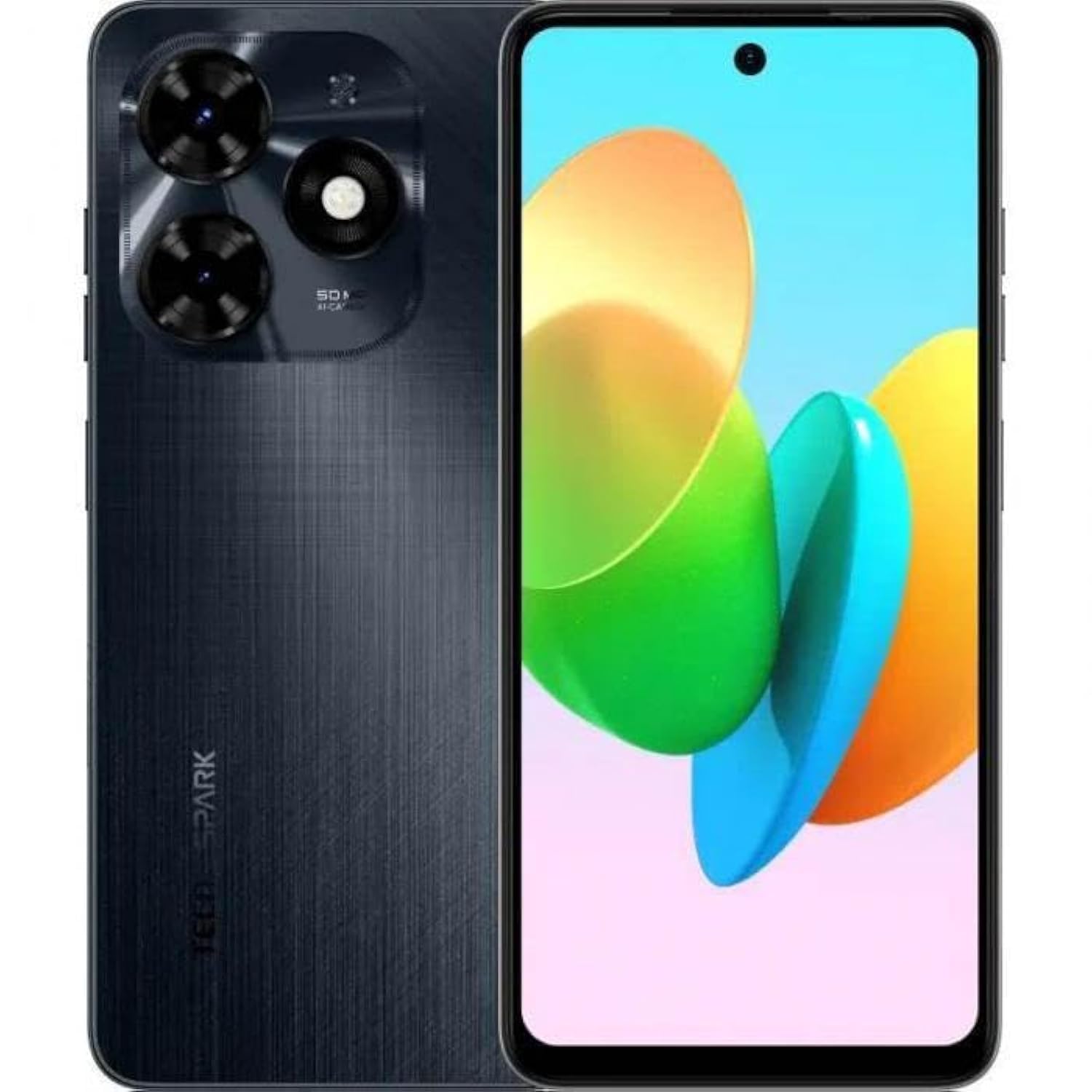
Imatge 1.1: Frontal view of the Tecno Spark 20C smartphone.
2. Contingut del paquet
Upon unboxing your Tecno Spark 20C, please verify that the following items are included:
- Tecno Spark 20C Smartphone
- Adaptador d'alimentació
- Cable de càrrega USB
- Eina expulsora de SIM
- Guia d'inici ràpid
- Targeta de garantia
3. Dispositiu acabatview
The Tecno Spark 20C features a 6.6-inch HD+ display. The device is equipped with a 50-megapixel main camera on the rear and an 8-megapixel front camera. Physical buttons typically include power/lock and volume controls. Ports usually include a USB charging port and a 3.5mm audio jack.
4. Configuració
4.1. Instal·lació de targetes SIM i MicroSD
- Localitza la safata de la targeta SIM al lateral del dispositiu.
- Introduïu l'eina d'expulsió de la SIM al forat petit que hi ha al costat de la safata i premeu suaument fins que la safata surti.
- Col·loqueu la targeta (o targetes) Nano-SIM i/o la targeta MicroSD a les ranures designades de la safata. Assegureu-vos que els contactes daurats estiguin mirant cap avall.
- Torneu a inserir la safata amb cura al dispositiu.
4.2. Engegada i configuració inicials
- Press and hold the Power button until the Tecno logo appears.
- Segueix les instruccions que apareixen a la pantalla per seleccionar l'idioma i la regió, connectar-te a una xarxa Wi-Fi i configurar el teu compte de Google.
- You may also be prompted to set up a screen lock (PIN, pattern, or fingerprint).
4.3. Càrrega del dispositiu
Connect the USB cable to the charging port on your phone and the other end to the power adapter. Plug the adapter into a wall outlet. The battery icon on the screen will indicate charging status. For optimal battery life, use the provided charger and cable.
5. Funcionament
5.1. Navegació bàsica
Your Tecno Spark 20C uses a touchscreen interface. Common gestures include:
- Toca: To open apps, select items, or confirm actions.
- Llisca: To scroll through screens, lists, or pages.
- Pessigar: Per ampliar o reduir les imatges i web pàgines.
- Premsa llarga: Per accedir a menús contextuals o moure icones d'aplicacions.
5.2. Fer trucades i enviar missatges
Per fer una trucada, obriu la Telèfon aplicació, introdueix el número i toca la icona de trucada. Per enviar un missatge, obre l'aplicació Missatges app, tap the new message icon, enter the recipient's number or select from contacts, and type your message.
5.3. Ús de la càmera
Obriu el Càmera app. The Tecno Spark 20C features a 50-megapixel main camera with AI image processing algorithms and an 8-megapixel front camera. Tap the shutter button to take a photo. Swipe to switch between photo, video, and other modes like panorama. AI features can automatically optimize settings for different scenes.
5.4. Connectivitat a Internet
Access the internet via Wi-Fi or mobile data (4G). To connect to Wi-Fi, go to Configuració > Xarxa i Internet > Wi-Fi, turn Wi-Fi on, and select your desired network. To enable mobile data, go to Configuració > Xarxa i Internet > Xarxa mòbil and toggle Mobile data on.
5.5. NFC for Contactless Payments
The Tecno Spark 20C includes an NFC module. To use contactless payments, ensure NFC is enabled in Settings > Connected devices > NFC. Set up your preferred payment app and hold your phone near a compatible payment terminal.
6. Manteniment
6.1. Neteja del dispositiu
Use a soft, lint-free cloth to gently wipe the screen and body of your phone. Avoid using harsh chemicals or abrasive materials, which can damage the device's finish or screen coating.
6.2. Cura de la bateria
To prolong battery life, avoid exposing your phone to extreme temperatures. It is recommended to keep the battery charge between 20% and 80% for daily use. Avoid completely draining the battery frequently.
6.3. Actualitzacions de programari
Comproveu regularment si hi ha actualitzacions de programari per assegurar-vos que el dispositiu tingui les darreres funcions, pegats de seguretat i millores de rendiment. Aneu a Configuració > Sistema > Actualització del sistema per comprovar i instal·lar les actualitzacions disponibles.
7. Solució De Problemes
This section addresses common issues you might encounter with your Tecno Spark 20C.
- El dispositiu no s'encén: Ensure the battery is charged. Connect the charger and wait a few minutes before attempting to power on again. If it still doesn't turn on, try a forced restart by holding the Power button for about 10-15 seconds.
- La pantalla no respon: If the screen is frozen, perform a forced restart. If the issue persists, ensure your hands are clean and dry, and the screen is free of debris.
- Problemes de xarxa (sense senyal/Wi-Fi): Check if Airplane mode is off. For mobile data, ensure your SIM card is properly inserted and mobile data is enabled in settings. For Wi-Fi, try forgetting the network and reconnecting, or restart your router.
- Les aplicacions es bloquegen o es bloquegen: Try clearing the app's cache and data in Configuració > Aplicacions > [Nom de l'aplicació] > Emmagatzematge i memòria cau. If the problem continues, uninstall and reinstall the app. Ensure your device's software is up to date.
8. Especificacions
Key technical specifications for the Tecno Spark 20C:
| Sistema operatiu | Android T |
| Processador | Octa-core |
| Xarxa | 4G |
| Mida de la pantalla | 6.6 polzades HD+ |
| Resolució | 720*1612 |
| RAM instal·lada | 4 GB |
| Emmagatzematge intern | 256 GB |
| Capacitat de la bateria | 5000 mAh (as per product description) |
| Tecnologia de connectivitat | 4G, GSM |
| Operador sense fil | Desbloquejat per a tots els transportistes |
| Dimensions del producte | 16.3 x 8 x 0.8 cm; 410 g |
9. Garantia i Suport
Your Tecno Spark 20C smartphone comes with a limited warranty. Please refer to the warranty card included in your package for detailed terms and conditions, including coverage period and service procedures. For technical support or further assistance, please visit the official Tecno weblloc o poseu-vos en contacte amb el seu servei d'atenció al client.