
1. Introducció
Welcome to the HOTWAV Hyper 7 Pro rugged smartphone user manual. This guide will assist you in understanding and utilizing all the features of your new device. The Hyper 7 Pro is designed for durability and high performance, featuring Android 14, 5G connectivity, a 200MP camera, and a large 10800mAh battery.
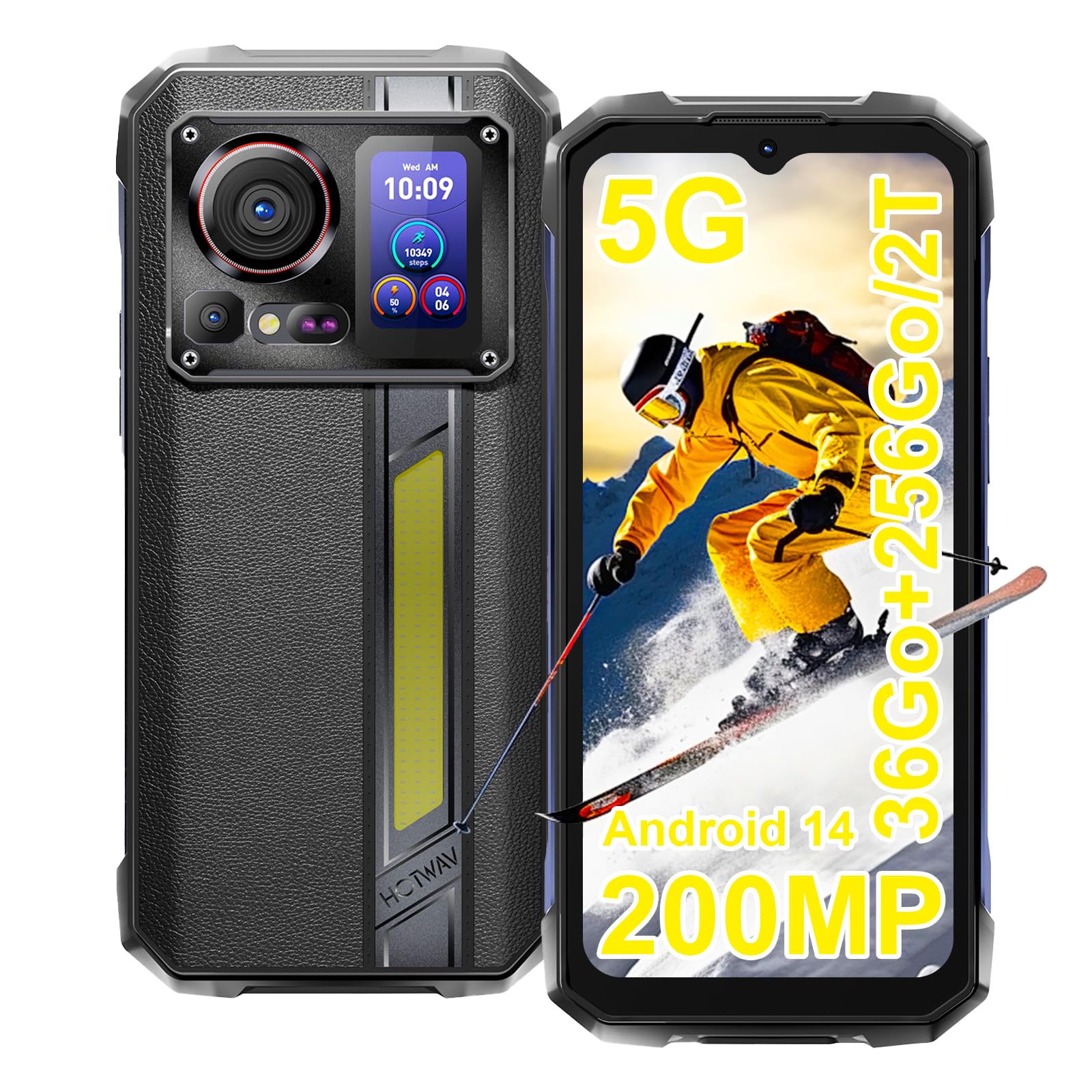
Image: The HOTWAV Hyper 7 Pro rugged smartphone, showcasing its robust design and rear display.
2. Què hi ha a la caixa
Upon unboxing your HOTWAV Hyper 7 Pro, please ensure all the following items are present:
- HOTWAV Hyper 7 Pro Smartphone
- Cable USB-Type C
- Adaptador de corrent (33 W)
- Eina expulsora de SIM
- Pre-applied Screen Protector (Gorilla Glass)
- Additional Screen Protector
- Manual d'usuari

Image: All items included in the HOTWAV Hyper 7 Pro package, including the phone, charger, cables, and documentation.
3. Guia de configuració
3.1. Instal·lació de targetes SIM i targetes MicroSD
- Localitzeu la safata de la targeta SIM al costat esquerre del dispositiu.
- Introduïu l'eina d'expulsió de la SIM al forat petit que hi ha al costat de la safata i premeu suaument fins que la safata surti.
- Place your Nano-SIM card(s) and/or a microSD card (up to 2TB) into the designated slots on the tray. Ensure the gold contacts face downwards.
- Torneu a inserir la safata amb cura al telèfon fins que encaixi al seu lloc.
3.2. Engegada inicial i configuració bàsica
- Press and hold the Power button (located on the right side) until the HOTWAV logo appears.
- Segueix les instruccions que apareixen a la pantalla per seleccionar l'idioma, connectar-te a una xarxa Wi-Fi i configurar el teu compte de Google.
- Configure your preferred security methods, such as Face ID and Fingerprint Unlock.
3.3. Càrrega del dispositiu
Abans del primer ús, es recomana carregar completament el dispositiu.
- Connecteu el cable USB tipus C al port de càrrega de la part inferior del telèfon.
- Connect the other end of the cable to the provided 33W power adapter.
- Plug the power adapter into a wall outlet. The charging indicator will appear on the screen.

Image: The HOTWAV Hyper 7 Pro charging with its 33W fast charger, highlighting the OTG function.
4. Instruccions de funcionament
4.1. Main Display and Navigation
The Hyper 7 Pro features a 6.6-inch FHD+ display with a 120Hz refresh rate for smooth interactions. Navigate through the Android 14 interface using standard touch gestures: tap, swipe, pinch-to-zoom.

Image: The vibrant 6.6-inch FHD+ display of the Hyper 7 Pro, showcasing la seva qualitat visual.
4.2. Secondary Rear Screen
The innovative secondary screen on the back provides quick access to essential information and controls without activating the main display.
- Visualització de l'hora: View hora i data actuals.
- Control de la càmera: Utilitzar com a viewfinder for rear camera selfies or quick shots.
- Music Applications: Control playback for music apps.
- Notificacions: See incoming call and message alerts.
- Battery Status & Step Count: Monitor battery level and daily steps.

Image: The versatile secondary display on the back of the Hyper 7 Pro, showing different information widgets.
4.3. Funcions de la càmera
The Hyper 7 Pro is equipped with a powerful camera system:
- Càmera posterior: 200MP main sensor for high-resolution photos and a 24MP night vision camera with infrared LEDs for clear images in low light.
- Càmera frontal: 32MP for sharp selfies and video calls.
- AI Algorithms: Enhance saturation for night scenes, portraits, and landscapes.
- Gravació de vídeo: Supports 4K video capture.

Image: A visual comparison demonstrating the superior detail captured by the Hyper 7 Pro's 200MP camera.
4.4. Customizable Side Button
The red side button can be configured for three different actions:
- Premsa única: Assign to open a specific app or function.
- Doble premsa: Assign to open a different app or function.
- Premsa llarga: Assign to open a third app or function.
Configure these settings in the phone's 'Side Key Function' menu.

Image: The customizable side button on the Hyper 7 Pro, showing how different press actions can launch various applications.
4.5. Connectivitat i característiques especials
- Xarxa 5G: Gaudeix de connectivitat a Internet d'alta velocitat.
- Wi-Fi 6 i Bluetooth 5.2: Advanced wireless connectivity for faster speeds and stable connections.
- NFC: For contactless payments and quick pairing with other devices.
- GPS: Integrated GPS, Beidou, Galileo, and GLONASS for precise navigation.
- Campla llum: A powerful 280-lumen LED light on the back, with timer and SOS/Flash functions.
- Funció OTG: Connect USB devices or use your phone as a power bank to charge other devices.
- Mode guant: Enhanced touch sensitivity for use with gloves.
- Ràdio FM: Escolta les teves emissores de ràdio preferides.

Image: The powerful LED camping light of the Hyper 7 Pro, demonstrating its illumination capabilities.
5. Manteniment
5.1. Neteja del dispositiu
The HOTWAV Hyper 7 Pro is IP68/IP69K rated for water and dust resistance. To clean, gently wipe the device with a soft, damp cloth. For stubborn dirt, you may rinse it under low-pressure fresh water, ensuring all ports are securely closed. Avoid using harsh chemicals or abrasive materials.

Image: The Hyper 7 Pro enduring water splashes, highlighting its waterproof design.
5.2. Cura de la bateria
Per allargar la vida útil de la bateria de 10800 mAh:
- Eviteu temperatures extremes.
- Use only the provided 33W charger and USB-C cable.
- No deixeu que la bateria es descarregui completament amb freqüència.
5.3. Actualitzacions de programari
Regularly check for and install system updates to ensure optimal performance, security, and access to new features. You can usually find this option in your phone's Settings menu under 'System' or 'About phone'.
5.4. Gestió de l'emmagatzematge
With 256GB of internal storage and support for up to 2TB microSD cards, you have ampespai. Repetir periòdicamentview teu files and applications to free up space and maintain performance. Consider backing up important data to cloud storage or an external device.
6. Solució De Problemes
If you encounter issues with your HOTWAV Hyper 7 Pro, refer to the following common solutions:
- El dispositiu no s'encén: Ensure the battery is charged. Connect the phone to the charger for at least 30 minutes, then try powering on again.
- Problemes de càrrega: Verify that the charger and USB-C cable are securely connected and undamaged. Try a different power outlet. Ensure the charging port is clean and free of debris.
- Network Connectivity Problems (5G/Wi-Fi): Check if Airplane Mode is off. Restart your phone. For mobile data, ensure your SIM card is correctly inserted and your plan is active. For Wi-Fi, forget the network and reconnect.
- La càmera no funciona: Restart the camera app or the phone. Check app permissions for the camera in Settings.
- Rendiment lent: Close unnecessary background apps. Clear cache for frequently used apps. Ensure you have sufficient storage space. Restart the device.
- La pantalla no respon: Restart the phone by holding the power button for an extended period (usually 10-15 seconds). If a hard reset is needed, consult the online support resources.
- Errors de programari: Ensure your Android 14 system is up to date. If issues persist, a factory reset might be necessary (back up your data first).
If these steps do not resolve your issue, please contact HOTWAV customer support for further assistance.
7. Especificacions
| Característica | Especificació |
|---|---|
| Marca | HOTWAV |
| Nom del model | Hyper 7 Pro |
| Sistema operatiu | Android 14 |
| Processador | MediaTek Dimensity 7050 Octa-core (2.6 GHz) |
| RAM | 16 GB (ampliable fins a 36 GB amb memòria virtual) |
| Emmagatzematge intern | 256 GB |
| Emmagatzematge ampliable | Fins a 2 TB (microSD) |
| Mida de la pantalla | 6.6 polzades FHD+ |
| Resolució de visualització | 1080*2408 píxels |
| Freqüència d'actualització | 120 Hz |
| Protecció de pantalla | Corning Gorilla Glass 3 |
| Capacitat de la bateria | 10800 mAh |
| Carregant | Càrrega ràpida de 33 W, càrrega inversa OTG |
| Càmera posterior | 200 MP Main, 24 MP Night Vision |
| Càmera frontal | 32 MP |
| Resolució de vídeo | 4K |
| Classificacions de durabilitat | IP68, IP69K, MIL-STD-810H |
| Connectivitat | 5G, Wi-Fi 6, Bluetooth 5.2, NFC |
| Navegació | GPS, Beidou, Galileo, GLONASS |
| Tipus de targeta SIM | Nano-SIM dual |
| Dimensions | 17.5 x 8.2 x 1.8 cm |
| Pes | 406 grams |
8. Garantia i Suport
8.1. Informació de la garantia
Your HOTWAV Hyper 7 Pro comes with a 2 any de garantia des de la data de compra. Aquesta garantia cobreix defectes de fabricació i avaries en condicions d'ús normal. Conserveu el comprovant de compra per a reclamacions de garantia.
8.2. Atenció al client
For any technical assistance, warranty claims, or product-related inquiries, please contact HOTWAV customer support through their official website or the contact information provided with your purchase. Ensure you have your device model and purchase details ready when contacting support.

Image: HOTWAV's commitment to customer satisfaction, including a 2-year warranty and dedicated customer service.