
1. Introducció i finalview
This manual provides essential information for the safe and effective use of your AENBUSLM 80W Laser Module with Air Assist. This module features an 80W machine power and a 10W optical output, designed for precision laser engraving and cutting tasks. It incorporates a fixed-focus design and built-in FAC technology for a double ultra-fine compressed spot, enhancing performance on various materials. The integrated air assist system helps maintain a clean working environment and improves cutting efficiency.
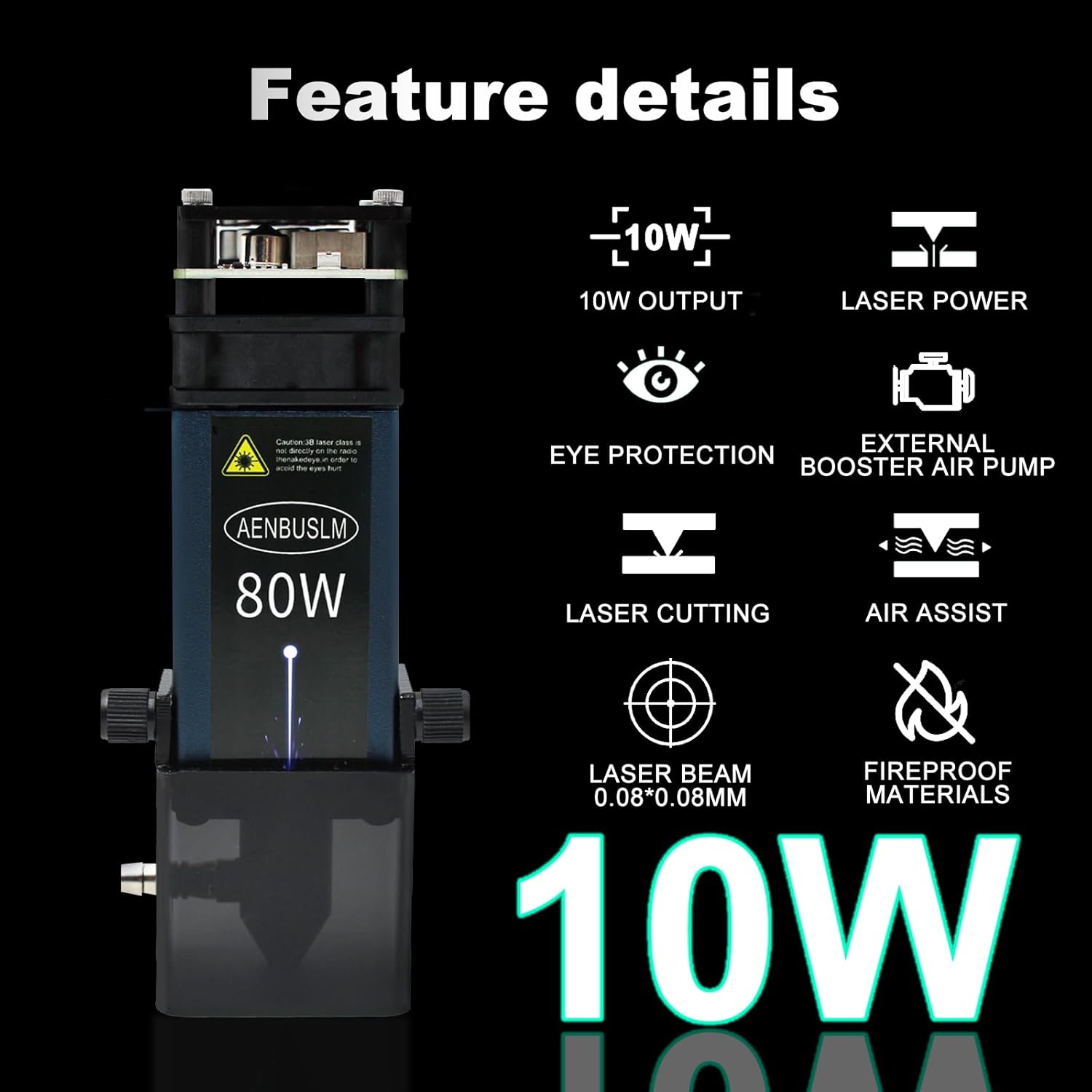
Figure 1: Key features of the AENBUSLM 80W Laser Module.
2. Informació de seguretat
The AENBUSLM 80W Laser Module is a Class 4 laser product. Improper use can result in serious injury, including permanent eye damage, skin burns, and fire. Adhere to all safety precautions.
- Protecció ocular: Always wear certified laser safety goggles (OD6+) that specifically block the laser's wavelength during operation. Never look directly into the laser beam or at its reflection. The module includes a magnetic eye protection cover for additional safety, but dedicated goggles are mandatory.
- Ventilació: Operate the laser module in a well-ventilated area or use an appropriate fume extraction system. Laser processing can produce smoke, fumes, and potentially harmful particles.
- Seguretat contra incendis: Keep a fire extinguisher nearby. Do not leave the laser module unattended during operation. Ensure the work area is clear of flammable materials.
- Compatibilitat de materials: Do not engrave or cut materials that produce toxic fumes or are highly reflective without proper precautions.
- Nens i animals de companyia: Keep children and pets away from the laser module and operating area.
- Font d'alimentació: Use only the specified 12V power supply. Ensure all connections are secure before powering on.

Figure 2: Magnetic Eye Protection Cover for the laser module.
3. Contingut del paquet
Verifiqueu que tots els components siguin presents al vostre paquet:
- AENBUSLM 80W Laser Module (10W Output)
- Bomba d'aire
- Tub de bomba d'aire
- External Power Cord
- First to Second Line + External Power Cord
- 3P Line (Signal Cable)
- Air Pump Power Cord
- Lens Replacement Tool
- Clau L de 1.5 mm
- Focus Fixing Plate
- Replaceable Protective Lens
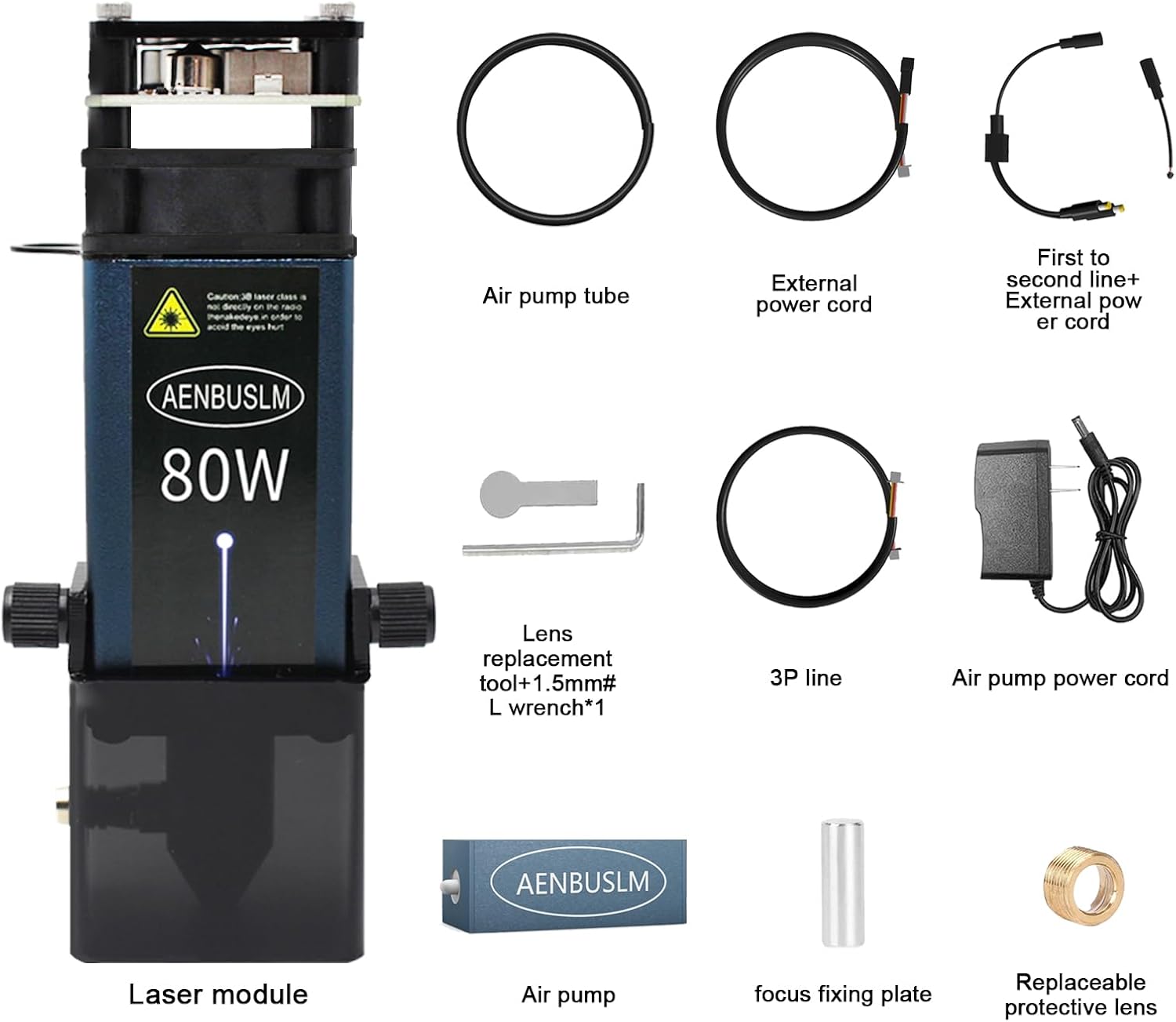
Figure 3: Contents of the AENBUSLM 80W Laser Module package.
4. Instruccions de configuració
Follow these steps to set up your laser module with a compatible laser engraving machine:
- Mounting the Laser Module: Securely attach the AENBUSLM laser module to your laser engraving machine's gantry according to your machine's instructions. Ensure it is stable and properly aligned.
- Connecting Power and Signal Cables:
- Connect the 3P line (signal cable) from the laser module to the corresponding VCC (DC 12/24V), GND, and PWM (0/5-12V, 0-1kHz) ports on your laser engraving machine's control board. Refer to Figure 4 for typical connection points.
- Connect the external power cord to the laser module's power input.
- Connexió d'assistència aèria:
- Connect the air pump tube to the air assist inlet on the laser module.
- Connect the air pump power cord to the air pump and then to a suitable power source.
- Fixed-Focus Adjustment: The module is fixed-focus. Use the provided focus fixing plate to set the correct working distance between the laser module and the material surface. Place the plate on the material, lower the laser module until it touches the plate, then secure the module. Remove the plate before operation.

Figure 4: Cable installation instructions for the laser module.

Figure 5: External Air Assist setup for improved performance.
5. Instruccions de funcionament
Once the module is set up, follow these general steps for operation:
- Preparació del material: Place the material to be engraved or cut on the machine's workbed. Ensure it is flat and securely held.
- Ajustar el focus: As this is a fixed-focus module, ensure the working distance was correctly set during setup using the focus fixing plate.
- Configuració del programari: Open your laser control software (e.g., LightBurn, LaserGRBL). Load your design and configure the appropriate power, speed, and pass settings for your material.
- Enable Air Assist: For cutting and to minimize smoke and debris during engraving, ensure the air assist pump is powered on and functioning.
- Inici de l'operació: With all safety precautions in place (including wearing laser safety goggles), initiate the laser process from your software. Monitor the operation closely.
Capacitats de rendiment:
- Gravat: Capable of directly engraving mirror stainless steel without prior blackening. Achieves super-fast engraving speeds of up to 300mm/s on 304 stainless steel with a 45mm focus length.
- Tall: Demonstrates remarkable cutting ability, capable of cutting through 8mm thick plywood in a single pass at a speed of 1.5mm/s with a 47mm focus length. Can cut 12mm black acrylic in two passes and 12mm basswood plywood in two passes.

Figura 6: Examples of the laser module's cutting capabilities.
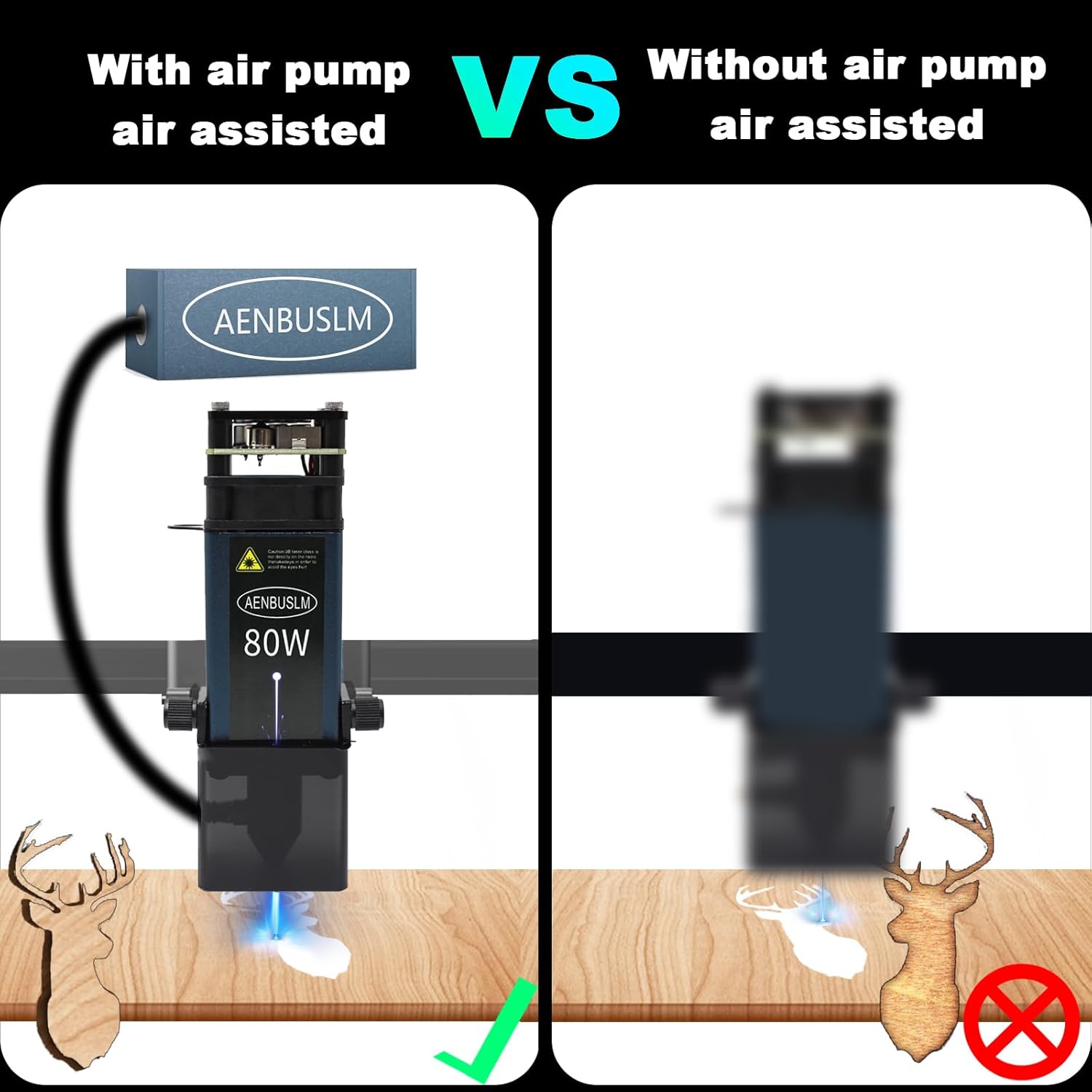
Figure 7: Visual comparison of laser operation with and without air assist.
Video 1: Demonstration of the AENBUSLM 80W Laser Module in operation, showcasing its engraving and cutting capabilities on various materials.
6. Manteniment
Regular maintenance ensures optimal performance and longevity of your laser module:
- Neteja de lents: Periodically inspect the protective lens for dust or debris. Use a soft, lint-free cloth and lens cleaning solution (specifically designed for optics) to gently clean the lens. Avoid abrasive materials. The module includes a replaceable protective lens for convenience.
- Neteja de mòduls: Keep the exterior of the laser module clean and free of dust and material residue. Use compressed air to clear any debris from cooling fins.
- Comprovacions de connexió: Regularly inspect all power and signal cable connections to ensure they are secure and free from damage.
7. Solució De Problemes
Si teniu problemes, tingueu en compte els passos habituals següents per resoldre'ls:
- Sense sortida làser:
- Check if the power supply is connected and providing the correct voltage (12 V).
- Verify all signal cables (3P line) are securely connected to the control board.
- Ensure the laser control software is correctly configured and sending commands.
- Check for any error indicators on the laser module or control board.
- Mala qualitat de gravat/tall:
- Confirm the laser focus is correctly set for the material thickness.
- Adjust power and speed settings in your software. Different materials require different parameters.
- Clean the protective lens if it is dirty.
- Ensure the air assist is functioning correctly to clear debris and prevent charring.
- Sobreescalfament del mòdul:
- Ensure the cooling fan on the module is operating.
- Verify there is adequate airflow around the module.
- Reduce laser power or increase engraving/cutting speed if operating continuously at high intensity.
8. Especificacions
| Característica | Especificació |
|---|---|
| Número de model | DLC-JG-3.0 |
| Marca | AENBUSLM |
| Potència de la màquina | 80W |
| Potència de sortida òptica | 10 W (10000 mW) |
| Classe làser | Classe 4 |
| Tipus làser | Diode Laser with Built-in FAC |
| Tipus d'enfocament | Fixed-Focus |
| Mida del punt làser | Double Ultra-Fine Compressed Spot (e.g., 0.08*0.08mm) |
| Entrada Voltage | 12 V |
| Assistència aèria | Integrated (External Air Pump Included) |
| Dimensions del producte | 1.57 x 1.57 x 5.71 polzades |
| Pes de l'article | 1.96 lliures |
9. Garantia i Suport
AENBUSLM is committed to providing high-quality after-sales service. If you encounter any problems while using this product, please contact our customer support team. Our professional technicians are available to provide solutions and assistance.
Please refer to your purchase documentation or the official AENBUSLM weblloc web per conèixer els termes de garantia i la informació de contacte específics.