
REMAX CozyBuds W11
REMAX CozyBuds W11 HiFi Stereo Wireless Earhook Earphones User Manual
Model: CozyBuds W11
Introducció
This manual provides instructions for the proper use, setup, operation, and maintenance of your REMAX CozyBuds W11 HiFi Stereo Wireless Earhook Earphones. Please read this manual carefully before using the product to ensure optimal performance and longevity.
Producte acabatview
The REMAX CozyBuds W11 are wireless earhook earphones designed for comfortable and stable wear, offering high-fidelity stereo sound. They feature Bluetooth connectivity for wireless audio and call management, intuitive touch controls, and a durable, sweatproof design suitable for active use.
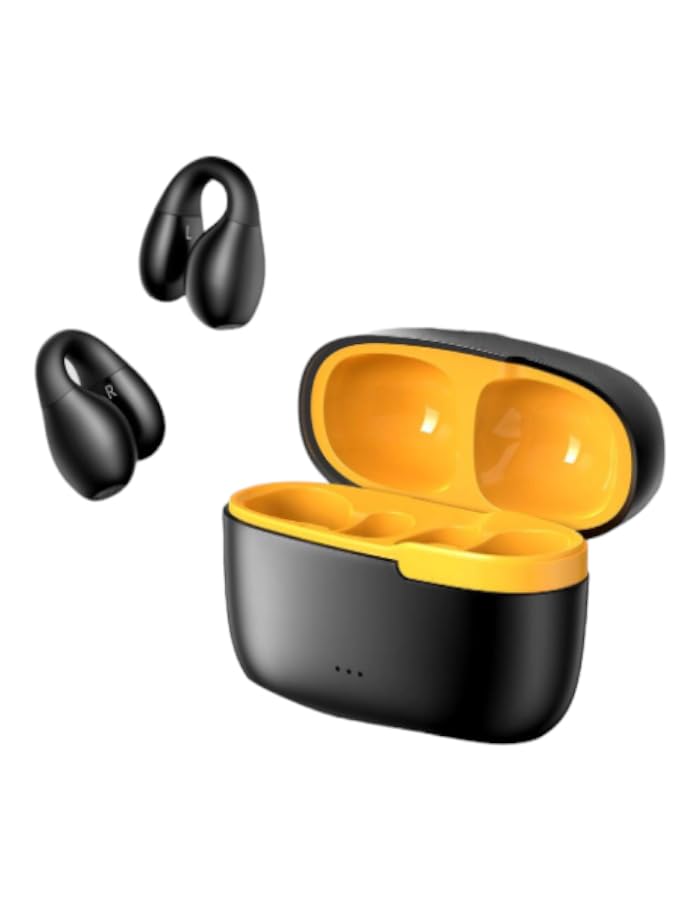
Image: REMAX CozyBuds W11 Earphones and Charging Case. This image displays the earphones in their charging case, highlighting their compact design.
Contingut del paquet
- REMAX CozyBuds W11 Earphones (1 pair)
- Estoig de càrrega (1)
- Cable de càrrega (1)
- Manual d'usuari (aquest document)
Configuració
1. Càrrega dels auriculars i l'estoig
Before first use, fully charge the earphones and the charging case. Place the earphones into the charging case. Connect the charging cable to the case and a power source. The charging case has a 200mAh capacity and requires approximately 2 hours for a full charge. A full charge provides up to 8 hours of continuous earphone playback, with the case extending total playback time to up to 24 hours.
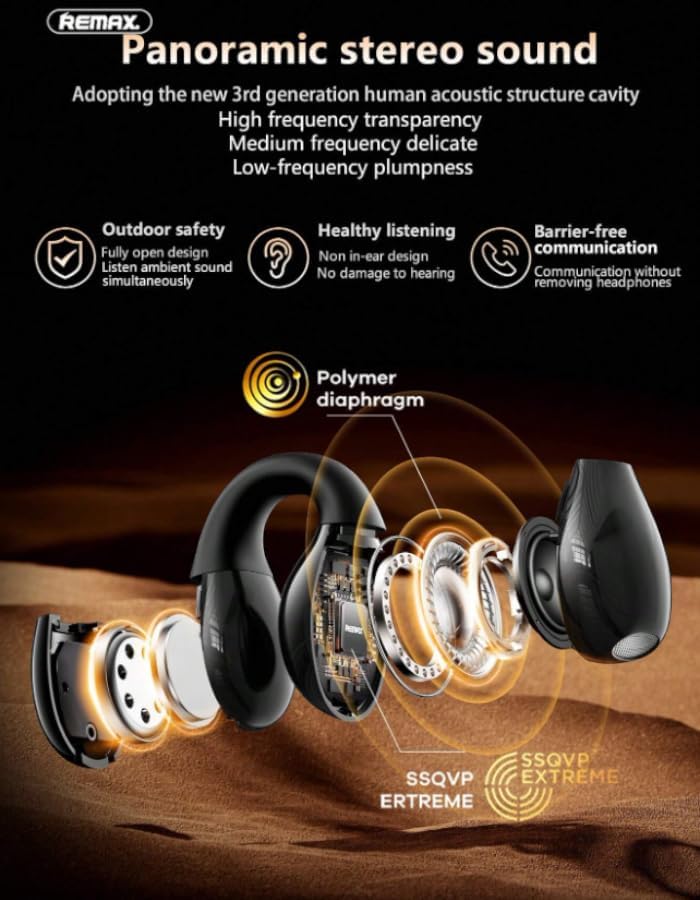
Image: Earphones and Charging Case illustrating battery life. This image shows the earphones and their charging cases, indicating a total usage time of 16 hours (likely referring to combined earphone and case battery life).
2. Vinculació amb un dispositiu Bluetooth
- Assegureu-vos que els auriculars estiguin carregats.
- Obre l'estoig de càrrega. Els auriculars entraran automàticament en mode d'emparellament.
- Al dispositiu (telèfon intel·ligent, tauleta, etc.), activeu el Bluetooth i cerqueu els dispositius disponibles.
- Select "REMAX CozyBuds W11" from the list of found devices.
- Once connected, you will hear a confirmation sound, and the earphones will be ready for use.
3. Com posar-se els auriculars
The CozyBuds W11 feature an ergonomic earhook design for a secure and comfortable fit. Gently place the earphone into your ear canal and position the soft silicone earhook around your ear. Adjust for optimal comfort and stability. The design ensures the earphones remain in place during activities.

Image: A person wearing the REMAX CozyBuds W11 Earphones. This image demonstrates the proper way to wear the earhook earphones for a secure fit.
Instruccions de funcionament
Encès/Apagat
- Encès: Obriu la funda de càrrega i els auriculars s'encendran automàticament.
- Apagar: Torneu a col·locar els auriculars a l'estoig de càrrega i tanqueu la tapa. S'apagaran automàticament i començaran a carregar-se.
Music and Call Control (Touch Controls)
The CozyBuds W11 feature intuitive touch controls on each earbud. Specific functions may vary slightly by device, but general controls are as follows:
- Reproduir/pausa: Un sol toc a qualsevol dels auriculars.
- Pista següent: Toqueu dues vegades l'auricular dret.
- Pista anterior: Toqueu dues vegades l'auricular esquerre.
- Respondre/Finalitzar la trucada: Toqueu un sol cop a qualsevol dels auriculars durant una trucada entrant.
- Rebutja la trucada: Premeu i manteniu premut qualsevol dels auriculars durant 2 segons durant una trucada entrant.
- Activa l'Assistent de veu: Toqueu tres vegades qualsevol dels auriculars.
- Control de volum: (Specific gesture not detailed in product info, often press and hold left/right for volume down/up, or controlled via device). Please refer to your device's settings or experiment with long presses if not covered by other functions.

Image: Detailed features of REMAX CozyBuds W11. This image highlights various features including touch operation, sound synchronization, and driver unit details.
Característiques de so
The CozyBuds W11 incorporate advanced sound technologies for an enhanced listening experience:
- So estèreo d'alta fidelitat: Delivers clear highs, balanced mids, and deep bass.
- Panoramic Stereo Sound: Utilizes a 3rd generation human acoustic structure cavity for high frequency transparency, delicate medium frequency, and plump low frequency.
- Directional Transmission Technology: Ensures clear sound is accurately transmitted to your ear.
- Adaptive Directional Sound: Sound is transmitted through pulse for an open panoramic sound experience.
- Non In-Ear Design: Promotes healthy listening and barrier-free communication without removing headphones.

Image: Diagram illustrating panoramic stereo sound technology. This image details the internal structure and sound delivery mechanisms for high-quality audio.
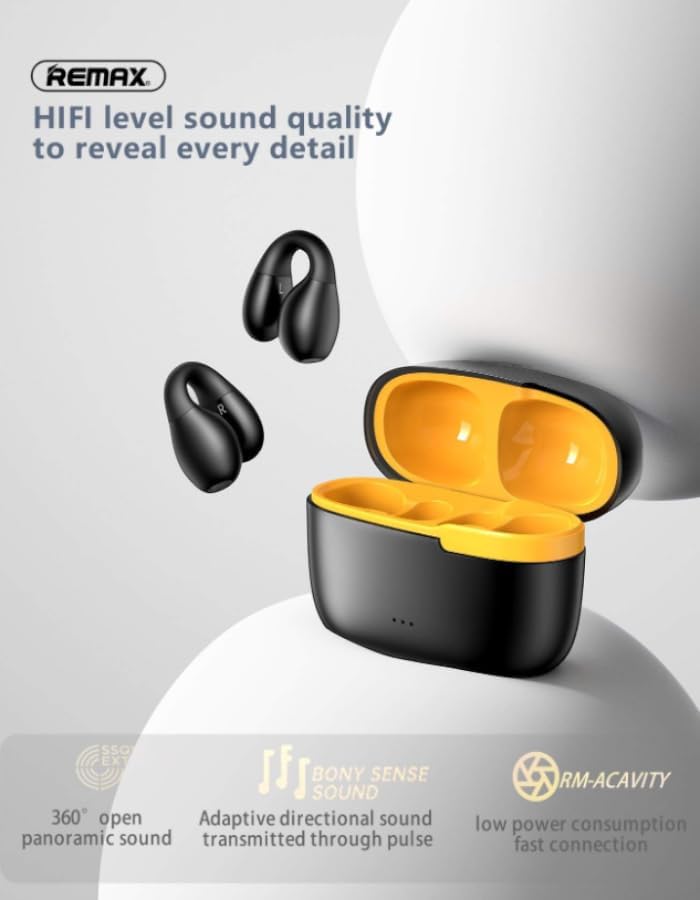
Image: Features related to HIFI level sound quality. This image highlights 360° open panoramic sound, adaptive directional sound, and low power consumption.
Manteniment
Neteja
Regularly clean your earphones and charging case to ensure optimal performance and hygiene. Use a soft, dry, lint-free cloth. Do not use abrasive cleaners, alcohol, or chemical solvents. Avoid getting moisture into any openings.
Emmagatzematge
When not in use, store the earphones in their charging case. This protects them from dust, damage, and also keeps them charged for your next use. Store in a cool, dry place away from extreme temperatures.
Resistència a l'aigua
The CozyBuds W11 earphones are IPX4 water-resistant, meaning they are protected against splashing water from any direction. They are suitable for workouts and light rain but are not designed for submersion in water. Do not expose them to strong jets of water or wear them while swimming or showering.
Resolució de problemes
| Problema | Causa possible | Solució |
|---|---|---|
| Els auriculars no s'encenen. | Bateria baixa. | Col·loca els auriculars a l'estoig de càrrega i carrega'ls completament. |
| No es pot emparellar amb el dispositiu. | El Bluetooth està desactivat al dispositiu; els auriculars no estan en mode d'emparellament; massa lluny del dispositiu. | Ensure Bluetooth is enabled on your device. Open the charging case to put earphones in pairing mode. Keep earphones within 10 meters of your device. |
| No hi ha so o hi ha mala qualitat de so. | Volume too low; earphones not properly seated; connection issue. | Adjust volume on your device. Ensure earphones are correctly worn. Re-pair the earphones with your device. |
| Earphones disconnect frequently. | Interference; low battery; too far from device. | Move away from sources of interference. Charge earphones. Stay within Bluetooth range. |
Especificacions
- Model: CozyBuds W11
- Marca: REMAX (Manufacturer) / Generic (Seller Brand)
- Connectivitat: Sense fil (Bluetooth)
- Factor de forma: Over Ear (Earhook Design)
- Color: Black And Yellow
- Capacitat de la caixa de càrrega: 200 mAh
- Single Ear Using Time: Fins a 4 hores
- Temps total de reproducció: Fins a 24 hores (amb estoig de càrrega)
- Temps de càrrega: Approximately 2 hours for case
- Temps d'espera: Fins a 90 dies
- Classificació de resistència a l'aigua: IPX4 (resistent a la suor)
- Característiques addicionals: Fast Charging, Intuitive Touch Controls, HiFi Stereo Sound, Panoramic Stereo Sound, Directional Transmission Technology
Garantia i Suport
Your REMAX CozyBuds W11 earphones come with a 6 mesos de garantia from the date of purchase. This warranty covers manufacturing defects. It does not cover damage caused by misuse, accidents, unauthorized modifications, or normal wear and tear.
For warranty claims or technical support, please contact your retailer or the manufacturer's customer service with your proof of purchase.
Documents relacionatsCozyBuds W11


Ask a question about this manual
Ask about setup, troubleshooting, compatibility, parts, safety, or missing instructions. Manuals+ will review the question and use this page’s manual context to help answer it.