
1. Informació important de seguretat
Please read all instructions carefully before using this device. Failure to follow safety instructions may result in injury, electric shock, fire, or damage to the device.
1.1 Seguretat làser
This device emits a Class II laser. Avoid direct eye exposure to the laser beam. Do not stare into the beam. Do not aim the laser at people or animals. Use caution when operating the device in areas where reflective surfaces may be present.
- No intenteu desmuntar o modificar el dispositiu.
- Mantingueu el dispositiu fora de l'abast dels nens.
- Do not use the device in explosive atmospheres or near flammable materials.
1.2 Seguretat general
- Assegureu-vos que el dispositiu estigui net i sec abans d'utilitzar-lo.
- No exposeu el dispositiu a temperatures o humitat extremes.
- Handle the tape measure carefully to prevent cuts or injuries from the tape edge.
2. Producte acabatview
The MiBoce 3-in-1 Laser Tape Measure combines a digital laser rangefinder, a traditional 5-meter tape measure, and a laser crosshair function into a single compact device. It features an LCD display with backlight for clear readings in various lighting conditions.

Figura 2.1: Mésview of the 3-in-1 functionality, highlighting the laser, tape, and crosshair features.
2.1 Característiques clau
- Disseny 3 en 1: Integrates laser rangefinder (up to 60m), 5m tape measure, and laser cross marking.
- Pantalla LCD: Backlit display for clear visibility of measurement data.
- Construcció duradora: High elasticity and toughness ABS + TPR case for anti-slip, drop resistance, and dustproof protection.
- Self-locking Tape: Automatically locks the tape in position when pulled out, with an unlock button for safe retraction.
- Dual Scale Tape: 5m coated manganese steel tape with both imperial and metric scales.
2.2 Components del dispositiu
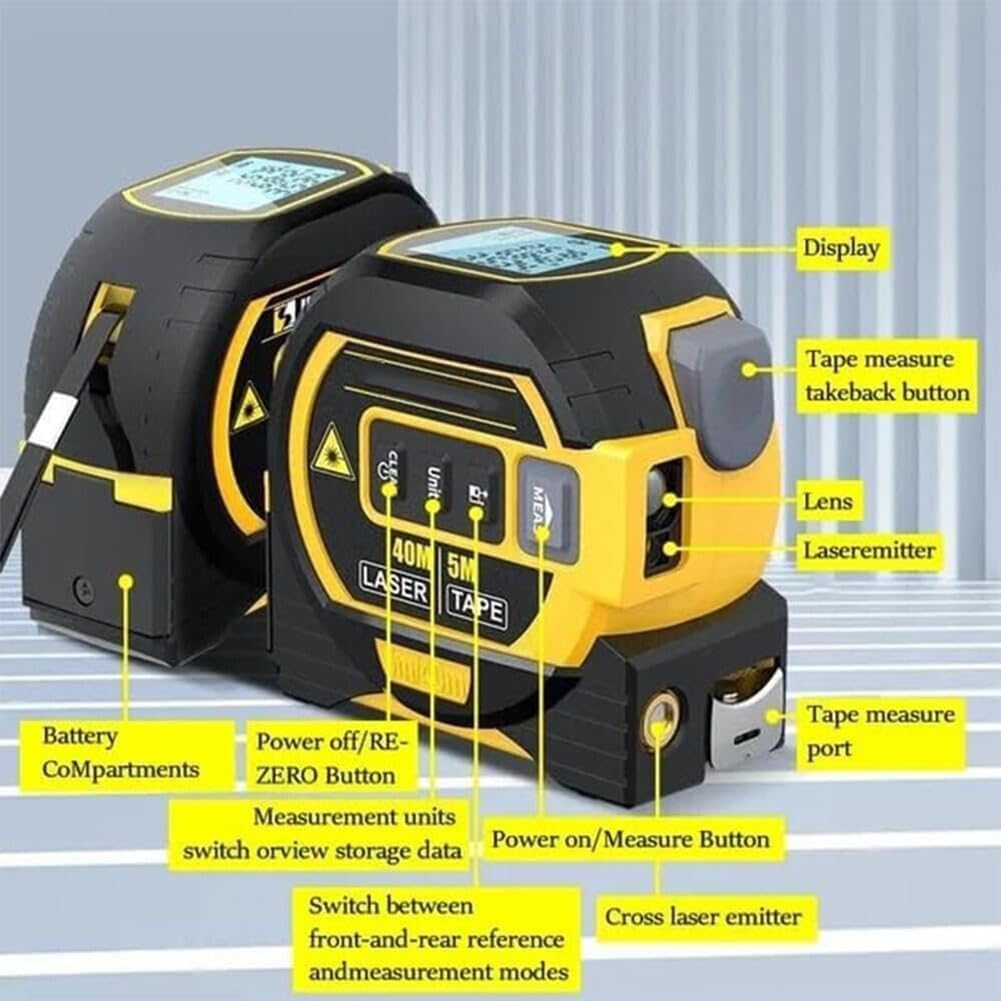
Figure 2.2: Labeled diagram showing the display, tape measure takeback button, lens, laser emitter, battery compartment, power off/re-zero button, measurement units switch, power on/measure button, switch between front-and-rear reference, and cross laser emitter.
- Visualització: Shows measurement data, unit, and mode.
- Tape Measure Takeback Button: Retracts the steel tape.
- Lent: Laser receiver lens.
- Emissor làser: Emits the main laser beam for distance measurement.
- Compartiment de la bateria: Houses the batteries.
- Power Off/RE-ZERO Button (CLEAR): Clears current measurement or powers off.
- Measurement Units Switch (UNIT): Changes measurement units (m/in/ft).
- Power On/Measure Button (MEAS): Powers on the device and initiates laser measurement.
- Reference Point/Mode Switch: Switches between front/rear reference and measurement modes.
- Cross Laser Emitter: Projects the crosshair laser.
- Tape Measure Port: Where the steel tape extends from.
3. Configuració
3.1 Instal·lació de la bateria
The device requires [Insert Battery Type, e.g., 2 x AAA batteries] for operation. To install or replace batteries:
- Locate the battery compartment (5) on the side or back of the device.
- Obriu la tapa del compartiment de la bateria.
- Introduïu les piles, assegurant-vos la polaritat correcta (+/-).
- Tanqueu bé la tapa del compartiment de la bateria.
Nota: Traieu les piles si no heu d'utilitzar el dispositiu durant un període prolongat per evitar fuites.
4. Instruccions de funcionament
4.1 Engegada/Apagada i Selecció d'Unitats
- Encès: Premeu el botó MEAS button (8) to turn on the device. The LCD display will illuminate.
- Apagar: Manteniu premut el botó CLAR button (6) for a few seconds to turn off the device. The device will also automatically power off after a period of inactivity.
- Canvia unitats: Premeu el botó UNITAT button (7) to cycle through measurement units: meters (m), inches (in), and feet (ft).
4.2 Laser Rangefinder Mode
This mode uses the laser to measure distances, areas, and volumes.
4.2.1 Mesura de distància única
- Assegureu-vos que el dispositiu estigui encès.
- Premeu el botó MEAS button (8) once to activate the laser. A red laser dot will appear.
- Apunteu el punt làser al punt objectiu.
- Premeu el botó MEAS button (8) again to take the measurement. The distance will be displayed on the LCD.
4.2.2 Mesura contínua (seguiment)
- Manteniu premut el botó MEAS button (8) for approximately 2 seconds. The device will enter continuous measurement mode, displaying real-time distance as you move the device.
- Premeu MEAS again to stop continuous measurement and hold the last reading.
4.2.3 Mesura de l'àrea
- Press the Reference Point/Mode Switch button (9) until the area icon (e.g., a square) appears on the display.
- Take the first measurement (length) by pressing MEAS dues vegades.
- Take the second measurement (width) by pressing MEAS dues vegades.
- El dispositiu calcularà i mostrarà l'àrea automàticament.
4.2.4 Mesura del volum
- Press the Reference Point/Mode Switch button (9) until the volume icon (e.g., a cube) appears on the display.
- Take three consecutive measurements (length, width, height) by pressing MEAS twice for each dimension.
- El dispositiu calcularà i mostrarà el volum automàticament.
4.2.5 Mesura pitagòrica
This mode allows indirect measurement using the Pythagorean theorem (e.g., height of an object). Refer to the display icons for specific Pythagorean modes (e.g., two-point or three-point measurement).
- Press the Reference Point/Mode Switch button (9) until the desired Pythagorean icon appears.
- Seguiu les instruccions que apareixen a la pantalla per prendre les mesures necessàries (per exemple, hipotenusa, base).
- El dispositiu calcularà i mostrarà el costat desconegut.
4.2.6 Selecció del punt de referència
Press the Reference Point/Mode Switch button (9) to toggle between measuring from the front edge of the device or the rear edge of the device. An icon on the display will indicate the current reference point.
4.3 Tape Measure Mode
The integrated 5-meter steel tape measure is suitable for short-range measurements.

Figure 4.1: The tape measure features both inch and metric scales for versatile measurements.
- Estenent la cinta: Pull the tape from the tape measure port (11). The tape will automatically lock at the desired length due to the self-locking mechanism.
- Retracció de la cinta: Press the Tape Measure Takeback Button (2) to safely retract the tape. Guide the tape back into the device to prevent sudden retraction.

Figure 4.2: Demonstrating the self-locking tape design and the button for safe retraction.
4.4 Laser Crosshair Mode
The device can project a horizontal and vertical laser line simultaneously, creating a crosshair for alignment tasks.

Figure 4.3: The device projecting a laser crosshair, useful for leveling and alignment.
- Activating Crosshair: Press the Cross Laser Emitter button (10) to turn on the crosshair laser.
- Deactivating Crosshair: Press the Cross Laser Emitter button (10) again to turn off the crosshair laser.
5. Manteniment
5.1 Neteja
- Netegeu el dispositiu amb un suau, damp tela. No utilitzeu netejadors abrasius ni dissolvents.
- Keep the laser lens (3) clean and free of dust for accurate measurements. Use a lens cleaning cloth if necessary.
- Ensure the tape measure is clean before retracting it fully into the housing.
5.2 Emmagatzematge
- Guardeu el dispositiu en un lloc fresc i sec, allunyat de la llum solar directa i de temperatures extremes.
- Remove batteries if storing for extended periods to prevent corrosion.

Figure 5.1: The durable ABS + TPR casing provides environmental protection, making the device strong, wear-resistant, and dustproof.
6. Solució De Problemes
| Problema | Causa possible | Solució |
|---|---|---|
| El dispositiu no s'encén. | Piles baixes o gastades; instal·lació incorrecta de la bateria. | Replace batteries; check battery polarity. |
| Laser beam is weak or not visible. | Low batteries; dirty laser lens. | Replace batteries; clean the laser lens (3). |
| Mesures làser inexactes. | Dirty laser lens; unstable measuring surface; incorrect reference point. | Clean the laser lens (3); ensure a stable measurement; verify reference point (front/rear). |
| La cinta mètrica no es retrau suaument. | Tape is dirty or obstructed; retraction mechanism issue. | Clean the tape; ensure no obstructions. Do not force retraction. |
| La pantalla LCD està en blanc o parpelleja. | Low batteries; device malfunction. | Canvieu les piles. Si el problema persisteix, poseu-vos en contacte amb el servei d'atenció al client. |
7. Especificacions
| Nom del producte | MiBoce 3-in-1 Laser Tape Measure |
| Model | 3-in-1 Laser Tape Measure 60m |
| Rang de telèmetre làser | Fins a 60 metres |
| Longitud de la cinta mètrica | 5 metres |
| Unitats de mesura | Meters (m), Inches (in), Feet (ft) |
| Classe làser | Classe II |
| Mostra | LCD amb llum de fons |
| Font d'alimentació | [Insert Battery Type, e.g., 2 x AAA batteries] |
| Material | ABS + TPR casing, Manganese steel tape |
| Dimensions (aprox.) | 8.5cm x 8.2cm x 5.6cm (interpreted from image 51RXpXZ0K5L.jpg) |

Figure 7.1: Approximate dimensions of the device.
8. Garantia i Suport
MiBoce products are manufactured to high-quality standards. For warranty information, technical support, or service inquiries, please contact your retailer or the manufacturer directly.
- Keep your purchase receipt as proof of purchase.
- Do not attempt to repair the device yourself, as this may void the warranty.