
1. Introducció
Thank you for choosing the ABASK ZDX78 4K WiFi Dash Cam. This device is designed to provide high-quality video recording for your vehicle, enhancing driving safety and providing crucial evidence in case of incidents. Featuring 4K Ultra HD resolution, advanced night vision, G-sensor for collision detection, 24-hour parking monitoring, and seamless WiFi connectivity with app control, the ZDX78 offers a comprehensive solution for your in-car recording needs. Please read this manual carefully before use to ensure proper installation and operation.
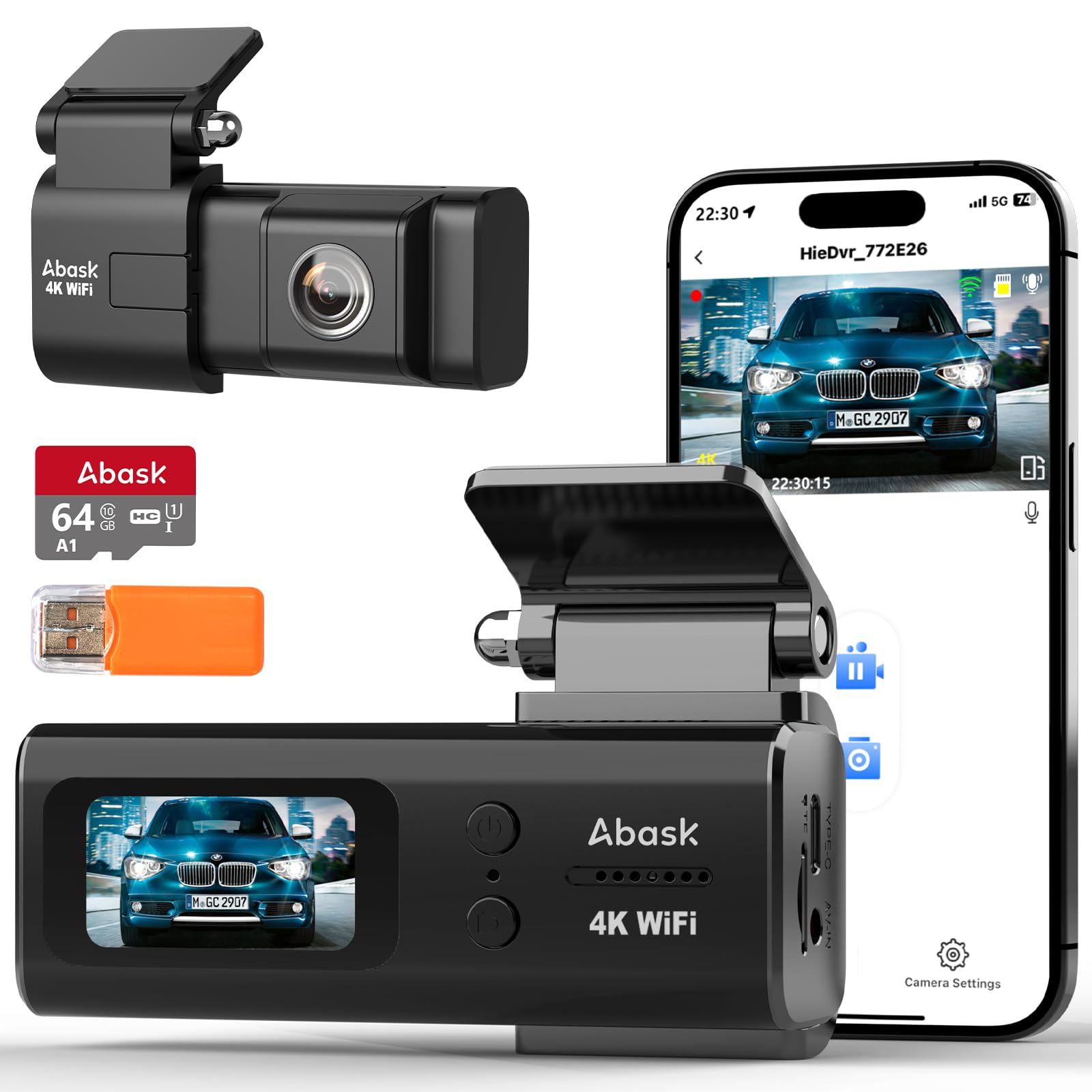
Image: The ABASK ZDX78 4K WiFi Dash Cam, showcasing its compact design, the accompanying mobile app interface, and the included 64GB SD card with a card reader.
2. Producte acabatview & Contingut del paquet
The ABASK ZDX78 is a compact and durable dash cam designed for easy integration into your vehicle. It features a 1.47-inch IPS display for clear viewcontrols intuïtius.
Què inclou:
- Dashcam ZD-X78 Unit
- Suport de muntatge
- Targeta de memòria de 64 GB
- Lector de targetes SD
- Manual d'usuari
- Carregador de cotxe tipus C
- Cable USB
- Prying Tool
- 3M Strong Adhesive Sticker
- Adhesiu electrostàtic
- Cable Clips (for neat cable management)

Image: A visual representation of all items included in the ABASK ZDX78 Dash Cam package, such as the dashcam, bracket, memory card, charger, and installation tools.
3. Guia de configuració
Follow these steps for quick and easy installation of your ABASK ZDX78 Dash Cam.
3.1. Prepareu la targeta SD
- Insert the included 64GB SD card into the dash cam's SD card slot. Ensure it is inserted correctly until it clicks into place.
- It is recommended to format the SD card within the dash cam's settings before first use to ensure optimal performance.
3.2. Muntar la càmera del salpicader
- Netegeu la zona del parabrisa on voleu muntar la càmera del salpicader. Assegureu-vos que no tingui pols ni greix.
- Apply the electrostatic sticker to the chosen area on the windshield. This helps in easy removal without leaving adhesive marks.
- Fixeu el suport de muntatge a la càmera del salpicader.
- Secure the dash cam with the bracket onto the electrostatic sticker. Ensure the camera has a clear view de la carretera i no obstrueix la teva visió al volant.
3.3. Connexió d'alimentació
- Connect the Type-C car charger to the dash cam's Type-C port.
- Connecteu l'altre extrem del carregador de cotxe a la presa de corrent de 12 V del vostre vehicle (endoll de l'encenedor de cigarrets).
- Route the power cable neatly along the windshield edge and dashboard using the provided prying tool and cable clips to avoid interference with driving.

Image: An illustration demonstrating the simple installation process of the ABASK ZDX78 dash cam on a car's windshield, including cable routing.
3.4. Connect to Mobile App (Viidure)
- Download the "Viidure" app from the Google Play Store or Apple App Store.
- Enceneu la càmera de tauler.
- Enable Wi-Fi on your smartphone and connect to the dash cam's Wi-Fi network (SSID and password can be found in the dash cam's settings or manual).
- Obre l'aplicació "Viidure" per a view viu footage, download, playback, and edit recordings.

Image: A driver interacting with the dash cam via a smartphone app, illustrating the ease of WiFi connectivity and sharing features.
4. Instruccions de funcionament
Understand the various functions of your ABASK ZDX78 Dash Cam.
4.1. Automatic Recording & 4K Resolution
- Once powered on, the dash cam will automatically begin recording.
- The ZDX78 captures video in stunning 4K (3840*2160P/30fps) resolution, ensuring clear and detailed footage.
- The 170° wide-angle lens covers multiple lanes, reducing blind spots.

Image: A side-by-side comparison illustrating the superior clarity and detail of 4K recording compared to 1080P, particularly noticeable on license plates.
4.2. Enregistrament en bucle
- The dash cam continuously records in short segments (e.g., 1, 3, or 5 minutes).
- When the SD card is full, the oldest unlocked video fileLes s se sobreescriuen automàticament per fer espai per a noves gravacions.
- This ensures continuous recording without manual intervention.

Image: A visual explanation of the loop recording feature, showing how the dash cam automatically overwrites the oldest unlocked video files when the memory card reaches its capacity.
4.3. Sensor G (enregistrament d'emergència)
- El sensor G integrat detecta impactes o col·lisions sobtades.
- Upon detection, the current video segment is automatically locked and saved to a special folder, preventing it from being overwritten by loop recording.
- This ensures critical accident footage es conserva com a prova.

Image: A scene depicting a car collision, with an overlayed lock icon, symbolizing the G-sensor's function to automatically lock and protect video footage durant un impacte.
4.4. Monitorització d'aparcament les 24 hores
- When connected to a hardwire kit (sold separately), the dash cam can monitor your vehicle even when it's parked and the engine is off.
- If an impact or motion is detected, the dash cam will automatically start recording to capture any incidents.
- This provides continuous protection for your vehicle.

Image: A car parked with a protective shield icon and '24h' symbol, illustrating the 24-hour parking monitoring feature. A note indicates the need for a separate hardwire kit.
4.5. Control per veu
- The ZDX78 supports voice commands (English only) for hands-free operation.
- You can issue commands such as "Successfully photo" to take a picture, "Start recording", "Stop recording", or "Start the emergency video" to lock the current recording.
- This feature enhances safety by allowing you to keep your hands on the steering wheel.

Image: A driver using voice commands to control the dash cam, with visual cues indicating successful photo capture, Wi-Fi connection status, and recording initiation.
4.6. Supervisió nocturna
- Equipped with an F1.8 large aperture and advanced sensor, the ZDX78 provides enhanced night vision capabilities.
- It captures clear and sharp footage even in low-light conditions, ensuring license plates and road signs are visible.

Image: A car driving at night, demonstrating the dash cam's super night vision capability, which clearly records road signs and license plates due to its F1.8 aperture and 6-layer lens.
4.7. Fer fotos
- The dash cam features a dedicated button for taking still photos.
- Simply press the photo button to capture high-resolution images of your surroundings.

Image: A hand pressing the photo button on the dash cam, capturing a still image of a deer on the side of the road, highlighting the instant photo-taking function.
5. Manteniment
Un manteniment adequat garanteix la longevitat i el rendiment òptim de la càmera del salpicader.
5.1. Neteja
- Gently wipe the lens and screen with a soft, lint-free cloth. Do not use abrasive cleaners or solvents.
- Ensure the camera body is free from dust and debris.
5.2. Gestió de targetes SD
- Regularly format the SD card (e.g., once a month) through the dash cam's settings to prevent data corruption and ensure smooth recording.
- Fes una còpia de seguretat del vídeo important files to your computer or cloud storage before formatting.
- Use only high-quality, genuine SD cards (Class 10 or higher, U3 recommended) to avoid recording issues.
5.3. Temperature Considerations
- The ZDX78 is built with a heat-resistant chipset and aluminum alloy shell, designed to withstand extreme temperatures from -40°F to 185°F (-40°C to 85°C).
- While durable, avoid prolonged exposure to direct sunlight in extremely hot conditions when the vehicle is parked, if possible.
Image: Visuals demonstrating the integrated supercapacitor's resilience, allowing the dash cam to operate reliably in extreme weather conditions, from intense heat to freezing cold.
6. Solució De Problemes
If you encounter any issues with your ABASK ZDX78 Dash Cam, refer to the following common problems and solutions:
- Dash Cam not turning on:
- Ensure the car charger is properly connected to both the dash cam and the vehicle's 12V power outlet.
- Check if the vehicle's 12V power outlet is functioning.
- Try a different USB cable or car charger if available.
- La gravació s'atura de manera inesperada:
- Formata la targeta SD regularment.
- Ensure you are using a high-speed (Class 10, U3) SD card.
- Check if the SD card is full and loop recording is enabled.
- Clean the SD card slot and reinsert the card.
- Vídeo footage is blurry or unclear:
- Clean the dash cam lens and your car's windshield.
- Assegureu-vos que s'hagi tret la pel·lícula protectora de la lent.
- Check if the dash cam is securely mounted and not vibrating.
- Problemes de connexió Wi-Fi:
- Assegureu-vos que el Wi-Fi de la càmera del salpicader estigui activat.
- Reinicieu tant la càmera del salpicader com el telèfon intel·ligent.
- Ensure you are within range of the dash cam's Wi-Fi signal.
- Torneu a introduir la contrasenya del Wi-Fi si se us demana.
- Parking monitor not working:
- Ensure a hardwire kit is properly installed and connected to the vehicle's power supply.
- Check the parking monitor settings in the dash cam menu.
If the problem persists, please contact ABASK customer support for assistance.
7. Especificacions tècniques
| Característica | Especificació |
|---|---|
| Marca | ABASK |
| Model | ZDX78 |
| Resolució de captura de vídeo | 4K (3840*2160P) |
| Viewangle ing | 170 graus (frontal) |
| Tipus de visualització | LCD |
| Mida de la pantalla de peu | 1.47 polzades |
| Tipus de memòria flash | SD (Supports up to 128GB) |
| Mida de la targeta de memòria inclosa | 64 GB |
| Característiques especials | Built-In WiFi, Night Vision, App Control, Voice Control, Built-In Supercapacitor, G-Sensor, Loop Recording, 24H Parking Monitor |
| Tecnologia de connectivitat | Wi-Fi |
| Tipus de muntatge | Muntatge del parabrisa |
| Dimensions del producte | 4.5 x 11 x 5 cm; 310 g |
8. Garantia i Suport
ABASK is committed to providing high-quality products and excellent customer service.
- Garantia: Enjoy peace of mind with an 18-month warranty on the entire machine.
- Política de devolució: A 45-day full refund policy is available.
- Suport tècnic: Benefit from lifetime technical support for your product.
- Atenció al client: ABASK's professional team provides round-the-clock online consultation services. If you need any assistance, feel free to reach out.


Image: Icons representing key support features: 24-hour quick reply, 101-day trial, 18-month warranty, and lifetime technical support.