
1. Introducció
This manual provides essential information for the safe and effective operation of your Micsig STO1004 Tablet Oscilloscope. Please read this manual thoroughly before using the device to ensure proper functionality and to prevent damage.
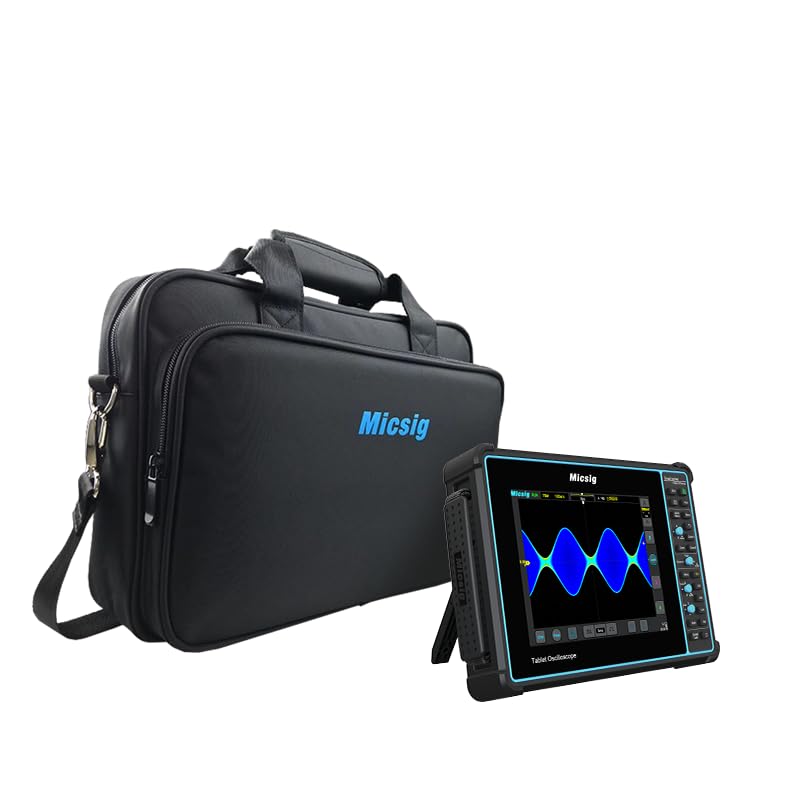
Figure 1: Micsig STO1004 Tablet Oscilloscope with its carrying bag.
Característiques clau
- Ample de banda: 100 MHz
- SampVelocitat de ling: 1GSa/s
- Canals: 4
- Memory Depth: 70Mpts
- Display: 8-inch, 800x600 resolution touchscreen
- Sistema operatiu: Android
- Emmagatzematge intern: 32 GB
- Serial Bus Decodings: UART, LIN, CAN, I²C, SPI
- Battery: Built-in 7500mAh Li-ion battery for up to 5 hours of operation
2. Contingut del paquet
Verify that all items listed below are included in your package. If any items are missing or damaged, please contact Micsig customer support.
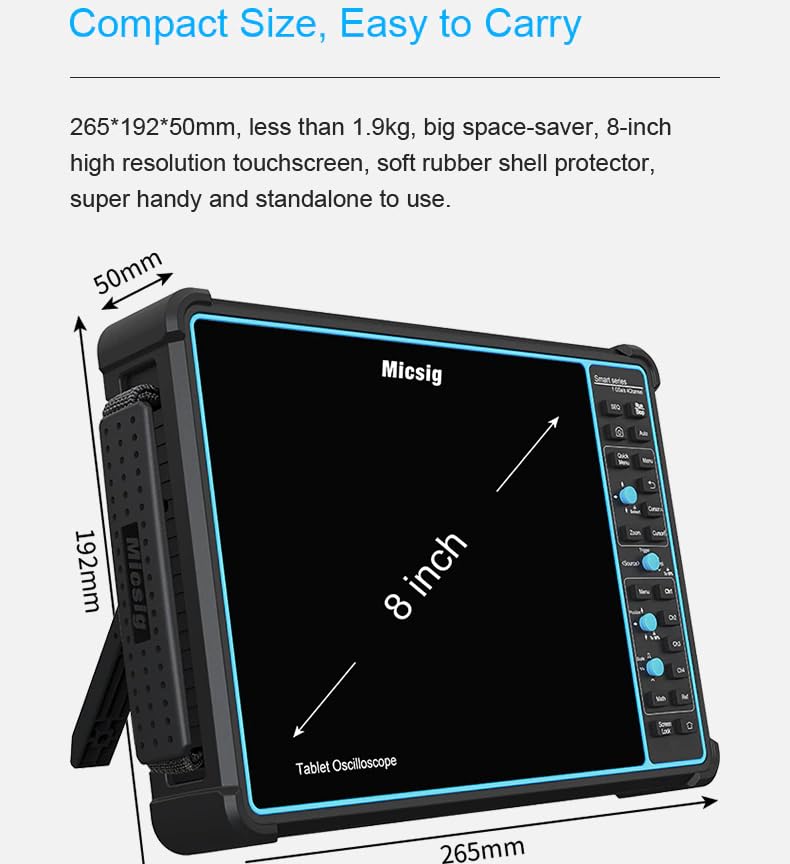
Figure 2: Contents of the Micsig STO1004 package.
- Oscilloscope Main Unit (1 pc)
- Probes (4 pcs)
- Adaptador de corrent (1 unitat)
- Cable d'alimentació (1 unitat)
- Calibration Certificate (1 pc)
3. Dispositiu acabatview
Dimensions físiques
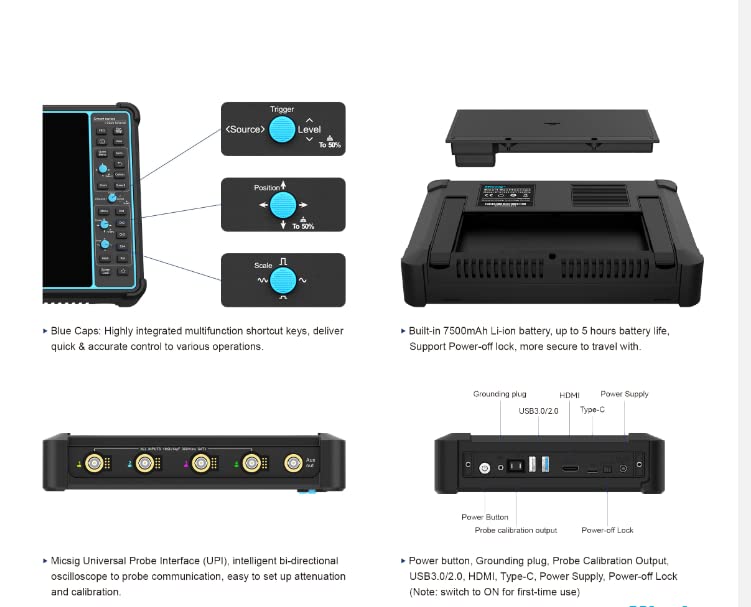
Figure 3: Physical dimensions of the oscilloscope.
The STO1004 features a compact design for portability and ease of use:
- Mides: 265 x 192 x 50 mm
- Pes: menys de 1.9 kg
- Mida de la pantalla: 8 polzades
Controls i Ports

Figure 4: Side panel controls and ports.
The device is equipped with various controls and ports for comprehensive functionality:
- Blue Caps: Highly integrated multifunction shortcut keys for quick and accurate control.
- Ports USB 3.0/2.0: For data transfer and peripheral connections.
- Port HDMI: For external display output.
- Port de tipus C: For power supply and data.
- Botó d'encesa: Per encendre/apagar el dispositiu.
- Grounding Plug: For safety and signal integrity.
- Probe Calibration Output: For probe compensation.
- Power-off Lock: To prevent accidental power-off (switch to ON for first-time use).
- Micsig Universal Probe Interface (UPI): Intelligent bi-directional communication for automatic probe attenuation matching.
4. Configuració
Encès inicial
- Ensure the device is fully charged or connected to the power adapter using the provided power cord.
- Locate the Power-off Lock switch on the side panel and ensure it is in the 'ON' position for initial use.
- Press and hold the Power Button until the Micsig logo appears on the screen.
- The device will boot into the Android operating system.
Sondes de connexió
- Connect the BNC connector of the probe to the desired channel input on the oscilloscope.
- Attach the probe's ground clip to the circuit's ground reference.
- If using the Micsig Universal Probe Interface (UPI), ensure the probe is correctly seated for automatic attenuation detection.
5. Instruccions de funcionament
The Micsig STO1004 features an intuitive touchscreen interface and dedicated physical controls.

Figure 5: Touchscreen operation.
Basic Waveform Acquisition
- Encès: Follow the steps in the Setup section.
- Connect Signal: Connect your probe to the signal source and the oscilloscope input.
- Configuració automàtica: Press the 'Auto' button on the control panel or tap the 'Auto' icon on the screen. The oscilloscope will automatically adjust vertical, horizontal, and trigger settings to display a stable waveform.
- Ajustaments manuals: Use the dedicated knobs and touchscreen gestures to fine-tune settings such as vertical scale (Volts/Div), horizontal scale (Time/Div), and trigger level.
Funcions de disparador
The oscilloscope offers powerful trigger functions to stabilize and capture specific events.

Figure 6: Video trigger settings interface.
Access trigger settings via the 'Trigger' menu. Options include Edge, Pulse Width, Video, Slope, Runt, and more.
Serial Bus Decoding
The STO1004 supports decoding for common serial communication protocols.

Figure 7: CAN bus decoding interface.
Navigate to the 'Decode' menu to select protocols like UART, LIN, CAN, I²C, and SPI. Configure parameters such as source channel and baud rate for accurate decoding.
Measurements and Analysis
Perform automatic measurements and advanced waveform analysis.

Figure 8: Automatic measurement display.
The device supports 31 automatic measurements. Access these through the 'Measure' menu. You can also use cursors for manual measurements and perform mathematical operations on waveforms.
Saving and Exporting Data
Waveforms and settings can be saved to the internal storage or exported.

Figure 9: Data saving options.
Use the 'Save' menu to store waveforms, screenshots, or settings. Data can be saved in various formats (e.g., WAV, CSV, BIN) to the internal 32GB storage or an external USB drive.
6. Manteniment
Neteja del dispositiu
- Turn off the oscilloscope and disconnect it from all power sources and probes before cleaning.
- Utilitzeu un suau, damp cloth with a mild detergent to clean the exterior surfaces. Avoid abrasive cleaners or solvents.
- For the touchscreen, use a specialized screen cleaning solution and a microfiber cloth to prevent scratches.
- Ensure no liquid enters the device through ports or ventilation openings.
Cura de la bateria
The device contains a built-in Li-ion battery. Follow these guidelines for optimal battery life:
- Eviteu descarregar completament la bateria amb freqüència.
- Guardeu el dispositiu en un lloc fresc i sec quan no el feu servir durant períodes prolongats.
- If storing for a long time, charge the battery to approximately 50-70% capacity.
- No exposeu el dispositiu a temperatures extremes.
Calibració de la sonda
Regularly calibrate your probes to ensure accurate measurements. Use the dedicated probe calibration output on the oscilloscope and follow the on-screen instructions for compensation.
7. Solució De Problemes
This section addresses common issues you might encounter. For problems not listed here, please contact Micsig customer support.
| Problema | Causa possible | Solució |
|---|---|---|
| El dispositiu no s'encén. | Low battery; Power-off Lock engaged; Faulty power adapter. | Charge the battery; Ensure Power-off Lock is OFF; Try a different power source/adapter. |
| No es mostra cap forma d'ona. | Probe not connected; Incorrect trigger settings; Signal too small/large; Channel off. | Check probe connections; Use 'Auto' setup; Adjust vertical scale; Ensure channel is enabled. |
| Forma d'ona inestable. | Incorrect trigger level or mode; Noise in signal. | Adjust trigger level; Change trigger mode (e.g., Edge, Video); Use averaging acquisition mode. |
| La pantalla tàctil no respon. | Software glitch; Screen protector interference. | Restart the device; Ensure screen is clean and free of debris; Remove and reapply screen protector if applicable. |
8. Especificacions
Detailed technical specifications for the Micsig STO1004 Tablet Oscilloscope.
| Característica | Especificació |
|---|---|
| Model | STO1004 |
| Ample de banda | 100 MHz |
| Canals | 4 |
| S en temps realampli Rate | 1 GSa/s |
| Profunditat de memòria | 70 Mpts |
| Mostra | 8-inch TFT LCD, 800x600 resolution, Capacitive Touchscreen |
| Sistema operatiu | Android |
| Emmagatzematge intern | 32 GB |
| Bateria | 7500 mAh Li-ion (up to 5 hours operation) |
| Connectivitat | USB 3.0/2.0, HDMI, Type-C |
| Dimensions (L x A x A) | 265 x 192 x 50 mm |
| Pes | Aprox. 1.9 kg |
| Serial Decoding | UART, LIN, CAN, I²C, SPI |
9. Garantia i Suport
Informació de la garantia
Micsig products are covered by a limited warranty. Please refer to the warranty card included in your package or visit the official Micsig weblloc web per conèixer els termes i condicions detallats. Conserveu el comprovant de compra per a reclamacions de garantia.
Atenció al client
For technical assistance, troubleshooting, or service inquiries, please contact Micsig customer support:
- Assistència en línia: Visit the Micsig official website for FAQs, software updates, and contact forms.
- Suport per correu electrònic: Refer to your product documentation for the appropriate support email address.
- Suport telefònic: Contact numbers may be available on the Micsig weblloc per a la vostra regió.
When contacting support, please have your product model (STO1004) and serial number ready.