1. Introducció
Thank you for choosing the PNI Escort HP 5500 CB Radio. This compact and versatile CB radio is designed for reliable communication, featuring multistandard operation, 4W power output, AM-FM modulation, and compatibility with both 12V and 24V power systems. It includes advanced features like Automatic Squelch (ASQ) and RF Gain for enhanced audio clarity and reception control. This manual provides essential information for the proper installation, operation, and maintenance of your device.
2. Informació de seguretat
- Llegiu atentament totes les instruccions abans d'utilitzar el dispositiu.
- No exposeu la ràdio a la pluja, la humitat ni a temperatures extremes.
- Assegureu-vos el volum adequattage supply (12V or 24V DC) to prevent damage.
- Connect the antenna correctly before transmitting to avoid damage to the transceiver.
- No intenteu obrir ni reparar la unitat vosaltres mateixos. Encarregueu tot el manteniment a personal qualificat.
- Mantingueu la ràdio allunyada de camps magnètics forts.
3. Contingut del paquet
Verifiqueu que tots els elements siguin presents al paquet:
- PNI Escort HP 5500 CB Ràdio
- Microphone with coiled cord
- Power cord with cigarette lighter plug
- Microphone holder and screws
- Radio mounting bracket and screws
- Manual d'usuari
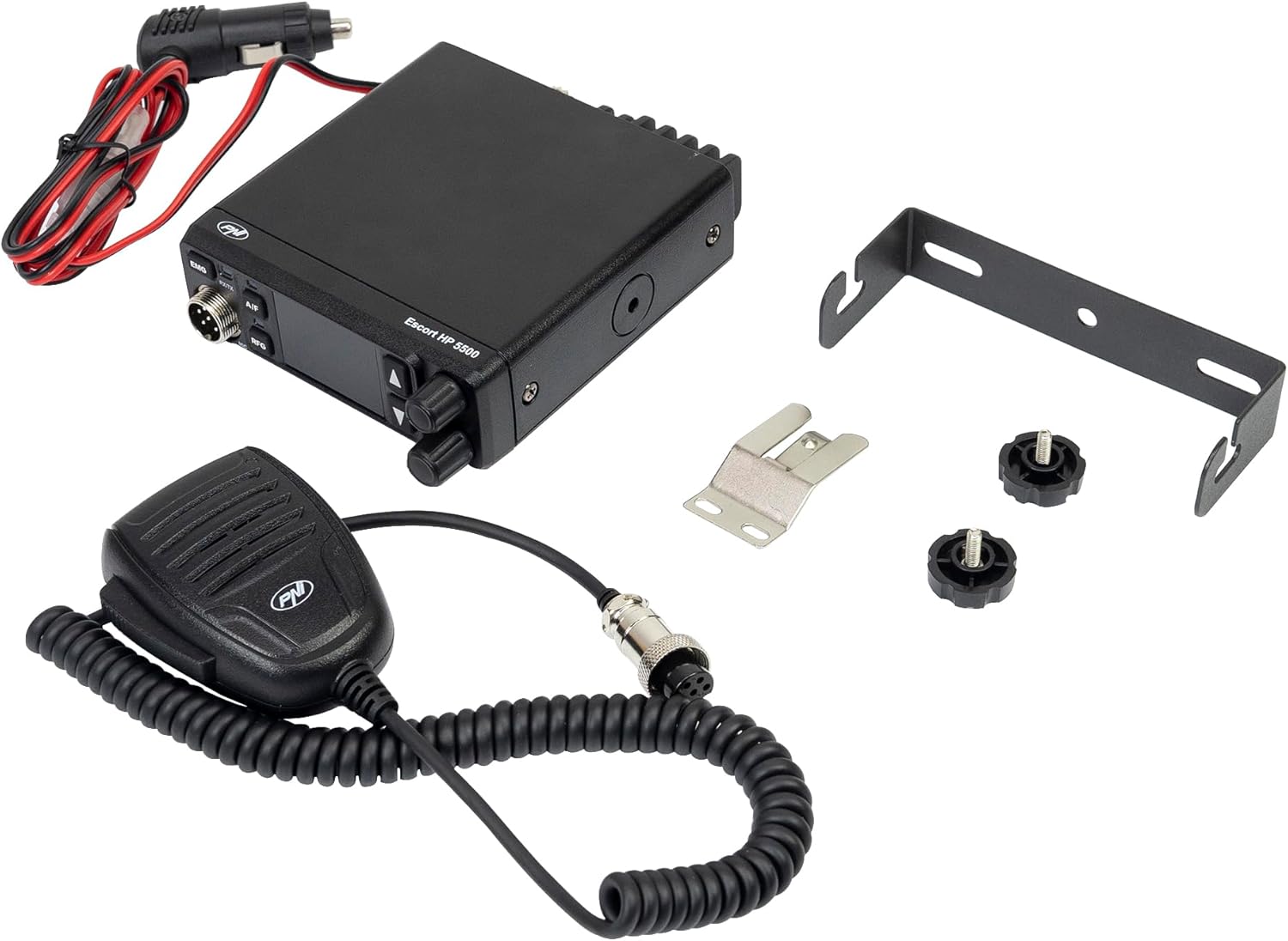
Image 3.1: PNI Escort HP 5500 CB Radio with its microphone, power cable, mounting bracket, and microphone holder.
4. Producte acabatview
4.1 Tauler frontal

Imatge 4.1: Frontal view of the PNI Escort HP 5500 CB Radio, showing the display, control buttons, and microphone connection.
- Visualització: Shows the current channel number and other indicators.
- EMG Button: Activates emergency channels (9/19).
- RX/TX Indicator: Illuminates green for reception (RX) and red for transmission (TX).
- A/F Button: Toggles between AM and FM modulation.
- RFG Button: Activates and adjusts RF Gain.
- Botons UP/DOWN: S'utilitza per a la selecció de canals i la navegació per menús.
- SQ Knob: Manual Squelch control.
- Connector MIC: Port for connecting the microphone.
4.2 Panell posterior

Imatge 4.2: posterior view of the PNI Escort HP 5500 CB Radio, showing the antenna connector and power input.
- Connector ANT: SO-239 type connector for CB antenna.
- Entrada d'alimentació: For connecting the 12V/24V DC power cord.
- EXT SP: Presa d'altaveu extern.
4.3 Micròfon

Imatge 4.3: Primer pla view of the PNI Escort HP 5500 microphone, highlighting the PTT, UP, DOWN, and ASQ buttons.
- Botó PTT (Premeu per parlar): Premeu per transmetre, deixeu anar per rebre.
- Botons UP/DOWN: For channel selection.
- ASQ Button: Activates and adjusts the Automatic Squelch.
5. Configuració
5.1 Muntatge de la ràdio
Use the provided mounting bracket and screws to secure the radio in a suitable location within your vehicle. Ensure the location allows for easy access to controls and good ventilation.
5.2 Connexió de l'antena
Connect a compatible CB antenna (51 Ohms impedance) to the ANT connector on the rear panel of the radio. Ensure the connection is secure. It is crucial to connect the antenna before powering on the radio to prevent damage.
5.3 Connexió d'alimentació
Connect the power cord to the power input on the rear of the radio. Plug the cigarette lighter adapter into your vehicle's 12V or 24V DC power socket. The radio automatically detects the voltage.
6. Instruccions de funcionament
6.1 Engegada/Apagada i Volum
Turn the radio on by rotating the volume knob clockwise. Adjust the volume to a comfortable listening level.
6.2 Selecció de canals
Use the UP and DOWN buttons on the front panel or on the microphone to select the desired channel.
6.3 Modulation (AM/FM)
Premeu el botó A / F button on the front panel to switch between AM (Amplitude Modulation) and FM (Frequency Modulation) modes. The selected mode will be indicated on the display.
6.4 Squelch (SQ and ASQ)
The PNI Escort HP 5500 offers two squelch methods to eliminate background noise:
- Manual Squelch (SQ): Gira el SQ knob clockwise until the background noise disappears. Rotate counter-clockwise to hear weaker signals.
- Silenciador automàtic (ASQ): Premeu el botó ASQ button on the microphone to activate the 5-level automatic squelch. This feature automatically filters and eliminates noise for clearer communication.
6.5 RF Gain
The 7-level RF Gain function allows you to control the receiver's sensitivity, reducing distortion from strong signals. Press the RFG button to activate and adjust the RF Gain level using the UP/DOWN buttons.
6.6 Changing Frequency Band
The PNI Escort HP 5500 supports major European bands (EU, CE, UK, PL, dE, in, i0, l2). To change the frequency band:
- Apagueu la ràdio.
- Simultàniament, manteniu premut el botó PTT botó i el UP button on the microphone while restarting the radio.
- The LED corresponding to the A / F button will illuminate, and the current standard will appear on the display.
- Utilitza el UP-BAIX buttons to select the desired band.
- Restart the radio or press the PTT button to exit the band setting mode.

Image 6.1: The PNI Escort HP 5500 supports multiple European frequency bands.
6.7 Emergency Channels
Premeu el botó EMG button to quickly access emergency channels (Channel 9 for general emergencies, Channel 19 for highway information).
7. Manteniment
- Clean the radio's exterior with a soft, dry cloth. Do not use abrasive cleaners or solvents.
- Ensure all connections (antenna, power, microphone) are secure and free from corrosion.
- Avoid exposing the radio to direct sunlight or extreme heat for prolonged periods.
- Regularly check the antenna for damage and ensure it is properly tuned for optimal performance.
8. Solució De Problemes
| Problema | Causa possible | Solució |
|---|---|---|
| Sense poder | Loose power connection, blown fuse, vehicle power issue. | Check power cord connection. Inspect the fuse in the cigarette lighter plug. Verify vehicle's power socket functionality. |
| Sense recepció o mala recepció | Antenna not connected, damaged antenna, high squelch setting, incorrect frequency band. | Ensure antenna is securely connected. Check antenna for damage. Lower SQ/ASQ level. Verify correct frequency band setting. |
| No es pot transmetre | Microphone not connected, faulty microphone, antenna issue. | Check microphone connection. Ensure PTT button is fully pressed. Verify antenna connection. |
| Àudio distorsionat | High RF Gain, strong interference, microphone issue. | Adjust RF Gain level. Move away from sources of interference. Check microphone for damage. |
9. Especificacions
| Característica | Especificació |
|---|---|
| Marca | PNI |
| Número de model | PNI-HP5500 |
| Color | Negre |
| Característiques especials | Noise suppression, adjustable receiver sensitivity, emergency channels, Automatic Squelch (ASQ) |
| Resistència | 51 ohms |
| Dispositius compatibles | All PNI brand CB antennas |
| Nombre de canals | 40 |
| Interval de freqüència | 26.965 a 27.405 MHz |
| Interval màxim | 20 Kilometers (dependent on terrain and antenna) |
| Voltage | 12V / 24V CC |
| Nivell de resistència a l'aigua | No impermeable |
| Dimensions del producte (P x A x A) | 115 mm x 35 mm x 115 mm |
| País d'origen | Xina |
10. Garantia i Suport
The PNI Escort HP 5500 CB Radio comes with a 2-year manufacturer's warranty. For technical support, warranty claims, or service inquiries, please refer to the contact information provided with your purchase documentation or visit the official PNI weblloc.
La informació sobre la disponibilitat de peces de recanvi no està disponible en aquest moment. No es garanteixen les actualitzacions de programari.