
1. Introducció
The TONGOU Smart Home DIN Rail WiFi Switch is an intelligent device designed to integrate traditional household appliances into a smart home system. This switch offers remote control capabilities via a mobile application, voice control through popular assistants like Amazon Alexa and Google Assistant, and comprehensive energy monitoring features. It also includes various timing functions and multiple protection mechanisms to enhance safety and energy efficiency.
2. Informació de seguretat
Important: This device provides over-current, high power, and high CPU temperature protection. It does no include short circuit protection. For complete electrical safety, it is strongly recommended to use this smart switch in conjunction with a standard circuit breaker. All electrical installations should be performed by a qualified electrician and comply with local electrical codes and regulations. Ensure the power supply is disconnected before installation or maintenance.
The device complies with IEC 60947 standard and has FCC certification.
3. Producte acabatview
The TONGOU Smart DIN Rail WiFi Switch is designed for easy integration into standard DIN rail setups. It features a compact design with clear indicators and accessible wiring terminals.

Figura 3.1: Acabatview of TONGOU Smart WiFi Switch features, including remote control, voice control, over-current protection, multi-timing, power monitoring, high CPU temperature protection, over-voltage protecció, sota-voltage protection, and high power protection.
3.1. Components i indicadors
The device includes a multifunctional button and an LED indicator for status feedback.

Figura 3.2: Visualization window showing LED indicator states: Flashing Blue (pairing mode), Solid Blue (network connected), Black (network not connected). Also shows the power button for turning the device on/off.
3.2. Dimensions
The switch is designed to fit standard 35mm DIN rails. Its compact size allows for easy installation in electrical panels.
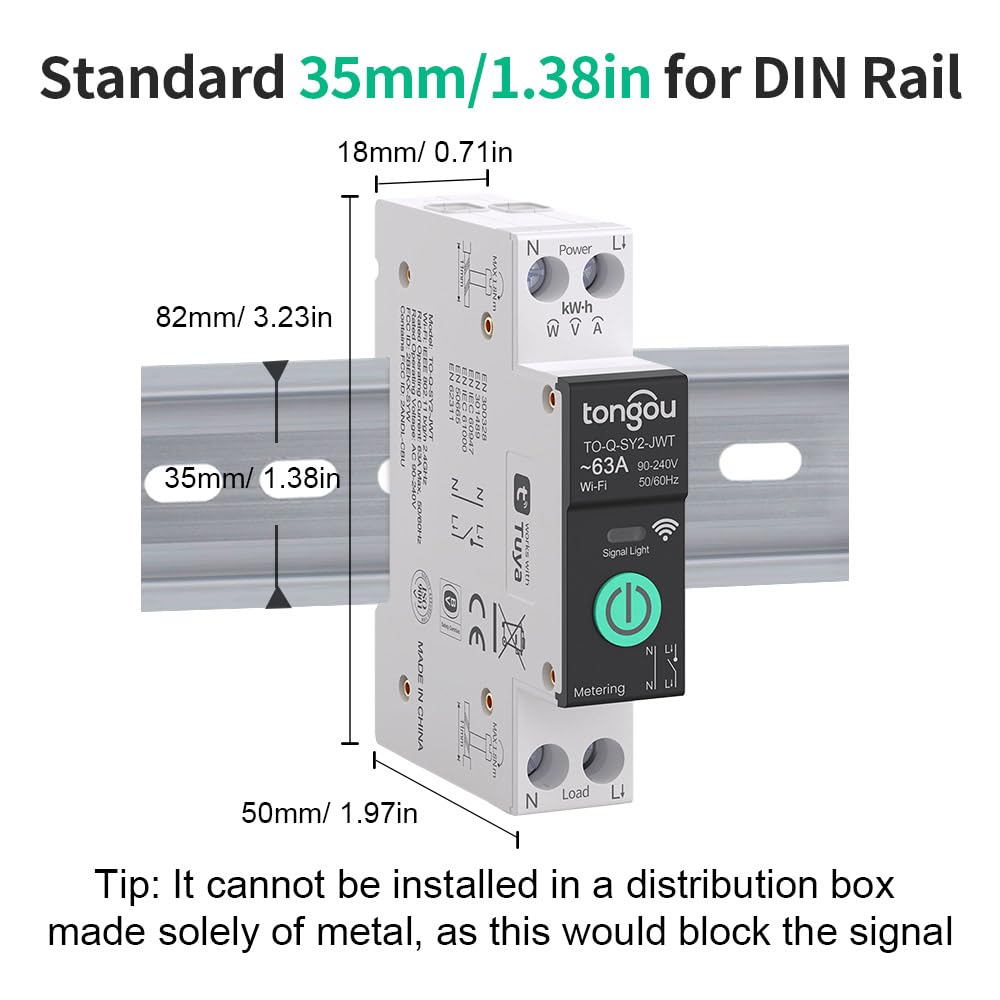
Figura 3.3: Dimensions of the TONGOU Smart DIN Rail Switch: 82mm (3.23in) height, 18mm (0.71in) width, 50mm (1.97in) depth. Note: It cannot be installed in a distribution box made solely of metal, as this would block the Wi-Fi signal.
4. Especificacions
| Característica | Especificació |
|---|---|
| Mode d'operació | ON-OFF |
| Valoració actual | 1 a 63 Amps (Adjustable in app) |
| Volum operatiu nominaltage | CA 90-240V, 50/60Hz |
| Tipus sense fil | WiFi 2.4 GHz |
| Sobrevoltage Rang | 220~265V |
| Baix voltage Rang | 76~240V (110V not applicable) |
| Poles Description | 1P+N (N pole cannot be cut off) |
| Max Wiring Capacity (Power/Load) | 10 mm² |
| Tipus de canvi | Smart Switch, Latching Relay |
| Material | Nylon PA66 (Flame-retardant) |
| Material de contacte | Relay Contacts: Silver |
| Dimensions de l'article (L x A x A) | 3.54 x 0.79 x 3.15 polzades (90 x 20 x 80 mm) |
| Tipus de muntatge | Muntatge sobre carril DIN |
| Tipus de controlador | Amazon Alexa, Google Assistant |
| Mètode de control | Aplicació, comandament a distància, veu |
| Wattage | 15120 watts (màx.) |
| Interval de temperatura de funcionament | De 40 a 100 graus Celsius |
| Classificació de protecció internacional | IP20 |
| Certificacions | CE, FCC |
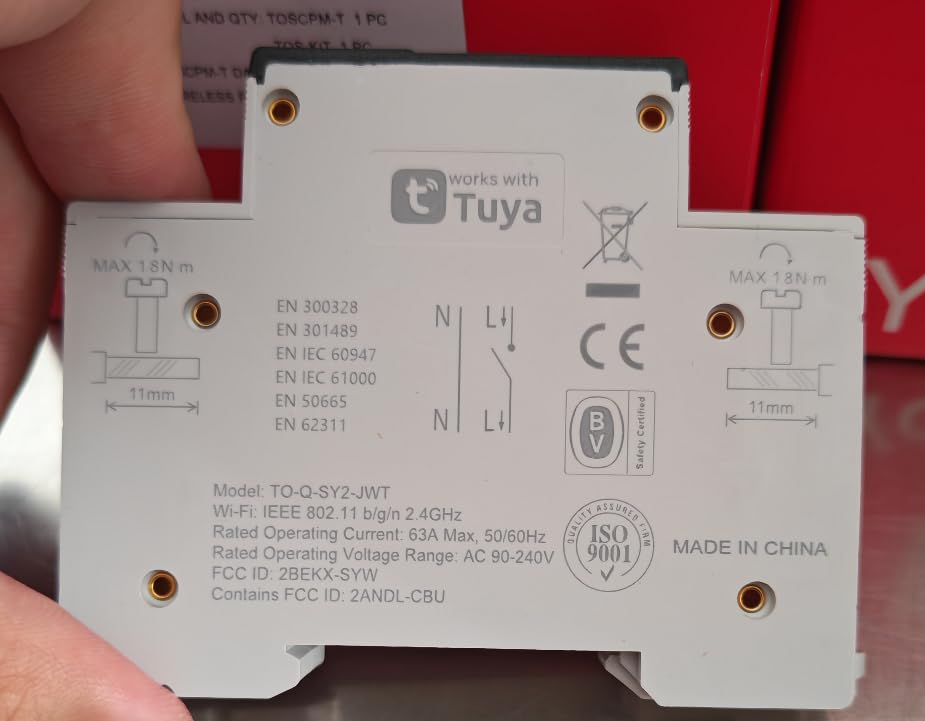
Figura 4.1: posterior view of the TONGOU Smart DIN Rail Switch, showing technical specifications, wiring terminals, and certifications.
5. Configuració
5.1. Instal·lació física i cablejat
The TONGOU Smart DIN Rail WiFi Switch is designed for easy installation. Ensure all power is OFF before proceeding with wiring.
- Mount the switch onto a standard DIN rail.
- Connect the power supply (Line and Neutral) to the 'Power' terminals (L and N) at the top of the switch.
- Connect the load (appliance) to the 'Load' terminals (L and N) at the bottom of the switch.
- Ensure all cables are securely inserted and screws are tightened. The maximum wiring capacity for both power and load sides is 10 mm².

Figura 5.1: Example wiring diagram for the TONGOU Smart DIN Rail Switch, showing connections to a circuit breaker and load. This device is 1P+N, meaning the neutral pole cannot be cut off.
5.2. Instal·lació de l'aplicació i emparellament de dispositius
To control the smart switch, you need to install the 'Smart Life' or 'Tuya' app on your smartphone. The app is available on the App Store (iOS) and Google Play (Android).
- Baixeu i instal·leu el Aplicació Smart Life or Tuya App.
- Registreu-vos o inicieu sessió al vostre compte.
- Ensure your mobile device is connected to a 2.4GHz Wi-Fi network. The smart switch only supports 2.4GHz Wi-Fi.
- Press and hold the multifunctional button on the smart switch for 5-10 seconds until the LED indicator flashes quickly. This indicates the device is in pairing mode.
- In the app, tap 'Add Device' (usually a '+' icon) and follow the on-screen instructions to discover and add the 'WiFi Din Rail Switch'.
- Introduïu la contrasenya de la xarxa Wi-Fi quan se us demani.
- Once successfully added, the LED indicator on the switch will turn solid blue.

Figura 5.2: Step-by-step guide for connecting the smart switch to the Smart Life/Tuya app, including pressing the button for pairing, scanning QR code (if applicable), and entering Wi-Fi details.
Vídeo 5.1: Official video demonstrating the network configuration steps for the TONGOU 1P+N Smart Wi-Fi Switch, including mobile app connection and pairing process.
6. Instruccions de funcionament
Once the smart switch is successfully paired with the app, you can utilize its various smart features.
6.1. Control remot mitjançant l'aplicació
Control your connected appliances from anywhere using the Smart Life/Tuya app. Simply tap the switch icon in the app to turn the device ON or OFF.

Figura 6.1: Illustration of remote control functionality, allowing users to turn devices on or off through the mobile application.
6.2. Control per veu
The smart switch is compatible with Amazon Alexa and Google Assistant. Link your Smart Life/Tuya account to your voice assistant app to enable voice commands.
- Example Ordres:
"Alexa, turn off the lights."
"Hey Google, turn on the fan."

Figura 6.2: Demonstrates voice control capabilities with Amazon Alexa and Google Assistant, allowing hands-free operation of connected devices.
6.3. Power Monitoring
The app provides real-time monitoring of power consumption, load current, load voltage, and load power. You can also view historical electricity consumption data by hour, day, month, and year.

Figura 6.3: App interface showing real-time power data (Power, Voltage, Current) and historical electricity statistics (Total Ele, Today Ele) over different time periods.

Figura 6.4: Un altre view of the power monitoring feature, displaying electricity statistics over daily, monthly, and yearly periods.
6.4. Funcions de temporització
The smart switch offers various timing modes to automate your appliances:
- Horari: Set specific ON/OFF times for your devices.
- Compte enrere: Configureu un temporitzador perquè el dispositiu s'apagui després d'un temps especificat.
- Circular: Program the device to turn ON/OFF repeatedly during a set period.
- Astronomical Timing: Use sunrise/sunset times to automate device operation.

Figura 6.5: App interface for setting up various timing modes, including Schedule, Sunrise, Sunset, and Circulate.

Figura 6.6: Schedule timing setup.

Figura 6.7: Countdown timer setup.

Figura 6.8: Circulate timing setup.

Figura 6.9: Astronomical timing setup.
6.5. Alarm Settings and Protections
The smart switch offers multiple protection features configurable via the app:
- High CPU Temperature Protection: Set a threshold (40-100°C) to trigger an alarm or trip the breaker.
- High Power Protection: Set a threshold (1-26KW) to trigger an alarm or trip the breaker.
- Protecció contra sobreintensitat: Set a threshold (1-63A) to trigger an alarm or trip the breaker.
- Sobrevoltage Protecció: Set a threshold (220-265V) to trigger an alarm or trip the breaker.
- Baix voltage Protecció: Set a threshold (76-240V) to trigger an alarm or trip the breaker.

Figura 6.10: App interface for configuring alarm settings, including setting thresholds for various protections and enabling/disabling the tripping switch.

Figura 6.11: Example of an alarm notification in the app when a threshold is exceeded, without automatic tripping.

Figura 6.12: Example of an alarm notification in the app when a threshold is exceeded, with automatic tripping enabled.
6.6. Potència Outage Memòria
The device is equipped with a power outage memory function. In the event of a power interruption, the switch will remember its last ON/OFF status and restore it once power is re-established.

Figura 6.13: Illustration demonstrating the power outage memory feature, showing the device restoring its previous state after a power interruption.
7. Manteniment
To ensure optimal performance and longevity of your TONGOU Smart DIN Rail WiFi Switch, follow these general maintenance guidelines:
- Neteja: Periodically wipe the device with a soft, dry cloth. Do not use harsh chemicals or abrasive cleaners.
- Inspecció: Regularly check the wiring connections to ensure they remain secure.
- Actualitzacions de firmware: Keep the Smart Life/Tuya app updated to receive the latest firmware for the switch, which may include performance improvements and new features.
8. Solució De Problemes
If you encounter issues with your smart switch, refer to the following common troubleshooting steps:
- El dispositiu no es connecta a la Wi-Fi:
- Ensure your Wi-Fi network is 2.4GHz. The device does not support 5GHz Wi-Fi.
- Check the LED indicator status (refer to Figure 3.2). If it's black, the network is not connected. If it's flashing blue, it's in pairing mode.
- Make sure the device is within range of your Wi-Fi router. - Problemes de control d'aplicacions:
- Verify your phone has an active internet connection.
- Ensure the Smart Life/Tuya app is up to date.
- Try restarting the app or your phone. - El control per veu no funciona:
- Confirm that your Smart Life/Tuya account is correctly linked to Amazon Alexa or Google Assistant.
- Check your voice assistant device's internet connection. - El dispositiu no respon:
- Check the power supply to the switch.
- If the device is completely unresponsive, try power cycling it by turning off the main circuit breaker for a few seconds and then turning it back on.

Figura 8.1: The device features automatic Wi-Fi reconnection, attempting to re-establish connection if the network is temporarily lost.

Figura 8.2: Illustration suggesting an optimal Wi-Fi range of approximately 100 feet for reliable device operation.
9. Garantia i Suport
Per obtenir informació sobre la garantia o assistència tècnica, consulteu la documentació inclosa amb la compra o poseu-vos en contacte directament amb el venedor. Conserveu el rebut de compra com a comprovant de compra.