
1. Introducció
The Philips GoSure 5101 Dash Cam is designed to provide reliable and high-quality video recording for your vehicle. Equipped with a 2K QHD 1600p Sony STARVIS IMX335 sensor and a 135° wide-angle lens, it captures clear footage day and night. This manual provides detailed instructions for installation, operation, and maintenance of your dash cam.
2. Què hi ha a la caixa
Desembaleu la caixa amb cura i assegureu-vos que hi hagi tots els elements:
- Philips GoSure 5101 Dash Camera
- Cable de càrrega
- Cigar Jack (Car Charger)
- Manual d'usuari

Image: Contents of the Philips GoSure 5101 Dash Cam box.
Vídeo: Una breu presentacióview demonstrating the unboxing and contents of the Philips GoSure 5101 Dash Cam.
3. Producte acabatview
The Philips GoSure 5101 features a compact design with a 3-inch LCD display for easy viewing and menu navigation. The main camera lens is equipped with an F2.0 aperture for optimal light capture. It includes a built-in microphone for audio recording and a USB port for power and data transfer.

Image: The Philips GoSure 5101 Dash Cam highlighting its 135-degree wide-angle lens and coverage of three lanes.
4. Instal·lació
Follow these steps for proper installation of your dash cam:
- Neteja el parabrisa: Assegureu-vos que la zona del parabrisa on es muntarà la càmera del salpicader estigui neta i seca.
- Enganxeu el muntatge: Remove the protective film from the detachable adhesive base of the mount. Firmly press the mount onto the chosen location on your windshield, ideally behind the rearview mirall per a una òptima view i una obstrucció mínima.
- Connecteu la Dash Cam: Feu lliscar la càmera del salpicader sobre el suport fins que encaixi al seu lloc.
- Connectar l'alimentació: Connect the charging cable to the dash cam and route it along the edge of the windshield and dashboard to the cigar jack (car charger). Plug the cigar jack into your vehicle's 12V power outlet.
- Ajust d'angle: Power on your vehicle to activate the dash cam. Adjust the camera angle to ensure it captures the road ahead clearly, covering the desired field of view.

Image: Demonstrating the easy installation process of the dash cam on a car windshield.
5. Configuració inicial
Before first use, insert a compatible microSD card (not included) into the designated slot on the dash cam. The device supports up to 256GB microSD cards. Format the card through the dash cam's settings menu for optimal performance. The dash cam will automatically power on and off with your car's ignition.
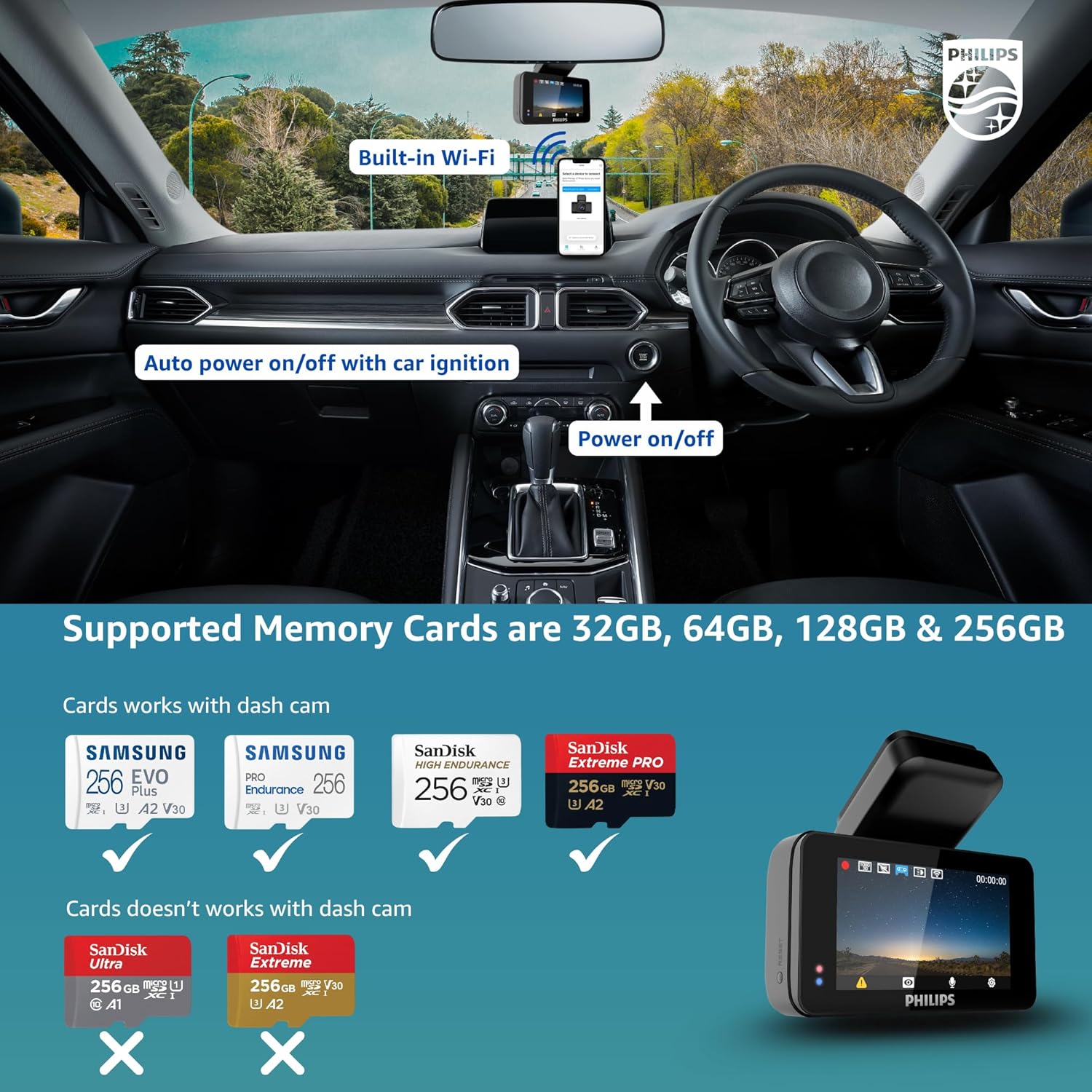
Image: Dash cam installed on a car dashboard, illustrating compatible and incompatible memory card types.
6. Instruccions de funcionament
6.1. Basic Recording (Loop Recording)
The dash cam automatically begins recording when powered on. It uses loop recording, continuously overwriting the oldest files amb menjar noutage once the memory card is full. This ensures uninterrupted recording without manual intervention.
6.2. Sensor G (enregistrament d'emergència)
The built-in 3-axis G-Sensor detects sudden impacts or collisions. When an event is detected, the current footage is automatically locked and saved in a secure folder, preventing it from being overwritten by loop recording. This preserves crucial evidence.

Image: Dash cam in emergency recording mode, showing G-Sensor activation and app connectivity.
6.3. Visió nocturna
Equipped with a Sony STARVIS IMX335 sensor and Wide Dynamic Range (WDR) technology, the dash cam provides superior night vision. It enhances clarity in low-light conditions, making details like license plates more visible even at night.

Image: Night and day clarity comparison, demonstrating the dash cam's ability to capture clear license plates at night.

Image: Night vision performance with WDR, showing enhanced detail compared to an ordinary shot.
6.4. Control per veu
The GoSure 5101 supports voice commands for hands-free operation. You can instruct the dash cam to take a picture, lock the current video, open the recorder, or close the recorder, allowing you to focus on driving.

Image: Voice control features of the dash cam, enabling hands-free operation for various functions.
6.5. Wi-Fi Connectivity & App Usage
The dash cam features built-in Wi-Fi, allowing you to connect it to your smartphone via the GoSure Safe mobile app. The app provides a user-friendly interface to view viu footage, download recorded videos, manage settings, and review emergency clips directly on your phone.

Image: The GoSure Safe app interface on a smartphone, showing various settings and video management options.
7. Funcions avançades
7.1. ADAS Alerts
The dash cam includes Advanced Driver-Assistance Systems (ADAS) features such as collision detection, buffered motion detection, and driver fatigue alerts to enhance driving safety.

Image: Driver safety and ADAS alerts, including collision detection and driver fatigue warning.
7.2. Resistència a la temperatura
The Philips GoSure 5101 is designed to operate reliably in a wide range of temperatures, from -10°C to 60°C, making it suitable for various climates.
8. Manteniment
- Neteja: Use a soft, dry cloth to clean the camera lens and screen. Avoid abrasive cleaners.
- Targeta de memòria: Regularly format your microSD card (at least once a month) to maintain optimal performance and prevent data corruption.
- Actualitzacions de firmware: Check the Philips website or the GoSure Safe app for available firmware updates to ensure your dash cam has the latest features and improvements.
9. Solució De Problemes
| Problema | Causa possible | Solució |
|---|---|---|
| Dash cam does not power on | Sense font d'alimentació; connexió fluixa | Check car charger connection; ensure vehicle ignition is on. |
| La gravació s'atura inesperadament | Memory card full or corrupted; incompatible memory card | Format the memory card; replace with a compatible, high-speed card. |
| Poca qualitat de vídeo | Dirty lens; incorrect resolution settings | Clean the lens; adjust video resolution in settings. |
| Problemes de connexió Wi-Fi | Incorrect password; too far from phone | Ensure correct Wi-Fi password; keep phone close to the dash cam. |
10. Especificacions
| Característica | Detall |
|---|---|
| Model | GS5101 |
| Resolució de captura de vídeo | 1600p (2K QHD) |
| Sensor d'imatge | Sony STARVIS IMX335 |
| Viewangle ing | 135 graus |
| Mida de la pantalla | 3 polzades |
| Tipus de visualització | LCD |
| Característiques especials | App Control, Built-In Display, Built-In Microphone, Built-In WiFi, G-Sensor, Loop Recording, Night Vision, Voice Control |
| Tecnologia de connectivitat | Wi-Fi |
| Tipus de suport compatible | MP4 |
| Tipus de memòria flash | microSD (up to 256GB, not included) |
| Temperatura de funcionament | -10 °C a 60 °C |
| Pes de l'article | 350 g |
| Dimensions del producte | 7 x 6 x 5 cm |
11. Garantia i Suport
Per obtenir informació sobre la garantia i l'assistència al client, consulteu la pàgina oficial de Philips. weblloc web o poseu-vos en contacte amb el seu servei d'atenció al client. Conserveu el rebut de compra com a comprovant de compra per a reclamacions de garantia.