
1. Producte acabatview
The VCELINK 8K Short HDMI Extender Cable is designed to extend the length of your existing HDMI cables, providing a convenient solution for insufficient cable reach in various setups. This male-to-female adapter supports high-resolution video and audio transmission, making it ideal for connecting a wide range of devices to your displays.

This image displays two short HDMI extender cables, each featuring a male HDMI connector on one end and a female HDMI port on the other, designed for extending existing HDMI connections.
2. Característiques clau
- HDMI Cable Extension: Extends existing HDMI cables, resolving issues of insufficient cable length. Supports mirroring and extended display modes.
- High-Resolution HDMI 2.1: Supports resolutions up to 7680 x 4320 (8K@60Hz) and 4K@120Hz/144Hz. Compatible with HDCP 2.2/2.3 and dynamic HDR for precise details and sharper images.
- Alta transmissió de dades: Achieves data transmission speeds of up to 48Gbps. Supports VRR (Variable Refresh Rate) and QFT (Quick Frame Transport) functions for a smooth and immersive experience. Backward compatible with HDMI 2.0/1.4.
- Flexible & Safe Design: Double-covered with flexible PVC and nylon braid for resistance against bending, abrasion, and breakage. Ideal for tight spaces like behind wall-mounted TVs.
- Construcció duradora: Features an aluminum alloy shell and nylon braided shielding for multiple layers of protection against electromagnetic interference. Gold-plated connectors are corrosion-resistant and durable.
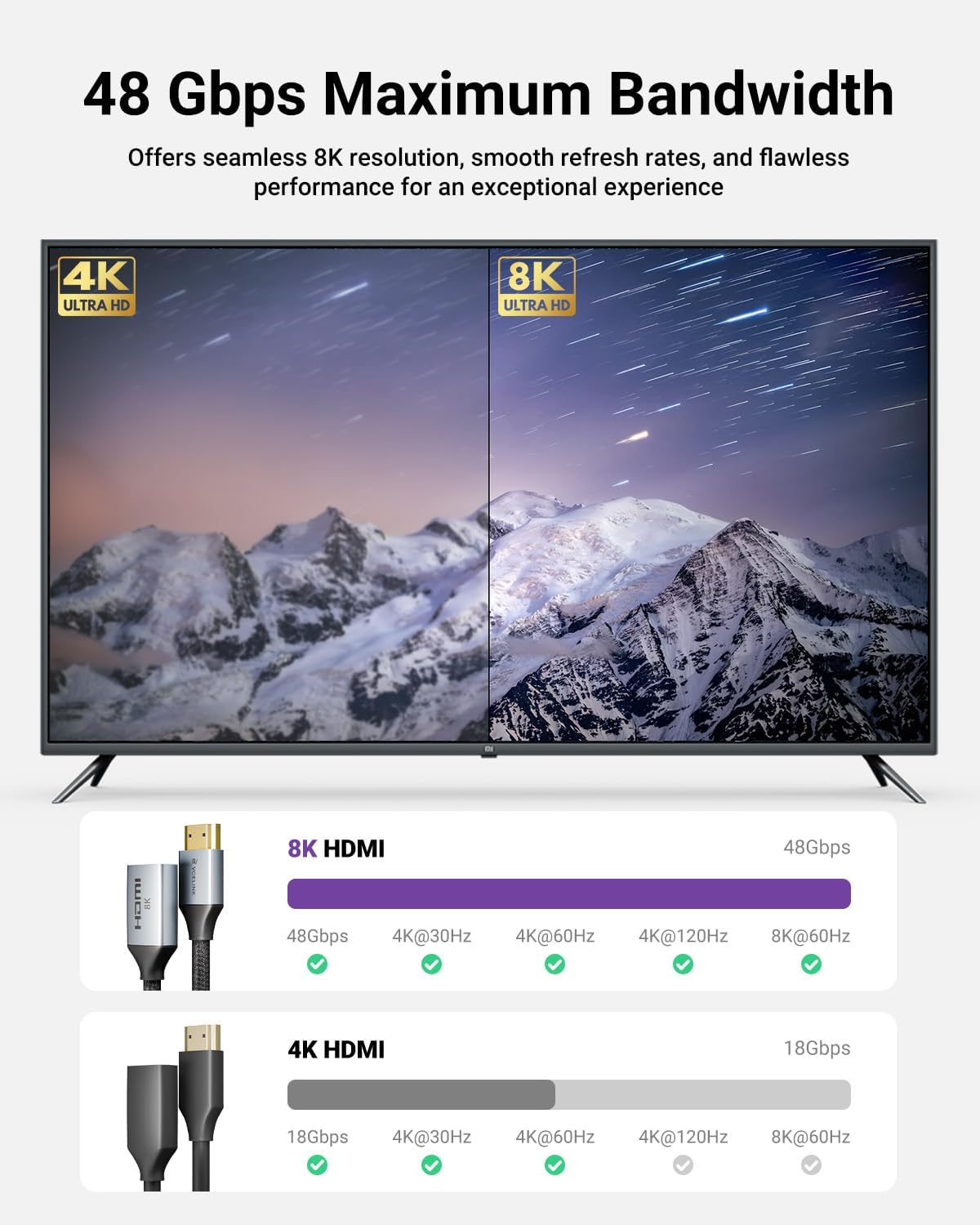
This image illustrates the difference in bandwidth and supported resolutions between 4K and 8K HDMI cables, highlighting the 48Gbps capability of the 8K extender.

This image showcases the design elements contributing to the cable's durability and flexibility, including the aluminum alloy case, gold-plated connectors, and flexible nylon cable.

This diagram details the internal structure of the cable, illustrating its triple shielding layers, including nylon braid, PVC jacket, braid, aluminum foil shields, and copper wire, designed to protect against EMI interference.
3. Configuració i instal·lació
The VCELINK 8K Short HDMI Extender Cable is designed for simple plug-and-play installation. Follow these steps to set up your connection:
- Identify the HDMI port on your source device (e.g., TV stick, game console, laptop) and your display device (e.g., HDTV, monitor, projector).
- Connect the male end of the HDMI extender cable into the HDMI input port of your display device.
- Connect your existing HDMI cable (from your source device) into the female end of the HDMI extender cable.
- Assegureu-vos que totes les connexions estiguin segures per evitar la pèrdua de senyal.

This image demonstrates practical applications of the HDMI extension cable, showing its use with an HDTV, a TV stick, and game consoles to provide flexible and convenient connections.
Video 1: VCELINK 8K HDMI Extension Cable Overview
This video provides a visual demonstration of the VCELINK 8K HDMI Extension Cable, showcasing its features, ease of connection, and how it helps manage cables in tight spaces, as well as its compatibility with various devices.
4. Instruccions de funcionament
Once connected, the HDMI extender cable operates passively, transmitting audio and video signals between your devices. No additional software or power is required.
- Mode mirall: Your display will show the same content as your source device.
- Mode estès: Your display will act as a second screen, extending your desktop space.
- Mode de joc: Enjoy seamless gaming with high refresh rates and low latency when connected to compatible gaming consoles and displays.
Ensure your source and display devices are configured to output and receive the desired resolution and refresh rate for optimal performance (e.g., 8K@60Hz or 4K@120Hz).

This image depicts a family enjoying high-quality audio and video content, emphasizing the cable's support for 3D, eARC, Dolby Atmos, Dolby Vision, 8K 60Hz, 4K 120Hz, and DTS:X technologies.
5. Compatibilitat
The VCELINK 8K Short HDMI Extender Cable offers wide compatibility with various devices that feature a standard HDMI connector. It is designed to extend the distance between your source and display, providing greater flexibility for wiring and setup.
Dispositius d'entrada compatibles:
- PC (Personal Computer)
- PS4, PS5 (PlayStation Consoles)
- Xbox360 (Xbox Console)
- Roku TV Stick, Roku Streaming Player
- Other TV Sticks (e.g., Fire TV Stick)
- Nintendo Switch
- Portàtils
- Reproductors de Blu-ray
- Satellite Boxes, Cable TV Boxes
- Reproductors de DVD
- Any device that accepts a standard HDMI male connector.
Compatible Output Devices:
- HDTVs (High-Definition Televisions)
- Monitors
- Projectors
- Sistemes de cinema a casa
- PC Stereo Speakers (for audio output)

This diagram visually represents the broad compatibility of the HDMI extender, listing common input devices such as Xbox, TV Stick, PS4/PS5, Laptop, Switch, Roku Streaming Player, and Blu-ray Player, along with output devices like TV, Monitor, and Projector.
6. Especificacions
| Característica | Descripció |
|---|---|
| Número de model | HD036-2P |
| Tipus de connector | HDMI Male to HDMI Female |
| Versió HDMI | HDMI 2.1 (Backward Compatible) |
| Resolucions suportades | 8K@60Hz, 4K@120Hz/144Hz |
| Velocitat de transmissió de dades | Fins a 48 Gbps |
| Suport HDR | Dynamic HDR |
| Suport HDCP | HDCP 2.2 / 2.3 |
| Característiques addicionals | VRR, QFT, eARC, 3D |
| Longitud del cable | 0.6 peus (aprox. 7.2 polzades) |
| Material | Aluminum Alloy Shell, Nylon Braided Shielding, Gold-Plated Connectors |
| Color | Negre |
| Pes de l'article | 1.41 unces |
| Dimensions del paquet | 6.57 x 4.57 x 0.59 polzades |
7. Manteniment
To ensure the longevity and optimal performance of your HDMI extender cable, follow these simple maintenance guidelines:
- Manejar amb cura: Eviteu doblegar, girar o estirar excessivament el cable, especialment a prop dels connectors.
- Mantenir net: Periodically wipe the cable and connectors with a soft, dry cloth to remove dust and debris. Do not use liquid cleaners directly on the connectors.
- Emmagatzema correctament: When not in use, store the cable in a cool, dry place, away from direct sunlight and extreme temperatures. Avoid coiling the cable too tightly.
- Protegir els connectors: Keep the gold-plated connectors free from dirt and moisture. If possible, use dust caps when the cable is disconnected.
8. Solució De Problemes
If you encounter issues with your VCELINK 8K Short HDMI Extender Cable, try the following troubleshooting steps:
Sense senyal o senyal intermitent:
- Comproveu les connexions: Ensure both ends of the extender cable and your main HDMI cable are securely plugged into their respective ports.
- Verify Source/Display: Confirm that your source device is powered on and outputting a signal, and your display device is set to the correct HDMI input.
- Test Without Extender: Temporarily connect your source device directly to the display using only your main HDMI cable to rule out issues with the source, display, or main cable.
- Reinicieu els dispositius: Power cycle both your source and display devices.
Poor Picture/Audio Quality:
- Check Resolution Settings: Ensure your source device's output resolution matches your display's capabilities.
- Longitud del cable: For optimal performance, especially with 8K resolutions, keep the total cable length (main HDMI cable + extender) within recommended limits (typically under 2 meters for HDMI 2.1).
- Interferència: While the cable is shielded, ensure it is not running parallel to power cables or other sources of strong electromagnetic interference.
9. Garantia i Suport
VCELINK stands by the quality of its products. This HDMI extender cable comes with an 18 mesos de garantia des de la data de compra.
If you have any questions, suggestions, or require technical assistance, please do not hesitate to contact our customer support team. We are committed to providing the best experience for all our users.
For support, please refer to the contact information provided with your product packaging or visit the official VCELINK weblloc.