
Introducció
This manual provides essential instructions for the safe and efficient use of your Aiwa AW-KF4 Portable Bluetooth Speaker. Please read this manual thoroughly before using the product and retain it for future reference.
The Aiwa AW-KF4 is a portable Bluetooth speaker designed for robust audio performance with dynamic LED lighting, a rechargeable battery, and resistance to water and dust (IPX6). It offers versatile connectivity options including Bluetooth, USB, and AUX input.
Contingut del paquet
Carefully unpack your speaker and ensure all items are present and in good condition. If any items are missing or damaged, please contact your retailer.
- Aiwa AW-KF4 Portable Bluetooth Speaker
- Cable de càrrega USB-C
- Manual d'instruccions

Image: The Aiwa AW-KF4 speaker in its retail packaging, showing the speaker and branding.
Producte acabatview
The Aiwa AW-KF4 speaker features a compact, cylindrical design with integrated controls and dynamic LED lighting. It is built for portability and durability.
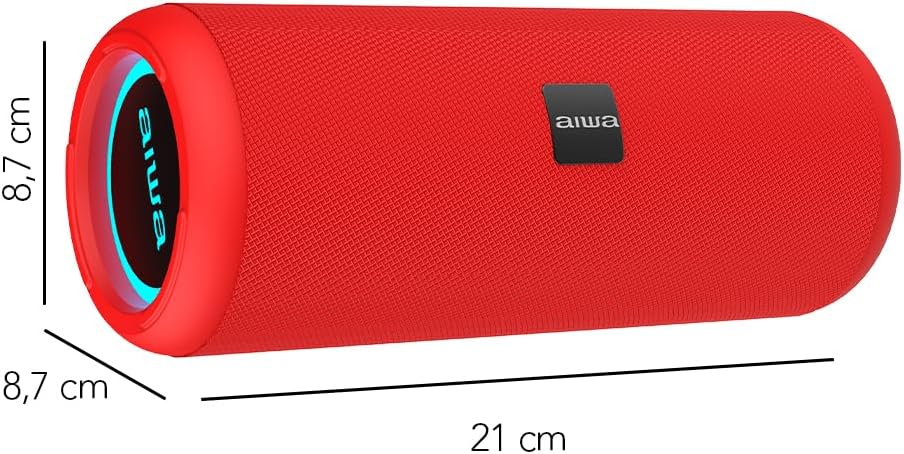
Image: A red Aiwa AW-KF4 speaker showing its approximate dimensions: 21 cm in length and 8.7 cm in diameter.

Image: Two Aiwa AW-KF4 speakers (red and black) illustrating key features: 20W output, LED lighting, TWS function, IPX6 water resistance, Bluetooth, USB, and SD card compatibility.

Image: A collage showing the Aiwa AW-KF4 speaker in various outdoor settings, emphasizing its IPX6 water resistance, up to 10 hours of battery life, and hands-free calling capability with an integrated microphone.
Configuració
1. Carregant l’altaveu
Before first use, fully charge the speaker. Use the provided USB-C cable to connect the speaker to a compatible USB power adapter (not included) or a computer's USB port.
- El llum indicador de càrrega s'il·luminarà durant la càrrega.
- Una càrrega completa triga aproximadament 3 hores.
- Once fully charged, the indicator light may change or turn off.
A fully charged battery provides up to 10 hours of playback, depending on volume level and usage.
2. Encendre/apagar
- To power on: Press and hold the Power button for a few seconds until you hear an audible prompt and the LED lights activate.
- To power off: Press and hold the Power button for a few seconds until you hear an audible prompt and the LED lights turn off.
Instruccions de funcionament
1. Emparellament Bluetooth
The speaker will automatically enter Bluetooth pairing mode when powered on for the first time or if no device is connected. The LED indicator will flash, indicating it's ready to pair.
- Assegureu-vos que l'altaveu estigui encès i en mode d'emparellament.
- Activa el Bluetooth al teu telèfon intel·ligent, tauleta o altre dispositiu d'àudio.
- Cerca "AW-KF4" in the list of available Bluetooth devices.
- Select "AW-KF4" to connect. You will hear a confirmation sound once paired.
- The LED indicator will stop flashing and remain solid.
L'altaveu té un abast Bluetooth de fins a 10 metres (33 peus).
2. Funció estèreo sense fil veritable (TWS)
The TWS function allows you to pair two Aiwa AW-KF4 speakers together for a stereo sound experience.

Image: A visual representation of the TWS (True Wireless Stereo) function, showing two Aiwa AW-KF4 speakers being used together for synchronized sound.
- Ensure both AW-KF4 speakers are powered on and not connected to any Bluetooth device.
- On one speaker (this will be the primary speaker), press and hold the TWS button (if available, or a designated button as per specific model instructions) until you hear a pairing tone.
- Els dos altaveus es connectaran automàticament entre si. Un cop connectats, sonarà un to de confirmació.
- Ara, connecteu el dispositiu Bluetooth a l'altaveu principal tal com es descriu a la secció "Emparellament Bluetooth".
Note: Refer to the specific button layout on your speaker for the exact TWS pairing button.
3. USB and AUX Playback
- Reproducció USB: Inseriu una unitat flash USB que contingui àudio files into the USB port. The speaker will automatically detect and begin playing music from the drive.
- Reproducció AUX: Connect an audio device using a 3.5mm AUX cable (not included) to the AUX input port. The speaker will switch to AUX mode.
4. Llums LED
The speaker features dynamic LED lights. These lights typically activate automatically when the speaker is powered on. Specific controls for changing light modes or turning them off may be available via a dedicated button on the speaker (refer to your speaker's button layout).
5. Controls
The speaker features tactile controls for various functions:
- Botó d'encesa: Manteniu premut per encendre/apagar.
- Botó Reproduir/Pausa: Premeu per reproduir o posar en pausa la música.
- Augment de volum / pista següent: Premeu per augmentar el volum. Mantingueu premut per a la pista següent.
- Baixada de volum / pista anterior: Premeu per baixar el volum. Mantingueu premut per passar a la pista anterior.
- Botó de mode: Press to switch between Bluetooth, USB, and AUX modes.
- Botó de trucada (si escau): Press to answer/end calls. Press and hold to reject calls.
Note: Button functions may vary slightly. Consult the diagrams in your physical manual for precise button identification.
Manteniment
To ensure the longevity and optimal performance of your Aiwa AW-KF4 speaker, follow these maintenance guidelines:
- Neteja: Use a soft, dry cloth to clean the speaker's exterior. Do not use abrasive cleaners, solvents, or harsh chemicals.
- Resistència a l'aigua (IPX6): The speaker is resistant to strong water jets. It is not designed for submersion. Ensure all port covers are securely closed before exposing the speaker to water or dust. After exposure to water, wipe the speaker dry before charging.
- Emmagatzematge: Guardeu l'altaveu en un lloc fresc i sec, allunyat de la llum solar directa i de temperatures extremes.
- Cura de la bateria: To preserve battery life, charge the speaker regularly, even if not in frequent use. Avoid fully discharging the battery for extended periods.

Image: The Aiwa AW-KF4 speaker positioned near a pool, illustrating its IPX6 water resistance feature, suitable for outdoor and poolside use.
Resolució de problemes
Si teniu problemes amb l'altaveu, consulteu els problemes i solucions més comuns següents:
| Problema | Possible causa/solució |
|---|---|
| L'altaveu no s'encén. |
|
| No es pot emparellar per Bluetooth. |
|
| Sense so. |
|
| Distorsió del so. |
|
| L'emparellament TWS falla. |
|
Especificacions
| Nom del model | AW-KF4 (AWKF4B) |
| Marca | No |
| Potència de sortida dels altaveus | RMS de 20 Watts |
| Resposta de freqüència | 80 Hz (mínim especificat) |
| Tecnologia de connectivitat | Bluetooth 5.0, USB, AUX |
| Mode de sortida d'àudio | estèreo |
| Material de l'habitatge | Plàstic |
| Tipus d'altaveu | Woofer |
| Nivell de resistència a l'aigua | IPX6 (Resistant to strong water jets) |
| Interval Bluetooth | Fins a 10 metres (33 peus) |
| Micròfons | 1 (for hands-free calling) |
| Capacitat de la bateria | 2000 mAh d'ions de liti |
| Durada de la bateria | Up to 10 hours (varies with volume and usage) |
| Temps de càrrega | Aproximadament 3 hores |
| Entrada Voltage | 5 Volts |
| Impedància | 4 ohms |
| Mètode de control | Tactile Buttons |
| Dimensions (L x P) | Approx. 21 cm x 8.7 cm |
| Dispositius compatibles | Smartphones, tauletes |
| Origen | Xina |
Garantia i Suport
Your Aiwa AW-KF4 Portable Bluetooth Speaker comes with a Garantia del fabricant de 1 anys des de la data de compra. Aquesta garantia cobreix els defectes de fabricació en condicions d'ús normal.
La garantia no cobreix:
- Damage caused by misuse, abuse, negligence, or accident.
- Danys per reparacions o modificacions no autoritzades.
- Desgast normal.
For warranty claims or technical support, please contact your retailer or the official Aiwa customer service in your region. Please have your proof of purchase and product model number (AW-KF4) ready when contacting support.