
Introducció
Thank you for choosing the Amazon Basics Full-Size Wireless Keyboard and Mouse Combo. This product is designed to provide a comfortable and efficient computing experience with its reliable 2.4 GHz wireless connection. This manual will guide you through the setup, operation, maintenance, and troubleshooting of your new device.

Image: The Amazon Basics wireless keyboard and mouse combo, showcasing its ergonomic design, tilt legs for reduced hand strain, and contoured mouse grip for comfort and precision. It highlights 2.4 GHz wireless connectivity and compatibility with Windows operating systems.
Configuració
1. Desembalatge i instal·lació de la bateria
Carefully remove the keyboard and mouse from their packaging. The USB receiver is located inside the mouse's battery compartment.
- Ratolí: Open the battery compartment cover on the underside of the mouse. Insert one AA battery (included), ensuring correct polarity (+/-). Close the cover.
- Teclat: Open the battery compartment cover on the underside of the keyboard. Insert two AAA batteries (included), ensuring correct polarity (+/-). Close the cover.
2. Connexió del receptor USB
- Locate the 2.4 GHz USB receiver inside the mouse's battery compartment. Remove it.
- Connecteu el receptor USB a un port USB-A disponible de l'ordinador.
3. Engegada i connexió inicial
- Turn on the mouse using the On/Off switch located on its underside.
- The keyboard does not have a separate power switch; it activates when keys are pressed after battery installation.
- Your computer should automatically detect and install the necessary drivers. This is a plug-and-play device, so no additional software installation is required.
- Test the keyboard and mouse to ensure they are functioning correctly.
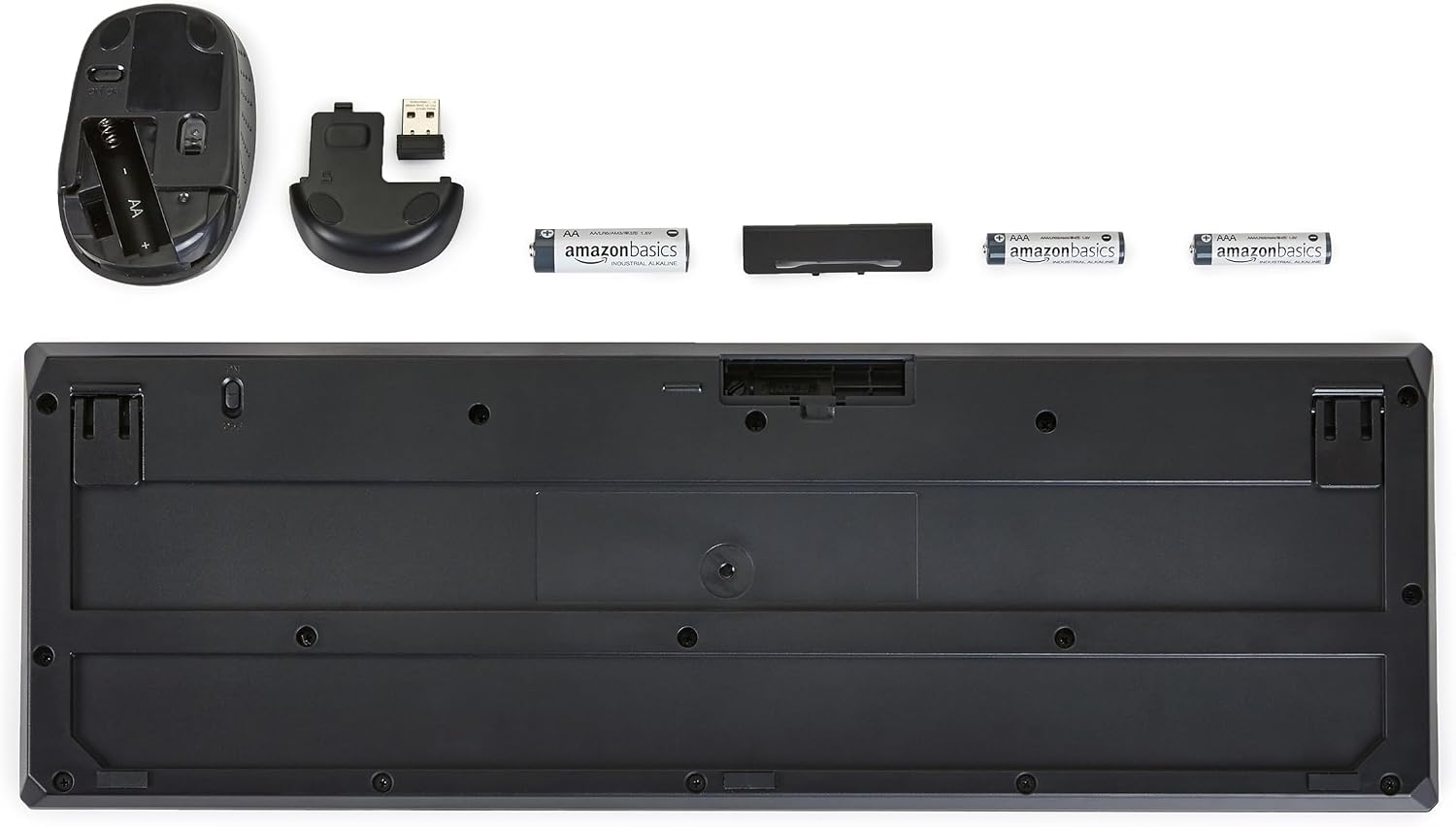
Image: The underside of the Amazon Basics wireless keyboard and mouse, showing the battery compartments, the location of the USB receiver within the mouse, and the included AA and AAA batteries.
Instruccions de funcionament
Ús del teclat
- The keyboard features a full-size Spanish layout, including a numeric keypad.
- Adjust the keyboard's tilt by extending the foldable legs on its underside for a more comfortable typing angle.
- Utilize the dedicated multimedia keys for quick access to volume control, playback, and other functions.
Ús del ratolí
- The mouse features a contoured design for comfortable grip and precise control.
- Use the left and right click buttons for primary and secondary functions.
- The scroll wheel allows for easy navigation through documents and web pàgines.

Image: The Amazon Basics wireless keyboard and mouse combo positioned on a desk, ready for use with a computer monitor, illustrating a typical setup for general computing tasks.

Imatge: Un primer pla view of a hand comfortably gripping and operating the Amazon Basics wireless mouse, highlighting its ergonomic design during active use.
Manteniment
Neteja
To maintain optimal performance and appearance, clean your keyboard and mouse regularly.
- Feu servir un drap suau, sec i sense borrissol per netejar les superfícies.
- Per a la brutícia persistent, lleugerament dampNetegeu el drap amb aigua o una solució de neteja suau. Eviteu l'excés d'humitat.
- Do not use abrasive cleaners, solvents, or aerosol sprays directly on the devices.
Canvi de bateria
Quan el rendiment del teclat o del ratolí es degrada (per exemple, resposta retardada, moviment erràtic del cursor), pot ser hora de substituir les piles.
- Ratolí: Substituïu la bateria AA.
- Teclat: Substituïu les dues piles AAA.
- Assegureu-vos sempre de la polaritat correcta quan inseriu piles noves.
- Eliminar les bateries usades de manera responsable d'acord amb la normativa local.
Resolució de problemes
If you encounter issues with your Amazon Basics Wireless Keyboard and Mouse Combo, refer to the following common solutions:
- No hi ha resposta del teclat ni del ratolí:
- Assegureu-vos que el ratolí estigui encès.
- Check if the batteries in both the keyboard and mouse are correctly installed and not depleted. Replace them if necessary.
- Verify that the USB receiver is securely plugged into a working USB-A port on your computer. Try a different USB port.
- Acosteu el teclat i el ratolí al receptor USB per descartar problemes d'abast.
- Reinicieu l'ordinador.
- Erratic Cursor Movement or Delayed Typing:
- This often indicates low battery power. Replace the batteries in the affected device.
- Ensure there are no large metallic objects or other wireless devices interfering with the 2.4 GHz signal between the receiver and the devices.
- Clean the mouse's optical sensor if cursor movement is inconsistent.
- Tecles específiques que no funcionen:
- Check for any physical obstructions under the key.
- Assegureu-vos que el teclat estigui net i lliure de brutícia.
- If only a few keys are affected, it might indicate a hardware issue.
- Dispositiu no reconegut per l'ordinador:
- Unplug the USB receiver, wait a few seconds, and plug it back in.
- Proveu de connectar el receptor a un port USB diferent.
- Ensure your operating system is compatible (Windows 2000, XP, Vista, 7, 8, 10/11, Android, Chrome OS, Linux).
Especificacions
| Marca | Conceptes bàsics d'Amazon |
| Número de model | MD023 |
| Color | Negre |
| Tecnologia de connectivitat | Sense fil de 2.4 GHz (receptor USB-A) |
| Disposició del teclat | Full-size, Spanish |
| Font d'alimentació | Bateries |
| Piles necessàries | Mouse: 1x AA; Keyboard: 2x AAA |
| Compatibilitat de sistemes operatius | Windows 2000, XP, Vista, 7, 8, 10/11; Android; Chrome OS; Linux |
| Dimensions del producte (teclat) | 45 x 21 x 4.4 cm (17.7 x 8.3 x 1.7 polzades) |
| Pes del producte | 570 g (1.26 lliures) |
| País d'origen | Xina |

Image: The Amazon Basics wireless keyboard displaying its overall dimensions of 45 cm in length and 21 cm in width.

Image: The Amazon Basics wireless mouse with its dimensions indicated: 3.7 inches (9.48 cm) in length, 2.2 inches (5.55 cm) in width, and 1.5 inches (3.9 cm) in height.
Informació de la garantia
This product is covered by the standard Amazon Basics warranty. For specific details regarding warranty coverage, duration, and terms, please refer to the warranty documentation included with your purchase or visit the Amazon Basics official weblloc.
Atenció al client
For further assistance, technical support, or to report any issues not covered in this manual, please contact Amazon Basics customer service. You can typically find contact information on the Amazon website under the 'Help' or 'Customer Service' sections, or by visiting the Amazon Basics brand store.
Assistència en línia: Visita Botiga bàsica d'Amazon