
1. Introducció i finalview
The WUBEN E1 is a versatile, portable LED ring light designed to enhance your smartphone photography and videography. Featuring a magnetic attachment system, it seamlessly integrates with MagSafe-compatible iPhones and can be used with other smartphones via an included magnetic ring. This compact device offers three distinct light modes (Warm, Natural, Cool) and stepless dimming, providing optimal illumination for various scenarios, from selfies and vlogs to product photography and general lighting needs. Its durable aluminum construction and USB Type-C rechargeable battery make it an ideal everyday carry (EDC) accessory.

Figure 1: WUBEN E1 Selfie Light in Camouflage Blue.
2. Contingut del paquet
Marqueu la casella per als elements següents:
- WUBEN E1 Selfie Light
- Cable de càrrega USB tipus C
- Magnetic Suction Ring (for non-MagSafe phones)
- Maleta de transport
- Manual d'usuari
Video 1: Unboxing and package contents of the WUBEN E1.
This video demonstrates the items included in the WUBEN E1 package, such as the light unit, charging cable, magnetic ring, and carrying case.
3. Característiques del producte
- Phone Flashlight: The WUBEN E1 is equipped with advanced SMD3030 LEDs, offering a maximum output of 300 lumens. It functions as a powerful, portable flashlight for various lighting needs.
- Cell Phone Selfie Light: Features 3 adjustable light modes (Warm Tone: 3000K-3500K, Natural Tone: 3500K-5000K, Cool Tone: 5000K-6000K) and stepless dimming from 10% to 100%. This allows for customized lighting for selfies, video recording, makeup application, and live streaming.
- Magnetic Phone Holder: Utilizes top-of-the-line N54 magnets for secure attachment to MagSafe-compatible devices (iPhone 12 series and above). It can also function as an adjustable phone stand, offering various viewangles d'ajust.
- Convenient USB Type-C Rechargeable: The E1 simplifies recharging with its USB Type-C port, ensuring quick and efficient power replenishment. A full charge takes approximately 50 minutes, providing up to 70 hours of battery life in 'Low' mode.
- Ideal for Everyday Carry: Weighing only 38 grams, its ultra-compact size and lightweight design make it easy to carry in pockets, purses, or attached to a keychain.

Figure 2: Multiple Light Modes and Brightness Adjustment.

Figure 3: Adjustable Mobile Phone Holder Functionality.
4. Configuració
4.1 Càrrega del dispositiu
Before first use, fully charge your WUBEN E1. Connect the provided USB Type-C cable to the charging port on the device and plug the other end into a compatible USB power source. The indicator light will show red during charging and turn blue when fully charged.

Figure 4: USB Type-C Fast Charging.
4.2 Attaching to Your Phone
The WUBEN E1 is designed for magnetic attachment to your smartphone.
- For MagSafe-compatible iPhones (iPhone 12 series and above): Simply align the WUBEN E1 with the MagSafe area on the back of your phone. The strong N54 magnets will securely attach the light.
- For other smartphones: Use the included magnetic suction ring. Peel off the adhesive backing from the magnetic ring and firmly attach it to the center of the back of your phone or phone case. Once the ring is in place, the WUBEN E1 can be magnetically attached to it.

Figure 5: Strengthened Magnetic Stability.
5. Instruccions de funcionament
5.1 Power On/Off and Locking
To prevent accidental activation, the WUBEN E1 has a lock feature. To unlock and power on the device, quickly press the control button 4 times. To power off, press the button once. To re-lock, quickly press the button 4 times again.
5.2 Adjusting Light Modes and Brightness
The WUBEN E1 offers flexible lighting control:
- Canvi de modes de llum: Press the control button once to cycle through the three light modes: Warm Tone, Natural Tone, and Cool Tone.
- Ajust de brillantor: Rotate the small dial on the side of the device to adjust the brightness from 10% to 100%.
Video 2: Demonstration of WUBEN E1's light modes and brightness adjustment.
This video illustrates how to switch between warm, natural, and cool light tones and adjust the brightness of the WUBEN E1.
5.3 Using as a Phone Stand
The WUBEN E1 features a flexible flip design that allows it to be used as a phone stand. Simply unfold the light to the desired angle (over 270 degrees of rotation) to prop up your phone for hands-free viewing in both portrait and landscape orientations.
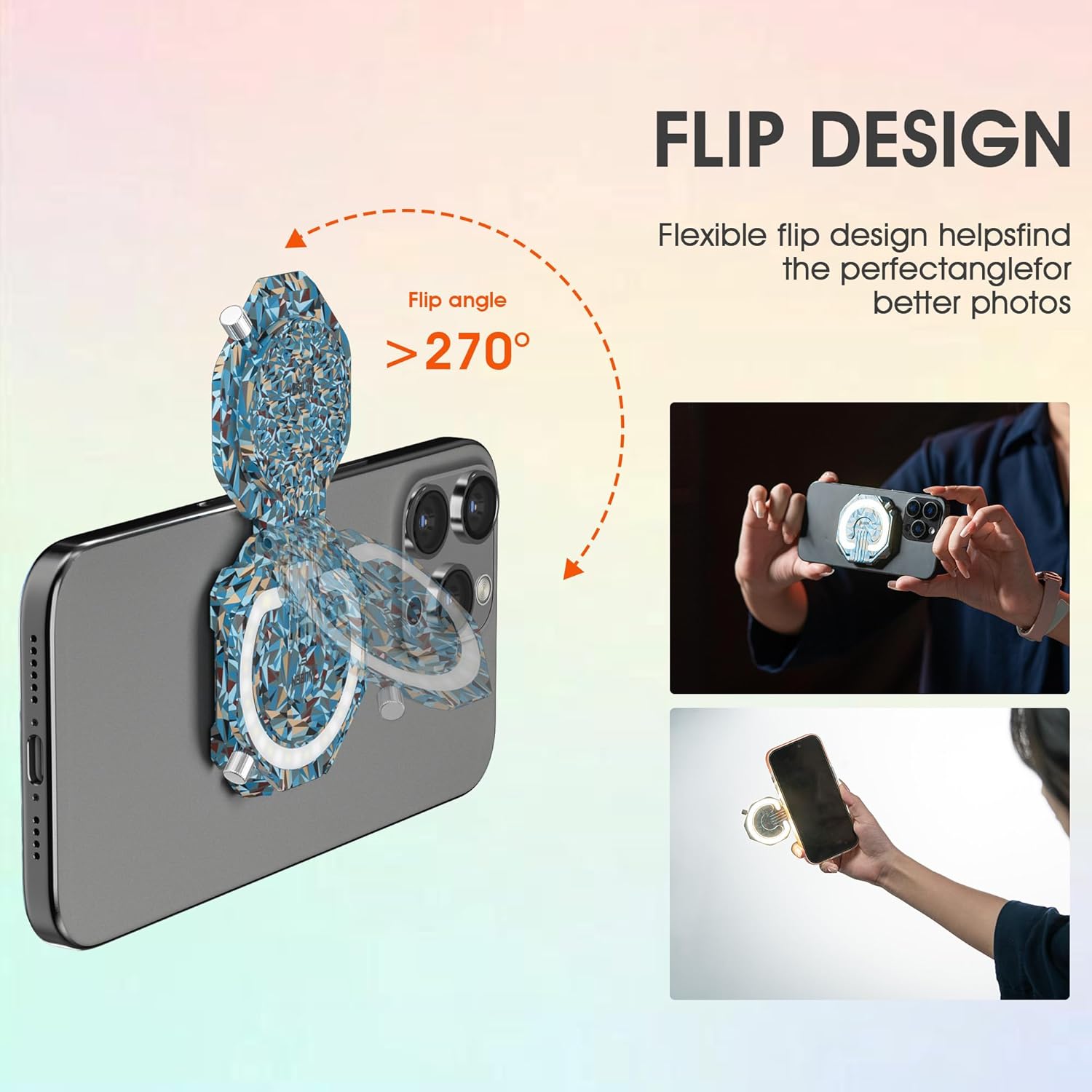
Figure 6: Flexible Flip Design for Phone Stand Functionality.
5.4 Versatile Lighting Applications
The WUBEN E1 can be used in various ways beyond just a selfie light:
- Llum d'ompliment: Attach it to your phone for improved lighting during video calls, vlogs, or product photography.
- Llanterna portàtil: Detach it from your phone and use it as a standalone flashlight for navigating dark areas, camping, or emergency situations.
- Magnetic Work Light: Its magnetic base allows it to be fixed onto any iron surface, providing hands-free illumination for tasks like working under a car hood or in a workshop.

Figure 7: Diverse Applications of the WUBEN E1.
6. Manteniment
6.1 Neteja
To maintain the performance and appearance of your WUBEN E1, wipe it regularly with a soft, dry cloth. Avoid using abrasive cleaners or solvents that could damage the surface or internal components.
6.2 Emmagatzematge
When not in use, store the WUBEN E1 in its provided carrying case to protect it from dust, scratches, and impacts. Store in a cool, dry place away from direct sunlight and extreme temperatures.
7. Solució De Problemes
| Problema | Causa possible | Solució |
|---|---|---|
| La llum no s’encén. | Device is locked or battery is low. | Quickly press the control button 4 times to unlock. Charge the device if the battery is low. |
| La fixació magnètica és feble. | Phone is not MagSafe compatible or magnetic ring is not properly installed. | Ensure your phone is MagSafe compatible or use the included magnetic suction ring. Make sure the ring is centered and securely attached to your phone or case. |
| La llum parpelleja o és inconsistent. | Bateria baixa o problema intern. | Charge the device fully. If the issue persists, contact customer support. |
8. Especificacions
| Característica | Detall |
|---|---|
| Marca | WUBEN |
| Número de model | E1 |
| Tipus de font de llum | LED (SMD3030) |
| Sortida de lumen màxima | 300 lúmens |
| Temperatura de color | 3000K-6000K (Warm, Natural, Cool) |
| Ajust de brillantor | 10%-100% de regulació gradual |
| Font d'alimentació | Funciona amb bateria |
| Port de càrrega | USB tipus C |
| Durada màxima de la bateria | 70 hours (in Low mode) |
| Material | Alumini |
| Pes de l'article | 5.3 unces (aproximadament 38 grams) |
| Dimensions del producte | 12"D x 4"W x 6"H (packaging dimensions, actual product is smaller) |
| Nivell de resistència a l'aigua | Not Water Resistant (IP65 mentioned in feature bullets, but 'Not Water Resistant' in specs. Will state 'Splash-proof' as per video, but advise caution.) |
Note: While some promotional materials indicate IP65, the official specifications list 'Not Water Resistant'. It is advisable to protect the device from direct water exposure. However, it is designed to be splash-proof as shown in promotional videos.
9. Garantia i Suport
9.1 Garantia limitada
The WUBEN E1 comes with a limited warranty. Please refer to the warranty information provided on the official WUBEN website or contact their customer service for specific details regarding coverage and duration.
9.2 Atenció al client
For any questions, technical assistance, or warranty claims, please contact WUBEN customer support through their official weblloc web o la informació de contacte que es proporciona a l'embalatge del producte. Conserveu el rebut de compra com a comprovant de compra.