
Introducció
This manual provides comprehensive instructions for the AIDITIYMI COV33662806 replacement infrared remote control. This remote is specifically designed to be compatible with a wide range of LG DVD Player models, offering a direct replacement solution without the need for complex programming or pairing procedures. Please read this manual carefully to ensure proper setup and operation of your new remote control.

Image: The AIDITIYMI COV33662806 replacement remote control, showing its full button layout.
Configuració
Instal·lació de la bateria
- Localitzeu el compartiment de la bateria a la part posterior del comandament a distància.
- Slide open the battery cover in the direction indicated by the arrow.
- Insert two (2) new AAA alkaline batteries, ensuring that the positive (+) and negative (-) terminals align correctly with the markings inside the compartment.
- Tanqueu la tapa de la bateria de manera segura fins que encaixi al seu lloc.

Image: The back of the remote control with the battery compartment open, showing where to insert two AAA batteries.
Primer ús
This remote control requires no programming or pairing. Once the batteries are correctly installed, the remote is ready for immediate use with compatible LG DVD players.
Instruccions de funcionament
Familiarize yourself with the functions of each button on your remote control:
- PODER: Turns the LG DVD player on or off.
- OBRIR/TANCAR: Opens or closes the disc tray of the DVD player.
- Botons numèrics (0-9): Used to select specific tracks, chapters, or to input numerical values.
- REPRODUIR (►): Initiates disc playback.
- PAUSE/STEP (▮▮): Pauses playback or advances frame by frame during pause.
- ATURAR (■): Halts disc playback.
- SCAN (◀◀ / ▶▶): Fast reverse or fast forward through content.
- SKIP (◀◀| / |▶▶): Skips to the previous or next track/chapter.
- VOLUM (+ / -): Adjusts the volume level. This function typically controls the volume of the connected TV if the DVD player supports AV control pass-through.
- PR/CH (+ / -): Changes channels. This function typically controls the channels of the connected TV if the DVD player supports AV control pass-through.
- AV: Switches video input sources on the connected TV.
- MENÚ DVD: Accesses the main menu of the DVD disc.
- TÍTOL: Accesses the title menu of the DVD disc.
- Botons direccionals (amunt, avall, esquerra, dreta): Navigates through on-screen menus and selections.
- ENTRAR: Confirms a selection in menus.
- VISUALITZACIÓ: Shows on-screen information about the current playback status.
- TORNAR: Torna al menú o a la pantalla anterior.
- ÀUDIO: Changes audio tracks or language options during playback.
- SUBTÍTOLS: Toggles or selects subtitle options.
- ANGLE: Changes camera angles if available on the disc.
- CONFIGURACIÓ: Accesses the system setup menu of the DVD player.
- MARCADOR: Sets a marker point during playback.
- CERCAR: Activates the search function.
- PROGRAMA: Allows programming of playback order.
- ZOOM: Zooms in on the picture.
- REPETIR: Repeats playback of a track, chapter, or disc.
- AB: Repeats a specific section between two marked points (A and B).
- RESOLUCIÓ: Changes the video output resolution.
- TÍTOL: Toggles closed captions on or off.

Imatge: Una part frontal detallada view of the remote control, highlighting the layout and labels of all functional buttons.
Manteniment
Neteja
To clean your remote control, gently wipe it with a soft, dry cloth. Avoid using liquid cleaners, solvents, or abrasive materials, as these can damage the remote's surface or internal components.
Canvi de bateria
Replace the batteries when the remote's response becomes sluggish, inconsistent, or stops working entirely. Always replace both AAA batteries simultaneously with new alkaline batteries. Remove depleted batteries promptly to prevent potential leakage and damage to the remote.
Resolució de problemes
- El comandament a distància no respon:
- Check if the batteries are inserted with the correct polarity (+ and -).
- Replace the batteries with a fresh pair of AAA alkaline batteries.
- Ensure there are no physical obstructions between the remote control and the infrared sensor on your LG DVD player.
- Confirm that the remote is pointed directly at the DVD player's sensor.
- Alguns botons no funcionen:
- Verify that the specific function is supported by your particular LG DVD player model. Not all DVD players have identical features.
- Buttons such as TV POWER, VOL, PR/CH, and AV are primarily for controlling a connected television. Their functionality depends on whether your DVD player supports AV control pass-through or if the remote is designed to be programmed for a TV (this replacement remote is not programmable for TV control).
Especificacions
- Marca: AIDITIYMI
- Número de model: COV33662806
- Tecnologia de connectivitat: infrarojos
- Tipus de bateria: 2 piles alcalines AAA (no incloses)
- Interval màxim: Approximately 32 Feet (10 meters)
- Dimensions: Approximately 15 cm (5.91 in) length x 4.5 cm (1.77 in) width.
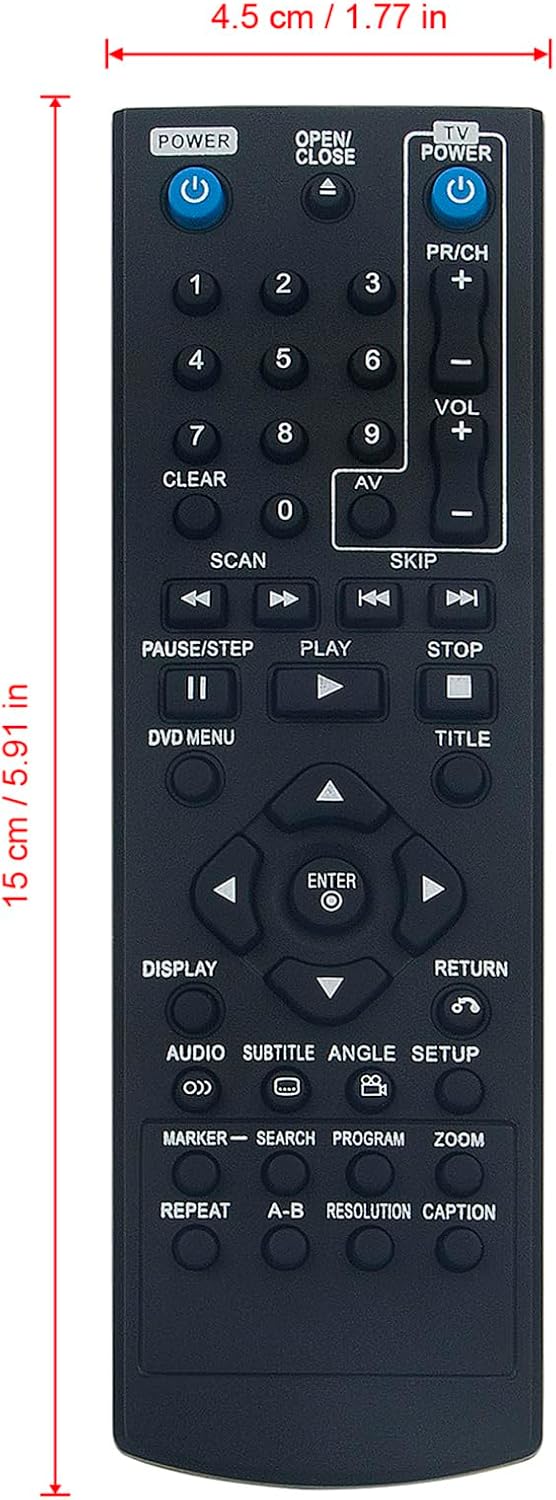
Image: The remote control shown with its approximate length (15 cm / 5.91 in) and width (4.5 cm / 1.77 in) dimensions.
Compatible LG DVD Player Models:
- DP520H, DP132H, DP540H, DP542H, DP132HE, DGK777, DGK778, DK785, DN898, DP522H, DP521H, DP527H, DVX276, DVX640H, DVX642H, DVX692H, DVX647KH, DVX641KH, DVX690H, DVX9900, DZ9500, DZ9800, DV276-E2M, DV276-E1M, DV276-E3M, DVX9900H, DV341, DV341S, DV351, DV381, DV381-P, DV392HN, DV380H-N, DV392H-N, DVX392H, DVX382H, DGK585XB, DGK588XB, DV392H-E, DV382H-E, DV392H-P, DV492H, DV8931H, DVX162, DVX172, DVX286, DVX289H, DVX582H, DVX691KH, DVX697KH, DVX9500, DVX9700, DZ9300, DZ9400, DGK683X, DGK685X.
Garantia
This AIDITIYMI remote control typically includes a 1-year warranty from the manufacturer. For specific details regarding warranty coverage, terms, and conditions, please refer to the documentation provided with your purchase or contact your seller directly.
Suport
Should you require further assistance, have questions not covered in this manual, or encounter any issues with your remote control, please contact the seller or manufacturer through the platform where you made your purchase. They will be able to provide specialized support and guidance.