
Introducció
Welcome to the Tikkers Kids Series 13 Smartwatch user manual. This guide provides essential information for setting up, operating, maintaining, and troubleshooting your new smartwatch. The Tikkers Series 13 is designed to offer a range of features for active children and teenagers, including fitness tracking, communication alerts, and personalization options.
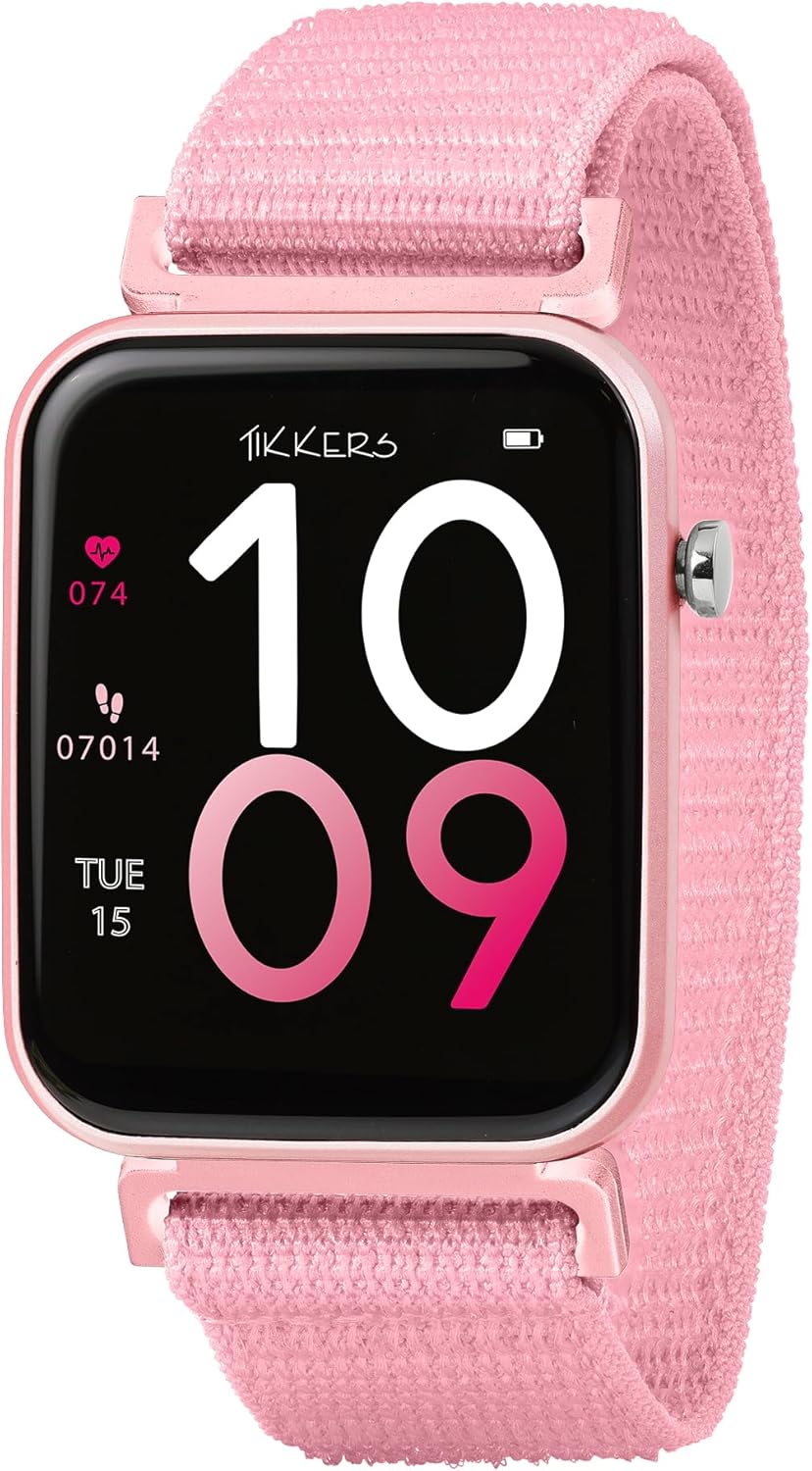
Image: The Tikkers Kids Series 13 Smartwatch in pink, showing the main watch face with digital time, heart rate (074 bpm), and step count (07014 steps), along with the date (TUE 15).
Configuració
1. Desembalatge i càrrega inicial
Upon unboxing, ensure all components are present: the Tikkers Series 13 Smartwatch, charging cable, and this instruction manual. Before first use, fully charge the smartwatch. Connect the charging cable to the watch and a compatible USB power source. The watch display will indicate charging status.
2. Instal·lació de l'aplicació
The Tikkers Series 13 Smartwatch requires the free Tikkers Time app for full functionality. Download the app from your smartphone's app store:
- Per a dispositius Android: Cerca "Tikkers Time" on Google Play Store.
- Per a dispositius iOS: Cerca "Tikkers Time" on the Apple App Store.

Image: A smartphone screen displaying the 'Tikkers Time' app logo, with icons for downloading the app from Google Play and the App Store.
3. Pairing the Smartwatch
- Assegura't que el teu rellotge intel·ligent estigui carregat i encès.
- Activa el Bluetooth al teu telèfon intel·ligent.
- Open the Tikkers Time app and follow the on-screen instructions to create an account or log in.
- The app will guide you through the pairing process to connect your Tikkers Series 13 Smartwatch. Confirm any pairing requests on both your phone and the watch.
Funcionament del rellotge intel·ligent
1. Navegació bàsica
The Tikkers Series 13 features a 1.69-inch touchscreen display. Swipe left, right, up, or down to navigate through menus and access different functions. Tap to select an option or open an application.
2. Esferes de rellotge i personalització
Personalize your smartwatch by choosing from a variety of pre-installed watch faces or by uploading your own photos through the Tikkers Time app. To change the watch face, long-press on the current watch face and swipe to browse available options, or use the customization features within the app.

Image: The Tikkers Kids Series 13 Smartwatch displaying a custom photo watch face, alongside a smartphone showing various digital watch face designs available for customization.
3. Notificacions
Receive alerts for calls, messages, and social media notifications directly on your wrist. Manage which notifications are displayed through the Tikkers Time app settings.
4. Control de la música
Control music playback on your connected smartphone directly from your smartwatch. This includes playing, pausing, skipping tracks, and adjusting volume.
5. Control de càmera
Use your smartwatch as a remote shutter for your smartphone's camera, ideal for taking selfies or group photos.
Seguiment de l'aptitud física i la salut
The Tikkers Series 13 Smartwatch offers comprehensive tracking features to monitor daily activity and well-being.
- Comptador de passos: Tracks your daily steps and calculates distance covered.
- Monitor de freqüència cardíaca: Provides on-demand heart rate readings.
- Seguiment esportiu: Records data for various sports and activities.
- Connexió GPS: Utilizes your smartphone's GPS for accurate route tracking during outdoor activities.
- Anàlisi del son: Monitors sleep patterns to help understand sleep quality.
- Recordatoris d'hidratació: Provides alerts to encourage regular water intake.
- Exercicis de respiració: Guides users through short breathing sessions for relaxation.
- Alarmes: Set multiple alarms for reminders or waking up.

Image: The Tikkers Kids Series 13 Smartwatch displaying a custom photo watch face, surrounded by icons and text highlighting key features such as Step Counter, Multiple Dials, Sleep Analysis, Music Control, Hydration Reminders, Message Notifications, Activity Monitor, IP68 Water Resistant, and Heart Rate.
Manteniment
1. Neteja
Netegeu regularment el vostre rellotge intel·ligent i la corretja amb un drap suau i sec.amp cloth. Avoid using harsh chemicals or abrasive materials, which can damage the device.
2. Resistència a l'aigua (IP68)
The Tikkers Series 13 Smartwatch is IP68 water-resistant. This means it is protected against dust ingress and can withstand immersion in water up to 1.5 meters for up to 30 minutes. It is suitable for everyday use, including hand washing and light rain. Avoid prolonged immersion, hot water, or exposure to high-pressure water jets.
3. Cura de la bateria
To prolong battery life, avoid fully discharging the battery frequently. Charge the watch regularly, ideally before the battery level drops below 20%. Use only the provided charging cable.
Resolució de problemes
- El rellotge no s'encén: Assegureu-vos que el rellotge estigui completament carregat. Connecteu-lo al carregador i espereu uns minuts abans d'intentar tornar-lo a encendre.
- No es pot emparellar amb el telèfon intel·ligent:
- Assegureu-vos que el Bluetooth estigui habilitat al vostre telèfon intel·ligent.
- Assegureu-vos que el rellotge estigui dins de l'abast del vostre telèfon intel·ligent.
- Reinicieu tant el rellotge intel·ligent com el vostre telèfon intel·ligent.
- Check the Tikkers Time app for any specific pairing instructions or error messages.
- Inaccurate fitness data: Ensure the watch is worn snugly on your wrist. For GPS-related tracking, ensure your smartphone's GPS is active and the watch is connected to the app.
- Notificacions que no apareixen: Check the notification settings within the Tikkers Time app and your smartphone's system settings to ensure permissions are granted for the app to display notifications.
Especificacions
| Marca | Tikkers |
| Número de model | TKS13-0023 |
| Color | Rosa |
| Mida de la pantalla | 1.69 polzades |
| Connectivitat | Bluetooth |
| Resistència a l'aigua | IP68 |
| Composició de la bateria | Polímer de liti |
| Bateria recarregable | Sí |
| Dispositius compatibles | Smartphone |
| Sistema operatiu (aplicació) | Android (for companion app) |
| Capacitat d'emmagatzematge de memòria | 1 MB |
| Fabricant | Shenzhen |
| País d'origen | Xina |
Garantia i Suport
Informació de la garantia
The Tikkers Series 13 Smartwatch is presented in a gift box and includes a charger and instructions. For specific warranty details, please refer to the documentation provided with your purchase or contact Tikkers customer support.
Atenció al client
For any assistance with your Tikkers Smartwatch or the Tikkers Time app, please contact the UK support team. They are available to help you get the best experience from your device.
Refer to the Tikkers Time app for direct support contact information or visit the official Tikkers weblloc.