
1. Introducció
This manual provides detailed instructions for the installation, operation, and maintenance of the Yitouniu EWeLink 4CH Smart WiFi 85-250V Switch Controller, Model EWB4CH-D1. This device allows remote control of up to four electrical appliances via the eWeLink mobile application, Bluetooth, or RF remote control, and supports voice control through compatible smart assistants like Amazon Alexa and Google Assistant.
Si us plau, llegiu aquest manual detingudament abans de la instal·lació i l'ús per garantir-ne el funcionament i la seguretat adequats.
2. Producte acabatview i Característiques
The EWB4CH-D1 is a versatile 4-channel smart switch controller designed for various applications, including smart home automation, access control, and DIY projects. It offers multiple control methods and operating modes for enhanced flexibility.
Característiques principals:
- 4-Channel Control: Independently control up to four electrical devices.
- Múltiples mètodes de control:
- eWeLink App (iOS/Android) for remote control.
- Bluetooth connectivity for local control and pairing.
- RF 433MHz remote control support.
- Manual buttons on the device.
- Control de veu: Compatible amb Amazon Alexa i Google Assistant per a un funcionament amb mans lliures.
- Flexible Operating Modes: Supports Point (Momentary), Self-Locking (Toggle), and Interlocking modes.
- Programació i temporitzadors: Set timed schedules for connected devices via the eWeLink app.
- Compartició de dispositius: Share control of the device with multiple users through the eWeLink app.
- Vol. Amplitage Entrada: AC 85-250V and Micro USB 5V input options.
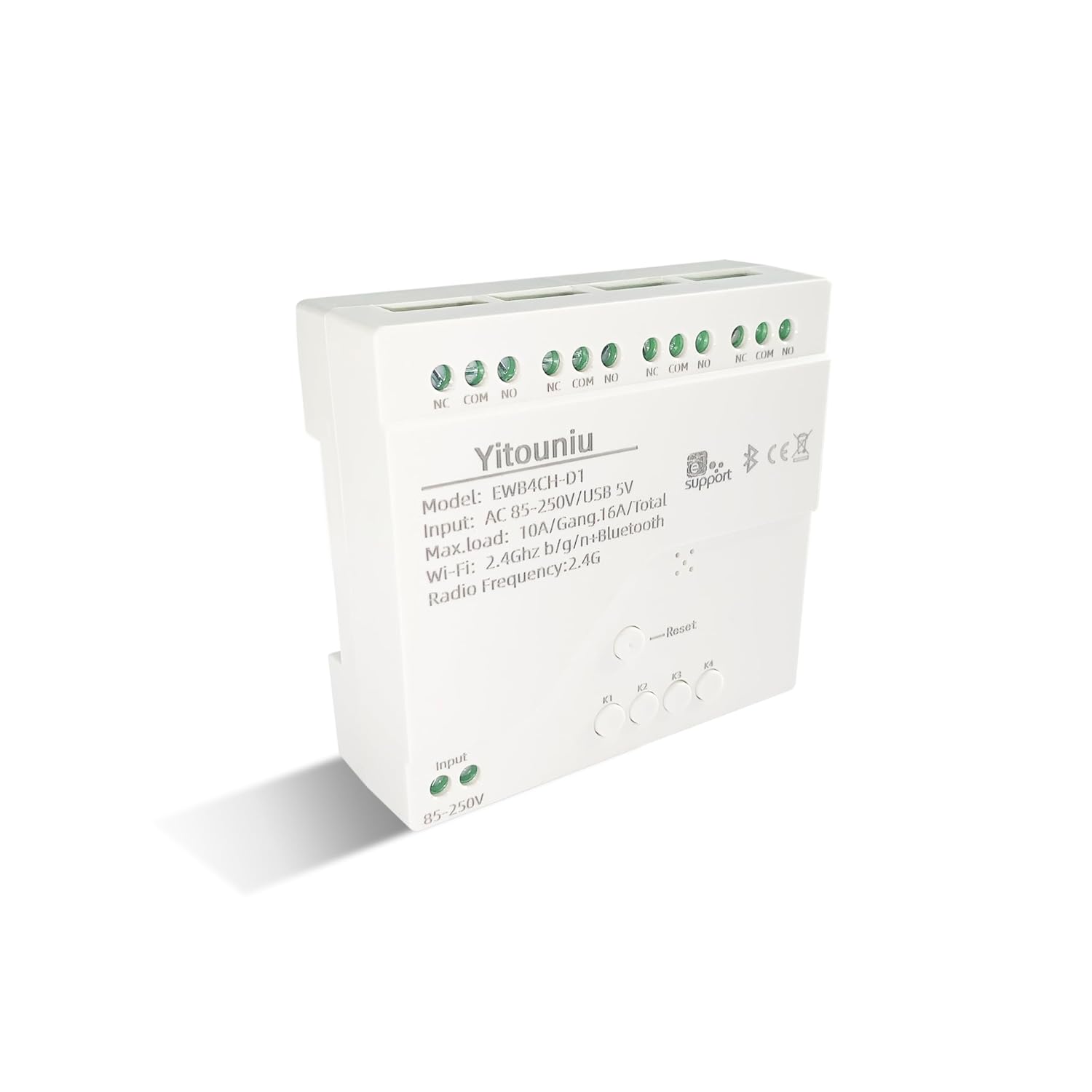
Imatge 1: Frontal view of the Yitouniu EWB4CH-D1 Smart Switch Controller, showing input terminals, control buttons, and model information.

Image 2: The Yitouniu EWB4CH-D1 Smart Switch Controller alongside its internal circuit board, illustrating the components and relay switches.
3. Què hi ha a la caixa
En obrir el paquet, comproveu que hi hagi tots els components:
- 1x Yitouniu EWeLink 4CH Smart WiFi Switch Controller (Model EWB4CH-D1)
- 1x Manual d'instruccions (aquest document)
4. Especificacions
| Paràmetre | Valor |
|---|---|
| Model | EWB4CH-D1 |
| Entrada Voltage | AC 85-250V, Micro USB 5V |
| Maximum Current (per gang) | 10A |
| Maximum Load (total) | 16A / 3500W (for 4 gangs) |
| Estàndard sense fils | Wi-Fi 2.4GHz b/g/n + Bluetooth |
| Temperatura de funcionament | -20 °C a 70 °C |
| Material | ABS ignífugs |
| Dimensions del producte (L x A x A) | 3.15 x 2.95 x 0.98 polzades (80 x 75 x 25 mm) |
| Pes | 3.84 unces (109 g) |
| Mode d'operació | ON-OFF-ON |
| Tipus de contacte | Normalment obert (NO), comú (COM), normalment tancat (NC) |
| Tipus de connector | Terminal de cargol |
| Tipus d'actuador | App, RF Remote, Manual Button |
5. Configuració
5.1 Precaucions de seguretat
ADVERTIMENT: La instal·lació implica un alt volumtage. Ensure power is disconnected at the circuit breaker before performing any wiring. If you are unsure about electrical wiring, consult a qualified electrician. Improper installation can lead to electric shock, fire, or property damage.
5.2 Esquema de cablejat
The device features screw terminals for input power and four independent relay outputs. Each output has Normally Open (NO), Common (COM), and Normally Closed (NC) contacts.
- Potència d'entrada: Connect AC 85-250V to the 'Input 85-250V' terminals. Alternatively, for low-voltage applications or testing, connect a 5V Micro USB power supply to the Micro USB port.
- Load Connections (Channels K1-K4): Each channel (K1, K2, K3, K4) has three terminals:
- NC (normalment tancat): Connected to COM when the relay is OFF.
- COM (Comú): El terminal comú per al relé.
- NO (normalment obert): Connected to COM when the relay is ON.
Connect your appliance's power line to the COM terminal and the control line to either NO or NC, depending on whether you want the appliance to be ON or OFF when the relay is activated.

Imatge 3: Part superior view of the Yitouniu EWB4CH-D1 controller, clearly showing the input terminals and the NC, COM, NO terminals for each of the four channels.
5.3 eWeLink App Installation and Device Pairing
- Descarrega l'aplicació eWeLink: Cerca "eWeLink" in the Apple App Store (iOS) or Google Play Store (Android) and install it.
- Registra't/Iniciar sessió: Obre l'aplicació i crea un compte nou o inicia la sessió amb un d'existent.
- Introduïu el mode de vinculació: Power on the EWB4CH-D1 controller. Press and hold the 'Reset' button on the device for approximately 5-7 seconds until the Wi-Fi indicator LED flashes rapidly.
- Afegeix un dispositiu a l'aplicació: In the eWeLink app, tap the '+' icon (usually in the bottom center or top right) to add a new device. Select 'Quick Pairing' or 'Bluetooth Pairing' if available.
- Connecta't a Wi-Fi: Follow the on-screen instructions to connect the device to your 2.4GHz Wi-Fi network. Enter your Wi-Fi password when prompted. (5GHz Wi-Fi networks are not supported).
- Anomena el teu dispositiu: Once successfully paired, give your device a descriptive name (e.g., "Living Room Lights Controller").
6. Modes de funcionament
The EWB4CH-D1 supports three distinct operating modes, configurable within the eWeLink app:
- Point (Momentary) Mode: When activated, the relay turns ON for a set duration (0.5 seconds to 1 hour) and then automatically turns OFF. This mode is suitable for applications like garage door openers or momentary button presses.
- Self-Locking (Toggle) Mode: Each channel operates independently. When activated, the relay turns ON and stays ON until it is manually turned OFF. This is ideal for controlling lights or other devices that need to remain in a specific state.
- Interlocking Mode: In this mode, only one channel can be ON at a time. When one channel is activated, any other currently active channel will automatically turn OFF. This is useful for controlling motors with forward/reverse functions or blinds.
To change the operating mode, access the device settings within the eWeLink app.
7. App Control and Voice Control
7.1 Control de l'aplicació eWeLink
After successful pairing, you can control each of the four channels independently from anywhere using the eWeLink app. The app provides real-time status updates for each channel.
- Encès/apagat remot: Tap the respective channel button in the app to turn devices on or off.
- Programació: Set up single, repeating, or countdown timers for automated control.
- Escenes: Create custom scenes to control multiple devices with a single tap or based on specific conditions.
- Compartició de dispositius: Share control of your device with family members or other users by inviting them through the app.

Image 4: Illustration showing how one mobile phone can control multiple smart switches, and how a single smart switch can be controlled by multiple mobile phones.

Image 5: Screenshot of the eWeLink app interface highlighting the 'Share Device' option, allowing users to grant control access to others.
7.2 Integració del control per veu
The EWB4CH-D1 is compatible with Amazon Alexa and Google Assistant. To enable voice control:
- Enllaça el compte d'eWeLink: In your Alexa or Google Home app, search for the "eWeLink Smart Home" skill/service and link it to your eWeLink account.
- Descobriu els dispositius: Once linked, ask your smart assistant to "Discover devices" or manually initiate device discovery in the app.
- Comandaments de veu: You can now use voice commands to control your connected appliances.
Example Ordres:
- "Alexa, activa [Nom del dispositiu]"
- "Ei Google, desactiva [Nom del dispositiu]"

Image 6: Depiction of smart speakers (Amazon Echo, Google Home) used for voice control, with example commands for turning on/off lights.

Image 7: Illustration of using voice commands with Alexa or Google Assistant to control a garage door, demonstrating hands-free operation.
8. Manteniment
To ensure optimal performance and longevity of your EWB4CH-D1 controller:
- Neteja: Disconnect power before cleaning. Use a dry, soft cloth to wipe the device. Do not use liquid cleaners or solvents.
- Actualitzacions de firmware: Consulteu periòdicament l'aplicació eWeLink per veure si hi ha actualitzacions de firmware disponibles. Mantenir el firmware actualitzat garanteix les darreres funcions i pegats de seguretat.
- Condicions ambientals: Eviteu exposar el dispositiu a temperatures extremes, humitat elevada o llum solar directa.
9. Solució De Problemes
If you encounter issues with your EWB4CH-D1 controller, refer to the following common problems and solutions:
- El dispositiu no s'està emparellant:
- Assegureu-vos que la vostra xarxa Wi-Fi sigui de 2.4 GHz. Les xarxes de 5 GHz no són compatibles.
- Verifiqueu que la contrasenya del Wi-Fi sigui correcta.
- Make sure the device is in pairing mode (Wi-Fi LED flashing rapidly). If not, press and hold the 'Reset' button.
- Apropa el dispositiu al teu encaminador Wi-Fi.
- Dispositiu fora de línia a l'aplicació:
- Comproveu la vostra connexió a Internet.
- Assegureu-vos que el dispositiu estigui encès.
- Restart the device by disconnecting and reconnecting power.
- Check if your router settings have changed or if there's Wi-Fi interference.
- El control per veu no funciona:
- Confirm that your eWeLink account is correctly linked to your Alexa or Google Home app.
- Ensure the device is discovered by your smart assistant.
- Use the exact device name configured in the eWeLink app for voice commands.
- RF remote control not responding:
- Ensure the RF remote is paired with the controller (refer to specific RF pairing instructions if provided with your remote).
- Check the battery in the RF remote.
10. Informació de seguretat
Si us plau, observeu les següents pautes de seguretat:
- No intenteu desmuntar ni modificar el dispositiu. Això pot anul·lar la garantia i plantejar riscos per a la seguretat.
- Ensure proper wiring according to local electrical codes and this manual.
- Do not exceed the maximum current and load ratings of the device (10A per gang, 16A/3500W total).
- Keep the device away from water, moisture, and flammable materials.
- Aquest dispositiu només està dissenyat per a ús interior.
- Mantenir fora de l'abast dels nens.
11. Garantia i Suport
For warranty information and technical support, please refer to the seller's policy or contact the manufacturer directly. Typically, support can be accessed through the eWeLink app's 'FAQ & Feedback' section or the official eWeLink weblloc.