
1. Introducció
Thank you for choosing the Hangrui Kids Camera C3. This digital camera is specifically designed for children, featuring a unique appearance, an HD IPS screen, and a durable soft silicone case. It allows children to capture high-resolution photos and videos, fostering their creativity and imagination. This manual provides essential information for setting up, operating, maintaining, and troubleshooting your camera.
2. Producte acabatview
2.1 Contingut del paquet
- 1 x Hangrui Kids Camera
- 1 x cable USB
- 1 x cordó
- 1 x Manual d'usuari
- 1 x 32GB Memory Card (pre-installed)
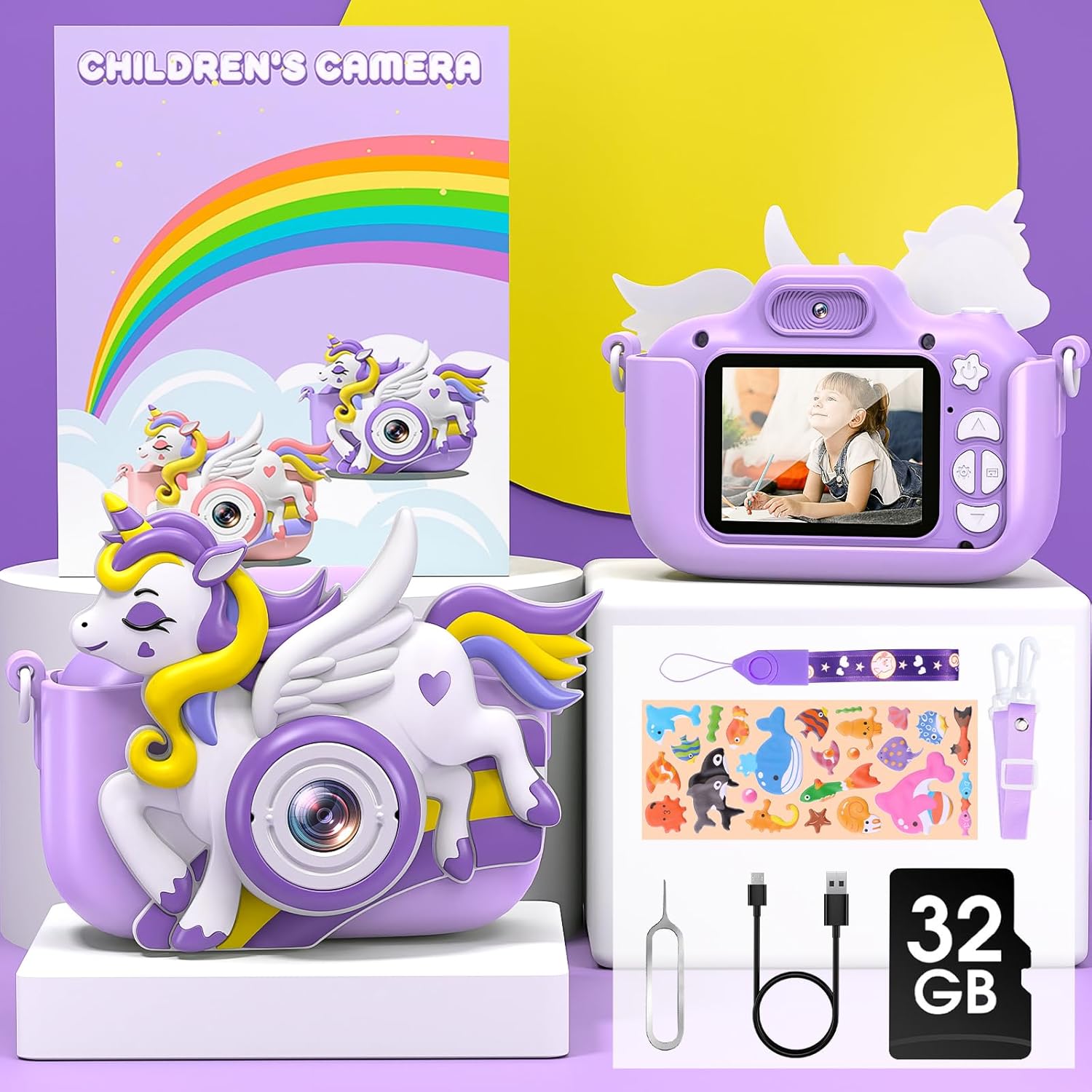
Image: Contents of the Hangrui Kids Camera C3 package.
2.2 Característiques clau
- Pantalla IPS de 2.0 polzades: Clear display for viewfent fotos i vídeos.
- 20 Million Pixels (20MP) Photos: High-resolution image capture.
- Gravació de vídeo HD 1080P: Capture moments in high definition.
- Zoom digital 8X: Magnify subjects for detailed shots.
- Multifuncionalitat: Supports photo taking, video recording, playback, selfie mode, time-lapse, and includes fun filters, stickers, and built-in puzzle games (Snake, Tetris, Sokoban).
- Bateria recarregable de 1000 mAh: Provides 3-5 hours of continuous use on a full charge.
- Targeta de memòria de 32 GB: Emmagatzema aproximadament 5,000 fotos.
- Disseny durador: Eco-friendly soft silicone case protects against bumps and drops.
- Portàtil: Includes a durable lanyard for easy carrying.

Imatge: Més deview of the Hangrui Kids Camera C3 and its main features.
3. Configuració
3.1 Instal·lació de la targeta de memòria
The 32GB memory card is typically pre-installed in the camera. If you need to remove or re-install the memory card, ensure the camera is powered off. After re-installing the memory card, you must restart the camera for it to be recognized properly.
3.2 Càrrega inicial
Before first use, fully charge the camera. When the camera indicates a low battery, use the included USB data cable to charge it promptly. Ensure the camera is powered off during charging. Connect the USB cable to a 5V/1A power adapter (not included) or a standard USB power port.
4. Instruccions de funcionament
4.1 Encès/Apagat
Premeu i manteniu premut el botó d'engegada per encendre o apagar la càmera.
4.2 Fer fotos
In photo mode, press the shutter button to take a picture. Use the navigation buttons to select from various filters and fun frames to enhance your photos.

Imatge: Examples of color filters and funny frames available for photos.
4.3 Gravació de vídeos
Switch to video mode and press the shutter button to start recording. Press it again to stop recording. The camera supports 1080P HD video resolution.
4.4 Selfie Mode
The camera features both front and rear lenses. Switch to selfie mode to use the front-facing camera for self-portraits.

Image: Demonstrating the front and rear selfie camera function.
4.5 Funció de zoom
Use the zoom buttons to apply up to 8X digital zoom while taking photos or recording videos.
4.6 Fotografia a intervals
Select the time-lapse function to capture a series of photos at set intervals, creating a time-lapse video.

Image: Illustrating 1080P HD video recording, time-lapse settings, and 8X zoom.
4.7 Jugar a jocs
The camera includes three puzzle games: Snake, Tetris, and Sokoban. Navigate to the games menu to select and play.
4.8 Reproducció de música
The camera supports music playback. Transfer audio files to the memory card and access them through the music menu.

Image: The camera's compact design and music feature.
5. Manteniment i seguretat
5.1 Pautes de càrrega
Always use the provided USB cable for charging. Ensure the camera is turned off during charging. Use a 5V/1A power adapter or a standard USB port. Avoid overcharging the battery.
5.2 Advertències generals de seguretat
- No desmunteu: Do not attempt to disassemble the camera yourself to avoid potential hazards or damage.
- Manejar amb cura: Do not strike or crush the camera, as this can damage internal electronic components.
- No impermeable: This camera is an electronic product and is not waterproof. Do not expose it to water splashes or immerse it in water.
- Neteja: Use a soft, dry cloth to clean the camera. Avoid using liquid cleaners.
6. Solució De Problemes
If you encounter any issues with your Hangrui Kids Camera C3, please refer to the following common solutions:
- La càmera no s'encén: Ensure the battery is sufficiently charged. Connect the camera to a power source using the USB cable and try again.
- Error de la targeta de memòria: If the camera displays a memory card error, ensure the card is correctly inserted. Power off the camera, remove and re-insert the 32GB memory card, then restart the camera. If the issue persists, try formatting the card (this will erase all data) or using a different compatible memory card.
- Mala qualitat d'imatge/vídeo: Ensure the lens is clean and free from smudges. Check lighting conditions.
- Camera Freezes: If the camera becomes unresponsive, press and hold the power button for an extended period (e.g., 10-15 seconds) to force a shutdown, then restart it.
- Durada de la bateria curta: Ensure the camera is fully charged before use. Reduce screen brightness or turn off unnecessary features to conserve battery.
Si aquests passos no resolen el problema, poseu-vos en contacte amb l'atenció al client.
7. Especificacions
| Marca | Hangrui |
| Nom del model | C3 |
| Tipus de producte | Càmera digital compacta |
| Pantalla | LCD IPS de 2.0 polzades |
| Resolució de fixes efectius | 20 megapíxels |
| Resolució de vídeo | 1080p |
| Zoom digital | 8x |
| Capacitat de la bateria | Polímer de liti de 1000 mAh |
| Temps de càrrega | 3-4 hores |
| Suport d'emmagatzematge | 32GB Memory Card (included) |
| Tecnologia de connectivitat | USB |
| Nivell de resistència a l'aigua | No impermeable |
| Any model | 2024 |
8. Garantia i Suport
Specific warranty information for the Hangrui Kids Camera C3 is not provided in this manual. For details regarding warranty coverage, terms, and conditions, please refer to the product packaging or contact the retailer where the product was purchased.
For technical support, troubleshooting assistance beyond what is covered in this manual, or inquiries about replacement parts, please contact Hangrui customer service or the authorized distributor.