1. Introducció
The Satlink ST-5030 is a compact, lightweight, and intuitive handheld digital satellite signal finder meter. It is fully compliant with DVB-S2/S, ISDB-T, and J83B standards, making it a versatile tool for installing and verifying digital TV services. This device is designed to assist users in quickly finding desired satellite signals and optimizing antenna reception for residential homes or multi-dwelling units.
This manual provides detailed instructions on the operation, setup, maintenance, and troubleshooting of your ST-5030 meter to ensure optimal performance and longevity.
2. Informació de seguretat
Please read all safety warnings and instructions carefully before using this device to prevent injury or damage.
- No exposeu el dispositiu a la pluja o la humitat.
- Avoid extreme temperatures. Operate the device within its specified temperature range.
- No desmunteu el dispositiu. Encarregueu tot el manteniment a personal qualificat.
- Feu servir només l'adaptador de corrent proporcionat. L'ús d'un adaptador incorrecte pot fer malbé el dispositiu i anul·lar la garantia.
- Mantingueu el dispositiu allunyat de camps magnètics forts.
- Ensure proper ventilation when operating to prevent overheating.
3. Contingut del paquet
Verifiqueu que tots els elements que s'enumeren a continuació s'inclouen al vostre paquet:
- 1 x Satlink ST-5030 Digital Satellite Meter
- 1 x corretja de transport
- 1 x adaptador d'alimentació (endoll dels EUA)
- 1 x CD (Software/Drivers)
- 1 manual d'usuari (anglès)
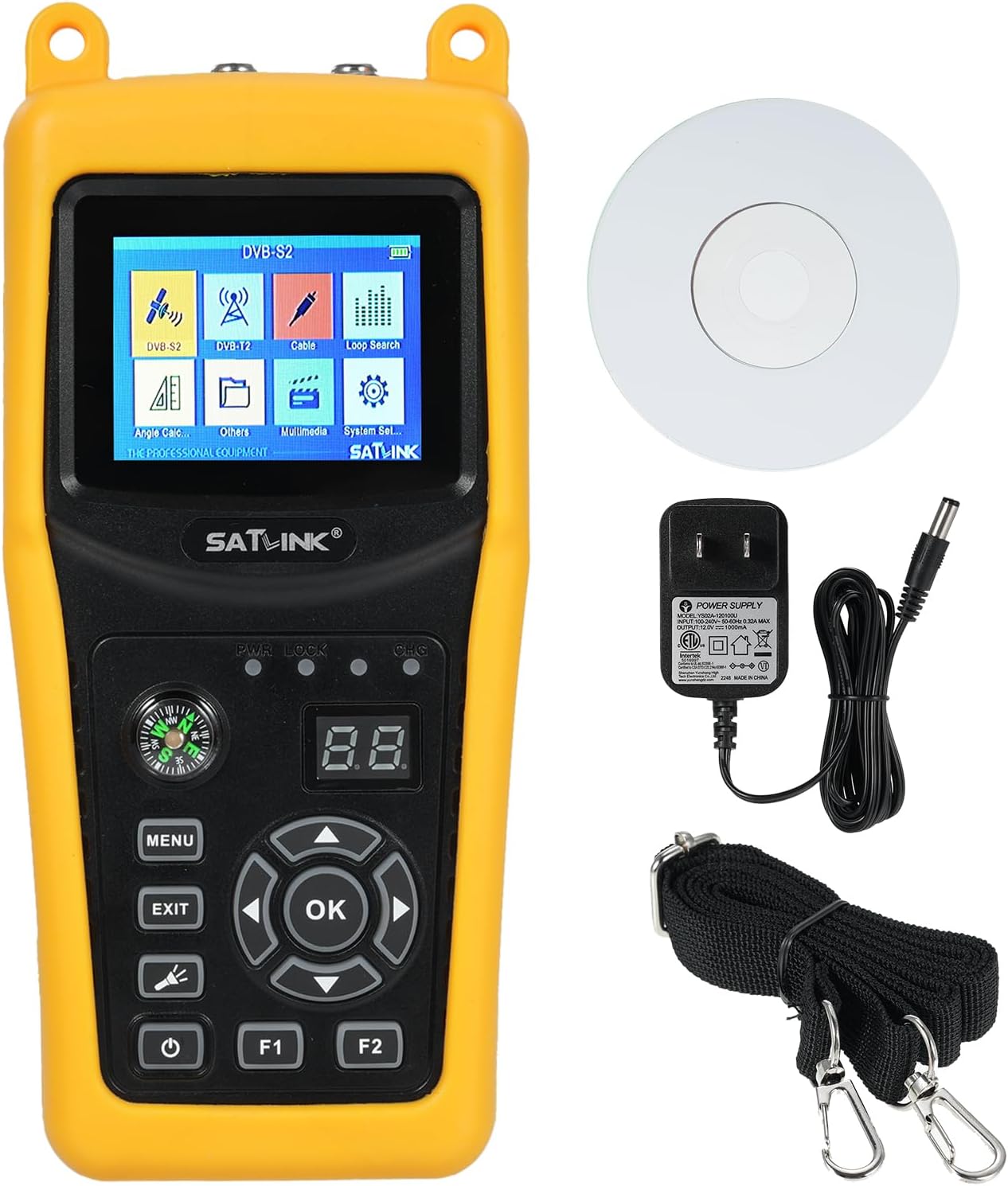
Figure 3.1: Satlink ST-5030 and its accessories.
4. Producte acabatview
Familiarize yourself with the components and controls of the Satlink ST-5030.

Figura 4.1: Diversos views of the ST-5030 device.

Figure 4.2: Front and Rear Panel Layout with Key Features.
4.1 Tauler frontal
- Pantalla LCD TFT de 2.4 polzades: Displays menus, signal strength, quality, and other operational data.
- Botons de control:
- MENÚ: Accediu al menú principal.
- SORTIDA: Go back to the previous screen or exit a function.
- D'ACORD: Confirma la selecció o entra en un submenú.
- Tecles de fletxa (amunt/avall/esquerra/dreta): Navegueu pels menús i ajusteu la configuració.
- Botó d'encesa: Enceneu / apagueu el dispositiu.
- Botons F1/F2: Function keys, context-dependent.
- Brúixola: Aids in initial dish alignment.
- Llums indicadores: Provide status feedback (e.g., power, charge).
4.2 Panell posterior
- Satellite Input (F-Type): Connects to the LNB of the satellite dish.
- Antenna Input (F-Type): Connects to terrestrial antenna (for ISDB-T/J83B).
- Port USB: For software updates or data transfer.
- Entrada de 12 V CC: For connecting the power adapter to charge the device.
5. Configuració
Follow these steps for initial setup and charging.
5.1 Càrrega del dispositiu
- Connect the provided US plug power adapter to the 12V DC input port on the side of the ST-5030.
- Plug the power adapter into a standard wall outlet (100-240V AC, 50/60Hz).
- The charging indicator light will illuminate. Allow the device to charge fully before first use. A full charge typically takes several hours.

Figure 5.1: US Plug Power Adapter for ST-5030.
5.2 Encès inicial
- Premeu i manteniu premut el botó d'engegada fins que la pantalla s'il·lumini.
- El dispositiu arrencarà i mostrarà el menú principal.
6. Instruccions de funcionament
This section details how to use the ST-5030 for satellite signal finding and other functions.
6.1 Navegació al menú principal
Use the Arrow keys to navigate through the menu icons and the OK button to select an option. The main menu typically includes options like DVB-S2, DVB-T, Cable, Loop Search, Angle Calc, Others, Multimedia, and System Set.

Figura 6.1: Interfície del menú principal.
6.2 Satellite Signal Finding (DVB-S2/S)
- Connect the LNB cable from your satellite dish to the "Satellite" F-type input on the ST-5030.
- From the main menu, select "DVB-S2" or "DVB-S" (depending on your system).
- Select the desired satellite from the list. If your satellite is not listed, you may need to add it in the system settings.
- Adjust your satellite dish slowly, using the compass for initial direction, while observing the signal strength and quality bars on the ST-5030 screen.
- Optimize the dish position until the signal strength and quality are maximized. The device will provide audible tones or visual indicators to assist.
- Once a strong signal is acquired, you can perform a channel scan to verify reception.
6.3 Recerca de senyal terrestre (ISDB-T/J83B)
- Connect your terrestrial antenna cable to the "Antenna" F-type input on the ST-5030.
- From the main menu, select "ISDB-T" or "J83B".
- Select the desired channel or frequency range.
- Adjust your antenna position while monitoring the signal strength and quality on the screen.
- Fine-tune the antenna for optimal reception.
6.4 Configuració del sistema
The "System Set" menu allows you to configure various parameters:
- Idioma: Seleccioneu el vostre idioma preferit.
- Configuració de l'hora: Ajusteu la data i l'hora.
- Restabliment de fàbrica: Reset all settings to default. Use with caution.
- Actualització de programari: Update firmware via USB. Refer to the CD for instructions and software.
- Satellite/Transponder Management: Add, edit, or delete satellite and transponder information.
7. Manteniment
Proper care and maintenance will extend the life of your ST-5030.
- Neteja: Feu servir un drap suau i sec per netejar el dispositiu. No utilitzeu netejadors líquids ni aerosols.
- Emmagatzematge: Store the device in a cool, dry place when not in use. Avoid direct sunlight and extreme temperatures.
- Cura de la bateria: Per a una durada òptima de la bateria, eviteu descarregar-la completament amb freqüència. Si la guardeu durant un període llarg, carregueu-la fins a un 50% aproximadament cada pocs mesos.
- Actualitzacions de firmware: Reviseu periòdicament el fabricant website or the included CD for available firmware updates to ensure optimal performance and compatibility.
8. Solució De Problemes
If you encounter issues with your ST-5030, refer to the following common problems and solutions.
| Problema | Causa possible | Solució |
|---|---|---|
| El dispositiu no s'encén. | Problema amb la bateria baixa o l'adaptador de corrent. | Ensure the device is fully charged. Verify the power adapter is correctly connected and functioning. |
| No s'ha detectat cap senyal. | Incorrect cable connection, wrong satellite/transponder selected, or dish/antenna misalignment. | Check all cable connections. Verify the correct satellite/transponder is selected in the menu. Re-align the dish/antenna slowly. |
| Signal strength is low. | Dish/antenna not optimally aligned, obstruction, or LNB/cable issue. | Fine-tune dish/antenna alignment. Check for any physical obstructions. Inspect LNB and cables for damage. |
| Pantalla congelada o no respon. | Error de programari. | Perform a soft reset by holding the power button until the device turns off, then restart. If persistent, consider a factory reset (data loss) or firmware update. |
| Cannot find specific channels. | Incorrect transponder settings or regional variations. | Verify transponder frequencies and symbol rates. Perform a full channel scan. |
9. Especificacions
Detailed technical specifications for the Satlink ST-5030.

Figura 9.1: Especificacions tècniques detallades.
| Categoria | Paràmetre | Valor |
|---|---|---|
| Normes de transmissió | Estàndards suportats | DVB-S2/S, ISDB-T, J83B |
| Descodificació | MPEG-2/MPEG-4, H.264 | |
| Entrada/Demodulació de satèl·lit | Tipus de connector | Tipus F |
| Freqüència d'entrada | 950 a 2150 MHz | |
| Nivell d'entrada del senyal | -65 a -25 dBm | |
| Control de commutació de banda | 22 KHz | |
| Subministrament de LNB | 13V/18V, Imax 350mA | |
| Tipus de demodulació | QPSK, 8PSK, 16APSK, 32APSK | |
| ISDB-T/J83B Input/Demodulation | Tipus de connector | Tipus F |
| Freqüència d'entrada | 48 a 862 MHz | |
| Nivell d'entrada del senyal | -80dBm (ISDB-T), -67dBm (J83B) | |
| Tipus de demodulació | 64QAM, 256QAM | |
| Funcions LCD | Tipus de LCD | Transmissiu TFT |
| Nombre de punts | 320 (RGB) x 240 | |
| Mida de pantalla LCD | 2.4 polzades | |
| Processament d'àudio/vídeo | Descompressió de vídeo | MPEG4/H.264 |
| Descompressió d'àudio | MPEG-1/2 Capa I/II/III, Dolby | |
| Mode de sortida d'àudio | Estèreo, Mono, Dret/Eix | |
| Port de servei de dades | Connector | USB |
| Protocol de dades | Interfície USB 2.0 | |
| File Sistema de gestió | NTFS, FAT32 | |
| Font d'alimentació | Bateria Li-ion | 7.4 V/2600 mAh |
| Sortida de l'adaptador | DC12V/1A | |
| Entrada d'adaptador | 100-240VAC 50/60Hz | |
| Consum d'energia | 10W màx | |
| Característiques físiques | Mida (A x P x A) | 8.46 x 6.69 x 2.05 inches (approx. 16x8x3.5 cm) |
| Pes net | Uns 0.7 kg | |
| País d'origen | Xina |
Nota: les especificacions estan subjectes a canvis sense previ avís.
10. Garantia i Suport
For warranty information and technical support, please refer to the documentation included with your purchase or contact the retailer/manufacturer directly. Keep your proof of purchase for warranty claims.
Manufacturer: Irfora
Model Number: LAKUSE25971US