
Soufyuane v519
Soufyuane V519 OBD2 Scanner User Manual
Professional Mechanic Diagnostic Code Reader Tool
1. Introducció
The Soufyuane V519 OBD2 Scanner is a professional diagnostic tool designed to help users identify and resolve issues with their vehicle's engine and emissions systems. This manual provides comprehensive instructions for setting up, operating, and maintaining your V519 scanner.
It is compatible with most vehicles manufactured after 1996 (US-Based), 2000 (EU-Based), and Asian cars that feature a 16-pin OBD2 port. The device supports 10 languages, including English, French, Spanish, German, Russian, Italian, Portuguese, Dutch, Japanese, and Chinese.
2. Contingut del paquet
En obrir el paquet, comproveu que hi hagi tots els elements:
- Soufyuane V519 OBD2 Scanner Unit
- Bossa d'emmagatzematge de lona
- Type-C Cable (for computer connection and updates)
- Manual d'usuari (aquest document)
3. Producte acabatview
The V519 OBD2 Scanner features a user-friendly interface with a 2.8-inch color screen and intuitive button layout. It is designed for easy handling and operation.

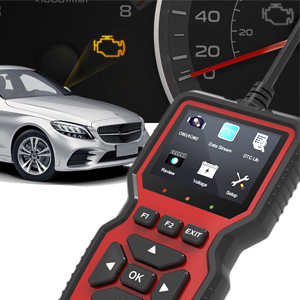
This image displays the V519 OBD2 Scanner, showcasing its compact design and the main interface. The screen shows various diagnostic options like Read Codes, Erase Codes, View Freeze Frame, Live Data, and DTC Lookup. Below the screen are navigation buttons (up, down, left, right, OK) and function keys (F1, F2, EXIT). The OBD2 connector cable is visible at the top.

This image illustrates the V519 scanner's capabilities, listing features such as Read Codes, Erase Codes, View Freeze Frame, I/M Readiness, Vehicle Info, Data Stream, Battery Voltage Reading, Oxygen Sensor Test, and a 35,901 fault code library. It also highlights support for 9 languages, including English, German, French, Spanish, Italian, Dutch, Japanese, Chinese, and Portuguese.
4. Configuració i ús inicial
4.1 Connecting the Scanner to Your Vehicle
- Locate the OBD2 port in your vehicle. This port is typically found under the dashboard on the driver's side. Refer to your vehicle's owner's manual if you cannot locate it.
- Assegureu-vos que l'encesa del vehicle estigui en la posició OFF posició abans de connectar l'escàner.
- Plug the V519 scanner's OBD2 connector firmly into the vehicle's OBD2 port.
- Gireu l'encesa del vehicle a la posició ON posició (motor apagat). L'escàner s'engegarà automàticament.

This image shows a hand plugging the V519 OBD2 scanner's cable into the vehicle's OBD2 diagnostic port, typically located under the dashboard. This is the first step in establishing communication between the scanner and the car's onboard computer.
4.2 Configuració inicial
After connecting, you may need to configure basic settings:
- Idioma: Navigate to the "Setup" menu to select your preferred language. The V519 supports 10 languages.
- Unitats de mesura: Choose between metric or imperial units for data display.
- Contrast/Brillo: Adjust the screen's visual settings for optimal readability.
- Bip: Enable or disable audible feedback for button presses.
This video provides a visual guide on how to connect the V519 scanner to a vehicle and navigate through its initial setup options, such as selecting the display language and adjusting other system settings. It shows the user interacting with the device's menu to customize preferences.
5. Instruccions de funcionament
5.1 Lectura de codis de diagnòstic d'errors (DTC)
Per llegir els codis d'error emmagatzemats:
- Al menú principal, seleccioneu "OBD/EOBD" or "Llegir codis".
- The scanner will communicate with the vehicle's ECU and display any active or pending DTCs.
- Use the up/down arrows to scroll through the codes. The V519 has a built-in DTC lookup library of over 35,901 codes, providing detailed definitions.

This image shows the V519 scanner displaying "Trouble Codes" such as P2029 (Fuel heater disabled) and explaining how to "Read Codes" using the F1 button for quick response. It also illustrates the "I/M Readiness" function, which instantly diagnoses car issues like MIL, DTC, EVAP, O2 Sensor, and more, to assess the car's status.
5.2 ErasinCodis de diagnòstic d'errors (DTC)
After addressing the underlying issue, you can clear the DTCs:
- Al menú principal, seleccioneu "Esborrar codis".
- Confirmeu la vostra selecció quan se us demani.
- The scanner will clear the codes from the vehicle's ECU and turn off the Check Engine Light (MIL).
5.3 ViewTransmissió de dades en directe
The Live Data Stream function allows you to view real-time sensor data from the vehicle:
- Al menú principal, seleccioneu "Flux de dades".
- The scanner will display various parameters such as engine RPM, vehicle speed, oxygen sensor readings, fuel system status, and more.
- Use the up/down arrows to scroll through the data.
5.4 Estat de preparació I/M
The I/M Readiness function checks the status of the vehicle's emission-related monitoring systems:
- Al menú principal, seleccioneu "Preparació I/M".
- The scanner will display whether various monitors (e.g., Misfire Monitor, Fuel System Monitor, O2 Sensor Monitor) have completed their diagnostic cycles.
- A "Ready" status indicates that the system has completed its self-test.
5.5 Cerca de DTC
If you have a specific DTC and want to know its definition:
- Al menú principal, seleccioneu "DTC Lib" or "Consulta de DTC".
- Enter the DTC using the navigation buttons.
- The scanner will display the detailed definition of the code.
5.6 Altres funcions
- View Congelar fotograma: Captures a snapshot of vehicle conditions at the moment a fault code is set.
- Informació del vehicle: Displays the vehicle identification number (VIN), calibration ID, and calibration verification number.
- Voltage: Reads the current battery voltage.
- Prova del sensor d'O2: Retrieves oxygen sensor monitor test results.
- Mode 6 Test: Recupera els resultats de les proves per a components i sistemes del tren motriu relacionats amb les emissions que no es controlen contínuament.
- Mode 8 Test: Retrieves test results for on-board diagnostic monitoring of specific components/systems.
6. Manteniment i actualitzacions
6.1 Neteja del dispositiu
Netegeu l'escàner amb un drap suauamp tela. No utilitzeu netejadors abrasius ni dissolvents.
6.2 Actualitzacions de programari
The V519 OBD2 Scanner offers lifetime free software upgrades to ensure you always have access to the latest features and vehicle compatibility. To update the device:
- Connect the scanner to your computer using the provided Type-C cable.
- Visit the official Soufyuane website to download the update software and instructions.
- Follow the on-screen prompts of the update software to complete the process.
This image shows the V519 OBD2 scanner connected to a laptop via its Type-C cable, with a printer in the background. This setup is used for printing diagnostic reports or for performing software updates on the device.
6.3 Data Printing
You can print fault data and diagnostic reports by connecting the scanner to your computer:
- Connect the V519 scanner to your computer using the Type-C cable.
- Access the printing function through the update software or a dedicated printing utility (refer to the software's instructions).
- Print the desired fault data or live data streams.
7. Solució De Problemes
| Problema | Causa possible | Solució |
|---|---|---|
| L'escàner no s'encén. |
|
|
| Missatge "Error d'enllaç" o "Error de comunicació". |
|
|
| No es poden esborrar els codis. |
|
|
8. Especificacions
- Model: V519
- Visualització: Pantalla a color de 2.8 polzades
- Vol. Operatiutage: 9-16V (from vehicle OBD2 port)
- Protocols admesos: All OBDII protocols (ISO9141, KWP2000, J1850 PWM, J1850 VPW, CAN)
- Biblioteca DTC: Built-in 35,901 DTCs
- Idiomes admesos: English, French, Spanish, German, Russian, Italian, Portuguese, Dutch, Japanese, Chinese
- Connectivitat: OBD2 16-pin connector, Type-C USB port
- Dimensions: 6.1 x 3.42 x 0.94 polzades (15.5 x 8.7 x 2.4 cm)
- Pes: 11.3 unces (320 g)
- Temperatura de funcionament: De 0 °C a 60 °C (32 °F a 140 °F)
- Temperatura d'emmagatzematge: -20 °C a 70 °C (-4 °F a 158 °F)
9. Garantia i Suport
Soufyuane offers a 60-day return policy and a 3-year replacement service for the V519 OBD2 Scanner. For technical support, warranty claims, or further assistance, please contact Soufyuane customer service through the retailer's platform or the official brand weblloc.
Si us plau, conserveu el rebut de compra per validar la garantia.
Documents relacionats - v519
 |
Professional V519 OBD2 Scanner Diagnostic Tool Instruction Manual User manual for the Professional V519 OBD2 Scanner. Includes setup instructions, vehicle compatibility, operation steps, and troubleshooting guide. |
 |
Manual d'usuari de l'escàner OBD2 V519 Comprehensive user guide for the V519 multi-functional vehicle fault diagnosis instrument. Learn how to read and clear engine fault codes, view live data, and perform vehicle inspections. |
 |
V519 OBDII Scanner User Manual Comprehensive user manual for the V519 vehicle fault diagnosis instrument. Learn how to use OBDII/EOBD protocols, read fault codes, and perform vehicle diagnostics. |
 |
V519 OBD II/EOBD Vehicle Fault Diagnosis Scanner User Manual Comprehensive user manual for the V519 vehicle fault diagnosis instrument. Learn how to read and clear OBD II/EOBD fault codes, view live data streams, perform vehicle inspections, and manage system settings. |
 |
V519 Automotive OBD II Diagnostic Tool User Manual Comprehensive user guide and technical specifications for the V519 automotive fault diagnosis instrument, including OBD II protocol support, fault code explanations, and compatibility guidelines. |
 |
V519 Vehicle Fault Diagnosis Instrument User Manual Comprehensive user manual for the V519, a multi-functional vehicle fault diagnosis instrument supporting nine OBD II/EOBD standard protocols. Learn how to quickly read fault codes and diagnose vehicle issues. |
Ask a question about this manual
Ask about setup, troubleshooting, compatibility, parts, safety, or missing instructions. Manuals+ will review the question and use this page’s manual context to help answer it.