
1. Introducció
Thank you for choosing the MZZYG Car Satellite Navigation Multimedia Player, Model 1005005311060377. This advanced car radio system is designed to provide a comprehensive in-car entertainment and navigation experience. It features a high-resolution 9-inch touchscreen, integrated GPS, Bluetooth, Wi-Fi, and 4G connectivity, ensuring you stay connected and entertained on the road.
This manual provides detailed instructions for the installation, operation, and maintenance of your new multimedia player. Please read it thoroughly before use to ensure proper functionality and to maximize your enjoyment of the product.
Característiques principals:
- High-fidelity sound reproduction for an enhanced audio experience.
- 9-inch touchscreen display with 1280*720 or 2000*1200 resolution.
- Support for steering wheel controls (volume, Bluetooth, voice commands).
- 4G connectivity for live streaming, online music, games, and movies.
- 360° 3D/2D panoramic mode for safer parking and reversing.
- Integrated speaker/microphone, Wi-Fi, and 3G/4G network support.
- Plug-and-play interface for simplified installation.
- Supports MP3, MP4, WMA, and JPEG digital media formats.
- Available with 32G, 64G, 128G, or 256G ROM and 8G RAM.
- TF/Micro SD slot for external memory up to 256G.
- Built-in cooling fan to prevent overheating and ensure stable operation.
- Customizable button lighting with various color options.
- Fully laminated screen for excellent visibility in bright conditions, reducing glare by 40%.
2. Configuració i instal·lació
This multimedia player features a plug-and-play interface for straightforward installation. However, professional installation is recommended to ensure correct wiring and optimal performance, especially for advanced features like camera integration and steering wheel controls.
2.1 Contingut del paquet
Verifiqueu que tots els components siguin presents al paquet:
- MZZYG Car Satellite Navigation Multimedia Player unit
- Power harness and necessary cables
- Antena GPS
- cables USB
- Manual d'usuari
- Optional accessories (e.g., 4K AHD Camera, 1080P ADAS DVR, Microphone, Tools, Clean Cloth)

Figure 1: Main unit and included accessories (some items may be optional gifts).
2.2 Basic Installation Steps
- Preparació: Desconnecteu la bateria del vehicle abans de començar qualsevol treball elèctric.
- Eliminar la unitat antiga: Carefully remove your existing car radio or dashboard panel to access the wiring harness.
- Connecteu el cablejat: Connect the provided power harness, speaker wires, and other necessary cables to the corresponding ports on the new multimedia player and your vehicle's wiring. Ensure all connections are secure.
- Antena GPS: Munteu l'antena GPS en un lloc amb llum clara view of the sky, typically on the dashboard or under the windshield, away from metal obstructions.
- Connexions opcionals: Connect any optional accessories such as the rear view camera, DVR, or external microphone as per their specific instructions.
- Funcionalitat de prova: Before fully reassembling the dashboard, reconnect the vehicle's battery and power on the unit to test basic functions like power, sound, and touchscreen response.
- Unitat segura: Once tested, securely mount the multimedia player into the dashboard and reassemble any removed panels.
2.3 Network and Connectivity Setup
- Wi-Fi: Access the system settings to connect to an available Wi-Fi network. This enables online features, app downloads, and software updates.
- 4G/3G Network: If your unit supports a SIM card slot (check specifications), insert a compatible SIM card to enable 4G/3G cellular data connectivity.
- Emparellament Bluetooth: Go to Bluetooth settings on the unit and enable Bluetooth. Cerca your mobile device and pair them to enable hands-free calling and audio streaming.
3. Instruccions de funcionament
This section details the primary functions and operations of your MZZYG multimedia player.
3.1 Controls bàsics
- Encès/apagat: The unit typically powers on automatically with the vehicle's ignition. Press and hold the power button (if available) to manually turn it off or on.
- Control de volum: Adjust volume using the physical buttons on the unit, steering wheel controls, or the on-screen interface.
- Interfície de pantalla tàctil: Navegueu pels menús i les aplicacions tocant, lliscant i pessigant a la pantalla tàctil de 9 polzades.
3.2 Sistema de navegació
The integrated GPS system provides reliable navigation. Ensure the GPS antenna is properly installed for optimal signal reception.
- Launching Navigation: Tap the 'Navigation' or 'Maps' icon on the home screen to open the navigation application.
- Setting Destination: Enter your destination using the on-screen keyboard or voice input.
- Guia de ruta: Follow the voice prompts and on-screen directions for turn-by-turn guidance.
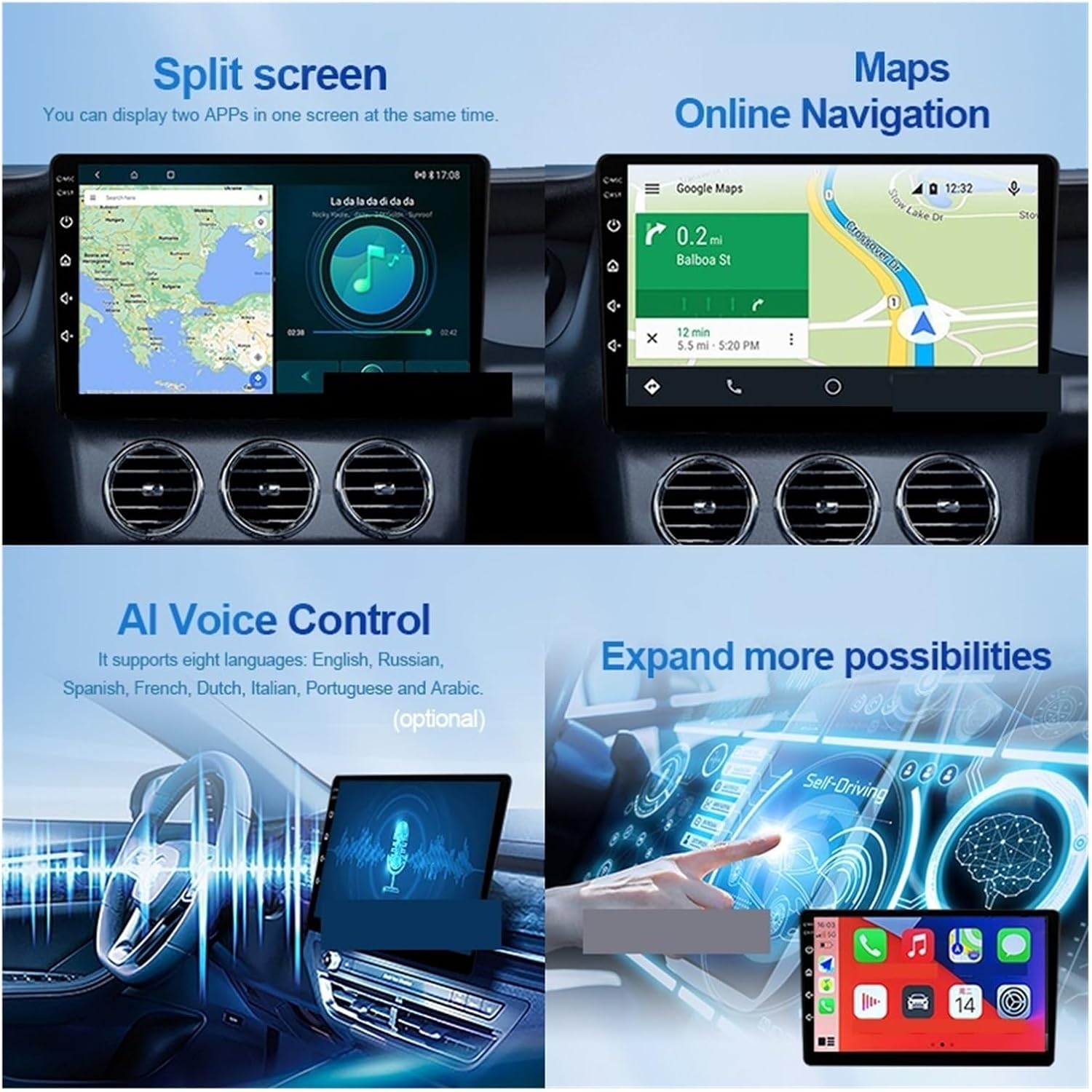
Figure 2: Split screen mode and online navigation capabilities.
3.3 Reproducció multimèdia
The unit supports various digital media formats including MP3, MP4, WMA, and JPEG.
- Audio/Video Playback: Access music and video files from internal storage, a connected USB device, or a Micro SD card.
- Ràdio: Tune into FM/AM radio stations using the built-in tuner.
- Àudio Bluetooth: Stream audio wirelessly from your paired smartphone or other Bluetooth devices.
3.4 Funcions avançades
- Pantalla dividida: Utilize the split screen function to run two applications simultaneously, such as navigation and music playback.
- Control de veu per IA: Use voice commands for hands-free operation. The system supports multiple languages.
- Control del volant: Program the unit to respond to your vehicle's steering wheel buttons for convenient control of volume, tracks, and calls.
- Llum de botó personalitzable: Change the color of the physical buttons to match your vehicle's interior lighting or personal preference.
- DTS Tuning System: For models equipped with the DTS Tuning System (H6 version), adjust sound settings with the TDA7850 DSP chip and 48-band EQ for optimized audio quality and sound field control.

Figure 3: DTS Tuning System for advanced audio customization.
3.5 Camera and DVR Functions
The unit supports external cameras and DVR systems for enhanced safety and recording.
- posterior View Camera (AHD): When connected, the display automatically switches to the rear view when the vehicle is in reverse. Supports dynamic track and night vision.
- Car DVR (ADAS): The 1080P ADAS Driving Assistance System records footage and provides safety warnings.
- Càmera panoràmica de 360°: For units with 360° camera support, this mode provides a comprehensive view around the vehicle, assisting with parking and maneuvering in tight spaces.

Figure 4: Sony AHD Camera and Car DVR features.

Figure 5: Customizable interface and 360° camera system overview.
4. Manteniment
Proper maintenance ensures the longevity and optimal performance of your multimedia player.
- Neteja de pantalla: Feu servir un drap suau i sense borrissol per netejar suaument la pantalla tàctil. Per a taques difícils, fregueu lleugeramentampNetegeu el drap amb aigua o un netejador de pantalles. Eviteu productes químics agressius o materials abrasius.
- Actualitzacions de programari: Periodically check for software updates via the system settings (requires Wi-Fi or 4G connection). Keeping the software updated can improve performance and add new features.
- Ventilador de refrigeració: The built-in cooling fan helps manage internal temperatures. Ensure the ventilation areas around the unit are not obstructed to allow for proper airflow.
- Atenció general: Eviteu exposar la unitat a temperatures extremes, a la llum solar directa durant períodes prolongats o a una humitat excessiva.
5. Solució De Problemes
If you encounter issues with your multimedia player, refer to the following troubleshooting guide. For problems not listed here, please contact customer support.
- Sense energia:
- Check all power connections and ensure they are securely plugged in.
- Verify the vehicle's battery is charged and the ignition is on.
- Check the fuse in the vehicle's fuse box and the unit's power harness.
- Sense so:
- Assegureu-vos que el volum no estigui silenciat ni al mínim.
- Comproveu les connexions dels cables de l'altaveu.
- Verify the audio source is correctly selected.
- GPS Signal Loss/Inaccurate:
- Assegureu-vos que l'antena GPS estigui connectada correctament i muntada en un lloc amb llum clara view del cel.
- Avoid parking in areas with tall buildings or dense foliage that may obstruct the signal.
- Touchscreen Unresponsive/Abnormal Operation:
- Restart the unit by turning off the vehicle's ignition and then restarting it.
- High temperatures can cause abnormal operation. The built-in cooling fan helps, but ensure the unit is not exposed to excessive heat.
- Perform a factory reset (refer to system settings, note this will erase all user data).
- Problemes de connectivitat Bluetooth:
- Ensure Bluetooth is enabled on both the unit and your mobile device.
- Suprimeix els emparellaments anteriors i intenta tornar a emparellar els dispositius.
- Move the mobile device closer to the unit.
6. Especificacions
| Característica | Especificació |
|---|---|
| Marca | MZZYG |
| Nom del model | 1005005311060377 |
| Mida de la pantalla | 9 polzades |
| Resolució | 1280*720/2000*1200 |
| Tipus de processador | Nucli de 4/8 |
| RAM | 8G |
| Opcions de ROM | 32G/64G/128G/256G |
| Suport de memòria externa | Up to 256G (TF/Micro SD slot) |
| Vol. Operatiutage | 24 V |
| Pes de l'article | 50 grams |
| Característiques especials | Built-in Speaker/Microphone, Wi-Fi Function, Steering Wheel Control Support, 3G/4G Network Support |
| Digital Media Format Support | MP3, MP4, WMA, JPEG |
| País d'origen | Xina |
7. Garantia i Suport
For warranty information, please refer to the terms and conditions provided by your retailer or the MZZYG official website. Warranty periods and coverage may vary depending on your region and point of purchase.
If you require technical assistance or have questions regarding your MZZYG Car Satellite Navigation Multimedia Player, please contact the seller or MZZYG customer support through their official channels. Have your model number (1005005311060377) and purchase details ready when contacting support.