
TECKNET EWM01107
Manual d'usuari del ratolí d'ordinador amb cable USB TECKNET
Model: EWM01107 | Brand: TECKNET
Introducció
This manual provides comprehensive instructions for the TECKNET USB Wired Computer Mouse (Model: EWM01107). Designed for comfort and efficiency, this mouse features adjustable DPI settings, an ergonomic design, and a reliable wired connection, making it suitable for various computing tasks.

Figure 1: TECKNET USB Wired Computer Mouse (Light Grey)
Característiques clau
- 4 nivells de DPI ajustables: Easily switch between 1200, 1800, 2400, and 3600 DPI to match your cursor sensitivity needs.
- Disseny ergonòmic: Crafted to fit comfortably in your hand, reducing fatigue during extended use.
- Plug and Play: No drivers required; simply connect the USB cable to your computer.
- 6 High-Efficient Buttons: Includes left/right click, scroll wheel, DPI button, and two side buttons for navigation.
- Connexió estable per cable: Ensures reliable performance without battery concerns or latency.
- Àmplia compatibilitat: Works with Windows 11/10/8.1/8/7/Vista/XP/2003/2000, macOS, Linux, and Chrome OS.
Guia de configuració
Connectant el ratolí
- Locate an available USB port on your computer (desktop, laptop, or Chromebook).
- Insert the USB connector of the TECKNET mouse firmly into the USB port.
- The mouse is plug-and-play, meaning no additional drivers or software installation is required. Your operating system will automatically detect and configure the mouse.
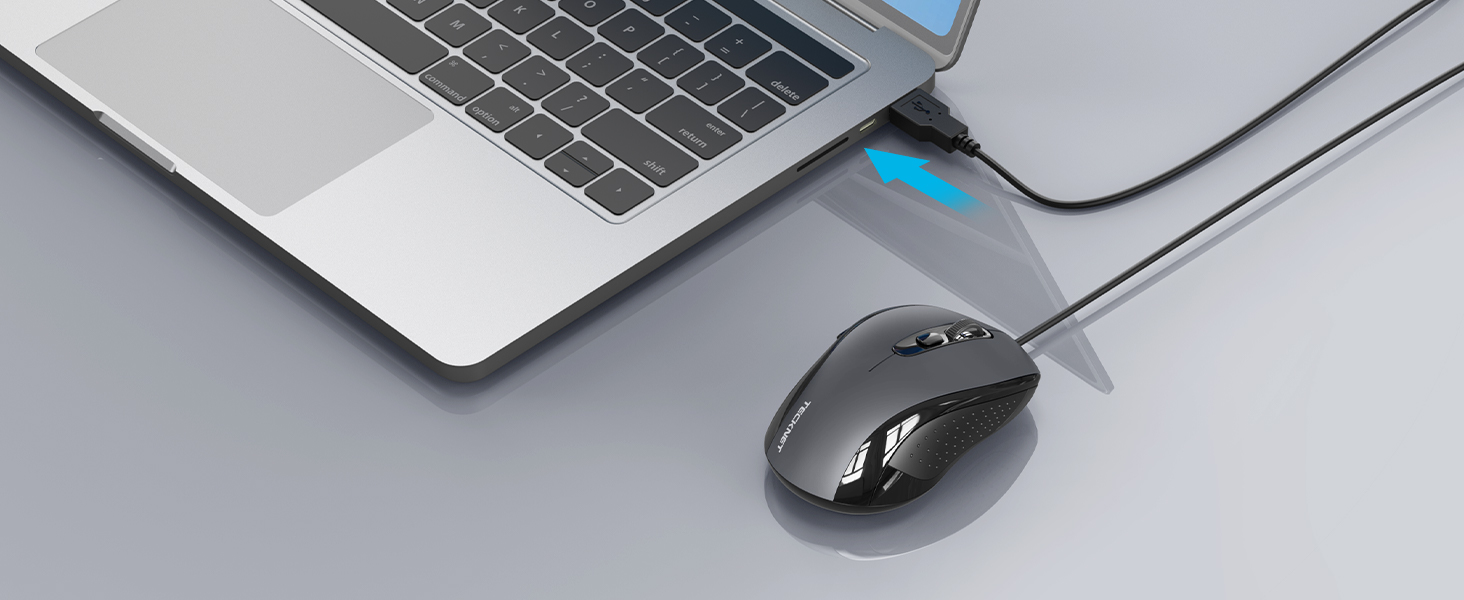
Figure 2: Connecting the USB cable to a laptop.
Instruccions de funcionament
Funcions del botó

Figure 3: Diagram of the mouse buttons and their functions.
- Left Click Button (1): Funció de clic principal estàndard.
- Right Click Button (2): Standard secondary click function, typically opens context menus.
- Roda de desplaçament (3): Desplaça't amunt o avall pels documents i web pàgines. També es pot prémer per a la funcionalitat de clic central.
- DPI Switch Button (4): Press to cycle through the 4 adjustable DPI settings (1200/1800/2400/3600). Each press changes the cursor sensitivity.
- Botó Enrere (5): Navega enrere web navegadors o file exploradors.
- Botó Endavant (6): Navega cap endavant web navegadors o file exploradors.
Ajust de la sensibilitat dels DPI
The mouse features 4 adjustable DPI levels, allowing you to customize cursor speed and precision for different tasks. To change the DPI:
- Premeu el botó Botó de commutador DPI (located behind the scroll wheel).
- Each press will cycle through the available DPI settings: 1200 DPI (default), 1800 DPI, 2400 DPI, and 3600 DPI.
- Select the DPI setting that best suits your preference and current activity.

Figura 4: Representació visual dels nivells d'ajust de DPI.
Confort ergonòmic
The mouse is designed with an ergonomic shape to provide a comfortable grip and reduce strain during prolonged use. Its convex arc design mimics the natural resting position of the hand, distributing palm gravity evenly for enhanced comfort.

Figure 5: Hand position demonstrating the ergonomic design.
Manteniment
- Neteja: Feu servir un drap suau i sec per netejar el ratolí. Per a la brutícia persistent, fregueu lleugerament.ampNetegeu el drap amb aigua o una solució de neteja suau. Eviteu productes químics agressius o materials abrasius.
- Emmagatzematge: Store the mouse in a cool, dry place when not in use. Avoid extreme temperatures.
- Cura del cable: Do not excessively bend or pull the USB cable. This can damage the internal wires.
Resolució de problemes
| Problema | Causa possible | Solució |
|---|---|---|
| El ratolí no respon | Cable USB no connectat correctament. Port USB defectuós. | Ensure the USB cable is fully inserted into the port. Prova de connectar el ratolí a un port USB diferent de l'ordinador. Reinicieu l'ordinador. |
| El moviment del cursor és erràtic o brusc | Sensor òptic brut. Mouse used on an unsuitable surface. | Netegeu el sensor òptic de la part inferior del ratolí amb un drap suau i sense borrissol. Feu servir el ratolí sobre una alfombrilla o superfície neta i no reflectant. |
| Els botons laterals no funcionen | Software conflict or specific application settings. | Ensure the application you are using supports mouse side buttons. Some applications may require specific settings. Prova de reiniciar l'aplicació o l'ordinador. |
Especificacions
| Característica | Detall |
|---|---|
| Número de model | EWM01107 |
| Marca | TECNET |
| Tecnologia de connectivitat | Amb cable (USB) |
| Nivells de DPI | 1200/1800/2400/3600 |
| Nombre de botons | 6 (Esquerra, Dreta, Roda de desplaçament, DPI, Endavant, Enrere) |
| Tecnologia de detecció de moviment | Òptic |
| Color | Gris clar |
| Pes de l'article | 3.52 unces (aproximadament 100 g) |
| Dimensions del paquet | 4.88 x 3.11 x 2.13 polzades |
| Longitud del cable | 5 peus (aprox. 1.5 metres) |
| Compatibilitat | Windows 11/10/8.1/8/7/Vista/XP/2003/2000, macOS, Linux, Chrome OS |

Figure 6: Mouse dimensions (107mm/4.2in length, 63.5mm/2.5in width, 39mm/1.5in height).
Garantia i Suport
TECKNET ofereix una 36 mesos de garantia for this product upon registration. For any issues encountered during the use of this wired mouse, please contact our professional customer service team.
Per obtenir ajuda, visiteu el lloc web oficial de TECKNET. weblloc web o consulteu la informació de contacte que s'inclou amb l'embalatge del producte.
Producte acabatview Vídeo
Video 1: Official TECKNET Wired Mouse product overview, espectacleasing features like adjustable DPI, ergonomic design, and button layout.
Documents relacionatsEWM01107


Ask a question about this manual
Ask about setup, troubleshooting, compatibility, parts, safety, or missing instructions. Manuals+ will review the question and use this page’s manual context to help answer it.