
AUSDOM Foliokey11
AUSDOM iPad Pro M4 11-inch Keyboard Case User Manual
Model: Foliokey11
1. Compatibilitat
This keyboard case is designed exclusively for the iPad Pro 11-inch (M4) 2024. Compatible iPad models include A2836, A2837 i A3006.
NOTE: This product is NOT compatible with iPad Air 11 (M2) 2024 or iPad Pro 11 4th/3rd/2nd/1st Generation models.

Image: Compatibility details for the keyboard case.
2. Característiques clau
- Suport magnètic: Securely attaches your iPad, transforming it into a floating stand for a laptop-like experience.
- Trackpad multitàctil: Integrated trackpad with full multi-touch gesture support for precise navigation and enhanced productivity.
- 11-Color Backlit Keyboard: Features 11 vibrant backlight colors and 4 adjustable brightness levels for comfortable typing in any lighting condition.
- Pencil Holder: Conveniently stores your Apple Pencil.
- Durable Hinge: Constructed with a tough aluminum alloy hinge, tested for over 20,000 open/close cycles, allowing for a smooth adjustable viewangle d'inclinació de fins a 135°.
- Llarga vida útil de la bateria: Equipped with a 700mAh battery, providing up to 200 hours of continuous use (with backlight off) on a single 2.5-hour charge via USB-C.

Image: Magnetic stand, durable hinge, and adjustable viewangle de ing.
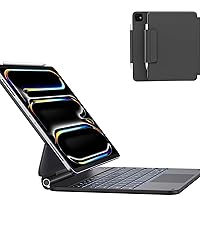
Image: Integrated pencil holder.
3. Instruccions de configuració
3.1 Connectar el vostre iPad
- Obriu la funda del teclat.
- Align your iPad Pro 11-inch (M4) with the magnetic back cover. The iPad will snap securely into place.
- Ajusteu el viewing angle by tilting the iPad to your desired position (up to 135°).
3.2 Vinculació Bluetooth
- Ensure the keyboard is charged (see section 3.3).
- Turn on the keyboard by sliding the power switch. The power indicator light will illuminate.
- Al teu iPad, vés a Configuració > Bluetooth i activa el Bluetooth.
- The iPad will search for nearby devices. Select "Foliokey11" from the list of available devices.
- Once connected, the pairing indicator light on the keyboard will turn off.
3.3 Càrrega del teclat
The keyboard uses a USB-C port for charging. Connect the provided USB-C cable to the charging port on the side of the keyboard and to a power source.
- Charging Indicator (Red Light): Flashes rapidly when battery is low, solid red when charging.
- Fully Charged (Green Light): Illuminates green when charging is complete.

Image: USB-C charging port and indicator lights.
4. Instruccions de funcionament
4.1 Ús del teclat
Once paired, the keyboard functions like a standard laptop keyboard. Type directly into any text field on your iPad.
4.2 Multi-Touch Trackpad Gestures
The integrated trackpad supports various multi-touch gestures for efficient navigation:
- Toc amb un sol dit: Click/Select.
- Desplaçament amb dos dits: Desplaça't amunt/avall o esquerra/dreta.
- Pessiga per fer zoom: Apropar/reduir el contingut.
- Lliscament cap amunt amb tres dits: Aneu a la pantalla d'inici.
- Lliscament amb tres dits cap a l'esquerra/dreta: Canvia entre les aplicacions obertes.
- Four-Finger Swipe Up: Open App Switcher.

Image: Multi-Touch Trackpad gestures.
Control de retroiluminació 4.3
The keyboard features an 11-color RGB backlight with 4 levels of adjustable brightness.
- Ajusta la brillantor: Premeu Fn + ↑ or Fn + ↓ per augmentar o disminuir la brillantor.
- Canvia el color: Premeu Fn + → to cycle through the 11 backlight colors.

Image: Backlit keyboard in use.
4.4 Keyboard Shortcuts
Utilize the following function key combinations for quick actions:

Image: Keyboard shortcut guide.
| Combinació de tecles | Funció |
|---|---|
| Fn + Esc | Torna enrere |
| Fn + ↑ | Augmenta la brillantor |
| Fn + ↓ | Disminueix la brillantor |
| Fn + 4 | Obriu Siri |
| Fn + → | Canvia el color de la llum de fons |
| Fn + 8 | Reproduir/Pausa |
| Fn + 9 | Baixa el volum |
| Fn + 0 | Turn Off/On Trackpad |
| Fn + 3 | Open Virtual Keyboard |
| Fn + 5 | Ajusteu la brillantor de la llum de fons |
| Fn + 7 | Pista anterior |
| Fn + - | Pista següent |
| Fn + = | Puja el volum |
| Fn + Suprimir | Pantalla de bloqueig |
5. Manteniment
- Neteja: Utilitzeu un suau, damp cloth to wipe the exterior of the case and keyboard. Avoid harsh chemicals or abrasive materials.
- Emmagatzematge: When not in use for extended periods, ensure the keyboard is fully charged and stored in a cool, dry place.
- Eviteu líquids: Keep the keyboard case away from liquids to prevent damage to electronic components.
6. Solució De Problemes
6.1 El teclat no es connecta
- Assegureu-vos que el teclat estigui encès i completament carregat.
- Check your iPad's Bluetooth settings to confirm Bluetooth is enabled and "Foliokey11" is selected.
- If already paired, try unpairing and re-pairing the keyboard.
- Reinicieu tant l'iPad com el teclat.
6.2 La retroiluminació no funciona
- Ensure the keyboard is charged. Low battery can affect backlight functionality.
- Utilitza el Fn + ↑ or Fn + ↓ keys to adjust brightness.
6.3 Trackpad Not Responding
- Ensure the trackpad is not accidentally turned off. Press Fn + 0 to toggle the trackpad on/off.
- Check Bluetooth connection.
- Reinicieu el teclat i l'iPad.
7. Especificacions
| Característica | Detall |
|---|---|
| Número de model | Foliokey11 |
| Dispositius compatibles | iPad Pro 11-inch (M4) 2024 (A2836, A2837, A3006) |
| Tecnologia de connectivitat | Bluetooth |
| Capacitat de la bateria | Polímer de liti de 700 mAh |
| Temps de càrrega | Aprox. 2.5 hores |
| Temps de treball continu | 200 hours (backlight off) |
| Il·luminació del teclat | 11 Colors RGB, 4 Brightness Levels |
| Característiques especials | Backlit, Ergonomic, Portable, Rechargeable, Full-area Trackpad |
| Dimensions del producte | 9.99 x 7.2 x 0.77 polzades |
| Pes de l'article | 2 lliures |
| Fabricant | AUSDOM |
8. Vídeos de productes
8.1 AUSDOM iPad Pro 11 Inch Case with Keyboard (M4, 2024) Overview
Video: This official product video provides a comprehensive overview of the AUSDOM iPad Pro 11-inch M4 Keyboard Case, demonstrating its features, design, and functionality.
9. Garantia i Suport
For warranty information, technical support, or any inquiries regarding your AUSDOM iPad Pro M4 11-inch Keyboard Case, please refer to the contact details provided in the packaging or visit the official AUSDOM weblloc.
A detailed user manual is included in the product packaging for additional guidance.
Ask a question about this manual
Ask about setup, troubleshooting, compatibility, parts, safety, or missing instructions. Manuals+ will review the question and use this page’s manual context to help answer it.