
Sky Devices Sky PAD10 MAX
Sky PAD10 MAX 10-inch Display Tablet
Manual d'usuari
Introducció
The Sky PAD10 MAX is a versatile 10-inch tablet designed for entertainment, education, and productivity. It features a powerful Quad Core 2.0 GHz processor, 3GB RAM, and runs on the Android 13 operating system, providing a smooth and responsive user experience. With 64GB of internal storage, expandable via SD card, you have ample space for your applications, media, and documents. The tablet is equipped with a 5MP rear camera and a 2MP front camera, and a 5000mAh battery for extended use. A protective case is included to help safeguard your device.

Figura 1: Frontal view of the Sky PAD10 MAX tablet.
Què hi ha a la caixa
En obrir el paquet, comproveu que hi hagi tots els elements següents:
- Sky PAD10 MAX Tablet (with built-in battery)
- Carregador
- Cable de dades
- Funda protectora
Configuració
1. Càrrega de la tauleta
Before initial use, fully charge your Sky PAD10 MAX tablet. Connect the provided data cable to the tablet's charging port and the charger to a power outlet. The battery indicator on the screen will show the charging status.

Figura 2: lateral view of the tablet, indicating the location of the charging port and other physical features.
2. Encès / apagat
- Per encendre: Press and hold the Power button (located on the side) until the Sky Devices logo appears on the screen.
- Per apagar: Press and hold the Power button until a power options menu appears. Select "Power off" and confirm.
- Per reiniciar: Al menú d'opcions d'energia, seleccioneu "Reiniciar" i confirmeu.
3. Assistent de configuració inicial
The first time you power on the tablet, you will be guided through an initial setup wizard. Follow the on-screen prompts to:
- Seleccioneu el vostre idioma.
- Connecteu-vos a una xarxa Wi-Fi.
- Set up your Google account (or create a new one). This is essential for downloading apps from the Google Play Store.
- Configura el bloqueig de pantalla (PIN, patró o contrasenya).
- Review i acceptar els termes i condicions.
4. Inserting an SD Card (Optional)
The Sky PAD10 MAX supports expandable storage up to 64GB via an SD card (not included). To insert an SD card:
- Locate the SD card slot on the side of the tablet.
- Gently insert the SD card into the slot with the gold contacts facing down until it clicks into place.
- The tablet will notify you once the SD card is detected. You may be prompted to format the card for use with the tablet.

Figura 3: posterior view of the tablet, indicating the general area where the SD card slot might be located (exact location varies, refer to physical device).
Funcionament de la tauleta
1. Navegació bàsica
- Toca: Toqueu una icona o opció per seleccionar-la.
- Toca i mantén premut: Mantingueu premut un element per accedir a opcions addicionals o moure'l.
- Llisca: Arrossegueu el dit per la pantalla per desplaçar-vos per pàgines o llistes.
- Pessiga per fer zoom: Feu servir dos dits per ampliar o reduir imatges, mapes o web pàgines.
2. Connectivitat Wi-Fi
Per connectar-se a una xarxa Wi-Fi:
- Vés a Configuració > Xarxa i Internet > Wi-Fi.
- Activa/desactiva el Wi-Fi On.
- Seleccioneu la xarxa desitjada de la llista.
- Introduïu la contrasenya si us demana i toqueu Connecta't.
3. Ús de les càmeres
La tauleta inclou una càmera posterior de 5 MP i una càmera frontal de 2 MP.
- Obriu el Càmera aplicació des de la pantalla d'inici o el calaix d'aplicacions.
- Toqueu la icona de la càmera per canviar entre la càmera frontal i la posterior.
- Toqueu el botó de l'obturador per fer una foto o iniciar/aturar la gravació de vídeo.
- Access various camera modes and settings within the app.
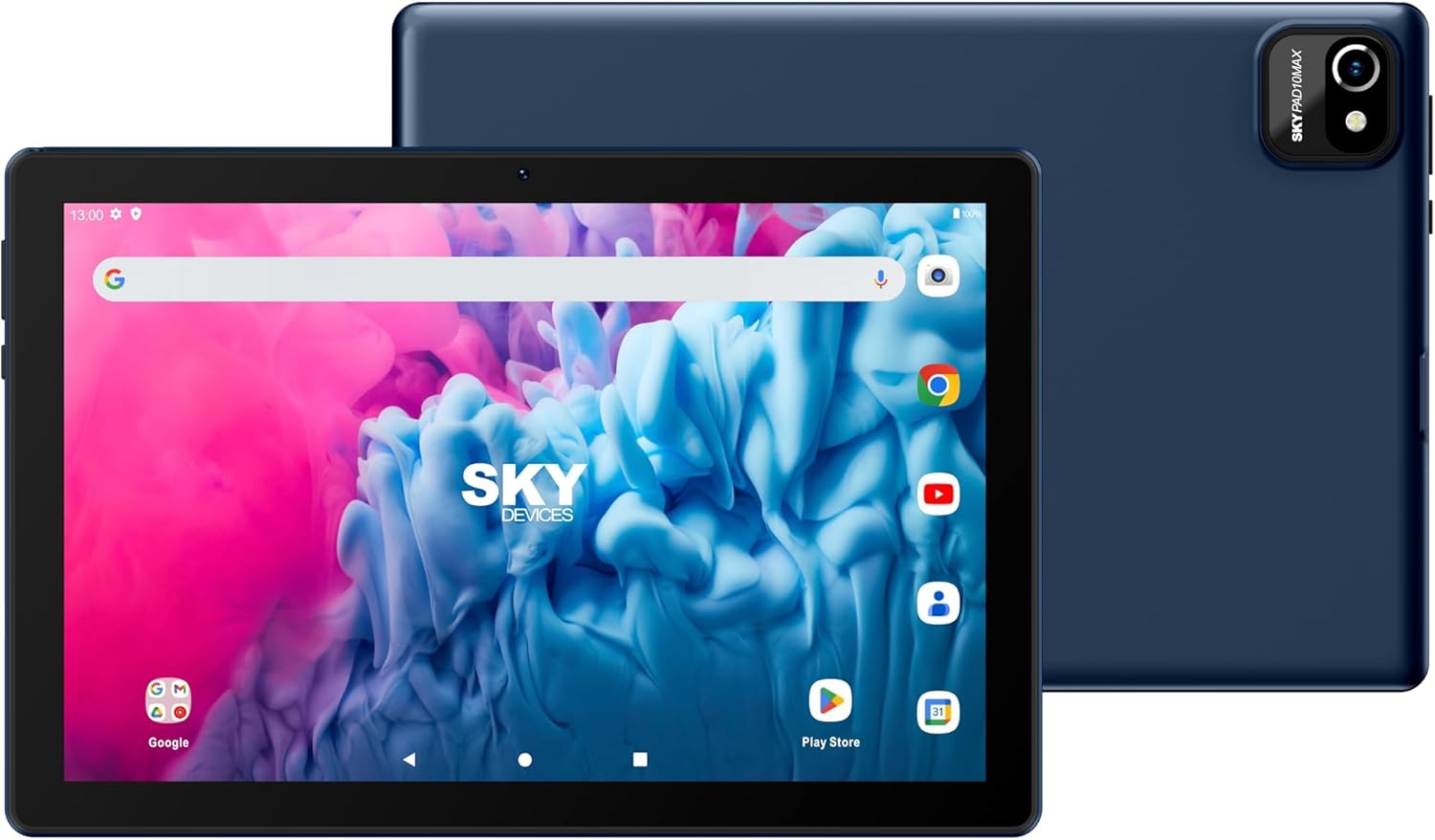
Figura 4: Davant i darrere views highlighting the camera locations.
4. Gestió d'aplicacions i Google Play Store
The Android 13 operating system provides access to millions of apps via the Google Play Store.
- Obriu el Play Store aplicació.
- Cerca apps, games, movies, and books.
- Toqueu Instal·lar to download and install applications.
- To uninstall an app, touch and hold its icon on the home screen or app drawer, then drag it to the "Uninstall" option, or go to Configuració > Aplicacions > selecciona l'aplicació > Desinstal·la.
5. Connectivitat Bluetooth
To connect Bluetooth devices (e.g., headphones, speakers):
- Vés a Configuració > Dispositius connectats > Preferències de connexió > Bluetooth.
- Commuta el Bluetooth On.
- Assegureu-vos que el dispositiu Bluetooth estigui en mode d'emparellament.
- Seleccioneu el dispositiu de la llista de dispositius disponibles i seguiu les instruccions d'emparellament que apareixen a la pantalla.
Manteniment
1. Neteja del dispositiu
- Feu servir un drap suau i sense borrissol per netejar la pantalla i el cos de la tauleta.
- Per a taques persistents, lleugerament dampNetegeu el drap amb aigua o un netejador de pantalles segur.
- Eviteu l'ús de productes químics agressius, materials abrasius o humitat excessiva.
2. Cura de la bateria
- Per allargar la durada de la bateria, eviteu exposar la tauleta a temperatures extremes.
- It is recommended to use the original charger and data cable provided with the tablet.
- Per a un estat òptim de la bateria, eviteu esgotar-la completament amb freqüència o mantenir-la al 100% de càrrega durant períodes prolongats.
3. Actualitzacions de programari
Comproveu i instal·leu regularment si hi ha actualitzacions de programari per assegurar-vos que la tauleta tingui les darreres funcions, pegats de seguretat i millores de rendiment.
- Vés a Configuració > Sistema > Actualització del sistema.
- Seguiu les instruccions que apareixen a la pantalla per comprovar i instal·lar les actualitzacions disponibles.
4. Using the Protective Case
The included protective case is designed to shield your tablet from scratches and minor drops. Ensure the tablet is properly seated within the case for maximum protection.
Resolució de problemes
This section addresses common issues you might encounter with your Sky PAD10 MAX tablet.
Tablet Does Not Power On
- Ensure the tablet is sufficiently charged. Connect the charger and wait a few minutes before attempting to power on again.
- Mantingueu premut el botó d'engegada durant almenys 10-15 segons per realitzar un reinici forçat.
No es pot connectar a la Wi-Fi
- Verifiqueu que el Wi-Fi estigui activat a la configuració de la tauleta.
- Assegureu-vos que esteu introduint la contrasenya de Wi-Fi correcta.
- Reinicieu el vostre encaminador Wi-Fi.
- Try forgetting the network and reconnecting. Go to Configuració > Xarxa i Internet > Wi-Fi, tap the network name, then Oblida't.
Tablet is Slow or Unresponsive
- Tanca les aplicacions que no s'utilitzen i que s'executen en segon pla.
- Clear cache data for frequently used apps (Configuració > Aplicacions > selecciona l'aplicació > Emmagatzematge i memòria cau > Esborra la memòria cau).
- Reinicieu la tauleta.
- Ensure there is sufficient free storage space.
La bateria s'esgota ràpidament
- Redueix la brillantor de la pantalla.
- Desactiva el Wi-Fi, el Bluetooth i el GPS quan no els utilitzis.
- Tanca les aplicacions en segon pla.
- Comprova l'ús de la bateria a Configuració > Bateria per identificar les aplicacions que consumeixen energia.
Especificacions
| Característica | Detall |
|---|---|
| Nom del model | Sky PAD10 MAX |
| Mida de la pantalla | 10 polzades |
| Resolució de pantalla | 800 x 1280 píxels (HD) |
| Processador | Quad Core 2.0 GHz (MediaTek) |
| RAM | 3 GB |
| Emmagatzematge intern (ROM) | 64 GB |
| Emmagatzematge ampliable | Up to 64GB via SD card (not included) |
| Sistema operatiu | Android 13 |
| Càmera posterior | 5 MP |
| Càmera frontal | 2 MP |
| Capacitat de la bateria | 5000mAh (approx. 5 hours average use, 200 hours standby) |
| Connectivitat sense fil | Wi-Fi (802.11g), Bluetooth |
| Dimensions (LxWxH) | 8.83 x 6.79 x 0.41 polzades |
| Pes de l'article | 9.6 unces |
| Color | Plata |
Garantia i Suport
Informació de la garantia
The Sky PAD10 MAX tablet comes with a standard manufacturer's warranty. Please refer to the warranty card included in your product packaging or visit the official Sky Devices weblloc web per obtenir els termes i condicions detallats sobre la cobertura de la garantia, la durada i els procediments de reclamació.
Atenció al client
If you encounter issues not covered in the troubleshooting section or require further assistance, please contact Sky Devices customer support. You can typically find contact information (phone number, email, or support portal) on the official Sky Devices weblloc web o dins de l'embalatge del producte.
When contacting support, please have your product model number (Sky PAD10 MAX) and any relevant purchase information ready to expedite the process.
Ask a question about this manual
Ask about setup, troubleshooting, compatibility, parts, safety, or missing instructions. Manuals+ will review the question and use this page’s manual context to help answer it.