
1. Introducció
This manual provides comprehensive instructions for the installation, operation, and maintenance of your TouchWo 15.6-inch Android 12 Industrial Embedded Interactive Touchscreen Monitor. Designed for robust industrial applications, this capacitive multi-touch tablet offers high performance and durability. Please read this manual thoroughly before using the product to ensure proper function and longevity.
2. Producte acabatview
Característiques clau
- 10 Points Touch Screen Monitor: The screen supports multi-finger touch for zooming and other gestures, requiring no driver installation. It also works with gloves and allows brightness adjustment.
- Rich Application Software & Interface: Runs on Android 12 OS with an RK3588 processor, 8GB RAM, and 128GB ROM. Pre-installed with Play Store. Features TF card slot, RJ45, Phoenix2Pin, USB, HD-MI, and audio ports. Powered by DC 12V or AC 110-240V.
- Fanless and Silent Design: Engineered for silent operation without the need for external cooling. The aluminum alloy back shell maximizes heat dissipation.
- Rendiment estable: Designed for embedded installation with VESA standard mounting holes. Ideal for high-traffic industrial environments such as cabinets, CNC tools, and control consoles.
- Quality Assurance & After-Sales Service: FCC, CE, RoHS certified, and manufactured under ISO9001 quality management. 24/7 online customer support is available.
Visuals and Connectivity

This image highlights the 10-point capacitive multi-touch screen, demonstrating its responsiveness even with gloved hands. It also emphasizes the HD display and IP65 front panel rating for water and dust resistance.

La part posterior view of the monitor showcasing its fanless design and aluminum alloy casing, which is engineered for efficient heat dissipation and silent operation.

Un detallat view of the monitor's rich interface options, including Power Terminal Connector, DC12V input, LAN, USB ports, TF card slot, HDMI, Audio, and WiFi antenna connections, ensuring wide compatibility for various industrial needs.

This image illustrates the diverse applications of the TouchWo industrial monitor, including industrial automation equipment, machine consoles, self-service terminals, and CNC control tools.
Vídeo d'introducció del producte
This video provides a general introduction to the TouchWo DM Series Touchscreen Products, highlighting their design, features, and potential applications in various industrial settings.
Water and Dust Resistance Demonstration
Watch this video to see a demonstration of the front screen's IP67 water and dust resistance, showcasing its durability in challenging environments. Note that the backshell may require customization for specific needs.
3. Configuració i instal·lació
Què hi ha a la caixa
- 1 x Touchscreen Tablet
- 1 x Power Adapter, Power Line 1.5m
- 1 x Manual del producte (aquest document)
- 4 x Embedded snap
Physical Installation (Embedded)
The TouchWo monitor is designed for easy embedded installation. It features VESA standard mounting holes on the back for flexible integration into various setups.
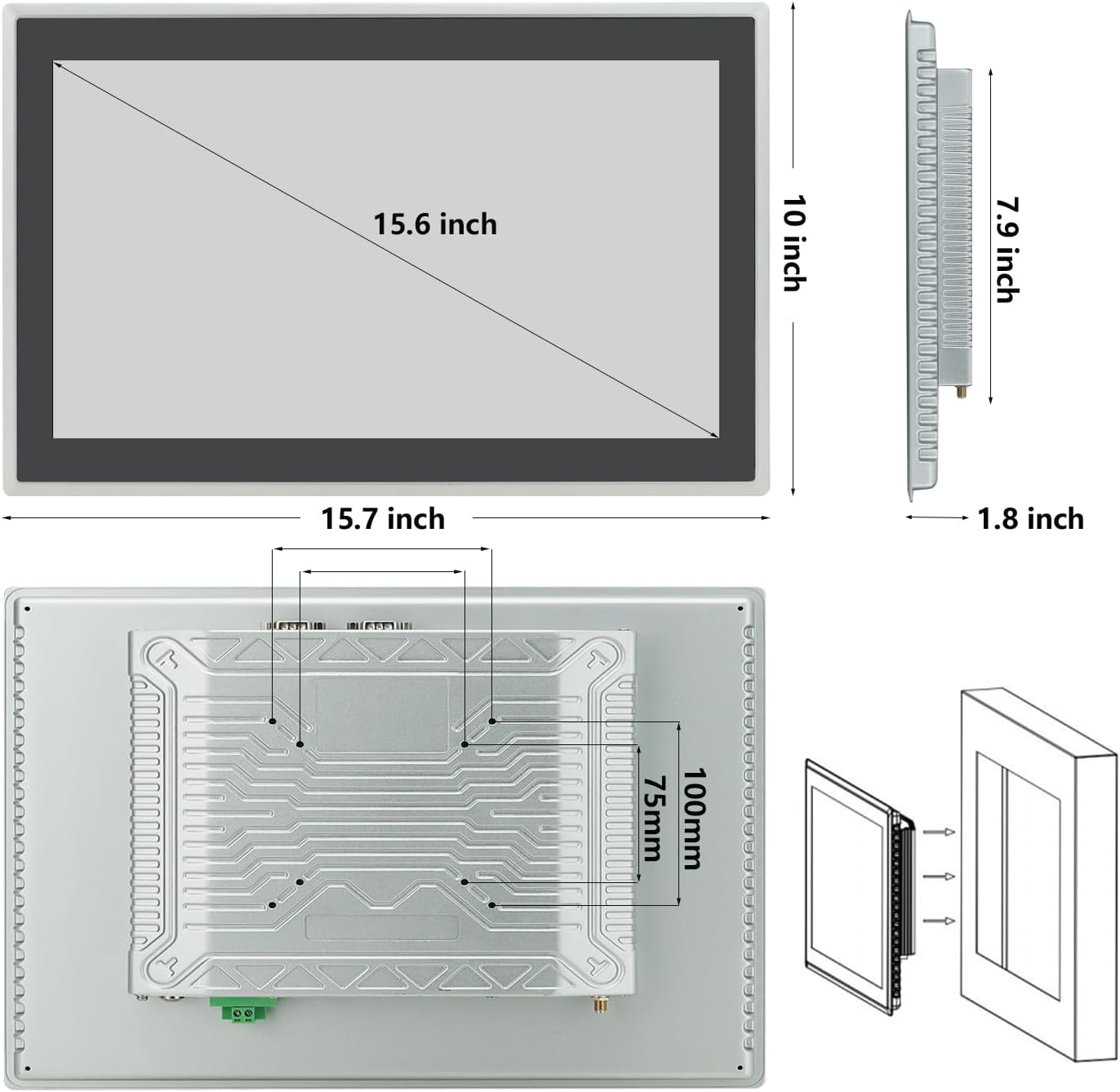
This diagram illustrates the product dimensions and the VESA mounting pattern on the rear of the monitor, providing necessary measurements for cabinet integration.
Embedded Installation Tutorial
This video provides a detailed step-by-step guide for embedding the TouchWo DMF Series monitor into a cabinet or panel, ensuring a secure and flush fit.
- Eines de preparació: You will only need a screwdriver for the installation.
- Unpack Accessories: Localitza el clamp plates, long screws, and short screws from the accessory pack.
- Insert Monitor: Gently push the monitor from the outside of the cabinet opening into its designated slot.
- Adjunteu Clamp Plates (Short Screws): Place a short screw into the hole of a clamp plate (the side without threads).
- Assegureu-vos Clamp Plates (Short Screws): Use the screwdriver to screw the short screw into the installation hole of the machine, ensuring the clamp plate is secure against the cabinet.
- Adjunteu Clamp Plates (Long Screws): Place a long screw into another hole on the clamp placa.
- Apretar Clamp Plates (Long Screws): Fix its position and then tighten it with the screwdriver.
- Repeat for All Sides: Apply the same installation method to the other three holes/sides of the monitor.
- Comprovació final: After installation, verify that all screws are securely tightened to ensure the monitor is firmly in place. The panel and cabinet should fit perfectly, making it waterproof, dustproof, and easy to clean.
4. Funcionament
Encès/Apagat
- Per encendre: Connect the provided power adapter to the DC 12V input or the Phoenix2Pin connector. The device will typically power on automatically or can be turned on via a dedicated power button if present.
- Per apagar: Access the Android system's power options (usually by holding the power button or through the system settings) and select 'Shut down' or 'Power off'. Avoid direct power disconnection during operation to prevent data corruption.
Basic Android 12 Navigation
- Gestos tàctils: The 10-point capacitive touch screen supports standard Android gestures including tap, double-tap, pinch-to-zoom, swipe, and drag-and-drop.
- Pantalla d'inici: Navigate through applications and widgets. Customize by long-pressing on empty space.
- Calaix d'aplicacions: Llisca cap amunt des de la pantalla d'inici per accedir a totes les aplicacions instal·lades.
- Notificacions i configuració ràpida: Feu lliscar el dit cap avall des de la part superior de la pantalla fins a view notifications and access quick settings toggles (Wi-Fi, Bluetooth, Brightness, etc.).
- Configuració: Access the full system settings menu to configure network, display, sound, storage, security, and other device options.
Connexió de perifèrics
- Dispositius USB: Connect USB keyboards, mice, or storage devices to the available USB ports.
- Xarxa: Use the RJ45 port for wired Ethernet connection or connect to a Wi-Fi network via system settings.
- Pantalla externa: Connect an external monitor via the HD-MI port for extended display options.
- Àudio: Use the audio output port for external speakers or headphones.
5. Manteniment
Neteja del monitor
- Apagueu i desendolleu sempre el monitor abans de netejar-lo.
- Utilitzeu un drap suau i sense pelusa lleugerament dampRenteu-ho amb aigua o un netejador de pantalles no abrasiu.
- Do not spray liquid directly onto the screen or into any openings.
- Eviteu utilitzar productes químics agressius, netejadors abrasius o dissolvents.
Atenció General
- Ensure proper ventilation around the device, especially if not fully embedded, to maintain optimal operating temperature.
- Protegiu la pantalla d'objectes punxeguts per evitar ratllades.
- Comproveu regularment les connexions dels cables per assegurar-vos que estiguin ben fixades.
- Perform periodic software updates as recommended by the manufacturer to ensure system stability and security.
6. Solució De Problemes
Problemes comuns i solucions
- Sense energia:
- Check if the power adapter is securely connected to both the monitor and the power outlet.
- Comproveu que la presa de corrent funcioni.
- Ensure the power adapter is the correct voltage (12 V CC).
- La pantalla no respon al tacte:
- Assegureu-vos que la pantalla estigui neta i lliure de residus.
- Reinicieu el dispositiu.
- If using gloves, ensure they are compatible with capacitive touchscreens.
- Sense pantalla:
- Comproveu la connexió d'alimentació.
- Assegureu-vos que el monitor estigui encès.
- If connected to an external display, ensure the correct input source is selected on the external display.
- Sistema lent o no respon:
- Tanca les aplicacions innecessàries que s'executen en segon pla.
- Esborra la memòria cau i temporal files.
- Reinicieu el dispositiu.
- Ensure sufficient storage space is available (128GB ROM).
For persistent issues not covered here, please refer to the warranty and support section for assistance.
7. Especificacions tècniques
| Característica | Especificació |
|---|---|
| Número de model | DM156NFAB |
| Mida de la pantalla | 15.6 polzades |
| Resolució de visualització | 1920 x 1080 píxels |
| Relació d'aspecte | 16:9 |
| Sistema operatiu | OS Android 12 |
| Processador | RK3588 |
| RAM | 8 GB |
| ROM | 128 GB |
| Tecnologia tàctil | 10-Point Capacitive Multi-Touch |
| Valoració del panell frontal | IP65 (resistent a l'aigua i la pols) |
| Connectivitat | WiFi, Bluetooth, RJ45, USB, HD-MI-Out, Audio Ports, TF Card Slot |
| Entrada de potència | DC 12V, AC 110-240V |
| Dimensions del producte | 1.8 x 15.7 x 10 polzades |
| Pes de l'article | 9.9 lliures (4.5 quilograms) |
| Color | Negre |
| Fabricant | Guangzhou Touchwo Electronics Co., Ltd |
| País d'origen | Xina |
8. Garantia i Suport
The TouchWo 15.6-inch Android 12 Industrial Embedded Interactive Touchscreen Monitor is FCC, CE, and RoHS certified, ensuring compliance with relevant safety and environmental standards. The manufacturing facility holds ISO9001 quality management certification, reflecting a commitment to high-quality production processes.
For any inquiries, technical assistance, or support needs, TouchWo offers 24/7 online customer support. Please refer to the contact information provided on the product packaging or the official TouchWo weblloc web per a assistència directa.