
1. Introducció
Thank you for choosing the RIKSION JF-H-40JD Under-Desk Treadmill. This manual provides essential information for the safe and effective use, setup, operation, and maintenance of your new fitness equipment. Please read this manual thoroughly before initial use and retain it for future reference.
The RIKSION JF-H-40JD is designed for home and office use, offering a compact and portable solution for walking, jogging, and light running. Its foldable design and transport wheels make it ideal for small spaces, allowing for convenient storage and movement.
2. Informació de seguretat
AVÍS: Per reduir el risc de lesions greus, llegiu totes les precaucions i instruccions importants d'aquest manual abans d'utilitzar la cinta de córrer.
- Consulteu sempre amb un metge abans de començar qualsevol programa d'exercici.
- Mantingueu els nens i les mascotes lluny de la cinta de córrer durant el funcionament.
- Col·loqueu la cinta de córrer sobre una superfície plana i estable amb almenys 2 metres (6.5 peus) d'espai lliure darrere i 0.6 metres (2 peus) a cada costat.
- Ensure the safety clip is properly attached to your clothing before starting the treadmill. In case of an emergency, the safety clip will stop the machine.
- No feu servir la cinta de córrer si té el cable d'alimentació o l'endoll danyats o si no funciona correctament.
- Porteu calçat i roba esportiva adequats. Eviteu la roba ampla que es pugui enganxar a les peces mòbils.
- No pugeu ni baixeu de la cinta de córrer mentre la cinta estigui en moviment.
- La capacitat màxima de pes de l'usuari per a aquesta cinta de córrer és de 120 kg (264 lliures).
- Desendolleu la cinta de córrer de la presa de corrent quan no l'utilitzeu, abans de netejar-la i abans de fer-ne el manteniment.
3. Producte acabatview
3.1 Components
- Running Belt (100 cm x 40 cm)
- Pantalla LED
- Control Panel (on armrest)
- Control remot
- Foldable Armrests with Device Holder
- Clip de seguretat
- Rodes de transport
- Cable d'alimentació
3.2 Característiques clau
- Inclinació ajustable: Features a manual incline adjustment of 5% and 10% (2 to 4 degrees) to simulate uphill training, enhancing workout intensity and calorie burn.
- Dual Shock Absorption: Equipped with a 5-layer anti-slip running belt and 2 soft rubber cushions for a stable and comfortable experience, reducing joint impact.
- Funcionament silenciós: Designed with multiple layers of anti-slip textures and noise-absorbing coatings, ensuring quiet operation (under 45dB) suitable for home or office environments.
- Disseny compacte i plegable: Ready to use out of the box with no installation required. Armrests fold down, reducing dimensions to 136.5 x 64.5 x 13 cm for easy storage under tables or sofas.
- Rodes de transport: Integrated wheels allow for easy relocation and vertical storage, making it ideal for small apartments or offices.
- Pantalla LED i comandament a distància: Clearly displays distance, speed, time, and calorie data. Speed can be adjusted, and the treadmill can be started, stopped, or paused via the remote control or the Fitshow app.
- Funcionalitat 3 en 1: Supports walking (1-6 km/h), jogging/workstation mode (1-6 km/h), and running (1-14 km/h).
4. Configuració
4.1 Desembalatge i col·locació
- Traieu amb cura la cinta de córrer del seu embalatge. La unitat ve premuntada.
- Place the treadmill on a firm, level surface. Ensure adequate clearance around the unit as described in the Safety Information section.
4.2 Desplegament de la cinta de córrer
- Gently lift the armrests from their folded position until they lock securely into place.
- Assegureu-vos que tots els mecanismes de bloqueig estiguin enganxats abans d'utilitzar-los.
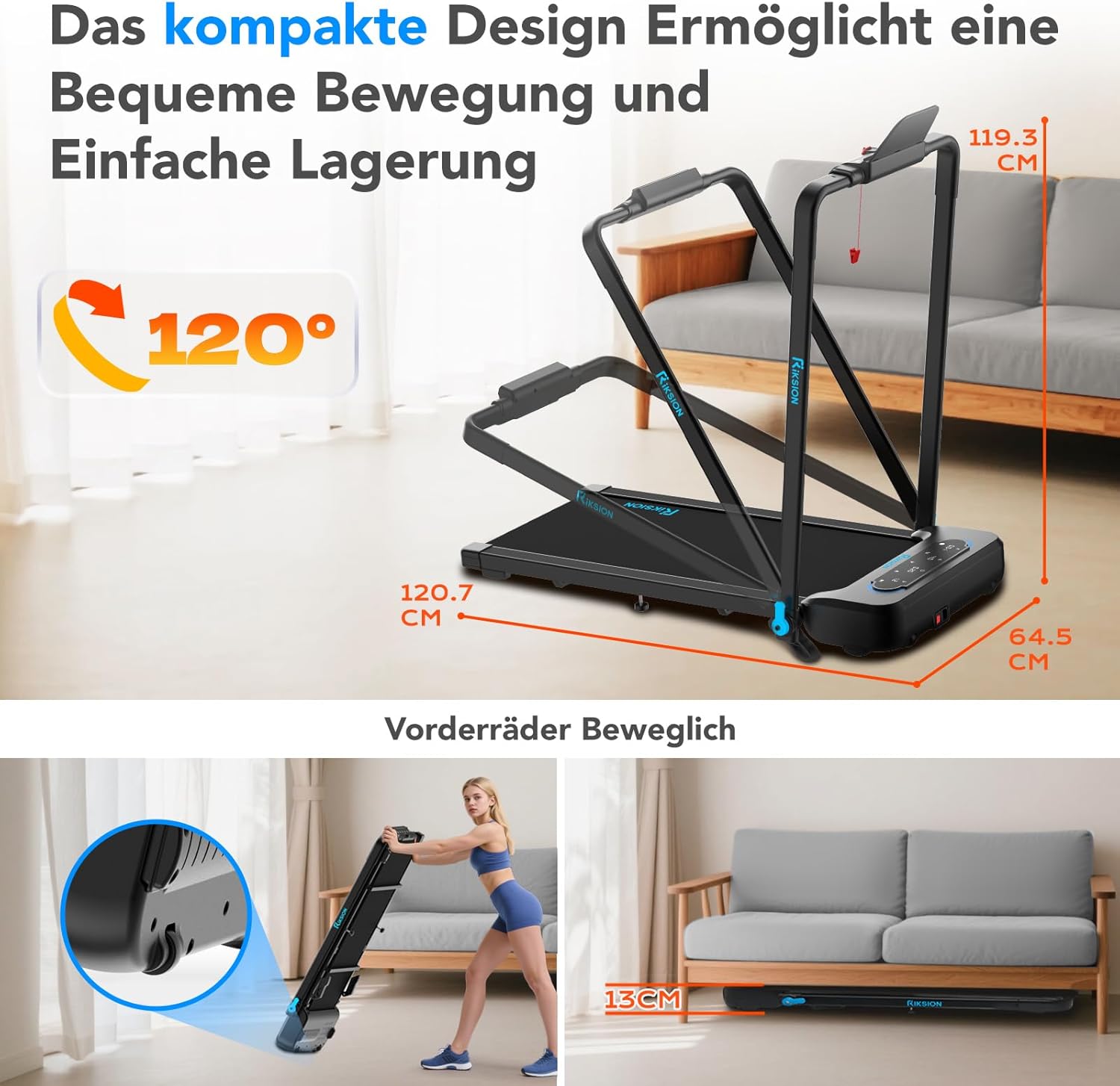
Image: The compact design allows for easy movement and storage. The treadmill can be folded to a height of 13 cm and features front wheels for transport.
4.3 Connexió d'alimentació
- Connecteu el cable d'alimentació a l'entrada d'alimentació de la cinta de córrer.
- Connecteu l'altre extrem del cable d'alimentació a una presa de corrent amb connexió a terra.
4.4 Ajust d'inclinació
The incline is manually adjustable. To change the incline, lift the rear of the treadmill and adjust the support legs to the desired 5% or 10% incline level. Ensure both sides are set equally.

Image: Illustration of the manual incline feature, demonstrating 5% and 10% incline settings and their impact on calorie expenditure.
5. Instruccions de funcionament
5.1 Engegada/apagada
- Press the power button on the treadmill's control panel or remote control to turn the unit on.
- To turn off, press the power button again or unplug the unit.
5.2 Attaching the Safety Clip
Before each use, attach the safety clip to the designated slot on the control panel and secure the other end to your clothing. The treadmill will not operate without the safety clip in place.
5.3 Using the Control Panel and Remote Control

Image: The treadmill's LED display shows workout data, and the remote control provides convenient speed adjustment and start/stop functions.
- Inici/Parada: Use the 'Start' and 'Stop' buttons on the control panel or remote to begin and end your workout.
- Ajust de velocitat: Use the '+' and '-' buttons on the control panel or remote to increase or decrease the speed. The treadmill offers a speed range of 1-14 km/h.
- Selecció del mode: The treadmill supports different modes: walking (1-6 km/h), workstation (1-6 km/h), and running (1-14 km/h). Select the appropriate mode based on your activity.
5.4 pantalles LED
The integrated LED display automatically shows your workout data, including:
- Distància
- Velocitat
- Temps
- Calories cremades
5.5 App Connectivity (Fitshow)
The treadmill can connect to the Fitshow application. Refer to the Fitshow app's instructions for pairing and advanced control features.

Image: A user exercising on the RIKSION treadmill, demonstrating the device holder for tablets and the remote control for operation.
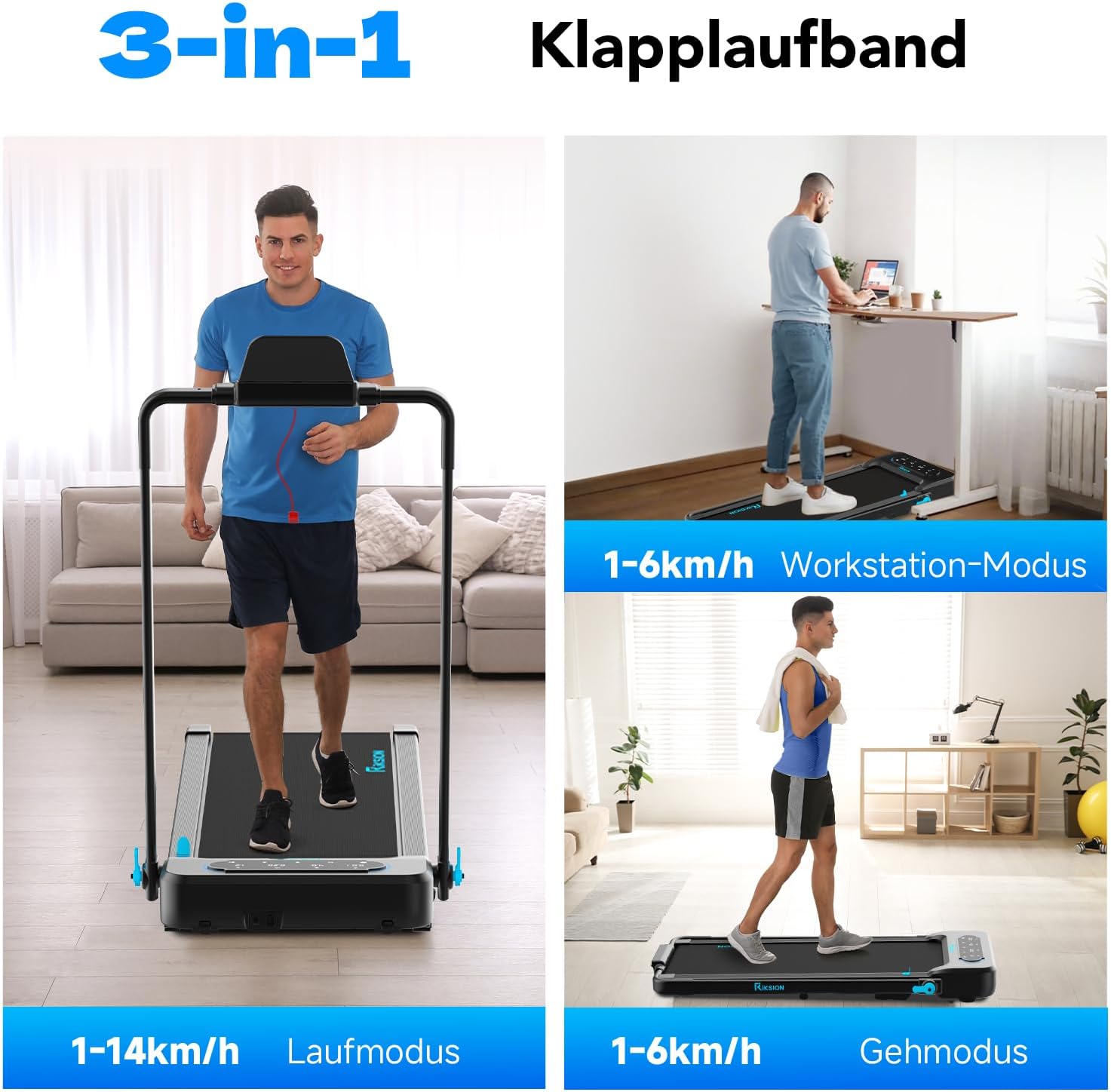
Image: Illustration of the treadmill's versatility, showcasing its use for running, as an under-desk walking pad, and for general walking.
6. Manteniment
Un manteniment regular garanteix la longevitat i el rendiment òptim de la cinta de córrer.
- Neteja: Netegeu la cinta de córrer amb anuncisamp drap després de cada ús per eliminar la suor i la pols. No utilitzeu productes de neteja abrasius ni dissolvents.
- Lubricació de corretja: The running belt requires periodic lubrication to reduce friction and extend its lifespan. Refer to the specific instructions provided with your lubricant or contact customer support for guidance. Generally, apply silicone lubricant under the belt every 3-6 months depending on usage.
- Tensió i alineació de la corretja: Check the running belt tension and alignment regularly. If the belt slips or drifts to one side, adjust it according to the instructions in the troubleshooting section or consult customer support.
- Emmagatzematge: When not in use, fold the treadmill and store it in a dry, cool place away from direct sunlight.
7. Solució De Problemes
If you encounter any issues with your RIKSION treadmill, refer to the following common problems and solutions:
- La cinta de córrer no s'encén:
- Ensure the power cord is securely plugged into a grounded outlet and the treadmill.
- Check if the safety clip is properly inserted.
- Verify the power switch is in the 'ON' position. - Running belt slips or stops:
- The running belt may be too loose. Refer to the manual for instructions on adjusting belt tension.
- The belt may require lubrication. See the Maintenance section. - Running belt drifts to one side:
- The running belt may be misaligned. Use the adjustment bolts at the rear of the treadmill to center the belt. Turn the bolt on the side the belt is drifting towards clockwise, or the opposite side counter-clockwise, in small increments (quarter turns) while the treadmill is running at a low speed. - Soroll inusual durant el funcionament:
- Check for any loose parts or foreign objects under the belt.
- The belt may need lubrication.
- Ensure the treadmill is on a level surface. - LED display is not working:
- Check all cable connections.
- Power cycle the treadmill (turn off, unplug, wait 30 seconds, plug in, turn on).
Si el problema persisteix després d'intentar aquestes solucions, poseu-vos en contacte amb l'atenció al client.
8. Especificacions
| Característica | Especificació |
|---|---|
| Número de model | JF-H-40JD |
| Marca | Riksion |
| Potència del motor | 2.25 CV |
| Interval de velocitat | 1 - 14 km/h |
| Capacitat de pes màxim | 120 quilos |
| Nivells d'inclinació | Manual 5% and 10% (2-4 degrees) |
| Dimensions de la cinta de córrer | 100 cm x 40 cm |
| Tipus de visualització | LED |
| Mides plegades (L x A x A) | 136.5 x 64.5 x 13 cm |
| Dimensions desplegades (L x A x A) | 120.7 x 64.5 x 115.3 cm (approximate, based on image) |
| Pes de l'article | 22.5 quilos |
| Material | Acer d'aliatge |
| Característiques especials | Foldable, LED Display, Double Shock Absorption, Armrests with Device Holder |
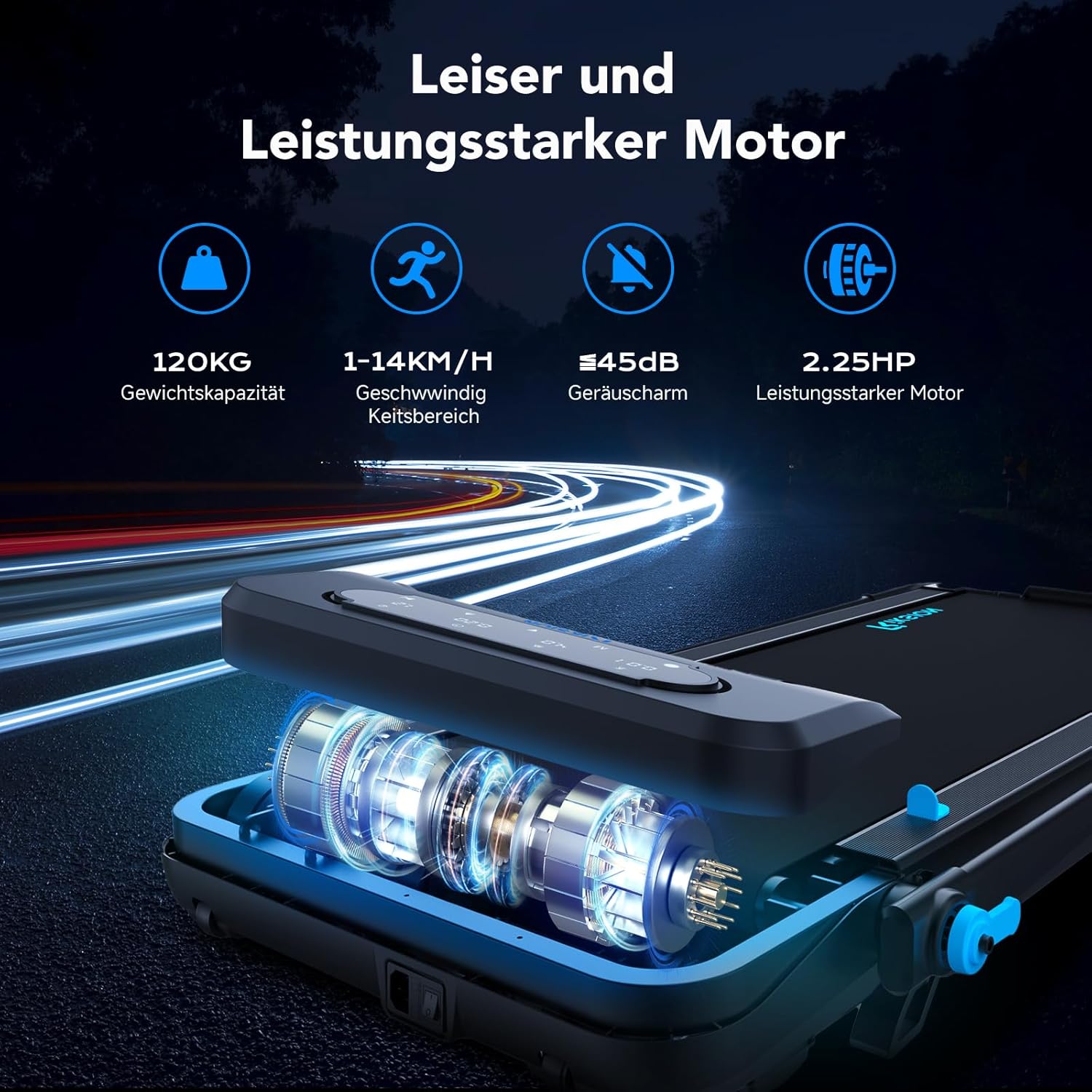
Image: Illustration of the treadmill's quiet and powerful 2.25 HP motor, capable of speeds up to 14 km/h and supporting up to 120 kg.

Imatge: Detallada view of the running belt's construction, highlighting its five layers for abrasion resistance, noise reduction, reinforcement, EVA cushioning, and high-strength compression.
9. Garantia i Suport
For warranty information and customer support, please refer to the documentation included with your purchase or contact the retailer/manufacturer directly. Keep your proof of purchase for warranty claims.