
1. Producte acabatview
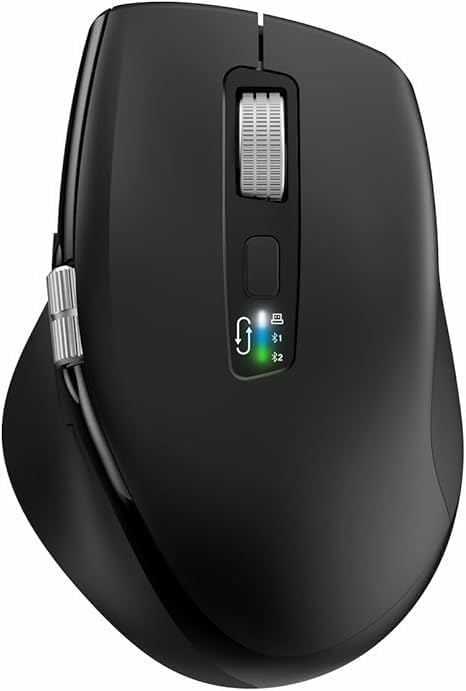
The INFINMIND L910 is a versatile wireless mouse designed for comfort and efficiency across multiple devices. It features both 2.4G wireless and Bluetooth connectivity, adjustable DPI settings, and specialized scrolling functions.
2. Contingut del paquet
- INFINMIND L910 Wireless Bluetooth Mouse
- USB Receiver (typically stored in the mouse battery compartment)
- 2 x piles AA
- Manual d'usuari (aquest document)
3. Instruccions de configuració
3.1. Instal·lació de la bateria
- Localitzeu el compartiment de la bateria a la part inferior del ratolí.
- Obriu la tapa del compartiment de la bateria.
- Insert one or two AA batteries, ensuring correct polarity (+/-). The mouse can operate with either one or two batteries, allowing for weight preference.
- Tanqueu bé la tapa del compartiment de la bateria.
3.2. Modes de connectivitat
The mouse supports three connection channels: one 2.4G wireless channel and two Bluetooth channels (BT1 and BT2). You can switch between these channels using the dedicated mode switch button on the mouse.
3.3. Connexió sense fil 2.4G
- Remove the USB receiver from its storage slot, usually located in the battery compartment.
- Connecteu el receptor USB a un port USB disponible de l'ordinador.
- Switch the mouse to the 2.4G wireless mode (indicated by a specific LED light, refer to mouse markings).
- L'ordinador hauria de detectar i instal·lar automàticament els controladors necessaris. El ratolí està llest per al seu ús.
3.4. Connexió Bluetooth (BT1 / BT2)
- Switch the mouse to either BT1 or BT2 mode using the mode switch button.
- Press and hold the mode switch button for 3-5 seconds until the corresponding Bluetooth LED indicator starts blinking rapidly. This indicates the mouse is in pairing mode.
- On your device (computer, smartphone, tablet), navigate to the Bluetooth settings.
- Cerca new devices. The mouse should appear as "INFINMIND L910" or similar.
- Select the mouse to pair. Once paired, the LED indicator will stop blinking and remain solid for a few seconds before turning off.
- Repeat these steps for the second Bluetooth channel (BT2) if you wish to connect to another device.
4. Instruccions de funcionament
4.1. Gestió d'energia
The mouse features an automatic sleep mode to conserve battery life. To wake the mouse from sleep, simply move it. There is no manual on/off switch; power is managed by battery insertion and activity.
4.2. Ajust de DPI
The mouse offers four adjustable DPI (Dots Per Inch) settings to suit various tasks and preferences. Press the DPI button, located near the main scroll wheel, to cycle through the available settings: 1000, 1600, 2400, and 3000 DPI.

4.3. Smart Flying Scroll Wheel
The main scroll wheel features a 'Smart Flying Scroll' function, allowing for rapid vertical scrolling. This is particularly useful for navigating long documents or web pages quickly and silently.
4.4. Side Scroll Wheel (Thumb Scroll)
A dedicated side scroll wheel, operated by the thumb, provides horizontal page scrolling. This feature enhances productivity, especially when working with wide spreadsheets or timelines.

4.5. Commutació multidispositiu
To switch between connected devices (2.4G, BT1, BT2), simply press the mode switch button. The corresponding LED indicator will light up to confirm the active connection.
4.6. Interruptor de compatibilitat del sistema
The mouse includes a one-touch switch specifically designed for seamless transitions between Windows and Mac operating systems, ensuring optimal performance on both platforms.
4.7. Ergonomic Design and Quiet Click
The contoured shape and soft rubber grips of the mouse are designed to reduce hand fatigue during extended use. The quiet click feature allows for multi-scene use without disturbing others.

5. Manteniment
5.1. Substitució de la bateria
When the mouse performance degrades or the LED indicator suggests low power, replace the AA batteries. Battery life can extend up to 20 months with one battery or 40 months with two batteries, depending on usage environment.
5.2. Neteja
Per netejar el ratolí, feu servir un drap suau i sec. Per a la brutícia persistent, feu servir un drap lleugerament sec.amp cloth with mild soap can be used, ensuring no liquid enters the internal components. Avoid abrasive cleaners or solvents.
5.3. Emmagatzematge
Store the mouse in a cool, dry place away from direct sunlight and extreme temperatures. If storing for an extended period, it is recommended to remove the batteries to prevent leakage.
6. Solució De Problemes
6.1. El ratolí no respon
- Comproveu si les piles estan correctament inserides i tenen prou càrrega. Substituïu-les si cal.
- Ensure the mouse is switched to the correct connection mode (2.4G, BT1, or BT2) for your device.
- For 2.4G connection, ensure the USB receiver is securely plugged into the computer. Try a different USB port.
- Per a la connexió Bluetooth, assegureu-vos que el Bluetooth estigui activat al dispositiu i que el ratolí estigui emparellat. Intenteu tornar a emparellar el ratolí.
6.2. Connectivity Issues / Lag
- Reduïu la distància entre el ratolí i el receptor/dispositiu.
- Elimineu qualsevol font potencial d'interferència (per exemple, altres dispositius sense fil, objectes metàl·lics grans).
- Try connecting to a different USB port or re-pairing the Bluetooth connection.
6.3. Els DPI no canvien
- Ensure you are pressing the DPI button firmly.
- If the issue persists, try restarting the mouse by removing and reinserting the batteries.
7. Especificacions
| Característica | Detall |
|---|---|
| Marca | INFINMENT |
| Número de model | L910 |
| Color | Negre |
| Tecnologia de connectivitat | Bluetooth, USB (sense fil 2.4G) |
| Característiques especials | Ergonomic Design, Thumb Scroll, Smart Flying Scroll |
| Dispositius compatibles | Ordinador personal, telèfon intel·ligent, tauleta |
| Composició de la bateria | Alcalí |
| Tecnologia de detecció de moviment | Òptic |
| Nombre de botons | 8 |
| Orientació de la mà | D'acord |
| Usos recomanats per al producte | Oficina |
| Durada de la bateria | Up to 40 months (with 2 AA batteries) |
| Configuració de DPI | 1000/1600/2400/3000 |
8. Garantia i Suport
Information regarding product warranty and specific customer support contact details is not available in this document. Please refer to the product packaging or the retailer's weblloc web per conèixer els termes de la garantia i les opcions d'assistència.