
feyree TAU EV-PRO (40A)
Feyree Level 2 Electric Vehicle Charger 40 Amp
Manual d'instruccions
1. Producte acabatview
The Feyree Level 2 Electric Vehicle Charger is a high-performance charging solution designed for both indoor and outdoor use. It features a 40 Amp, 240V NEMA 14-50 plug, and is compatible with SAE J1772 electric vehicles. With its 17-foot cable and WiFi connectivity, it offers convenience and flexibility for your EV charging needs.
This manual provides detailed instructions for the safe installation, operation, and maintenance of your Feyree EV charger.

Image: The Feyree Level 2 EV Charger unit, showing the main charging box, NEMA 14-50 plug, J1772 charging connector, three RFID cards, and a smartphone displaying the control app interface.
2. Informació de seguretat
Before operating the charger, please read and understand all safety warnings and instructions. Failure to follow these instructions may result in electric shock, fire, or serious injury.
2.1 Certifications and Protections
The Feyree EV charger complies with FCC and CE certifications, ensuring reliable and safe operation. It incorporates multiple protection mechanisms:
- Protecció contra fuites: Prevents electric shock by detecting current leakage.
- Protecció contra sobreintensitat: Mesures de seguretat contra el flux excessiu de corrent.
- Sobrevoltage Protecció: Protects the device from high voltage pics.
- Baix voltage Protecció: Garanteix un funcionament estable evitant el baix volumtage dany.
- Protecció contra llamps: Offers defense against lightning strikes.
- Protecció de connexió a terra: Ensures proper electrical grounding for safety.
- Protecció contra curtcircuits: Automatically shuts off power in case of a short circuit.
- Protecció contra el sobreescalfament: Monitors and prevents overheating of the unit.

Image: A visual representation of the comprehensive protection features integrated into the Feyree EV charger, highlighting its safety compliance with FCC and CE standards.
2.2 Environmental Resistance
The charger is designed with IP66 and NEMA-4 dustproof and waterproof protection, making it suitable for indoor and outdoor usage in various climates. The cable is flame retardant (CSA FT-2 compliant) and can operate in temperatures ranging from -40°F to 221°F. The control box itself is resistant to temperatures from -22°F to 131°F.

Image: The charger's resilience to extreme weather conditions, including cold, rain, and heat, emphasizing its IP66 waterproof rating and wide operating temperature range.
Video: Demonstrates the excellent protective performance of the Feyree EV charger, showcasing its durability and safety features in various tests.
3. What's Included in the Package
Your Feyree Level 2 EV Charger package includes the following components:
- 40A Wall-mounted EV Charger Unit
- Porta carregador EV
- 3 targetes RFID
- Suport de muntatge a la paret
- J1772 Connector Holder
- Manual d'usuari (aquest document)
- Screws Kit for installation

Imatge: Una imatge visualview of all items provided in the Feyree EV charger package, ensuring you have everything needed for setup and operation.
4. Configuració i instal·lació
The Feyree EV charger is designed for wall-mounted installation. Ensure you have a NEMA 14-50 outlet available and that the installation location is suitable for the charger's dimensions and cable length.
4.1 Muntatge del carregador
- Install the Wall Mount Bracket: Securely attach the wall mount bracket to a sturdy wall or pedestal using the provided screws. Ensure the bracket is level and at an appropriate height for convenient use. Recommended height for the top of the charger is approximately 1280mm (50.4 inches) from the ground.
- Mount the Charging Connector Holder: Attach the J1772 connector holder to the wall or pedestal at a convenient height, typically around 31.5 inches from the ground, to keep the cable tidy when not in use.
- Mount the Charger Unit: Slide the Feyree EV charger unit onto the installed wall mount bracket, ensuring it is securely seated.


Images: Diagrams illustrating the proper mounting height and method for attaching the charger to a wall or pedestal.


Images: Diagrams for mounting the J1772 connector holder and the complete installed setup.
4.2 Connexió d'alimentació
Plug the NEMA 14-50 plug of the charger into a compatible 240V NEMA 14-50 outlet. Ensure the outlet is properly installed and grounded by a qualified electrician.
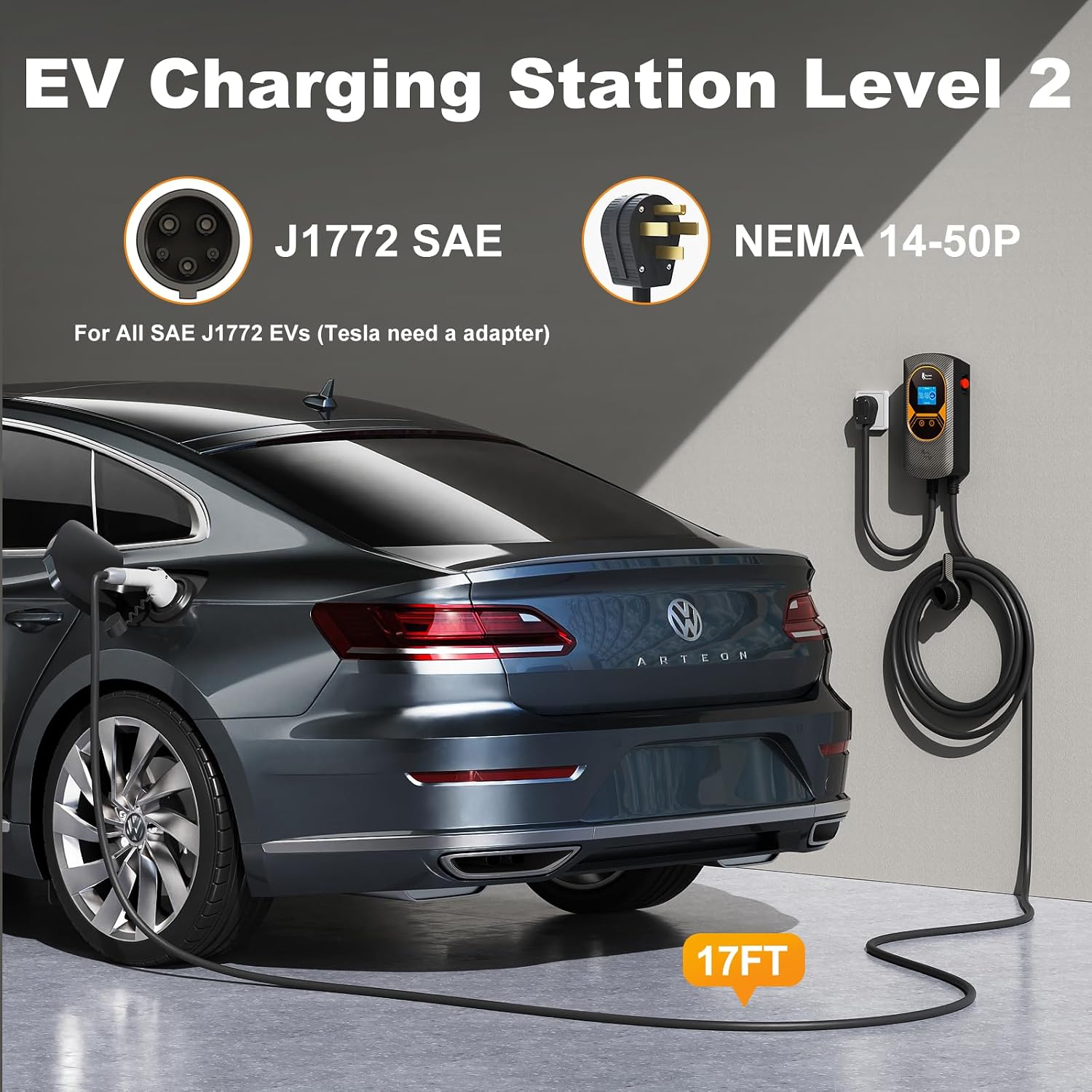
Image: Illustrates the J1772 SAE connector and NEMA 14-50P plug, showing the charger connected to an EV.
Video: Provides a visual guide on how to install and use the Feyree Level 2 EV Charger Station with WiFi, including physical setup steps.
5. Instruccions de funcionament
The Feyree EV charger offers multiple ways to initiate and manage charging sessions.
5.1 Charger Display and Buttons
The charger features a clear 2.8-inch LCD display that shows real-time charging status, including voltage, current, power, and charging duration. It also has physical buttons for basic control.

Imatge: Una imatge detallada view of the charger's LCD display and the prominent emergency stop button, indicating real-time charging data.

Image: Explains the functionality of each button on the charging station, including current adjustment, delay settings, and emergency stop.

Image: Details the menu interface on the LCD display, allowing users to set charge plans, manage RFID cards, and view charge logs.
5.2 Procés de càrrega
- Enceneu l'alimentació: Ensure the charger is plugged into the NEMA 14-50 outlet and powered on. The display will illuminate.
- Set Desired Charging Current: Use the buttons on the charger to set the desired charging current. The charger supports 8 adjustable levels (8A/10A/13A/16A/20A/25A/32A/40A).
- Connect to EV: Plug the J1772 charging connector into your electric vehicle's charging port.
- Comença a carregar: You can start charging using one of the following methods:
- Càrrega directa: Once connected, charging may begin automatically depending on your vehicle and charger settings.
- RFID Card Authorization: Swipe one of the provided RFID cards over the designated area on the charger to authorize and start the charging session. This function can be cancelled if not desired.
- Control de l'aplicació per a telèfon intel·ligent: Use the dedicated smartphone app to start, stop, and manage charging sessions remotely.
- Parada d'emergència: In case of an emergency during charging, you can press the red emergency stop button on the side of the charger to immediately cut off power. To disengage the emergency stop and return to normal operation, turn the button clockwise.

Image: Demonstrates the use of RFID cards for starting and ending charging sessions, providing a secure and convenient method.

Image: Illustrates the RFID card functionality for starting and stopping charging, highlighting the security feature to prevent unauthorized use.

Image: Displays the three primary methods for initiating a charge: direct plug-in, via the smartphone app, or using an RFID card.
5.3 Smartphone App (Tuya Smart Home)
The Feyree EV charger can be controlled and monitored via the Tuya Smart Home app (or a similar smart home app). This app allows for more precise control and monitoring of your charging sessions.
- Descarrega l'aplicació: Scan the QR code in your physical user manual or search for "Tuya Smart Home" in your smartphone's app store.
- Enter Wi-Fi Information: Follow the in-app instructions to connect the charger to your home Wi-Fi network.
- Bundle App with Charger: Complete the pairing process within the app to link your charger.
- Enjoy Smart Charging: Once connected, you can monitor real-time charging status, adjust current settings more finely than manually, set delayed charging times, and schedule charging durations.

Image: The smartphone app interface for the Feyree EV charger, detailing features like current adjustment, scheduling, and real-time monitoring.

Image: Illustrates the smart app remote control capabilities via Bluetooth and Wi-Fi, enabling users to monitor and manage charging from their phone.
Video: Demonstrates the process of binding and using the smartphone app with the Feyree EV charger, including setting current, delay, and charge duration.
6. Manteniment
Regular maintenance ensures the longevity and optimal performance of your Feyree EV charger.
- Neteja: Periodically wipe the charger unit and cable with a soft, damp drap. No utilitzeu productes químics agressius ni netejadors abrasius. Assegureu-vos que la unitat estigui desendollada abans de netejar-la.
- Inspecció de cables i connectors: Regularly inspect the charging cable and J1772 connector for any signs of wear, damage, or fraying. If any damage is observed, discontinue use immediately and contact customer support.
- Controls ambientals: Given its weather-resistant design, ensure that the charger's mounting area remains clear of debris and that water drainage is not obstructed.
7. Solució De Problemes
If you encounter issues with your Feyree EV charger, refer to the following common troubleshooting steps:
| Problema | Causa possible | Solució |
|---|---|---|
| El carregador no s'encén | No power from outlet; loose connection; internal fault. | Check NEMA 14-50 outlet for power; ensure plug is fully inserted; check circuit breaker. |
| "Earthing Fault" displayed | Grounding issue with outlet or charger. | Verify proper grounding of the NEMA 14-50 outlet by a qualified electrician. Some units may have a setting to bypass this check (refer to specific manual for details), but it's recommended to resolve the grounding issue. |
| La càrrega no comença | EV not ready; J1772 not fully inserted; RFID not authorized; app issue. | Ensure EV is ready to charge; firmly insert J1772 connector; swipe RFID card correctly; check app connection and settings. |
| Problemes de connectivitat de l'aplicació | Weak Wi-Fi signal; incorrect Wi-Fi password; app not paired. | Ensure strong Wi-Fi signal; re-enter Wi-Fi credentials; re-pair the device in the app. |
| Emergency Stop engaged | Button pressed accidentally or due to a fault. | Turn the emergency stop button clockwise to disengage. If it re-engages, contact support. |
For persistent issues or problems not listed here, please contact Feyree customer support.
8. Especificacions
| Característica | Especificació |
|---|---|
| Marca | feyree |
| Model | Level 2 Wall-mounted Electric Vehicle Charger |
| Número de model de l'article | TAU EV-PRO (40A) |
| Número de peça del fabricant | FR-CP-0614 |
| Pes de l'article | 11.4 lliures |
| Dimensions del producte | 3.3 x 6.3 x 12.5 polzades |
| País d'origen | Xina |
| Classificació de seguretat | CE/FCC |
| Wattage | 9.6 kW |
| Vol. De sortidatage | 240 Volts |
| Color | Negre |
9. Garantia i Suport
Feyree offers a 2-year maintenance period for this product. For warranty claims, technical support, or any questions regarding your Feyree Level 2 EV Charger, please contact Feyree customer service through the official channels provided at the point of purchase or on the Feyree weblloc.
Si us plau, conserveu el comprovant de compra per motius de garantia.
Ask a question about this manual
Ask about setup, troubleshooting, compatibility, parts, safety, or missing instructions. Manuals+ will review the question and use this page’s manual context to help answer it.