Introducció
Thank you for choosing the AJAZZ AJ179 8K Wireless Gaming Mouse. This high-performance gaming mouse is designed for precision and speed, featuring a PAW3950 optical sensor, multiple connectivity options (wired, 2.4G wireless, Bluetooth), and a magnetic charging dock with an RGB screen. This manual provides detailed instructions for setup, operation, maintenance, and troubleshooting to ensure optimal performance and longevity of your device.
Què hi ha a la caixa
- AJAZZ AJ179 8K Wireless Gaming Mouse
- Magnetic Screen Charging Dock
- Cable USB-C a USB-A (1.5 m)
- USB 2.4G Wireless Receiver
- Set of Competitive Non-slip Stickers
- Set of Competitive Foot Stickers
- Manual d'usuari
Producte acabatview

Figure 1: AJAZZ AJ179 8K Wireless Gaming Mouse and Magnetic Charging Dock.
Components del ratolí:
- Botons de clic esquerre/dret: Main input buttons.
- Roda de desplaçament: Per a la funció de desplaçament i clic amb el botó central.
- Botons laterals: Programmable for various functions (e.g., forward/back).
- Botó de commutació de DPI: Located on the bottom, for quick DPI adjustments.
- Interruptor d'alimentació: Located on the bottom, to turn the mouse On/Off or switch modes.
- Port USB-C: Per a connexió amb cable i càrrega.
- Emmagatzematge del receptor USB: Compartment on the bottom for the 2.4G wireless receiver.
Components de la base de càrrega:
- Pins de càrrega magnètics: Connects to the mouse for charging.
- RGB Full-Color Interactive Screen: Displays mouse status, GIF images, LOD, DPI, polling rate, battery level, date, etc.
- Port USB-C: Connects the dock to your computer.
- Tira d'il·luminació RGB: Customizable lighting on the base.
Configuració
1. Càrrega inicial
Before first use, it is recommended to fully charge the mouse. Connect the magnetic charging dock to your computer using the provided USB-C cable. Place the mouse onto the charging dock, ensuring the magnetic pins align. The screen on the dock will indicate charging status. Alternatively, connect the mouse directly to your computer via the USB-C cable for wired use and charging.

Figure 2: Mouse placed on the Magnetic Charging Dock.
2. Connectar el ratolí
The AJ179 mouse supports three connection modes: USB wired, 2.4G wireless, and Bluetooth (BT5.0).
- Connexió per cable: Connect the mouse directly to your computer using the USB-C cable. The mouse will automatically switch to wired mode.
- Connexió sense fil 2.4G: Remove the 2.4G wireless receiver from the storage compartment on the bottom of the mouse. Plug the receiver into an available USB port on your computer. Turn on the mouse using the power switch on the bottom and select the 2.4G mode. The mouse should connect automatically.
- Connexió Bluetooth: Turn on the mouse and select the Bluetooth mode using the power switch. On your computer, go to Bluetooth settings and search for new devices. Select "AJAZZ AJ179" (or similar) from the list to pair.
3. Driver Software Installation
For full customization and advanced features, download and install the official AJAZZ driver software from the AJAZZ weblloc. Aquest programari us permet:
- Adjust DPI settings (from 50 DPI to 42000 DPI).
- Customize button functions and macros.
- Adjust polling rates (up to 8000Hz for 2.4G wireless).
- Configure RGB lighting effects on the mouse and charging dock.
- Monitoritzar l'estat de la bateria.
Instruccions de funcionament
Ajust de DPI
The mouse has a default DPI range of 400-3200, adjustable in six speeds. Using the driver software, you can fine-tune the DPI from a minimum of 50 DPI up to 42000 DPI (with overclocking). Press the DPI switch button on the bottom of the mouse to cycle through preset DPI levels. The charging dock screen can display the current DPI setting.
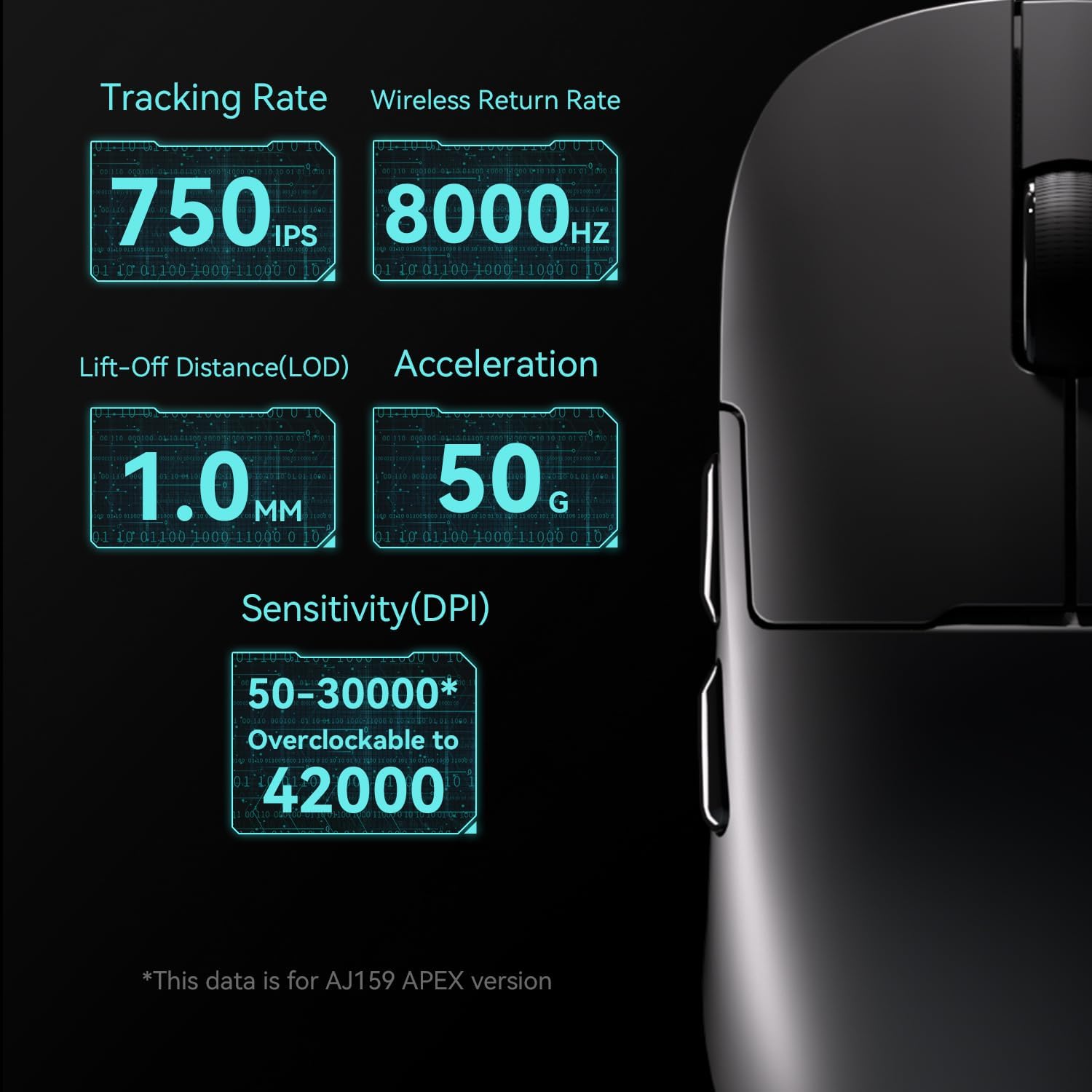
Figure 3: Key performance metrics including DPI range and polling rate.
Ajust de la taxa de votació
The default polling rate is 1000Hz for wired and 2.4G wireless modes, and 125Hz for Bluetooth. Through the driver software, you can adjust the polling rate for wired mode (125Hz/250Hz/500Hz/1000Hz) and 2.4G wireless mode (125Hz/250Hz/500Hz/1000Hz/2000Hz/4000Hz/8000Hz). Higher polling rates provide more responsive tracking.
Personalització de botons
The AJ179 features 6 programmable buttons plus a switch. Use the driver software to assign macros, reassign button functions, and personalize your gaming experience.
RGB Lighting and Screen Display
The magnetic charging dock features innovative RGB full-color interaction and a built-in TFT screen. This screen visually displays various mouse statuses, including GIF images (in wireless mode), Lift-Off Distance (LOD), DPI, polling rate, battery level, and date. Customize the RGB lighting effects via the driver software.
Manteniment
Neteja
To maintain the performance and appearance of your mouse, regularly clean it with a soft, dry cloth. For stubborn dirt, slightly dampen the cloth with water or a mild cleaning solution. Avoid using harsh chemicals or abrasive materials. Ensure no liquid enters the mouse or charging dock.
Cura de la bateria
The mouse is equipped with a 400mAh battery. To prolong battery life:
- Eviteu descarregar completament la bateria amb freqüència.
- Guardeu el ratolí en un lloc fresc i sec quan no l'utilitzeu durant períodes prolongats.
- Charge the mouse regularly, especially if using high polling rates, which consume more power.
Resolució de problemes
| Problema | Causa possible | Solució |
|---|---|---|
| Mouse not responding/connecting | Low battery; Incorrect mode selected; Receiver not plugged in; Bluetooth not paired. | Charge the mouse; Ensure correct mode (wired/2.4G/BT) is selected; Plug in the 2.4G receiver; Re-pair Bluetooth. |
| Cursor lag/tracking issues | Dirty sensor; Surface issues; Driver/firmware outdated; Interference. | Clean the optical sensor; Use a suitable mouse pad; Update driver software and mouse firmware; Move away from other wireless devices. |
| Magnetic charging dock screen not working | Dock not powered; Connection issue. | Ensure the dock is connected to a powered USB port; Check the USB-C cable connection. |
| Buttons not responding or performing incorrectly | Software configuration error; Physical damage. | Reset button configurations in the driver software; If physical damage is suspected, contact support. |
| Random keyboard inputs (Windows button repeatedly pressed) | Driver/software conflict or bug. | Ensure you have the latest official driver software installed. Try reinstalling the driver. If the issue persists, contact AJAZZ support. |
Especificacions
| Marca de producte | AJAZZ |
| Model | AJ179 APEX |
| Mètode de transmissió | Cable USB + 2.4 G sense fil + BT5.0 |
| Tipus d'interfície | Tipus-C |
| Dimensions del producte | 117.80 x 65.55 x 41.32 mm (4.65 x 2.56 x 0.04 polzades) |
| Pes del producte | ~58g (2.04 oz) |
| Material de closca | ABS Injection Molding |
| Nombre de claus | 6 tecles + 1 interruptor |
| Longitud del cable | 1.5 m |
| Ajust de DPI | 400-3200 (six-speed, driver adjustable from 50 DPI to 42000 DPI) |
| Sensor | PAW3950 |
| Botó Vida | 100 milions de clics |
| Capacitat de la bateria | 400 mAh |
| Taxa de sondeig (cablejat) | Default 1000Hz (Adjustable: 125Hz/250Hz/500Hz/1000Hz) |
| Polling Rate (2.4G Wireless) | Default 1000Hz (Adjustable: 125Hz/250Hz/500Hz/1000Hz/2000Hz/4000Hz/8000Hz) |
| Taxa de sondeig (Bluetooth) | Default 125Hz (Not adjustable) |
| Sistemes suportats | Windows Vista/XP/7/8/10/11, Mac |
Garantia i Suport
The AJAZZ AJ179 8K Wireless Gaming Mouse comes with a 12-month warranty from the date of purchase. This warranty covers manufacturing defects and ensures the product meets its specified performance. Please retain your proof of purchase for warranty claims.
For technical support, warranty inquiries, or any questions regarding your AJAZZ product, please visit the official AJAZZ website or contact their customer service team through the contact information provided on their website. A professional team is available to assist you with any issues.


