
Introducció
Thank you for choosing the Oakcastle HIFI150 Stereo System. This manual provides essential information for setting up, operating, and maintaining your device. Please read it thoroughly before use and retain it for future reference.
Informació de seguretat
Per garantir un funcionament segur i evitar danys, observeu les següents precaucions de seguretat:
- No exposeu la unitat a la pluja, la humitat o les temperatures extremes.
- No obriu la c.asing. Demaneu totes les tasques de manteniment a personal qualificat.
- Assegureu-vos que hi hagi una ventilació adequada al voltant de la unitat. No bloquegeu cap obertura de ventilació.
- Utilitzeu només l'adaptador d'alimentació subministrat amb la unitat.
- Keep the unit away from heat sources such as radiators, stoves, or other heat-producing appliances.
- Netegeu la unitat només amb un drap sec.
Contingut del paquet
Si us plau, comproveu que tots els articles estiguin presents al vostre paquet:
- Oakcastle HIFI150 Stereo System
- Control remot
- Bateries per a comandament a distància
- Cable d'alimentació
- Manual d'usuari
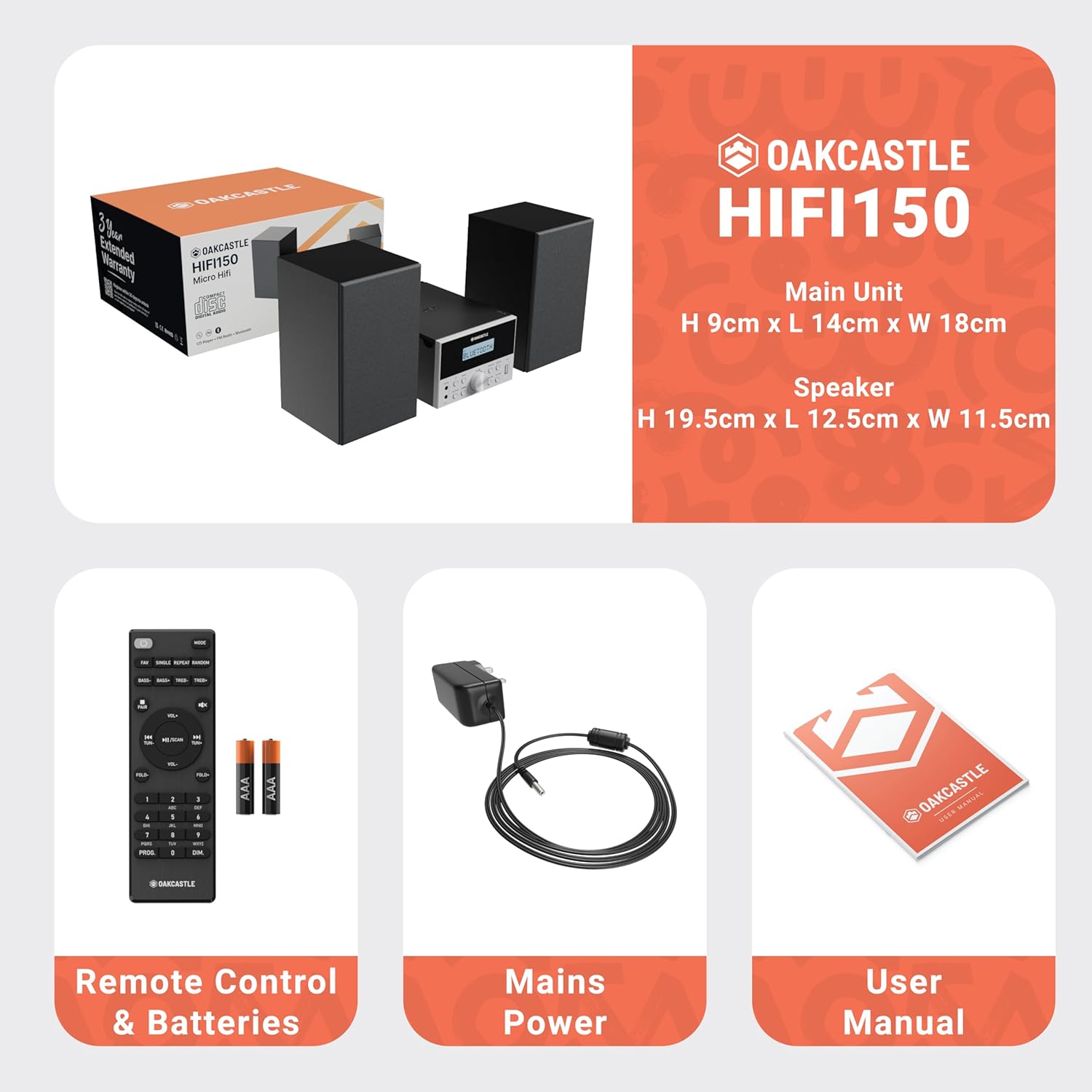
Image: The Oakcastle HIFI150 package contents, showing the main unit, two speakers, remote control with batteries, power adapter, and user manual.
Producte acabatview
The Oakcastle HIFI150 features a compact design with intuitive controls and multiple connectivity options.
Controls i pantalla del panell frontal

Image: A close-up of the Oakcastle HIFI150 main unit's front panel, highlighting the digital display, central volume knob, mode selection buttons, and front-facing AUX In and USB ports. The display shows 'BLUETOOTH'.
- Visualització: Shows current mode, track information, and radio frequency.
- Botó d'encesa: Encén o apaga la unitat.
- Botó de mode: Cycles through input sources (CD, FM, Bluetooth, AUX, USB).
- Pom de volum: Ajusta el volum mestre.
- Botó Reproduir/Pausa: Controla la reproducció de CD, USB i Bluetooth.
- Skip/Tune Buttons: Navigates tracks or tunes radio frequencies.
- Port d'entrada AUX: Per connectar dispositius d'àudio externs mitjançant un cable de 3.5 mm.
- Port USB: Per reproduir àudio files d'una unitat USB.
Connexions del panell posterior
The rear panel includes connections for speakers and power.
Configuració
1. Connexió dels altaveus
Connect the included speakers to the speaker terminals on the rear of the main unit. Ensure correct polarity (red to red, black to black) for optimal sound quality.
2. Connexió d'alimentació
Plug the power cable into the AC inlet on the rear of the main unit, then plug the other end into a standard wall outlet.
Instruccions de funcionament
Encès/Apagat
Premeu el botó Poder botó del panell frontal o del comandament a distància per encendre o apagar la unitat.
Selecció del mode
Premeu el botó Mode button on the front panel or remote control repeatedly to cycle through the available input sources: CD, Ràdio FM, Bluetooth, AUX, i USB.
Funcionament Bluetooth
- Seleccioneu Bluetooth mode using the Mode button. The display will show 'BLUETOOTH' and the unit will enter pairing mode.
- Al telèfon intel·ligent o a un altre dispositiu Bluetooth, activeu Bluetooth i cerqueu els dispositius disponibles.
- Select 'OAKCASTLE HIFI150' from the list. Once connected, the unit will confirm the connection.
- You can now stream audio wirelessly from your device to the HIFI150.
Reproducció de CD

Image: The Oakcastle HIFI150 with its top-loading CD player mechanism open, revealing a compact disc placed inside. The display shows 'CD'.
- Obriu la tapa del compartiment del CD.
- Place a CD (MP3, CD, WMA, or CD-R format) onto the spindle with the label side facing up.
- Tanqueu la coberta del compartiment del CD.
- Seleccioneu CD mode. The unit will read the disc and begin playback automatically.
- Feu servir els botons Reproduir/Pausa i Saltar per controlar la reproducció.
Funcionament de la ràdio FM

Image: The Oakcastle HIFI150 main unit with its telescopic antenna extended, displaying an FM radio frequency on its screen. The unit is placed between two speakers.
- Seleccioneu Ràdio FM mode.
- Esteneu l'antena telescòpica per a una millor recepció.
- Escaneig automàtic: Press and hold the Play/Pause button to automatically scan and save available FM stations (up to 30 presets).
- Sintonització manual: Use the Skip/Tune buttons to manually adjust the frequency.
- Recuperació de presets: Use the 'FAV/PROG' button on the remote to cycle through saved stations.
Reproducció USB
- Inseriu una unitat USB al port USB del tauler frontal.
- Seleccioneu USB mode. The unit will automatically detect and begin playing compatible audio files (MP3, WMA).
- Feu servir els botons Reproduir/Pausa i Saltar per controlar la reproducció.
Entrada AUX
- Connecteu un dispositiu d'àudio extern (per exemple, un reproductor MP3, un telèfon intel·ligent) al Entrada AUX port on the front panel using a 3.5mm audio cable (not included).
- Seleccioneu AUX mode.
- Controla la reproducció des del dispositiu extern connectat.
Control de volum
Gira el Pom de volum al panell frontal o utilitzeu el VOL+/- botons del comandament a distància per ajustar el nivell del so.
Ús del control remot
The included remote control provides full functionality for the HIFI150. Ensure batteries are correctly inserted. Point the remote control towards the front panel of the main unit for optimal response.
Manteniment
Neteja
- Netegeu la unitat amb un drap suau i sec.
- No utilitzeu netejadors abrasius, ceres o dissolvents, ja que poden danyar l'acabat.
Emmagatzematge
If the unit is not used for an extended period, unplug it from the power outlet and store it in a cool, dry place.
Resolució de problemes
If you encounter issues with your HIFI150, please refer to the following common problems and solutions:
| Problema | Causa possible | Solució |
|---|---|---|
| Sense poder | Cable d'alimentació no connectat; Presa de corrent defectuosa | Assegureu-vos que el cable d'alimentació estigui ben connectat; proveu una altra presa de corrent. |
| Sense so | Volume too low; Incorrect input mode; Speakers not connected | Increase volume; Select correct input mode; Check speaker connections. |
| El CD no es reprodueix | CD inserted incorrectly; Disc scratched/dirty; Incorrect format | Reinsert CD correctly; Clean or replace disc; Ensure disc is compatible (MP3, CD, WMA, CD-R). |
| Bluetooth no connectat | Bluetooth mode not selected; Device too far; Device already connected to another unit | Select Bluetooth mode; Move device closer; Disconnect from other devices and try again. |
| Mala recepció FM | Antena no estesa; Senyal feble | Fully extend the telescopic antenna; Try repositioning the unit. |
Especificacions
| Número de model | 1000002971 |
| Marca | Oakcastle |
| Connectivitat | Bluetooth 5.2, USB, AUX |
| Sortida d'àudio | 20W |
| Mitjans suportats | CD, MP3, WMA, CD-R, USB |
| Ràdio | FM Radio with 30 Presets |
| Dispositius compatibles | Reproductor MP3, Telèfon intel·ligent, Tauleta |
| Material de l'armari | Fusta |
| Color | Negre |
| Dimensions de l'article (L x A x A) | 13.7 x 17.8 x 9 cm |
| Pes de l'article | 2 quilos |
Garantia i Suport
The Oakcastle HIFI150 comes with an extended 3-year warranty. Registration is required to activate the full warranty period. Please refer to the warranty card included in your package or visit the official Oakcastle website for registration details and support information.
For technical assistance or further inquiries, please contact Oakcastle customer support through their official channels.


