
1. Introducció
This manual provides detailed instructions for the installation, operation, and maintenance of your ZENEC Z-N538 2-DIN Multimedia Receiver. Please read this manual thoroughly before using the device to ensure proper functionality and to prevent damage.
The ZENEC Z-N538 is a versatile multimedia system designed for vehicles with a 2-DIN bay. It features a 6.75-inch capacitive TFT LCD touchscreen, DAB+ digital radio, and seamless integration with smartphones via wireless Android Auto and Apple CarPlay.
2. Informació de seguretat
- Always operate the device in a safe manner. Avoid distractions while driving.
- No intenteu desmuntar ni modificar la unitat. Això pot causar danys i anul·lar la garantia.
- Assegureu-vos una ventilació adequada al voltant de la unitat per evitar el sobreescalfament.
- Consult a professional for installation if you are unsure about any steps. Incorrect installation can lead to vehicle damage or malfunction.
- Mantingueu la unitat allunyada de l'aigua i de la humitat excessiva.
3. Contingut del paquet
Verifiqueu que tots els elements siguin presents al paquet:
- ZENEC Z-N538 Multimedia Receiver Unit
- External Bluetooth Microphone
- Antena GPS
- 2 x cables USB
- Various Connection Cables and Adapters
- Marc de muntatge metàl·lic
- Eina de desmuntatge
4. Configuració
4.1 Instal·lació
The Z-N538 is designed for standard 2-DIN vehicle bays. Professional installation is recommended. Ensure all wiring connections are secure and correctly matched to your vehicle's electrical system.
The unit features multi-color key illumination, allowing you to match the device's button lighting to your vehicle's cockpit illumination.
4.2 Engegada inicial
After installation, turn on your vehicle's ignition. The Z-N538 should power on automatically. Follow any on-screen prompts for initial setup, such as language selection and time zone.
4.3 Connecting Steering Wheel Remote Control
The Z-N538 includes an IR-In adapter for connecting to your vehicle's steering wheel remote control. Refer to your vehicle's manual and the Z-N538 wiring diagram for proper connection and configuration.
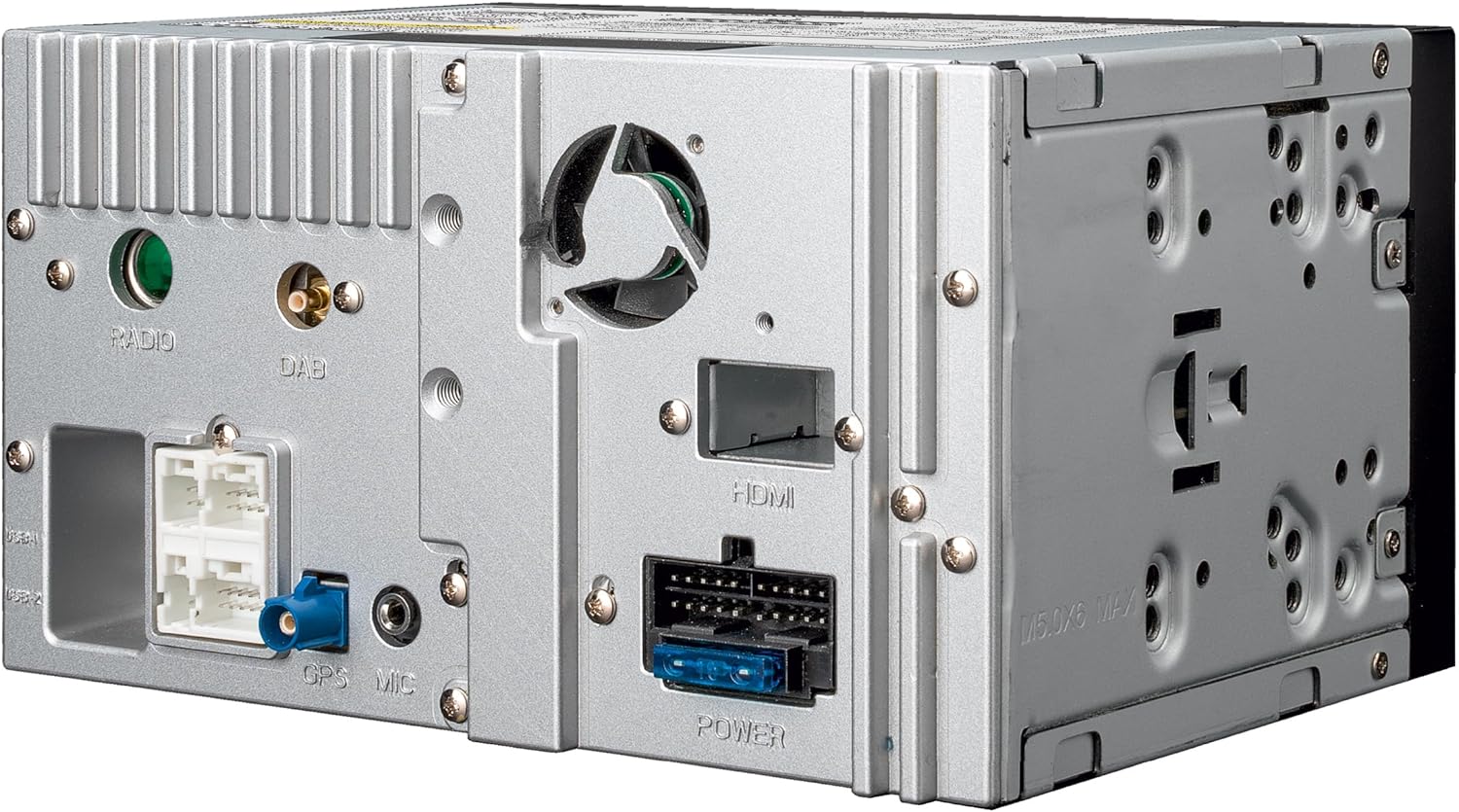
Descripció de la imatge: This image displays the rear panel of the ZENEC Z-N538 unit. Various ports are visible, including connections for Radio, DAB antenna, HDMI, GPS microphone, and power. These ports are essential for integrating the unit into a vehicle's electrical and antenna systems.
5. Instruccions de funcionament
5.1 General Interface Navigation
The Z-N538 features a responsive 6.75-inch capacitive touchscreen and large hard keys for intuitive operation. The home screen provides quick access to main functions.

Descripció de la imatge: This image shows the front of the ZENEC Z-N538 multimedia receiver. The touchscreen displays the main menu with large, clear icons for various functions such as USB, FM radio, DAB+ radio, Bluetooth, Apple CarPlay, and Android Auto. The physical buttons below the screen provide additional control.
5.2 Radio Functions (DAB+, FM)
The unit includes an integrated DAB+ Twin tuner for clear digital radio reception and a latest-generation automotive dual FM RDS tuner.
- Ràdio DAB+: Enjoy uninterrupted reception with DAB-FM and DAB-DAB Seamless Blending. Features include dynamic station lists, MOT Slideshow, and DLS Text.
- Ràdio FM: The dual FM RDS tuner ensures optimal reception. One tuner plays the current program while the second scans for alternative frequencies and provides a dynamic list of receivable stations.
5.3 Media Playback (USB, MicroSD)
The Z-N538 is equipped with two USB ports and a microSD card reader for A/V playback. Connect compatible storage devices to play audio and video files.
5.4 Connectivitat Bluetooth
Utilize Bluetooth for hands-free calling and A2DP music streaming. Pair your smartphone with the Z-N538 to make and receive calls safely and stream audio wirelessly.
5.5 Android Auto and Apple CarPlay (Wireless)
The Z-N538 supports wireless Android Auto and Apple CarPlay, connecting to your smartphone via WiFi or USB. This allows for seamless integration of smartphone features onto the receiver's display.
- Navegació: Use Google Maps or Apple Maps for real-time route information and to find points of interest.
- Comunicació: Make calls, send, and receive messages using voice commands (Siri, Google Voice Assistant) or the touchscreen.
- Música: Access your favorite music streaming services and apps.

Descripció de la imatge: This image illustrates the ZENEC Z-N538 unit installed in a vehicle, displaying a navigation map on its main screen. Below the main image, two smaller insets show the distinct user interfaces for Android Auto and Apple CarPlay, highlighting their integration capabilities.

Descripció de la imatge: This image shows the ZENEC Z-N538 multimedia receiver seamlessly integrated into a car's dashboard. The screen displays a navigation map, indicating active route guidance. The view through the windshield shows a winding road, suggesting the unit's use during travel.
5.6 Funcions de la càmera
The Z-N538 features two camera inputs (CVBS / AHD 720p) with a switched power supply and maneuver/switching function. You can activate and define guidelines that appear in the camera view for assistance during parking or maneuvering.
5.7 Configuració d'àudio
The unit offers sophisticated audio tuning capabilities:
- 5-Channel Digital Time Correction: Adjust audio timing for each speaker to optimize the soundstage.
- Equalitzador gràfic de 16 bandes: Fine-tune audio frequencies to match your preferences and vehicle acoustics.
- Active 12 dB/oct High-Pass and Low-Pass Filters: Configure crossover points for speakers and subwoofers.

Descripció de la imatge: This image displays the ZENEC Z-N538's screen interface dedicated to advanced audio settings. It shows controls for 5-channel time correction, a detailed 16-band graphic equalizer for precise frequency adjustments, and crossover settings for managing high-pass and low-pass filters.
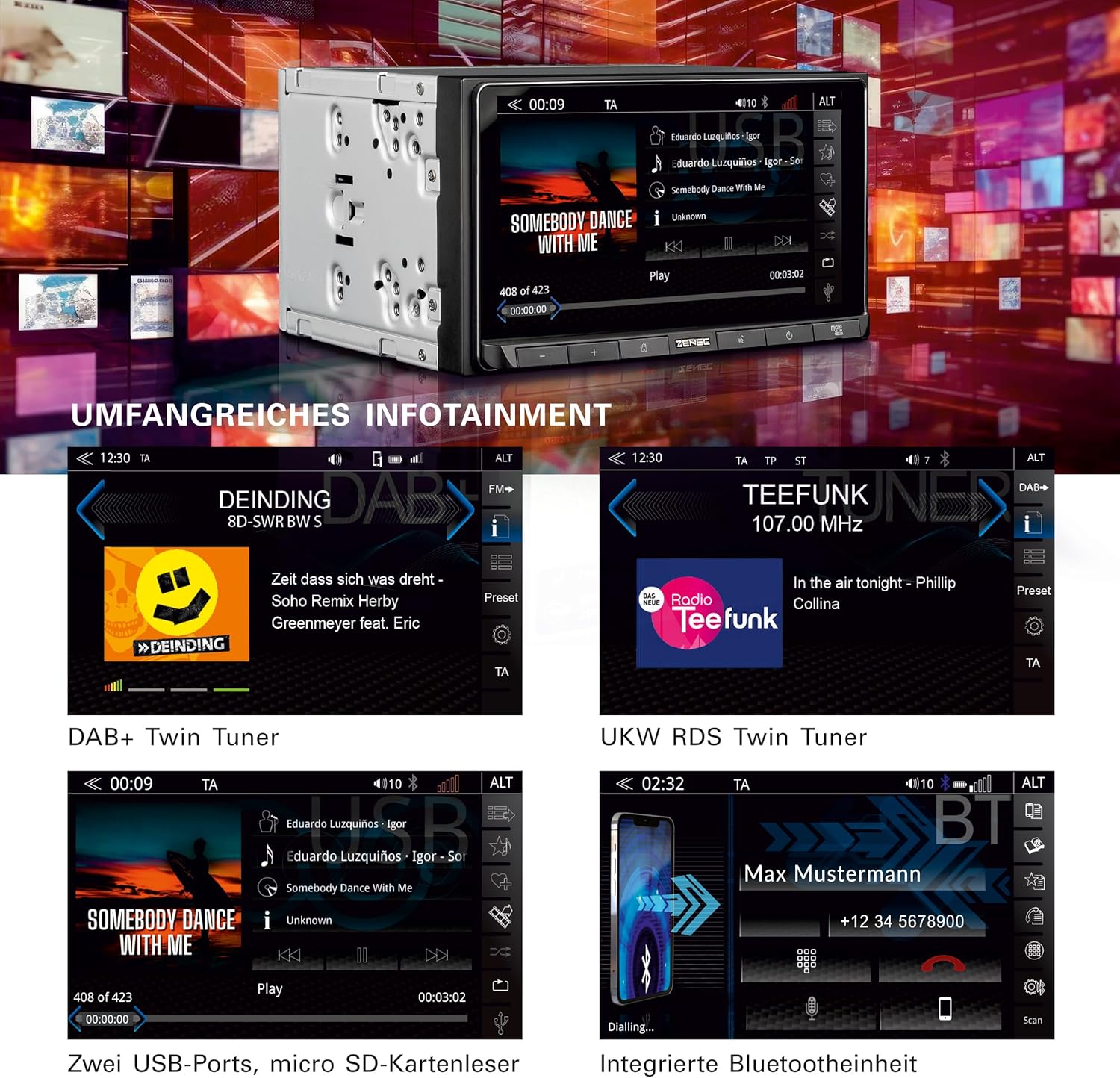
Descripció de la imatge: This image presents a collage of screenshots from the ZENEC Z-N538's display, showcasing its comprehensive infotainment features. It includes interfaces for DAB+ digital radio, UKW RDS FM radio, USB audio playback with track information, and the integrated Bluetooth hands-free calling screen.
6. Manteniment
6.1 Neteja de la pantalla
Feu servir un drap suau i sense borrissol per netejar suaument la pantalla tàctil. Per a taques difícils, fregueu lleugeramentampen the cloth with water or a screen-safe cleaning solution. Avoid abrasive cleaners or solvents.
6.2 Atenció general
Keep the unit free from dust and debris. Ensure no liquids are spilled onto the device. Periodically check connections for security.
7. Solució De Problemes
If you encounter issues with your Z-N538, refer to the following common problems and solutions:
| Problema | Causa possible | Solució |
|---|---|---|
| Sense poder | Cablejat incorrecte, fusible cremat | Check power connections and vehicle fuses. Consult installation professional. |
| Sense so | Volume too low, mute activated, speaker wiring issue | Augmenta el volum, comprova l'estat del silenci i verifica les connexions dels altaveus. |
| Bluetooth no connectat | Device not in pairing mode, interference | Ensure Bluetooth is enabled on both devices and in pairing mode. Try restarting both devices. |
| Android Auto/CarPlay not launching | Incorrect connection, app not installed/updated | Ensure correct USB/WiFi connection. Verify Android Auto/Apple CarPlay app is installed and updated on your smartphone. |
8. Especificacions
| Característica | Detall |
|---|---|
| Número de model | Z-N538 |
| Marca | Zenec |
| Mida de la pantalla | 6.75 polzades |
| Tipus de visualització | Capacitive TFT LCD |
| Resolució de visualització | 1280 x 720 |
| Connectivitat | Bluetooth, IR, USB, WiFi (for wireless CarPlay/Android Auto) |
| Dispositius compatibles | iPhone, telèfons intel·ligents Android |
| Sintonitzador de ràdio | DAB+ Twin Tuner, Dual FM RDS Tuner |
| AmpSortida més viva | 4 x 50 W |
| Funcions d'àudio | 5-Channel Digital Time Correction, 16-Band Graphic Equalizer, Active 12 dB/oct High/Low-Pass Filters |
| Entrades de càmera | 2 (CVBS / AHD 720p) |
9. Garantia i Suport
For warranty information, please refer to the warranty card included with your product or contact your authorized ZENEC dealer. Technical support may be available through the ZENEC weblloc web o el vostre punt de compra.
Conserveu el vostre comprovant de compra per a reclamacions de garantia.