
1. Introducció
Thank you for choosing the PULUZ Upgrade Video Light. This compact and versatile fill light is designed to enhance your photography and videography with adjustable brightness and color temperature. It features dual power options for flexible use in various shooting environments. Please read this manual carefully before use to ensure proper operation and maintenance.

Imatge 1.1: Frontal view of the PULUZ Upgrade Video Light, displaying its LED panel.
2. Contingut del paquet
Verifiqueu que tots els elements que s'enumeren a continuació s'inclouen al vostre paquet:
- PULUZ Upgrade Video Light x 1
- White Filter x 1
- Orange Filter x 1
- Cable de càrrega USB tipus C x 1

Imatge 2.1: Tots els components inclosos al paquet del producte.
3. Producte acabatview
Familiarize yourself with the main components of your video light:
- Panell LED: Proporciona il·luminació.
- Interruptor d'alimentació: Encén i apaga la llum.
- Botó d'ajust de la brillantor: Controls light intensity.
- Muntatge de sabates fredes: For attaching to cameras or other accessories.
- Forat de cargol de 1/4": For mounting on tripods, light stands, or rigs.
- Port de tipus C: Per a font d'alimentació externa.
- Compartiment de la bateria: For AA batteries.

Image 3.1: Key mounting points on the video light, including cold shoe and 1/4" screw hole.
4. Configuració
4.1 Font d'alimentació
The video light supports two power modes:
- Piles AA: Open the battery compartment cover and insert AA batteries (not included), ensuring correct polarity.
- USB tipus C: Connect the provided USB Type-C cable to the light's Type-C port and to a compatible USB power source (e.g., power bank, USB adapter).

Image 4.1: The video light can be powered by AA batteries or via a Type-C USB connection.
4.2 Muntatge
Attach the video light to your equipment:
- Camera Hot Shoe/Cold Shoe: Slide the light's cold shoe mount into your camera's hot shoe or a cold shoe adapter on a rig. Tighten the locking wheel if available.
- Tripod/Light Stand: Use the 1/4" screw hole at the bottom to mount the light onto a tripod, light stand, or other compatible accessories.
4.3 Instal·lació del filtre
The light comes with a white and an orange filter to adjust color temperature:
- Gently snap the desired filter onto the front of the LED panel.
- The white filter provides a neutral, daylight-balanced light (6400K).
- The orange filter provides a warm, tungsten-balanced light (3200K).
5. Funcionament
5.1 Encès/Apagat
Locate the power switch on the side of the unit. Slide it to the 'ON' position to turn on the light, and to the 'OFF' position to turn it off.
5.2 Ajust de brillantor
Once powered on, use the dimmable adjustment knob on the side of the light to increase or decrease the brightness. Rotate clockwise to increase brightness and counter-clockwise to decrease it.

Image 5.1: The adjustment knob controls brightness, and filters change the color temperature between white and warm.
5.3 Ajust de temperatura de color
Change the color temperature by attaching either the white or orange filter to the front of the light. The white filter provides a cooler, natural light, while the orange filter provides a warmer tone.
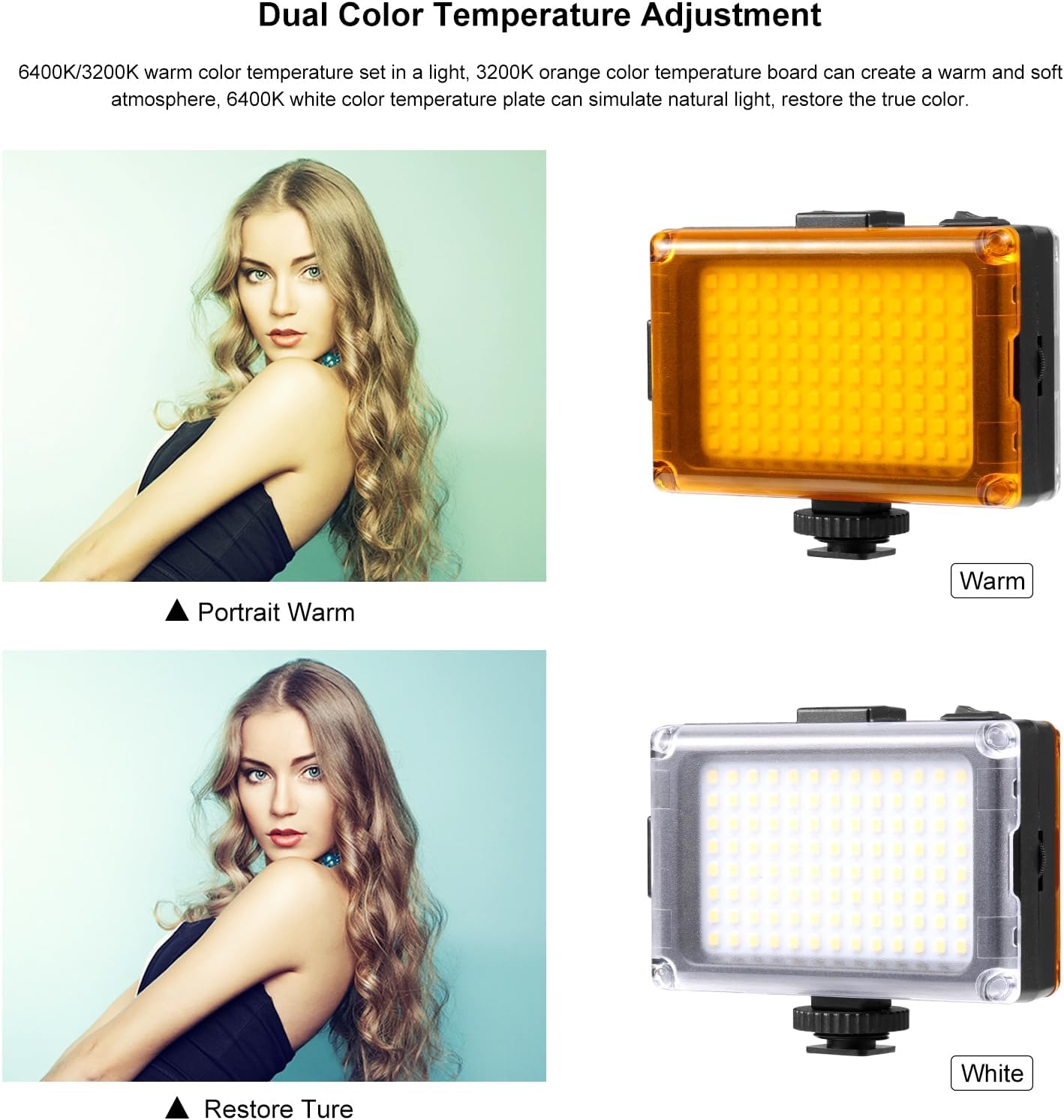
Image 5.2: The light can be adjusted for warm (3200K) or white (6400K) color temperatures using the included filters.
6. Manteniment
- Neteja: Use a soft, dry cloth to clean the light's surface and LED panel. Avoid using harsh chemicals or abrasive materials.
- Emmagatzematge: When not in use, store the light in a cool, dry place away from direct sunlight and moisture. If using AA batteries, remove them during extended storage to prevent leakage.
- Manipulació: Handle the light with care to avoid dropping or impacting it, which could damage internal components.
7. Solució De Problemes
- La llum no s'encén:
- Assegureu-vos que l'interruptor d'alimentació estigui a la posició "ON".
- If using AA batteries, check if they are inserted correctly and have sufficient charge. Replace if necessary.
- If using USB Type-C, ensure the cable is securely connected and the power source is active.
- Brightness is too low/high:
- Adjust the brightness knob to your desired level.
- Ensure the power source (batteries or USB) is providing adequate power.
- Sortida de llum inconsistent:
- Check for loose connections if using USB power.
- If using batteries, ensure they are making good contact and are not low on charge.
8. Especificacions
| Marca | PULUZ |
| Número de model | Upgrade Video Light |
| Tecnologia de connectivitat | USB |
| Interfície del maquinari | USB 3.0 tipus C |
| Descripció dels modes de flaix | Constant illumination, adjustable brightness, adjustable color temperature |
| Nivell de resistència a l'aigua | No resistent a l'aigua |
| Dispositius compatibles | DSLR cameras, Canon, Nikon, Sony, devices with Type-C port |
| Tipus de control d'exposició | Manual (M) |
| Angle de llum | 120 graus |
| Temperatura de color | 6400K (with white filter), 3200K (with orange filter) |
9. Informació de la garantia
This PULUZ Upgrade Video Light comes with a 1 mesos de garantia from the date of purchase. This warranty covers manufacturing defects and malfunctions under normal use. It does not cover damage caused by misuse, accidents, unauthorized modifications, or improper storage.
Conserveu el vostre comprovant de compra per a reclamacions de garantia.
10. Atenció al client
If you encounter any issues or have questions regarding your PULUZ Upgrade Video Light that are not addressed in this manual, please contact our customer support team. For the fastest service, please visit the official PULUZ website or refer to your purchase platform for contact details.
When contacting support, please provide your product model number and a detailed description of the issue.