
1. Introducció
Thank you for choosing the FLEXISPOT QB2W-2080-IE Height Adjustable Standing Desk. This electric standing desk is designed to provide a versatile and ergonomic workspace, allowing you to easily switch between sitting and standing positions. Featuring a robust dual-motor lift system, intelligent control panel with memory functions, and an anti-collision system, this desk offers stability, efficiency, and safety for your daily work.
2. Informació de seguretat
Please read all safety instructions carefully before assembly and use to prevent injury or damage to the product. Keep this manual for future reference.
- Capacitat de pes màxim: No supereu la capacitat màxima de càrrega estàtica de 120 kg (264 lliures) or dynamic load capacity of 100 kg (220 lliures)La sobrecàrrega pot causar inestabilitat i danys.
- Interval d'ajust d'alçada: Ensure the desk operates within its specified height range of 70 cm a 119 cm (de 27.6 polzades a 46.9 polzades) for optimal stability and safety.
- Nens i animals de companyia: Mantingueu els nens i les mascotes allunyats de l'escriptori durant el funcionament per evitar accidents.
- Font d'alimentació: Connect the desk only to a properly grounded power outlet. Do not use damaged power cords or adapters.
- Liquidació: Ensure there are no obstructions above or below the desk during height adjustments to allow the anti-collision system to function effectively.
- Muntatge: Assembly requires two people. Ensure all components are securely fastened before use.
- Vessaments de líquids: Avoid spilling liquids on the control panel or electrical components. In case of a spill, immediately disconnect power and allow to dry completely before reconnecting.
3. Contingut del paquet
Abans de començar el muntatge, verifiqueu que totes les peces siguin presents i no estiguin danyades. Si hi ha alguna peça que falti o estigui danyada, poseu-vos en contacte amb el servei d'atenció al client.
- Desktop (4 parts)
- Potes d'escriptori (2)
- Components del marc
- Dual Motor Lift System
- Tauler de control
- Adaptador d'alimentació i cable
- All necessary assembly tools and connection elements
- Manual d'usuari
4. Muntatge i muntatge
Assembly of the FLEXISPOT QB2W-2080-IE desk requires approximately 2 people and includes all necessary tools. Follow these general steps:
- Desempaquetar components: Traieu amb cura totes les peces de l'embalatge i col·loqueu-les sobre una superfície neta i suau per evitar ratllades.
- Muntar el marc: Attach the crossbars to the lifting columns (desk legs) using the provided hardware. Ensure all screws are tightened securely.
- Attach Desk Legs: Fixeu els peus a la part inferior de les columnes elevadores.
- Mount the Desktop: Place the desktop sections onto the assembled frame. The desktop is made of 4 parts and includes connection elements for stability. Align the pre-drilled holes and secure the desktop to the frame using the provided screws.
- Connect Control Panel and Power: Connect the control panel cable to the motor control box. Then, connect the power adapter to the control box and plug it into a grounded power outlet.
- Gestió de cables: Use the included cable ties or management accessories to organize cables neatly under the desk.
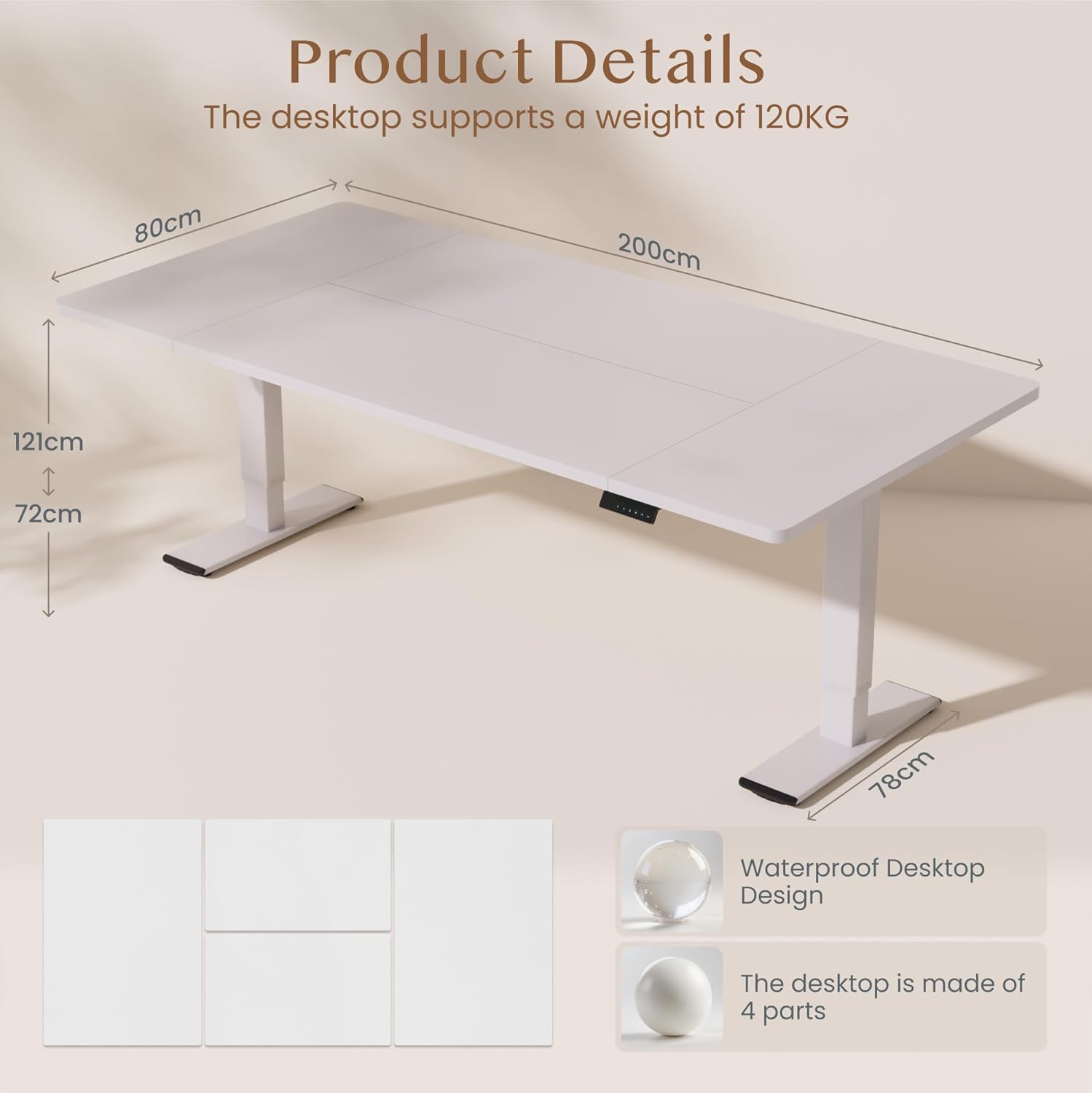
Imatge: Product details of the FLEXISPOT standing desk, illustrating its dimensions (200cm length, 80cm width, 72-121cm height range) and the four-part, waterproof desktop design. The desktop supports a weight of 120KG.

Imatge: The FLEXISPOT standing desk shown at its minimum (72cm) and maximum (121cm) height, demonstrating its height adjustability for both sitting and standing positions.
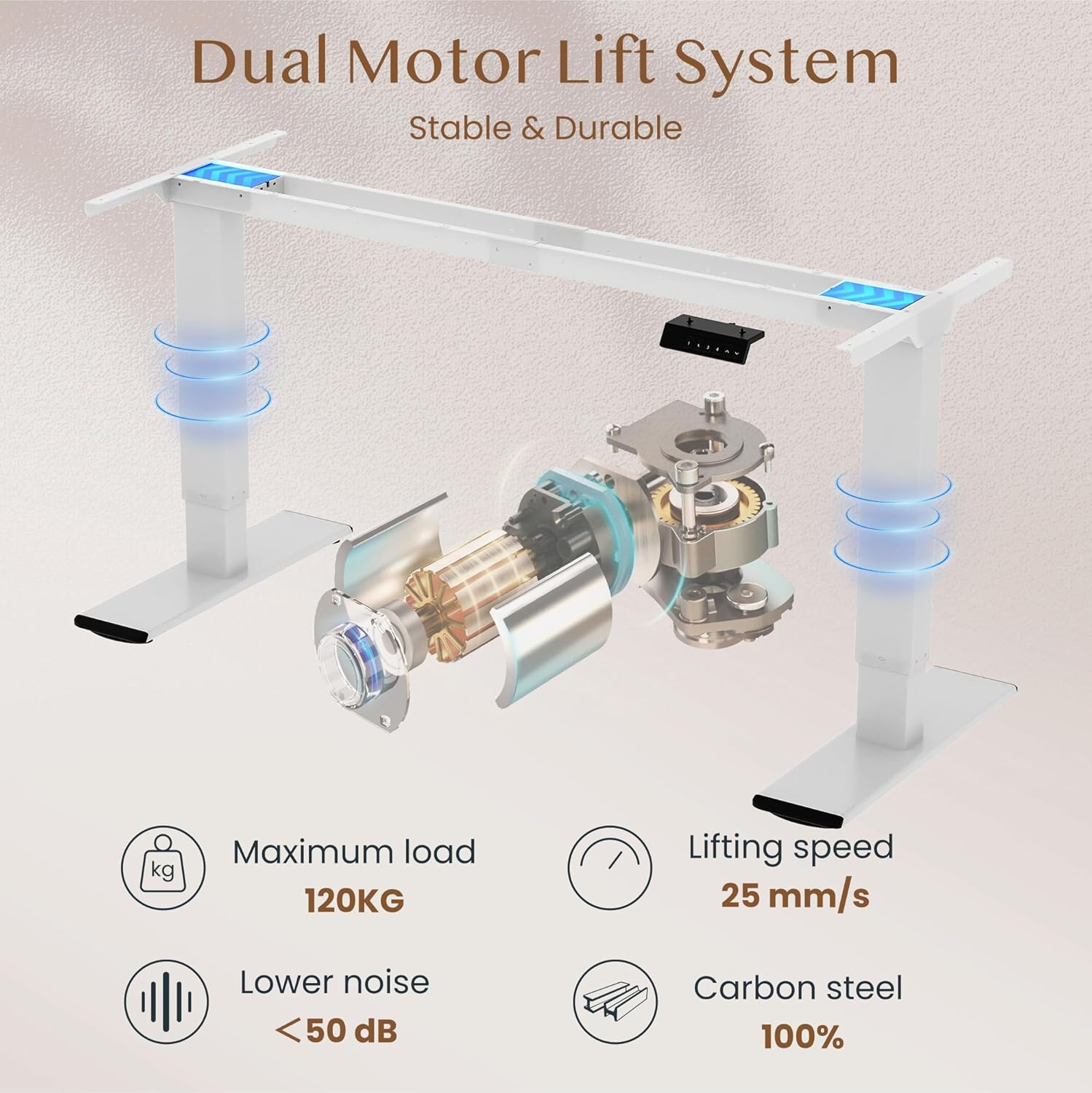
Imatge: Diagram illustrating the FLEXISPOT dual motor lift system, highlighting its stable and durable design. Key specifications like maximum load (120KG), lifting speed (25 mm/s), lower noise (<50 dB), and 100% carbon steel construction are visible.
5. Instruccions de funcionament
The FLEXISPOT QB2W-2080-IE desk features an intuitive control panel for easy height adjustment and memory functions.
5.1. Ajust bàsic d'alçada
- Premeu el botó "^" (Up) botó per aixecar l'escriptori.
- Premeu el botó "v" (Down) botó per baixar l'escriptori.
- Release the button to stop the desk at the desired height.
5.2. Preajustos de memòria
The control panel allows you to save up to four preferred height settings.
- Ajusteu l'escriptori a l'alçada desitjada amb els botons Amunt/Avall.
- Premeu el botó "M" (Memory) button (often represented by a 'f' symbol). The LED display will show "S-".
- Premeu immediatament un dels botons numèrics ("1", "2", "3", or "4") to save the current height to that preset. The display will show "S-1", "S-2", etc., to confirm.
- Per recuperar una alçada desada, només cal que premeu el botó numèric corresponent. L'escriptori es mourà automàticament a la posició desada.
5.3. Anti-Collision Function
The desk is equipped with an anti-collision system that automatically stops and slightly reverses the desk's movement if it encounters an obstruction during height adjustment. This feature enhances safety and prevents damage to the desk or other objects.

Imatge: Close-up of the FLEXISPOT intelligent control panel, showing buttons for Up & Down adjustment, 4 Memory Heights, an LED Screen, and the Anti-Collision Function indicator.

Imatge: The FLEXISPOT standing desk in an office setting, illustrating its smooth and quiet operation with a lifting speed of 25mm/s and noise levels below 50 dB. The control panel is visible under the desk.

Imatge: A visual comparison demonstrating the FLEXISPOT safety collision avoidance system. One side shows an object being avoided by the desk's upward movement (WITH Anti-Collision Function), while the other side implies a collision without the function.
6. Manteniment
Regular maintenance ensures the longevity and optimal performance of your FLEXISPOT standing desk.
- Neteja: Netegeu la superfície i les potes de l'escriptori amb anunciamp drap. Eviteu utilitzar productes químics agressius o netejadors abrasius que puguin danyar l'acabat.
- Comproveu les connexions: Reviseu periòdicament tots els cargols i perns per assegurar-vos que estiguin ben ajustats. Torneu a apretar-los si cal.
- Gestió de cables: Ensure all cables are neatly organized and not pinched or tangled, which could affect desk operation or cause damage.
- Eviteu la sobrecàrrega: Do not place items exceeding the maximum weight capacity on the desk.
7. Solució De Problemes
Si teniu problemes amb el vostre escriptori, consulteu els passos habituals següents per a la resolució de problemes:
- L'escriptori no es mou:
- Comproveu si el cable d'alimentació està ben connectat tant a l'escriptori com a la presa de corrent.
- Ensure there are no obstructions preventing movement.
- Try resetting the desk by unplugging it for 10 seconds and then plugging it back in.
- Codis d'error a la pantalla:
- If an error code appears, consult the specific error code section in the full manual (if available) or contact customer support. Often, a reset (unplugging and replugging) can clear minor errors.
- Uneven Movement/Instability:
- Assegureu-vos que l'escriptori estigui en una superfície plana.
- Comproveu que tots els cargols de muntatge estiguin ben apretats.
- Verify that the weight on the desk is evenly distributed and does not exceed the maximum capacity.
- Anti-Collision System Triggering Unnecessarily:
- Ensure there are no loose cables or objects near the desk's path that could be mistaken for an obstruction.
If these steps do not resolve the issue, please contact FLEXISPOT customer support for further assistance.
8. Especificacions
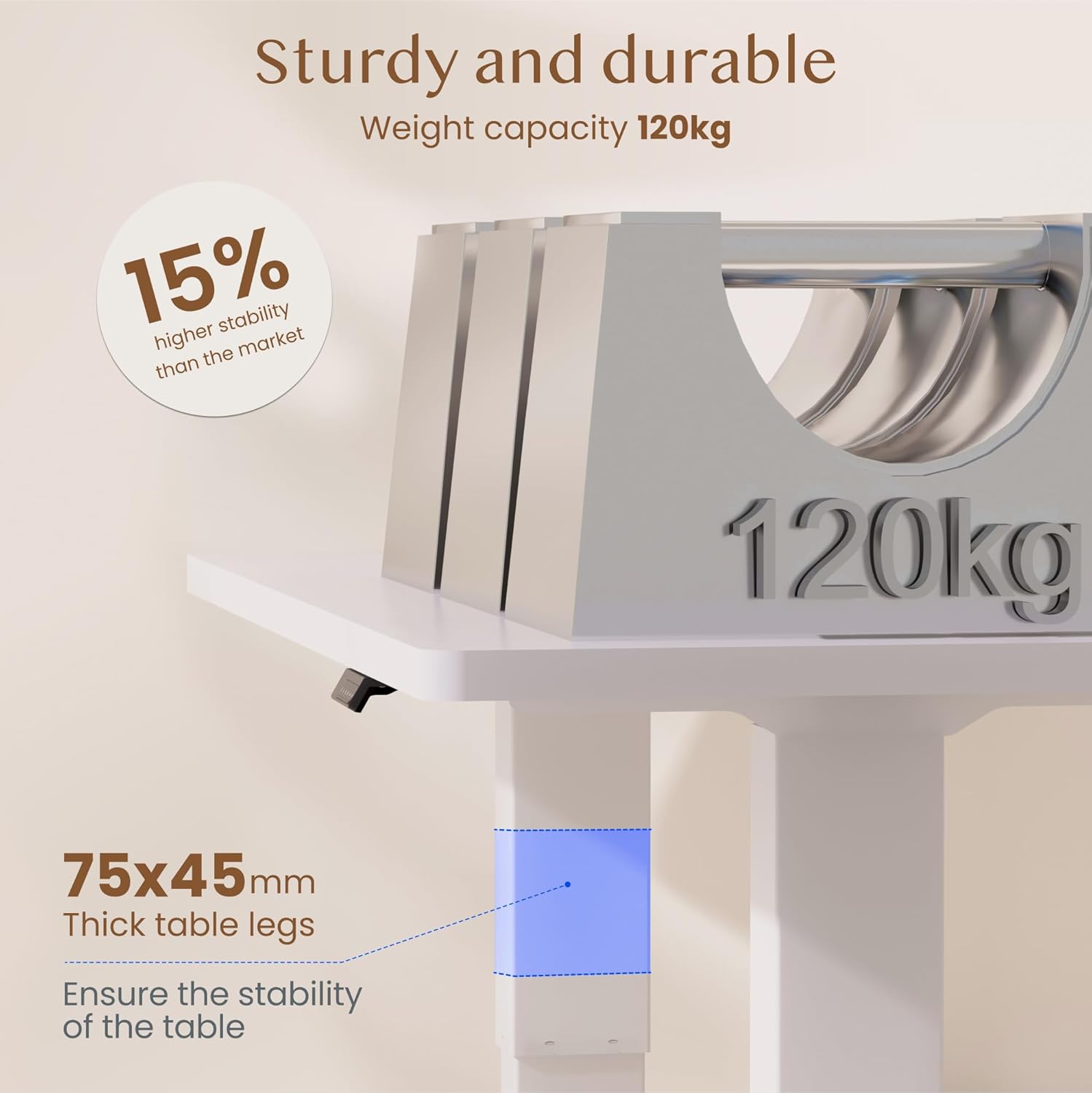
Imatge: The FLEXISPOT standing desk highlighting its sturdy and durable construction, specifically the 75x45mm thick table legs designed to ensure stability and support a weight capacity of 120kg.

Imatge: Un primer pla view of the FLEXISPOT desk's thickened table legs, illustrating the adjustable height range from 70cm to 119cm, providing unmatched stability.
| Característica | Especificació |
|---|---|
| Número de model | QB2W-2080-IE |
| Marca | FLEXISPOT |
| Dimensions (L x A x A) | 200 x 80 x 72 cm (min height) |
| Interval d'ajust d'altura | 70 cm - 119 cm (27.6 polzades - 46.9 polzades) |
| Gruix de l'escriptori | 25 mm |
| Maximum Load Capacity (Static) | 120 kg (264 lliures) |
| Maximum Load Capacity (Dynamic) | 100 kg (220 lliures) |
| Sistema d'elevació | Motor dual |
| Velocitat d'elevació | 25 mm/s |
| Nivell de soroll | < 50 dB |
| Material | Alloy Steel (Base and Top Material) |
| Color | Blanc |
| Muntatge obligatori | Yes (2 people recommended, tools included) |
| Característiques especials | Electric, 4 Memory Presets, Anti-Collision System |
| Pes del producte | 40.9 kg |
| UPC | 810072889508 |
9. Garantia i Suport
For warranty information, product support, or to report any issues, please contact FLEXISPOT customer service. Keep your purchase receipt and model number (QB2W-2080-IE) handy when contacting support.
The seller for this product is FLEXISPOT GmbH. Please refer to their official weblloc web o la documentació de compra per conèixer els termes específics de la garantia i les dades de contacte.