
MageGee MK-Storm
Manual d'usuari del teclat mecànic per a jocs MageGee MK-Storm
Brand: MageGee | Model: MK-Storm
1. Introducció
Thank you for choosing the MageGee MK-Storm Mechanical Gaming Keyboard. This 104-key wired keyboard is designed for an enhanced typing and gaming experience, featuring durable brown switches, blue backlighting, and anti-ghosting technology. This manual provides essential information for setup, operation, and maintenance to ensure optimal performance.
2. Característiques clau
- Blue Backlit Gaming Keyboard: Features 20 different backlit modes, 5 brightness levels, and 5 speed adjustments. The backlight can be easily turned off.
- Mechanical Brown Switches: Offers moderate trigger key travel and force, suitable for both typing and gaming. Provides tactile feedback with a slight sound.
- Anti-Ghosting Keyboard: All 104 keys have individual switches with full N-key rollover, ensuring faster response and simultaneous key presses without conflict.
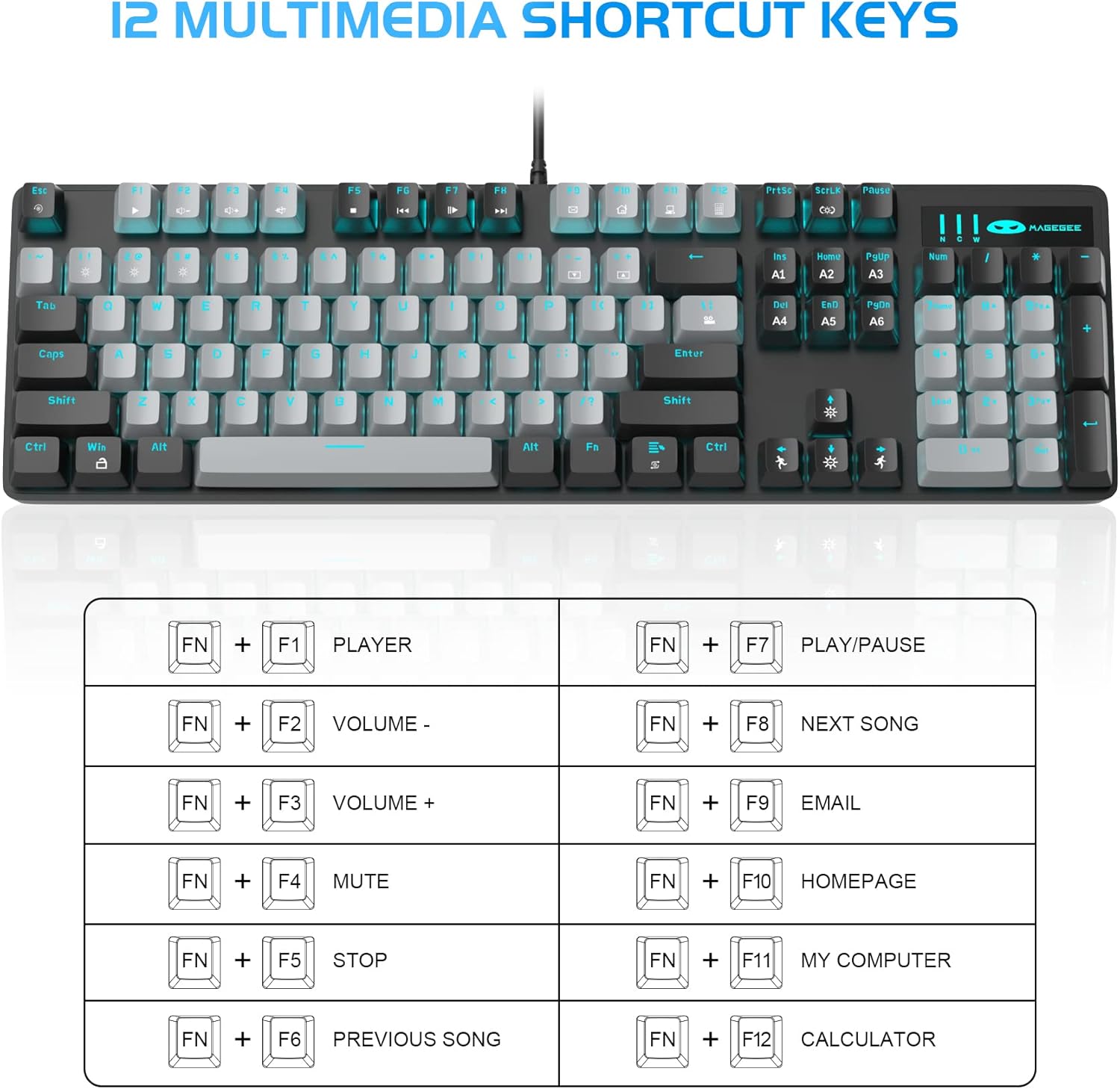
- 12 Multimedia Combination Keys: Quick operations via FN+ F1~F12 for media control and office functions.
- Disseny ergonòmic: Premium metal panel construction for stability. Ergonomic key layout and two-step adjustable feet for comfortable typing angles.
- Àmplia compatibilitat: USB wired connection compatible with Windows 2000/Vista/Win7/Win8/Win10/MAC/Linux.

3. Contingut del paquet
The MageGee MK-Storm Mechanical Gaming Keyboard package includes the following items:
- MageGee Mechanical Gaming Keyboard (MK-Storm)
- USB Wired Cable (attached to keyboard)
- Eina d'extracció de tecles
- 16 Extra Keycaps (color scheme varies by keyboard variant)
- Manual d'usuari
4. Configuració
- Connecteu el teclat: Plug the USB connector of the keyboard cable into an available USB port on your computer (PC, laptop, or desktop).
- Instal·lació del controlador: The keyboard is plug-and-play. Your operating system should automatically detect and install the necessary drivers. No additional software installation is typically required for basic functionality.
- Ajusta l'angle del teclat: Flip out the two-step feet on the underside of the keyboard to adjust the typing angle to your preference.

5. Instruccions de funcionament
Control de retroiluminació 5.1
The MK-Storm keyboard features a single blue backlight with multiple modes and adjustable settings.
- Canvia el mode de retroiluminació: Premeu FN + INS to cycle through 20 different backlight modes.
- Ajusta la brillantor: Premeu FN + ↑ (Up Arrow) to increase brightness (5 levels). Press FN + ↓ (Fletxa avall) per disminuir la brillantor.
- Ajustar velocitat: Premeu FN + ← (Left Arrow) to decrease animation speed (5 levels). Press FN + → (Right Arrow) to increase animation speed.
- Turn Off Backlight: The backlight can be turned off by cycling through the brightness levels until it is off, or by selecting a mode that has no illumination.

5.2 Tecles multimèdia
Access multimedia and system functions quickly using the FN key in combination with the F1-F12 keys.
| Combinació de tecles | Funció |
|---|---|
| FN + F1 | Jugador |
| FN + F2 | Volum - |
| FN + F3 | Volum + |
| FN + F4 | Silenciar |
| FN + F5 | Atureu-vos |
| FN + F6 | Cançó anterior |
| FN + F7 | Reproduir/Pausa |
| FN + F8 | Següent Cançó |
| FN + F9 | Correu electrònic |
| FN + F10 | Pàgina d'inici |
| FN + F11 | El meu ordinador |
| FN + F12 | Calculadora |
5.3 Professional personalitzatfiles (If applicable)
The keyboard supports custom lighting profiles. Consulteu el manual del fabricant website or included software (if any) for detailed instructions on programming and saving custom lighting zones or key assignments. Once programmed, these profiles can often be accessed directly from the keyboard using FN key combinations (e.g., FN+1, FN+2, FN+3 for different profiles).
6. Personalització
The MageGee MK-Storm keyboard allows for customization of keycaps and switches.
- Substitució de la tapa de les tecles: Use the included keycap puller tool to carefully remove existing keycaps. Align the new keycap with the switch stem and press down gently until it clicks into place.
- Substitució de l'interruptor: The keyboard comes with extra brown switches. To replace a switch, first remove the keycap. Then, use a switch puller (not included, but often similar to a keycap puller) to gently extract the switch from the PCB. Insert the new switch, ensuring the pins align correctly, and press firmly until it seats properly.


7. Manteniment
- Neteja: The floating keys design makes cleaning easier. Use a soft brush or compressed air to remove dust and debris from between the keycaps. For stubborn dirt, remove keycaps using the provided tool and wipe the keyboard surface with a slightly damp drap. Assegureu-vos que el teclat estigui desconnectat abans de netejar-lo.
- Emmagatzematge: Guardeu el teclat en un lloc sec i fresc, allunyat de la llum solar directa i de temperatures extremes.
- Cura del cable: Eviteu doblegar o girar excessivament el cable USB per evitar danys.
8. Solució De Problemes
- El teclat no respon:
- Assegureu-vos que el cable USB estigui ben connectat tant al teclat com a l'ordinador.
- Prova de connectar el teclat a un port USB diferent de l'ordinador.
- Reinicieu l'ordinador.
- Prova el teclat en un altre ordinador per descartar un problema específic del sistema.
- La retroiluminació no funciona/és incorrecta:
- Ensure the backlight is not turned off (FN + ↓ to increase brightness).
- Cycle through backlight modes using FN + INS.
- Check if any specific software is interfering with the lighting settings.
- Claus que no es registren:
- Netegeu al voltant de la tecla afectada per assegurar-vos que no hi hagi restes que obstrueixin l'interruptor.
- If a specific switch is faulty, consider replacing it with one of the spare switches provided, following the customization instructions.
9. Especificacions
| Característica | Detall |
|---|---|
| Marca | MageGee |
| Número de model | MK-Storm |
| Disseny de tecles | 104 tecles (mida completa) |
| Tipus de canvi | Interruptors mecànics marrons |
| Llum de fons | Blue Backlit (20 modes, 5 brightness, 5 speed) |
| Connectivitat | Cable USB |
| Anti-fantasma | Rollover complet de tecles N |
| Claus multimèdia | 12 (FN + F1-F12) |
| Material | Metal Panel Construction |
| Dispositius compatibles | Portàtil, PC |
| Sistemes operatius | Windows 2000/Vista/Win7/Win8/Win10/MAC/Linux |
| Pes de l'article | 2.77 lliures |
| Dimensions del paquet | 17.63 x 12.36 x 1.89 polzades |

10. Garantia i Suport
For warranty information, technical support, or any product-related inquiries, please contact MageGee customer service through the retailer where the product was purchased or visit the official MageGee weblloc. Conserveu el rebut de compra per a reclamacions de garantia.
Ask a question about this manual
Ask about setup, troubleshooting, compatibility, parts, safety, or missing instructions. Manuals+ will review the question and use this page’s manual context to help answer it.