
Introducció
This manual provides essential information for the proper installation, operation, and maintenance of your TouchWo 15-inch Capacitive Multi-Touchscreen Industrial Embedded PC Monitor, model DM150NFWA. Please read this manual thoroughly before using the product to ensure safe and efficient operation.
Producte acabatview
Característiques clau
- 10-Point Capacitive Touchscreen: Supports multi-finger gestures, glove operation, and offers adjustable brightness. No additional drivers are required for basic touch functionality.
- Sistema integrat: Equipped with Windows 10, Wi-Fi, and Bluetooth for comprehensive functionality.
- Connectivitat rica: Features a gigabit Ethernet port, Phoenix2Pin connector, multiple USB ports, HDMI-Out, and audio ports for diverse industrial applications.
- Fanless and Silent Design: Engineered for quiet operation and energy efficiency, utilizing an aluminum alloy back shell for effective heat dissipation without the need for active cooling.
- Robust Industrial Design: IP65 rated screen for protection against dust and water splashes. Suitable for embedded installation and VESA mounting, ideal for high-traffic industrial environments such as cabinets, CNC tools, and control consoles.
Què hi ha a la caixa
- 1 x Touchscreen Tablet
- 1 x Power Adapter (with 1.5m Power Line)
- 1 x Manual del producte (aquest document)
- 4 x Embedded Snaps
Informació de seguretat
Observeu les següents precaucions de seguretat per evitar danys al dispositiu o lesions personals.
- Font d'alimentació: Use only the provided power adapter. Ensure the power source matches the specified voltage (12 V CC).
- Medi ambient: Operate the monitor within the specified temperature range (0°C-50°C). Avoid exposure to extreme temperatures, direct sunlight, or high humidity.
- Instal·lació: Ensure the monitor is securely mounted using either embedded snaps or VESA mounting points. Improper installation can lead to device damage or personal injury.
- Neteja: Desconnecteu l'alimentació abans de netejar. Feu servir un drap suau i sec.amp drap. Eviteu productes de neteja o dissolvents abrasius.
- Manipulació: Do not drop or subject the device to strong impacts. Avoid placing heavy objects on the monitor.
Configuració
1. Desembalatge
Traieu amb cura tots els components de l'embalatge. Verifiqueu que hi hagi tots els elements que figuren a la secció "Què hi ha a la caixa".
2. Opcions de muntatge
The monitor supports both embedded installation and VESA standard mounting (75mm x 75mm or 100mm x 100mm patterns are typically supported, refer to physical product for exact VESA pattern).
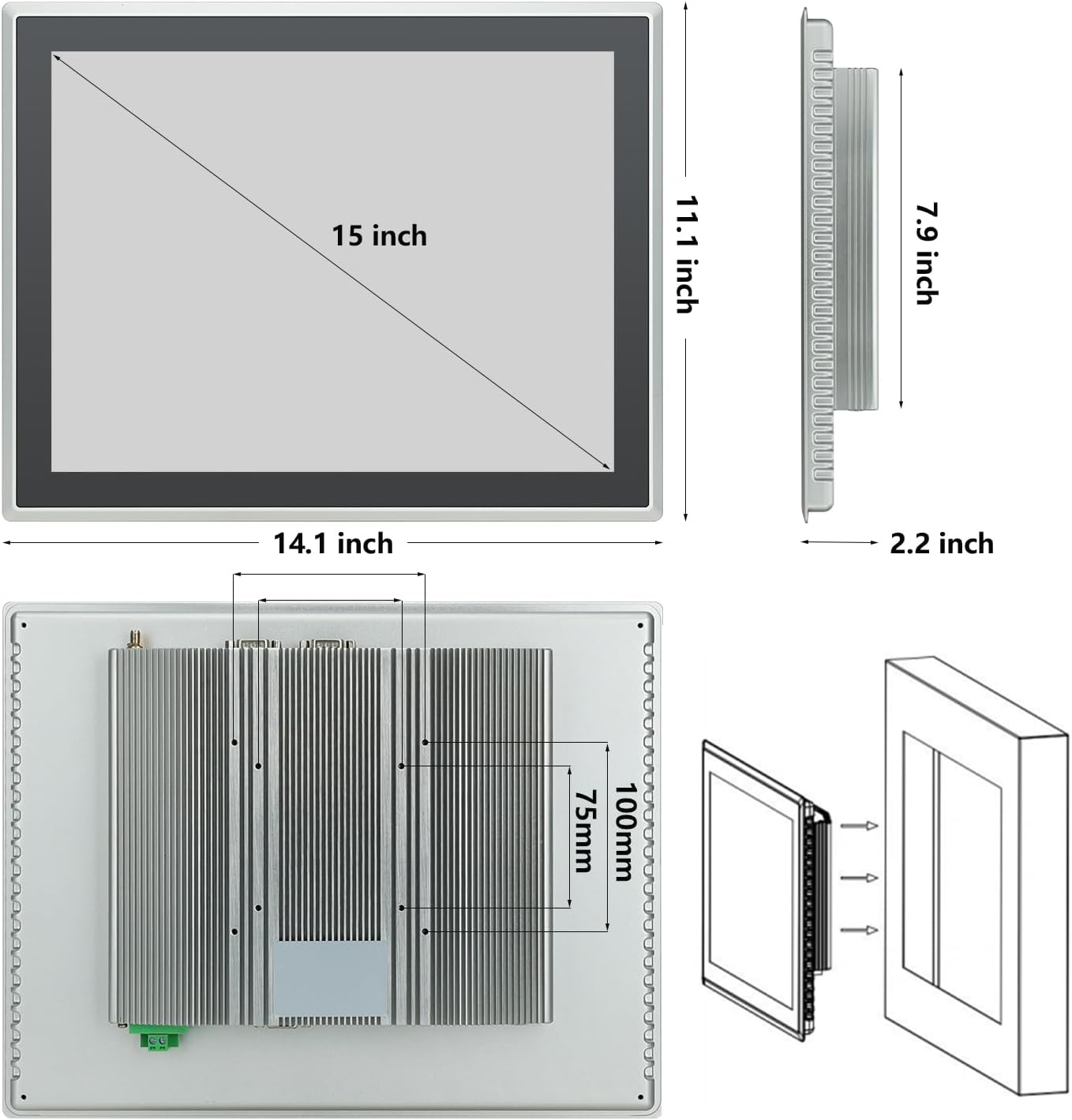
Figure 1: Monitor dimensions and embedded installation diagram. The monitor measures 14.1 inches wide, 11.1 inches high, and 2.2 inches deep. The screen display area is 15 inches diagonally. The back panel shows VESA mounting points and the embedded snap mechanism.
- Instal·lació incrustada: Use the provided embedded snaps to secure the monitor into a compatible cutout in a panel or enclosure.
- Muntatge VESA: Attach a VESA-compatible mount to the mounting holes on the rear of the monitor.
3. Connexió de perifèrics
Connect necessary devices to the available ports. Refer to the port diagram below.

Figura 2: posterior view of the monitor displaying various input/output ports. These include Terminal Ground, DC12V power input, VGA, LAN, USB ports, Audio ports, HDMI, Phoenix2pin, and WiFi antenna connectors.
- Potència: Connect the provided power adapter to the DC12V input port and then to a power outlet.
- Sortida de vídeo: Use the HDMI-Out port to connect to an external display if needed.
- Dispositius USB: Connect keyboards, mice, or other USB peripherals to the USB ports.
- Xarxa: Connecteu un cable Ethernet al port LAN per accedir a la xarxa amb cable.
- Àudio: Use the audio ports for external speakers or headphones.
- Phoenix2Pin: Connect industrial control signals as required by your application.
4. Engegada inicial
After all connections are made, press the power button (location typically on the side or back, refer to product for exact placement) to turn on the monitor. The system will boot into Windows 10.
Instruccions de funcionament
Funcionament de la pantalla tàctil
The monitor features a 10-point capacitive multi-touchscreen, allowing for intuitive interaction with the Windows 10 operating system.

Figure 3: A gloved hand interacting with the monitor's touchscreen, highlighting its 10-point touch capability and IP65 standard for industrial use.
- Toc senzill: Functions like a left-click on a mouse to select items or open applications.
- Doble toc: Functions like a double-click on a mouse.
- Arrossega: Touch and hold an item, then move your finger across the screen to reposition it.
- Pessiga per fer zoom: Use two fingers to pinch in or spread out to zoom in or out of content.
- Glove Operation: The touchscreen is designed to respond even when wearing gloves, enhancing usability in industrial environments.
Ajust de brillantor
Brightness can be adjusted through the Windows 10 display settings or via dedicated buttons on the monitor (if available, refer to product for exact controls).
Àudio
The monitor includes built-in speakers. Volume can be controlled via Windows 10 audio settings or external audio devices connected to the audio output ports.
Manteniment
Neteja de la pantalla
- Ensure the monitor is powered off and unplugged before cleaning.
- Utilitzeu un drap suau i sense pelusa dampRenteu-ho amb aigua o un netejador de pantalles no abrasiu.
- No ruixeu solucions de neteja directament sobre la pantalla.
- Avoid using harsh chemicals, alcohol, or ammonia-based cleaners, as these can damage the screen surface.
Dissipació de calor
The monitor features a fanless design with an aluminum alloy back shell for efficient passive heat dissipation. Ensure adequate airflow around the back of the unit, especially if embedded, to maintain optimal operating temperatures.

Figure 4: The rear of the monitor, illustrating the fanless design with prominent heat dissipation fins. Blue arrows indicate the direction of heat dissipation, emphasizing the efficient thermal management.
Consideracions ambientals
The IP65 rating protects the screen from dust ingress and low-pressure water jets. However, avoid submerging the device or exposing it to high-pressure water. Operate within the recommended temperature range of 0°C to 50°C.
Resolució de problemes
Si teniu problemes amb el monitor, consulteu els problemes i solucions més comuns següents:
| Problema | Causa possible | Solució |
|---|---|---|
| Sense poder | Power cable disconnected; Power adapter faulty; Power outlet issue. | Check power cable connections. Ensure power adapter is working. Test power outlet with another device. |
| Sense pantalla | Monitor is off; Brightness set too low; External display cable (if used) loose. | Press power button. Adjust brightness. Check HDMI/VGA cable connections. |
| La pantalla tàctil no respon | System frozen; Software issue; Screen dirty. | Restart the monitor. Ensure Windows 10 is updated. Clean the screen surface. |
| Problemes de connectivitat de xarxa | Ethernet cable disconnected; Wi-Fi disabled; Router issue. | Check Ethernet cable. Verify Wi-Fi is enabled in Windows settings. Restart router. |
Si el problema persisteix després d'intentar aquestes solucions, poseu-vos en contacte amb l'atenció al client.
Especificacions
| Característica | Detall |
|---|---|
| Número de model | DM150NFWA |
| Mida de la pantalla | 15 polzades |
| Resolució | 1024 x 768 píxels |
| Relació d'aspecte | 4:3 |
| Tecnologia tàctil | 10-Point Capacitive Multi-Touch |
| Brillantor de la imatge | 350 lm |
| Sistema operatiu | Windows 10 (pre-installed) |
| Processador | Intel Core i3 |
| RAM | 4 GB |
| Emmagatzematge | SSD de 128 GB |
| Connectivitat | Wi-Fi, Bluetooth, Gigabit Ethernet, USB (4 ports), HDMI-Out, Audio, Phoenix2Pin |
| Ingress Protection (Screen) | IP65 |
| Voltage | 12 volts (CC) |
| Dimensions del producte (L x A x A) | 14.1 x 11.1 x 2.2 polzades |
| Pes de l'article | 11.46 lliures |
| Fabricant | Guangzhou Touchwo Electronics Co., Ltd |
Garantia i Suport
Garantia de qualitat
This TouchWo monitor is FCC, CE, and RoHS certified, ensuring compliance with relevant safety and environmental standards. The manufacturing facility holds ISO9001 quality management certification.
Atenció al client
For any technical assistance, troubleshooting, or inquiries regarding your product, TouchWo offers 24/7 online customer support. Please refer to the product packaging or the official TouchWo weblloc per obtenir dades de contacte.