
1. Introducció
This manual provides comprehensive instructions for the installation, operation, maintenance, and troubleshooting of your EIMSOAH 7in HD Carplay Screen. Please read this manual thoroughly before using the product to ensure proper function and safety.
The EIMSOAH Carplay Screen is an advanced in-dash navigation and multimedia system designed to enhance your driving experience with features such as wireless CarPlay/Android Auto, GPS navigation, and a high-definition touch screen display.
2. Informació de seguretat
Always prioritize safety. Improper installation or operation can lead to damage to the device, vehicle, or personal injury. Observe the following safety guidelines:
- Assegureu-vos que el vehicle estigui apagat i que la bateria estigui desconnectada abans de la instal·lació per evitar curtcircuits.
- Si no esteu segurs de cap pas a seguir, consulteu un professional per a la instal·lació.
- Do not operate the device in a way that distracts you from driving. Always keep your eyes on the road.
- Eviteu exposar el dispositiu a temperatures extremes, a la llum solar directa durant períodes prolongats o a una humitat excessiva.
- No intenteu desmuntar ni modificar la unitat. Això anul·larà la garantia i pot causar danys.
- Ensure all wiring is properly insulated and secured to prevent short circuits or interference.
3. Contingut del paquet
Verifiqueu que tots els elements que s'enumeren a continuació siguin presents al vostre paquet:
- 1 x Car Multimedia Player Display
- 7 x Wiring Harnesses (various types for power, audio, video, etc.)
- 1 x GPS Box/Antenna
- 1 x Manual d'instruccions (aquest document)
- 1 x Wiring Instruction Diagram

Figure 3.1: Complete package contents including the main display unit, wiring harnesses, and GPS antenna.
4. Configuració i instal·lació
This section outlines the general steps for installing the EIMSOAH Carplay Screen. Specific wiring details are provided in the separate Wiring Instruction Diagram included in your package. Professional installation is recommended.
- Preparar el vehicle:
- Turn off the vehicle's ignition and remove the key.
- Disconnect the negative terminal of the car battery to prevent electrical hazards.
- Carefully remove the existing car stereo or dashboard panel to access the wiring harness and mounting area.
- Connect Wiring Harnesses:
- Refer to the provided Wiring Instruction Diagram for detailed connections.
- Connect the main power harness, speaker wires, and other necessary connections (e.g., AUX, USB, reverse camera input if applicable) to the corresponding ports on the car multimedia player.
- Assegureu-vos que totes les connexions estiguin segures i aïllades correctament.
- Instal·lació de l'antena GPS:
- Munteu l'antena GPS en un lloc amb llum clara view of the sky, typically on the dashboard or under the windshield, away from metal obstructions.
- Route the GPS antenna cable to the back of the head unit and connect it to the designated GPS input.
- Muntar la unitat:
- Carefully slide the car multimedia player into the dashboard opening.
- Secure the unit using the provided mounting brackets or screws, ensuring it is firmly in place.
- Torneu a connectar la bateria i proveu-ho:
- Torneu a connectar el terminal negatiu de la bateria del cotxe.
- Turn on the vehicle's ignition and power on the car multimedia player.
- Test all functions, including audio, touch screen response, GPS signal, Bluetooth connectivity, and any connected accessories (e.g., reverse camera).
- Remunta el tauler de control:
- Once all functions are verified, carefully reassemble the dashboard panels.

Figure 4.1: The Carplay screen integrated into a vehicle's dashboard.
5. Instruccions de funcionament
The EIMSOAH Carplay Screen operates on Android 12, providing a user-friendly interface. Below are common operations:
5.1 Navegació bàsica
- Encès/apagat: Press and hold the power button (usually on the left side of the unit) to turn the device on or off. A short press typically mutes/unmutes audio.
- Control de volum: Use the volume buttons on the unit or steering wheel controls (if configured) to adjust audio levels.
- Pantalla d'inici: Tap the "Home" icon to return to the main application screen.
- Botó enrere: Tap the "Back" icon to return to the previous screen or menu.
- Aplicacions recents: Tap the "Recent Apps" icon to view i canviar entre aplicacions obertes recentment.
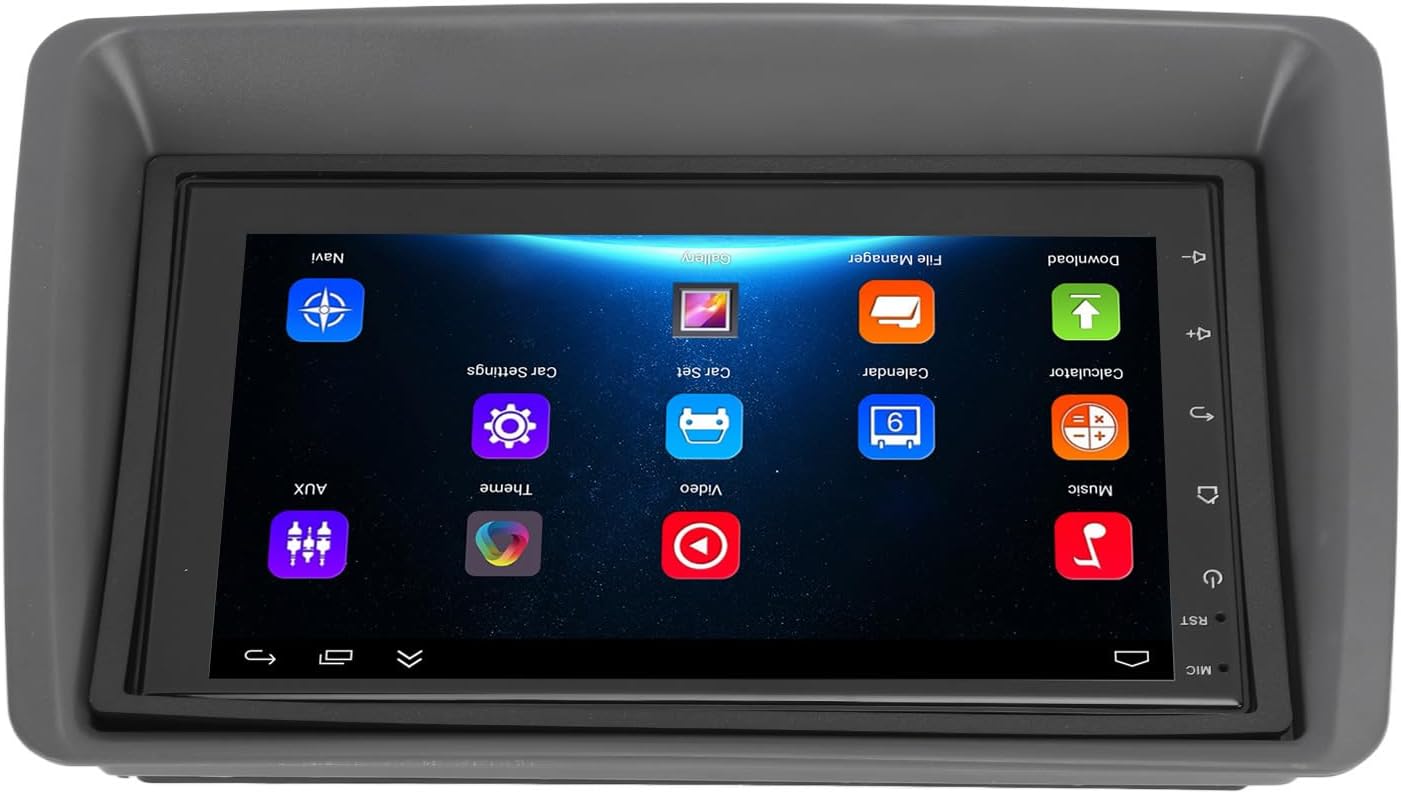
Figure 5.1: Main user interface of the Carplay screen.
CarPlay sense fil 5.2 / Android Auto
The unit supports wireless Apple CarPlay and Android Auto for seamless smartphone integration.
- Assegureu-vos que el Bluetooth i la Wi-Fi estiguin activats al vostre telèfon intel·ligent.
- On the Carplay screen, navigate to the "CarPlay" or "Android Auto" application.
- Follow the on-screen prompts to pair your phone via Bluetooth. Once paired, the system will automatically establish a Wi-Fi connection for CarPlay/Android Auto functionality.
- Your phone's compatible apps (navigation, music, messaging) will be displayed on the Carplay screen.
5.3 Navegació GPS
The unit supports both online and offline GPS navigation.
- Navegació en línia: Connect the unit to Wi-Fi (via a mobile hotspot or vehicle Wi-Fi) to use online mapping services. Download navigation apps from the pre-installed app store.
- Navegació fora de línia: Download map data for offline use within your preferred navigation application. This allows navigation without an active internet connection.
5.4 Connectivitat Bluetooth
Connecta el teu telèfon intel·ligent mitjançant Bluetooth per a trucades de mans lliures i transmissió d'àudio.
- Go to the "Settings" menu on the Carplay screen and select "Bluetooth".
- Enable Bluetooth and make the device discoverable.
- On your smartphone, search for available Bluetooth devices and select "EIMSOAH Carplay" (or similar name).
- Confirma el codi d'emparellament en tots dos dispositius.
- Once connected, you can make/receive calls and play audio through the car's speakers.
Pantalla dividida 5.5
The unit supports split-screen functionality, allowing two applications to be viewed simultàniament.
- Obriu la primera aplicació que vulgueu utilitzar.
- Press and hold the "Recent Apps" button (or swipe up and hold from the bottom of the screen, depending on the Android version).
- Arrossega la primera aplicació a un costat de la pantalla.
- Select the second application from the recent apps list or app drawer to fill the other half of the screen.
5.6 Reverse Image Function
If a compatible reverse camera is connected (not included), the screen will automatically display the reverse view when the vehicle is shifted into reverse gear.
- Ensure the reverse camera is properly installed and connected to the designated video input.
- The system will automatically switch to the camera view quan s'enganxa la marxa enrere.
6. Manteniment
Proper maintenance ensures the longevity and optimal performance of your EIMSOAH Carplay Screen.
- Neteja de la pantalla: Feu servir un drap suau i sense borrissol per netejar suaument la pantalla. Per a taques difícils, fregueu lleugeramentampNetegeu el drap amb aigua o un netejador de pantalles. Eviteu materials abrasius o productes químics agressius.
- Actualitzacions de programari: Periodically check for software updates through the system settings (if available) to ensure you have the latest features and bug fixes.
- Condicions ambientals: Avoid exposing the unit to extreme temperatures, high humidity, or direct sunlight for extended periods.
- Gestió de cables: Assegureu-vos que tots els cables estiguin connectats correctament i que no estiguin comprimits ni exposats a un desgast excessiu.
7. Solució De Problemes
If you encounter issues with your EIMSOAH Carplay Screen, refer to the following common problems and solutions:
| Problema | Causa possible | Solució |
|---|---|---|
| La unitat no s'encén. | No hi ha subministrament elèctric; cablejat solt; fusible fundit. | Check power connections and vehicle fuse box. Ensure battery is connected. |
| Sense sortida d'àudio. | Volume muted; speaker wires disconnected; incorrect audio settings. | Check volume level and mute status. Verify speaker wire connections. Adjust audio output settings. |
| La pantalla tàctil no respon. | Software glitch; screen protector interference; physical damage. | Restart the unit. Remove any screen protectors to test. If problem persists, contact support. |
| Senyal GPS feble o perdut. | GPS antenna obstructed or disconnected; poor satellite coverage. | Assegureu-vos que l'antena GPS tingui una visió clara view of the sky and is securely connected. Move to an open area. |
| Problemes de connexió Bluetooth. | Bluetooth off on device/phone; pairing error; interference. | Ensure Bluetooth is enabled on both devices. Delete previous pairings and re-pair. Move phone closer to unit. |
| El CarPlay/Android Auto no es connecta. | Wi-Fi/Bluetooth issues; phone compatibility; app issues. | Verify Wi-Fi and Bluetooth are active. Restart phone and unit. Ensure phone OS is up to date. |
If the problem persists after trying these solutions, please contact EIMSOAH customer support for further assistance.
8. Especificacions
Detailed technical specifications for the EIMSOAH 7in HD Carplay Screen:
| Característica | Descripció |
|---|---|
| Mida de la pantalla | 7 polzades |
| Sistema operatiu | Android 12 |
| CPU | 4 Nucli |
| Resolució de pantalla | 1024 x 600 |
| Versió Bluetooth | 4.0 |
| Ràdio | FM/RDS |
| Potència de sortida | 4 x 45W |
| Image Connection | For Android / For iOS (Wireless Apple CarPlay, Wired/Wireless Android Auto) |
| Navegació GPS | Support Online/Offline Navigation |
| Tipus de pantalla tàctil | HD Capacitive Multi-Point Touch |
| Wireless WI-FI | Support 3G/4G/5G wireless signal reception |
| Pantalla dividida | Supported (left and right split screen) |
| Control del volant | Admet |
| Reverse Image Input | Supported (HD reverse video input, camera not included) |
| Funció USB | Two USB ports (media playback, file transfer, DVR) |
| Funció AUX | Audio/Video input from external devices |
| Circuits de protecció | Sobrecàrrega, sobrevoltage, curtcircuit |
| Apagueu la memòria | Admet |
| Entrada/sortida de vídeo | Two video inputs, one video output |
| Sortida d'àudio | Left Audio Output, Right Audio Output |
| Formats d'imatge compatibles | JPEG, GIF, PNG, BMP, JPG |
| Formats de vídeo compatibles | MP4 / MP5 / MKV / AVI / RMVB / 1080P |
| Formats d'àudio compatibles | MP3/WMA/WAV/FLAC |
| Llengua | Built-in Multiple Languages (Simplified Chinese, Traditional Chinese, English, German, Russian, Spanish, Italian, etc.) |
| Encaixament | Replacement for Fiat Panda 2003-2012 |
| Pes de l'article | 2.57 lliures |
| Dimensions del paquet | 14.17 x 8.27 x 4.72 polzades |
9. Garantia i Suport
EIMSOAH products are designed for reliability and performance. For warranty information and technical support, please refer to the following:
- Garantia: Specific warranty terms and conditions may vary. Please refer to the warranty card included with your product or contact the seller/manufacturer directly for details regarding coverage period and claims process.
- Suport tècnic: For technical assistance, troubleshooting beyond this manual, or inquiries about parts and service, please contact EIMSOAH customer support through the retailer where you purchased the product or visit the official EIMSOAH brand store on Amazon: EIMSOAH Store.