
Introducció
This user manual provides comprehensive instructions for the Logia 5-in-1 Wi-Fi Wireless Weather Station. This advanced monitoring system delivers real-time weather and precipitation data directly from your home and backyard. It offers precise readings for indoor and outdoor temperature, humidity, wind speed and direction, and rain, along with forecast data and alerts.
The system includes an easy-to-mount outdoor sensor array and a full-color indoor LED display console. With Wi-Fi connectivity, you can sync your data with live weather servers like Weather Underground and Weathercloud, allowing you to track current conditions and view historical trends on your smartphone, PC, or tablet.
Producte acabatview
The Logia 5-in-1 Wi-Fi Wireless Weather Station consists of two main components: the outdoor sensor array and the indoor display console.

Figure 1: Logia 5-in-1 Wi-Fi Wireless Weather Station, showing both the outdoor sensor array and the indoor display console.
Matriu de sensors exteriors
The outdoor sensor array is designed for external installation and collects various environmental data. It is powered by an integrated solar panel and requires 3 AA batteries (not included) for backup, providing up to 2.5 years of operation.

Figura 2: Detallada view of the outdoor sensor array, highlighting its components.
- Penell de vent: Mesura la direcció del vent.
- Anemometer (Wind Speed Cups): Mesura la velocitat del vent.
- Thermo-Hygro Sensor with Radiation Shield: Measures outdoor temperature and humidity, protected from direct sunlight.
- Col·lector de pluja: Measures rainfall rate and total rainfall.
- Panell solar: Provides power to the sensor array.
- Nivell de bombolla: Assists in ensuring proper, level installation.
Consola de pantalla interior
The indoor console features a full-color LED display that presents all collected weather data. It can be placed on a tabletop or bedside and connects wirelessly to the outdoor sensor up to 492 feet away.
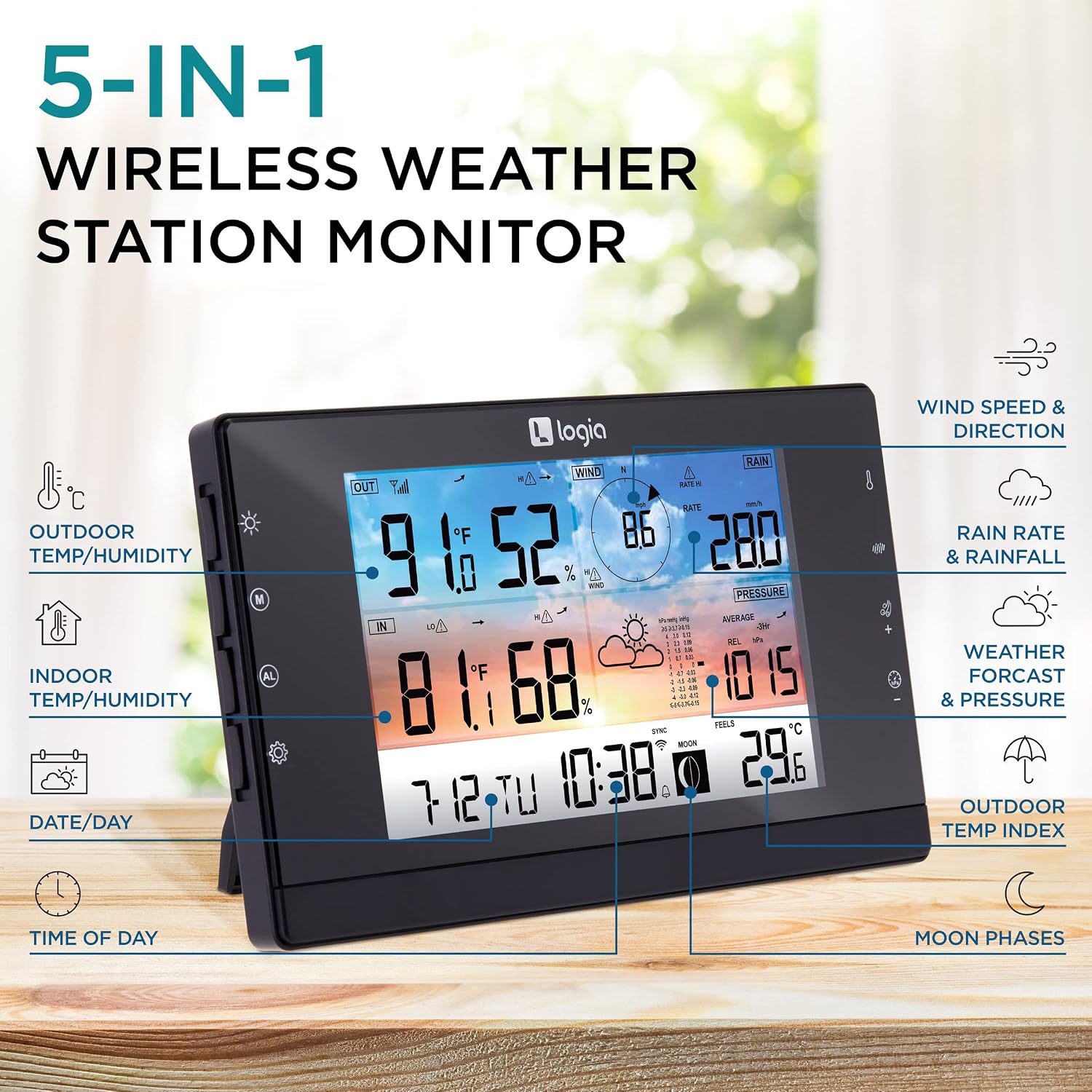
Figure 3: The indoor display console, showing various weather data points.
- Temperatura i humitat exteriors: Current readings from the sensor array.
- Temperatura i humitat interiors: Current readings from the console's internal sensors.
- Velocitat i direcció del vent: Real-time wind data.
- Rain Rate & Rainfall: Current and accumulated precipitation.
- Pressió baromètrica: Atmospheric pressure readings.
- 12/24-Hour Forecasts: Predictive weather icons.
- Fase de la Lluna: Fase lunar actual.
- Day/Date & Time: Current calendar and time information.
- Funció d'alarma: Includes ice and other extreme weather notifications.
- Retroil·luminació regulable: Lluminositat de la pantalla ajustable.
Configuració
Follow these steps to set up your Logia 5-in-1 Wi-Fi Wireless Weather Station.
- Desempaquetar components: Carefully remove all components from the packaging. Ensure you have the outdoor sensor array, indoor display console, power adapter, and mounting hardware.
- Instal·leu les piles al sensor exterior: Open the battery compartment on the outdoor sensor array and insert 3 AA batteries (not included). Ensure correct polarity. The integrated solar panel will help extend battery life.
- Mount Outdoor Sensor Array: Choose an outdoor location that is clear of obstructions for accurate readings. Mount the sensor array onto a pole or railing using the provided hardware and adjustable bracket. Ensure the sensor is level using the built-in bubble level and that the wind vane is pointing North. The recommended height is at least 6.6 feet (2 meters) off the ground.
- Power On Indoor Display Console: Connect the power adapter to the indoor display console and plug it into a power outlet. The console will power on and begin searching for the outdoor sensor.
- Pair Console with Sensor: The console should automatically connect to the outdoor sensor. If not, refer to the troubleshooting section for manual pairing instructions.
- Connecta't a Wi-Fi: Follow the on-screen prompts or refer to the console's settings menu to connect the weather station to your home Wi-Fi network. This enables data synchronization with online weather servers and mobile apps.

Figure 4: The outdoor sensor array properly mounted on a pole.
Instruccions de funcionament
Once set up, your Logia 5-in-1 Weather Station provides continuous weather monitoring. The indoor console displays a wealth of information at a glance.

Figure 5: The indoor console wirelessly receiving data from the outdoor sensor.
Lectura de la pantalla
The full-color LED display is organized to show outdoor and indoor conditions, wind data, rain data, and barometric pressure. Use the buttons on the side of the console to navigate through different data screens, view historical trends (up to 500 days prior), and adjust settings.

Figure 6: The console displaying various weather alerts, including high/low temperature, humidity, wind speeds, and barometric pressure changes.
Wi-Fi Connectivity and App Integration
The weather station automatically transmits data via Wi-Fi. You can connect to popular weather services like Weather Underground and Weathercloud to access your data remotely. The WSLink app allows you to view detailed weather results, track current data, and analyze graphs directly on your smartphone or tablet.

Figure 7: The weather station syncing data with live weather servers, accessible on various devices.

Figure 8: Accessing weather data on your smartphone using the WSLink app.
Manteniment
To ensure optimal performance and longevity of your weather station, regular maintenance is recommended.
- Neteja: Periodically clean the outdoor sensor array, especially the rain collector and wind sensors, to remove any debris, dust, or leaves that may affect accuracy. Use a soft, damp tela.
- Comprovació de la bateria: Although the outdoor sensor has a solar panel, it relies on 3 AA batteries for continuous operation, especially during periods of low sunlight. Check and replace batteries as needed to maintain consistent data transmission.
- Console Care: Keep the indoor display console clean and free from dust. Avoid exposing it to extreme temperatures or direct sunlight.
Resolució de problemes
If you encounter issues with your weather station, try the following troubleshooting steps:
- No es mostren dades exteriors:
- Ensure the outdoor sensor array is within the 492-foot range of the indoor console and there are no major obstructions.
- Check the batteries in the outdoor sensor array and replace if necessary.
- Verify that the outdoor sensor is powered on and transmitting.
- Problemes de connectivitat Wi-Fi:
- Ensure your Wi-Fi network is active and the console is within range of your router.
- Double-check your Wi-Fi password during setup.
- Restart both your Wi-Fi router and the weather station console.
- Some users have reported initial difficulties with internet connection; ensure you follow the specific instructions for connecting to Weather Underground or Weathercloud.
- Lectures inexactes:
- Ensure the outdoor sensor array is mounted level and free from obstructions that could interfere with wind or rain collection.
- Verify the radiation shield is clean and not blocked, as this can affect temperature readings.
Especificacions
| Característica | Detall |
|---|---|
| Marca | Logia |
| Número de model | LOWSC511SAB |
| Font d'alimentació | Corded Electric (Console), Solar Panel & 3 AA Batteries (Sensor) |
| Tecnologia de connectivitat | Wi-Fi |
| Tipus de visualització | LCD (Full-Color LED) |
| Precisió de la temperatura | +- 1 degree Celsius |
| Freqüència | 915 MHz |
| Pes de l'article | 3.8 lliures |
| Dimensions del paquet | 17.76 x 13.74 x 6.69 polzades |
| UPC | 843812174800 |
Garantia i Suport
For detailed warranty information and technical support, please refer to the official Logia weblloc web o contacteu directament amb el seu servei d'atenció al client. Conserveu el rebut de compra com a comprovant de compra per a qualsevol reclamació de garantia.